Disclosure: As an Amazon Associate, we earn from qualifying purchases. If you click a link on this page and make a purchase, we may receive a small commission at no extra cost to you.
Choosing a new router can be tricky when you want faster speeds, better coverage, and future-ready Wi-Fi without paying for features you may not use. The TP-Link Archer BE230 is a dual-band BE3600 Wi-Fi 7 router built for homes that need stronger everyday performance, multi-gig wired ports, and easier network control. It brings useful upgrades like 4-stream Wi-Fi 7, Multi-Link Operation, a 2.0 GHz quad-core processor, and 2.5G WAN/LAN support. The main tradeoff is clear: this is a dual-band router, so it does not include a 6 GHz band like higher-end tri-band Wi-Fi 7 models.
Quick Verdict
Rating: Recommended with caveats
Best For: Homes that want affordable Wi-Fi 7, multi-gig wired ports, and strong daily performance without needing a 6 GHz band.
Bottom Line: The Archer BE230 is a strong value-focused Wi-Fi 7 router for streaming, gaming, video calls, and busy households. Skip it if you specifically want the highest Wi-Fi 7 speeds from a tri-band 6 GHz setup.
Overview
The TP-Link Dual-Band BE3600 Wi-Fi 7 Router Archer BE230 is designed for buyers who want a faster home network without moving into premium tri-band router pricing. It combines Wi-Fi 7 features with 4-stream dual-band performance, which means it works across the 2.4 GHz and 5 GHz bands instead of adding a separate 6 GHz band.
For wired connections, the Archer BE230 includes 1× 2.5G WAN port, 1× 2.5G LAN port, three 1G LAN ports, and USB 3.0. That port mix matters if you have a fast internet plan, a gaming PC, a NAS, or another wired device that can benefit from more than standard gigabit speeds.
The router also uses a 2.0 GHz quad-core processor and four high-performance antennas. In practical terms, that setup is meant to help the router manage more connected devices, keep traffic moving smoothly, and improve signal targeting around the home.
Before You Buy: The Archer BE230 is a dual-band Wi-Fi 7 router. It does not include a 6 GHz band, so it is not the best fit if you want the highest possible Wi-Fi 7 wireless throughput from a tri-band setup.
Key Specifications
| Specification | Detail | Why It Matters |
|---|---|---|
| Brand | TP-Link | Known router brand with app-based setup and network tools. |
| Model | Archer BE230 / BE3600 | Identifies the exact dual-band Wi-Fi 7 router reviewed here. |
| Product Type | Dual-band Wi-Fi 7 router | Best for homes upgrading from older Wi-Fi 5 or Wi-Fi 6 routers. |
| Wireless Bands | 2.4 GHz and 5 GHz | Good everyday coverage, but no separate 6 GHz band. |
| Wi-Fi Standard | Wi-Fi 7 | Supports newer Wi-Fi features when paired with compatible devices. |
| Streams | 4-stream technology | Helps manage multiple connected devices more efficiently. |
| Processor | 2.0 GHz quad-core | Supports heavy network traffic and device handling. |
| Ports | 1×2.5G WAN, 1×2.5G LAN, 3×1G LAN, USB 3.0 | Useful for fast internet plans, wired gaming, and local storage. |
| Antennas | 4 high-performance antennas | Helps direct and strengthen wireless signal. |
| Setup and Control | Tether app and web UI support | Gives you app-based setup plus manual controls. |
| Mesh Support | EasyMesh support | Can help expand coverage with compatible mesh devices. |
| Best Use | Streaming, gaming, work-from-home, smart homes, and multi-device households | Best for users who want stronger daily speed and wired flexibility. |
What Is the TP-Link Archer BE230?
The TP-Link Archer BE230 is a BE3600-class dual-band Wi-Fi 7 router made for homes that need a faster and more stable network than many older routers can provide. It supports Wi-Fi 7 technology across the 2.4 GHz and 5 GHz bands, giving you newer wireless features while keeping the hardware more value-focused than many tri-band models.
This router is especially useful if your household has several phones, laptops, TVs, consoles, smart home devices, and work-from-home gear competing for bandwidth. The 2.5G WAN and 2.5G LAN ports also make it more appealing if you have a fast internet plan or want a high-speed wired connection for one key device.
It is not designed to be the absolute top Wi-Fi 7 router for every setup. Instead, it fits buyers who want meaningful Wi-Fi 7 upgrades, useful wired ports, and app-based control without paying for premium extras they may not need.
Detailed Features
The Archer BE230 stands out because it combines several practical upgrades in one router. You get 4-stream Wi-Fi 7 capability, a 2.0 GHz quad-core processor, multiple high-speed ports, and four external antennas. These features help the router handle modern homes where streaming, gaming, video calls, cloud backups, and smart devices often run at the same time.
Here is a quick breakdown:
| Feature | Description | Benefit |
|---|---|---|
| Wi-Fi 7 | 4-Stream Technology (Dual-Band 2.4/5 GHz) | Enhanced speed |
| Processor | 2.0 GHz Quad-Core | Efficient data handling |
| Ports | 1×2.5G WAN, 1×2.5G LAN, 3×1G LAN, USB 3.0 | Versatile connectivity |
| Antennas | 4 High-Performance | Stronger signal targeting |
| Multi-Link Operation | Next-gen link aggregation | Improved reliability |
This design works well if you want stronger internet access for normal home use, but it is still important to match the router to your devices and internet plan. A Wi-Fi 7 router can only deliver its best wireless features when your client devices also support those features.
Design and Build Quality
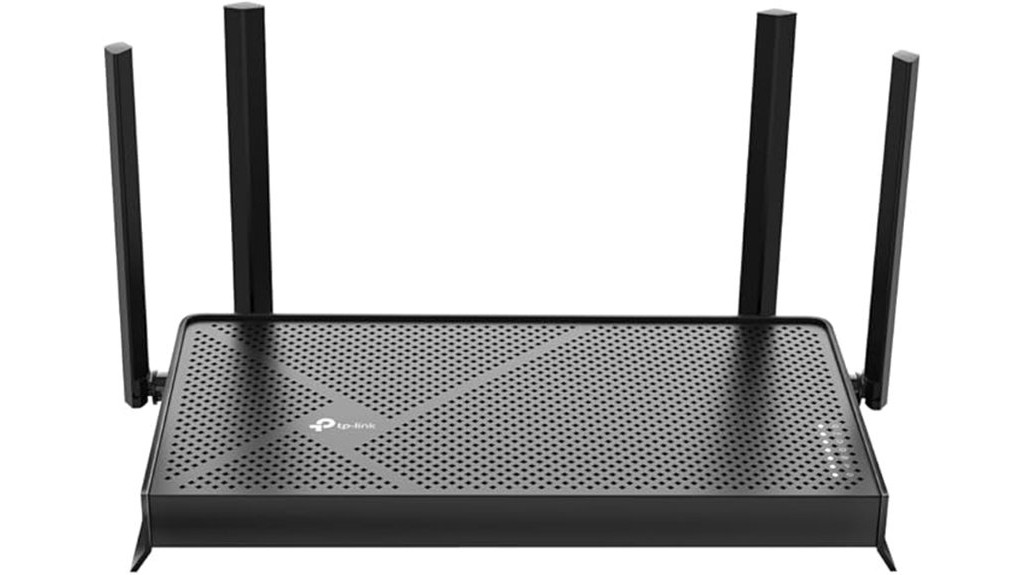
The Archer BE230 uses a practical router layout with four high-performance antennas and a compact body. The antenna design helps with signal direction and coverage, while the wired ports are placed for users who want a mix of high-speed and standard Ethernet connections.
The inclusion of USB 3.0 adds flexibility if you want network storage or shared file access, depending on your setup. This is useful for homes that still rely on local storage, shared media, or simple file access between devices.
The design is not the smallest option for a basic apartment setup, but it is reasonable for a router with multiple antennas and multi-gig ports. Place it in an open area for the best results rather than hiding it behind a TV, inside a cabinet, or near thick walls.
Performance and Speed
The Archer BE230 is built around dual-band Wi-Fi 7 performance, with up to BE3600-class speed from its 2.4 GHz and 5 GHz bands. For most homes, that is enough for 4K streaming, online gaming, video meetings, browsing, and smart home devices running together.
The 2.0 GHz quad-core processor is important because router performance is not only about top wireless speed. A stronger processor can help manage device load, routing tasks, network controls, and heavy traffic more smoothly.
The biggest limitation is the missing 6 GHz band. If you own newer Wi-Fi 7 laptops, phones, or desktops and want the cleanest high-bandwidth wireless channel, a tri-band Wi-Fi 7 router may be a better fit. For many everyday users, though, the Archer BE230 gives a more practical balance between performance and cost.
Wired Connectivity and Ports
The port selection is one of the stronger parts of the Archer BE230. You get 1× 2.5G WAN, 1× 2.5G LAN, three 1G LAN ports, and USB 3.0. This makes the router more useful than basic gigabit-only models.
The 2.5G WAN port is helpful if your internet plan supports speeds above 1 Gbps. The 2.5G LAN port can serve a wired gaming PC, desktop, switch, NAS, or other high-speed device. The three 1G LAN ports still work well for TVs, consoles, printers, hubs, and other wired equipment that does not need multi-gig speeds.
Pro Tip: Use the 2.5G LAN port for your most demanding wired device, such as a gaming PC, NAS, or high-speed switch. Save the 1G LAN ports for TVs, printers, and smart home hubs.
Setup, App, and Controls
The Archer BE230 supports setup and management through TP-Link’s Tether app and web interface. That gives you a simpler app-based path for basic setup, plus a more detailed control panel if you prefer manual settings.
For families, HomeShield parental controls can help manage internet access, set limits, block certain content, and monitor usage depending on the available feature level. This is useful if you want more control over children’s devices without setting up a separate security system.
Automatic firmware update support is another useful feature because router updates often improve security, stability, and performance. You can also update manually through the app or web UI if you prefer to control updates yourself.
Coverage and Mesh Support
The Archer BE230 uses four high-performance antennas and beamforming-style signal targeting to improve wireless coverage. In many homes, that can mean stronger connections across bedrooms, offices, living rooms, and smart TV areas.
Coverage still depends on your home layout. Thick walls, multiple floors, metal appliances, and router placement can reduce signal strength. If you have a larger home or dead zones, EasyMesh support gives you a path to expand coverage with compatible mesh devices.
This router makes the most sense as a strong main router for small to medium homes or as part of a planned EasyMesh setup. For large homes with heavy 6 GHz device use, a higher-end mesh system may be easier to recommend.
Who Should Buy It?
Best For
- Homes upgrading from an older Wi-Fi 5 or Wi-Fi 6 router.
- Users who want Wi-Fi 7 features without paying for a tri-band model.
- Gamers, streamers, and remote workers who can use the 2.5G wired ports.
Skip If
- You specifically need a 6 GHz Wi-Fi band.
- You want a premium tri-band Wi-Fi 7 router for maximum wireless throughput.
- Your internet plan and devices are basic enough that a cheaper Wi-Fi 6 router already meets your needs.
How It Performs in Real Use
For Streaming and Smart TVs
The Archer BE230 is a good match for homes with several streaming devices. Its Wi-Fi 7 support, dual-band design, and strong processor help keep 4K streaming, browsing, and app updates moving more smoothly than many older routers.
For Gaming and Low-Latency Use
Gamers will get the best result by using the 2.5G LAN port for a wired gaming PC or console setup when possible. Wi-Fi performance can still be strong, but wired Ethernet remains the better choice for stable latency and fewer interruptions.
For Work From Home
For video meetings, cloud apps, and remote work, the Archer BE230 offers enough performance for a busy home office. The processor and multi-device handling are useful when other people are streaming, gaming, or browsing during your calls.
For Smart Home Devices
The 2.4 GHz band remains useful for smart plugs, cameras, lights, and other smart home gear. The 5 GHz band handles faster devices, while the router’s controls can help you organize and manage a growing device list.
Setup Tips Before First Use
- Place it high and open: Put the router on a shelf, desk, or central table instead of inside a cabinet.
- Use the right wired port: Connect your modem or gateway to the 2.5G WAN port if your internet service supports it.
- Prioritize one key wired device: Use the 2.5G LAN port for the device that needs the fastest local connection.
- Update firmware early: Check for firmware updates during setup to improve stability and security.
- Check device compatibility: Wi-Fi 7 features work best when your phone, laptop, or PC also supports Wi-Fi 7.
Compatibility and Safety
The Archer BE230 is broadly compatible with most internet service providers, but a router is not the same as a modem. For cable, DSL, or some fiber connections, you may still need a separate modem, ONT, or ISP gateway to bring internet service into your home.
For security, keep firmware updated and use a strong Wi-Fi password. Avoid leaving default network names, weak passwords, or unused guest networks active. If you manage a family network, use parental control tools carefully and review device access from time to time.
Wall mounting may be possible on some router units, but you should check the underside of your specific device and the user guide before drilling. Do not block ventilation or place the router near heat sources.
Pros and Cons
The TP-Link Archer BE230 has a strong feature set for buyers who want Wi-Fi 7 without moving to a more expensive tri-band system. Its biggest strengths are the multi-gig wired ports, dual-band Wi-Fi 7 support, 4-stream design, and 2.0 GHz quad-core processor. It also supports useful home features like Tether app setup, HomeShield controls, EasyMesh support, and firmware update options.
Pros
- Wi-Fi 7 support gives you a more future-ready home network.
- 1×2.5G WAN and 1×2.5G LAN ports are useful for faster wired setups.
- 2.0 GHz quad-core processor helps with heavy device traffic.
- EasyMesh support gives you a path to expand coverage.
- Tether app and web UI make setup and control more flexible.
Cons
- No 6 GHz band, so peak Wi-Fi 7 wireless performance is limited versus tri-band routers.
- Advanced settings may feel complex if you only want basic plug-and-play networking.
- You may still need a separate modem or ISP gateway depending on your internet service.
Is It Worth the Price?
The Archer BE230 is worth considering if you want a value-focused Wi-Fi 7 router with stronger wired options than many entry-level routers. The mix of dual-band Wi-Fi 7, 2.5G WAN, 2.5G LAN, USB 3.0, and EasyMesh support gives it a practical feature set for modern homes.
It gives the most value to buyers who have a fast internet plan, several connected devices, or at least one device that can benefit from multi-gig wired Ethernet. It is also a smart buy for everyday use if you want to upgrade now and keep the router useful as more of your devices support Wi-Fi 7.
The main reason to spend more would be the 6 GHz band. If you want the cleanest high-speed wireless lane for compatible Wi-Fi 7 devices, compare this router with a tri-band Wi-Fi 7 model before you decide.
How It Compares to Alternatives
Compared with older Wi-Fi 6 routers, the Archer BE230 gives you newer Wi-Fi 7 features and better wired flexibility through its 2.5G ports. That makes it more appealing if you are upgrading your network for the next few years instead of buying the cheapest router available.
Compared with higher-end tri-band Wi-Fi 7 routers, the Archer BE230 is more value-focused but less complete for top wireless performance. Models with a dedicated 6 GHz band may be better for users with many Wi-Fi 7 client devices, while the Archer BE230 makes more sense if you want a practical balance of price, speed, and wired connectivity.
Concluding Thoughts
The TP-Link Dual-Band BE3600 Wi-Fi 7 Router Archer BE230 is a strong choice if you want modern connectivity, multi-gig wired ports, and useful home network tools in one router. Its Wi-Fi 7 technology, 2.5G WAN/LAN support, USB 3.0, and EasyMesh compatibility make it a practical upgrade for many homes.
The key limitation is its dual-band design. It can deliver strong everyday performance, but it will not match a tri-band Wi-Fi 7 router that includes 6 GHz support. If that tradeoff works for your home, the Archer BE230 is a strong value for streaming, gaming, remote work, and multi-device use.
Frequently Asked Questions
Does the Router Support Parental Controls for Managing Children’s Internet Usage?
Yes, the router supports parental controls through its HomeShield feature. You can manage internet access, set limits, block websites, and monitor activity, though exact features may depend on the available HomeShield plan.
Can the Archer BE230 Be Mounted on a Wall or Ceiling?
Wall mounting may be possible on some TP-Link routers that include mounting slots. Check your unit’s underside and the user guide for mounting support and spacing before drilling.
Is the Router Compatible With All Major Internet Service Providers?
Yes, it is broadly compatible with most ISPs and Wi-Fi generations. You may still need a separate modem, ONT, or ISP gateway depending on whether your service is cable, DSL, or fiber.
How Does the TP-Link Archer BE230 Handle Firmware Updates?
It supports automatic firmware updates via TP-Link Cloud. You can also update manually through the Tether app or web UI if you prefer to review updates yourself.
What Type of Devices Are Best Optimized for Wi-Fi 7 Technology?
Wi-Fi 7 benefits devices that need high-speed, low-latency links, such as gaming PCs, consoles, 4K or 8K TVs, and AR or VR gear. To use Wi-Fi 7 features like MLO and 4K-QAM, your client devices should also support Wi-Fi 7.
Does the Archer BE230 Have a 6 GHz Band?
No. The Archer BE230 is a dual-band Wi-Fi 7 router that works on 2.4 GHz and 5 GHz. If you want a dedicated 6 GHz band, compare it with a tri-band Wi-Fi 7 router.
Who Should Skip the TP-Link Archer BE230?
Skip it if you need a premium tri-band Wi-Fi 7 router with 6 GHz support or if your current Wi-Fi 6 router already handles your devices well. It is better for buyers who want practical Wi-Fi 7 upgrades and multi-gig wired ports at a more value-focused level.
What Is the Best Way to Use the 2.5G LAN Port?
Use the 2.5G LAN port for the device that benefits most from faster wired speed. Good examples include a gaming PC, NAS, desktop workstation, or high-speed Ethernet switch.
The Bottom Line
The TP-Link Archer BE230 is a smart pick if you want a practical Wi-Fi 7 router with multi-gig wired ports, solid app control, and enough performance for a busy connected home. Its biggest strength is value-focused Wi-Fi 7 with 2.5G WAN/LAN support, while its biggest limitation is the lack of a 6 GHz band.
Buy it if you want better streaming, gaming, work-from-home, and multi-device performance without paying for a premium tri-band router. Skip it if you need maximum Wi-Fi 7 wireless speed from a dedicated 6 GHz band.

