
Lane Tracing Assist can provide steering support to help keep an equipped Toyota Camry near the center of its lane while Dynamic Radar Cruise Control is operating. The exact switch behavior, display icons, menu settings, and related features vary by model year, trim, market, and software version, so confirm the procedure in the owner’s manual for your specific Camry.
Quick Answer
Turn Lane Tracing Assist on with the steering-wheel LTA switch, activate Dynamic Radar Cruise Control, set a cruising speed, and confirm that the lane and steering indicators show active assistance. Keep both hands ready on the wheel, watch the road, and take over immediately whenever the system warns, pauses, or steers unexpectedly.
Key Takeaways
- Lane-centering assistance operates only when Dynamic Radar Cruise Control is operating and the other system conditions are met.
- The LTA switch, indicator colors, retained settings, and customization menus differ among Camry model years.
- LTA is a driver-assistance feature, not automated driving. You remain responsible for steering, braking, speed, and surrounding traffic.
- Poor lane markings, sharp curves, construction, weather, sensor obstruction, crosswinds, or driver input can place LTA in standby or cancel assistance.
- Emergency Driving Stop System is available only on certain newer Camrys and does not stop the car merely because LTA is switched on.
At a Glance
| Time Required | About 2–5 minutes to verify the controls and activate the system |
| Difficulty | Easy, provided the driver understands DRCC and the instrument display |
| Tools Needed | No tools; use the steering-wheel controls and your model-year owner’s manual |
| Cost | $0 when LTA is already included on the vehicle |
Warning: Lane Tracing Assist is not self-driving. Keep your attention on the road, maintain control of the vehicle, hold the steering wheel as required, and be prepared to steer, brake, or accelerate immediately. Never use LTA to justify distracted, drowsy, impaired, or medically unsafe driving.
Confirm Which LTA System Your Camry Has
Before using the feature, confirm that your Camry is equipped with Lane Tracing Assist rather than only Lane Departure Alert. Check the steering wheel for the lane-assistance switch and review the Toyota Safety Sense section of the owner’s manual.
The current 2025–2026 U.S. Camry uses Toyota Safety Sense 3.0. Toyota describes its LTA function as steering assistance that helps keep the vehicle centered while Dynamic Radar Cruise Control is in use. Earlier Camrys may use Toyota Safety Sense 2.0 or 2.5+ and can have different displays, operating thresholds, switch behavior, and menu options.
Note: Do not use instructions for a different Toyota model or model year as your only reference. For example, Toyota’s 2025 Camry guide shows the LTA switch toggling the system on or off with each press, while earlier documentation may describe the control differently.
[Amazon Products Picked for You]

Part Number: 905410603 90541-06036 Brake Switch Stopper Compatible with Toyota 4Runner 1986 - 2020; Compatible with Avalon; Compatible with Camry; Compatible with Celica;...
How to Activate Lane Tracing Assist in a Toyota Camry
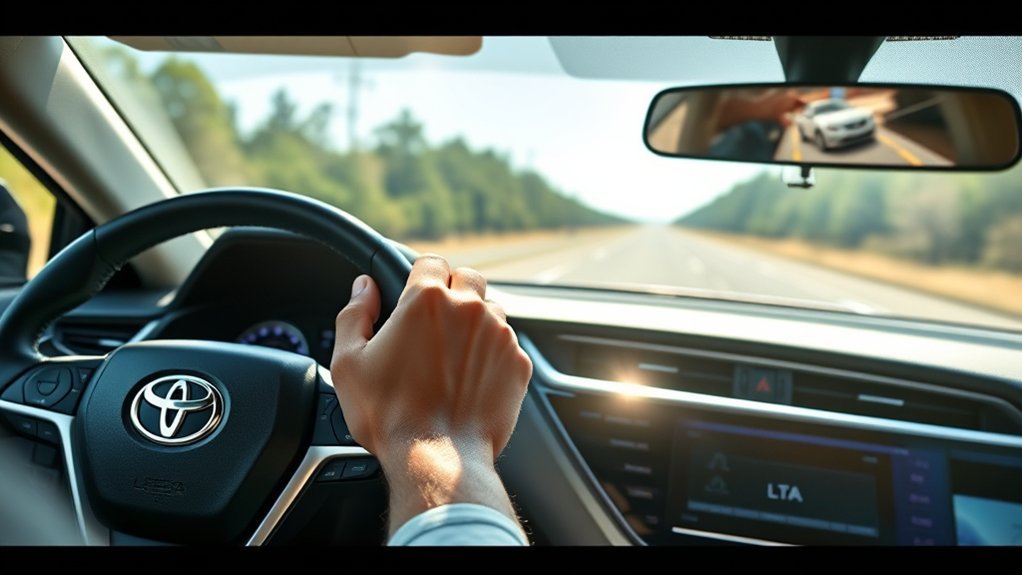
- Start the Camry and check the instrument cluster. Make sure no message indicates that the front camera, radar sensor, cruise control, or lane-assistance system is unavailable.
- Turn LTA on. Press the lane-assistance switch on the steering wheel using the procedure shown in your model-year manual. An LTA indicator or confirmation message should appear.
- Activate Dynamic Radar Cruise Control. Select vehicle-to-vehicle distance-control mode rather than conventional constant-speed cruise control, where the vehicle provides that choice.
- Set the cruising speed. LTA may be switched on before or after DRCC, but lane-centering assistance will not operate until DRCC is operating and the other conditions are satisfied.
- Check the lane and steering displays. Confirm that the system has changed from standby to active assistance rather than assuming it is steering because the LTA icon is merely illuminated.
- Keep steering responsibility. Hold the wheel, monitor traffic, and gently guide the Camry. Your steering input overrides the system.
On the 2025 Camry, Toyota states that LTA is intended for highways and expressways. It uses the front camera and radar sensor to detect lane lines and the paths of preceding or surrounding vehicles while DRCC is operating. If the necessary information cannot be detected, assistance may remain unavailable or stop temporarily.
Pro Tip: First try LTA in light traffic on a familiar, clearly marked highway. This makes it easier to learn the display states and steering feel without treating the system as a substitute for normal driving.
How to Read the LTA Indicators
The exact graphics and colors vary, so use your Camry’s manual as the final reference. On the 2025 U.S. Camry quick guide, the main display states are:
- White LTA indicator with gray or white lane graphics: LTA is on but standing by.
- Green LTA, lane, and steering indicators: Steering assistance is operating.
- Flashing yellow lane display: The vehicle is departing toward the flashing side and the driver must correct the path.
Earlier Camrys use different combinations of white, green, yellow, orange, solid, outlined, or flashing graphics. A lit LTA icon alone does not always mean that lane-centering steering is active. Look for the active steering-support display specified for your car.
LTA vs. LDA and Dynamic Radar Cruise Control
These systems are related but perform different jobs:
- Lane Tracing Assist: Provides continuous lane-centering steering support while DRCC is operating and the necessary lane or vehicle path is detected.
- Lane Departure Alert with Steering Assist: Warns when the vehicle appears to leave its lane unintentionally and may provide brief corrective steering. Depending on the Camry, this function can operate without DRCC when its own speed and detection conditions are met.
- Dynamic Radar Cruise Control: Controls cruising speed and following distance. LTA relies on active DRCC for its lane-centering function, but DRCC can operate without LTA.
This distinction explains why a Camry can display lane-departure warnings even when lane-centering assistance is not active.
[Amazon Products Picked for You]

Perfect Fit: The hidden box is custom-designed for the 2025 2026 2027 Camry LE SE XSE XLE.

Fitment: Compatible with Toyota Camry 2021 2022 2023

【FITMENT】Center Console AC Air Conditioning Knob Cover Radio Engine Start Stop Button Ring Trims Accessories Compatible with Toyota Camry 2021 2022 2023 2024 LE SE XLE XSE.
Adjusting LTA and Lane-Assist Settings
Use the steering-wheel meter controls to open the driver-assistance or vehicle-settings menu in the multi-information display. The available choices depend on the model year.
Documented Camry settings may include:
- Turning LTA or lane centering on or off
- Changing Lane Departure Alert warning sensitivity
- Turning sway warning on or off
- Changing sway-warning sensitivity
- Selecting an audible or steering-wheel-vibration warning where supported
Do not assume that a setting labeled “Sensitivity” changes how strongly the car centers itself. On prior-generation Camrys, Toyota uses that term for the timing of the lane-departure warning. A higher setting can warn before the front tire reaches a detected lane marker, while the standard setting warns closer to the crossing point.
For model-specific menu instructions, consult the 2025 Camry driving-support manual excerpt or the manual supplied for your exact model year.
[Amazon Products Picked for You]
☛【Fitment】Compatible with Toyota Camry 2006-2011; Highlander 2009-2014; Corolla; Hilux

High-Quality Microfiber Leather: Crafted with a fine microfiber leather outer layer, this steering wheel cover boasts meticulous stitching and reinforced seams. The durable, wear-resistant leather ensures a long service life, standing up to daily use. The sleek black streamlined design against a black background, making your car’s interior look both stylish and unique.
When LTA Can Operate
The complete operating conditions differ by generation. On the 2025 Camry, Toyota lists conditions that include detection of lane lines or a usable vehicle path, active DRCC, a suitable lane width, no turn-signal operation, no sharp curve, limited acceleration or deceleration, and the vehicle already traveling near the center of the lane.
LTA may not work properly or may cancel temporarily in situations such as:
- Faded, covered, missing, merging, diverging, or confusing lane lines
- Construction zones, repair marks, reflective poles, shadows, glare, tunnels, or bright concrete
- Rain, snow, fog, standing water, dirt, ice, or debris that affects the camera or radar sensor
- Sharp curves, steep slopes, rough roads, narrow lanes, wide lanes, or intersections
- A preceding vehicle that changes lanes, sways, or travels close to a lane boundary
- Strong crosswinds or turbulence from nearby vehicles
- Intentional steering, turn-signal use, hard acceleration, hard deceleration, or operation of another stability or collision-avoidance system
- A hands-off warning or another condition that requires the driver to resume full control
When an operating condition returns, assistance may resume automatically. Never wait for it to resume before correcting the vehicle’s path.
Why Lane Tracing Assist Is Not Working
If LTA is on but not centering the Camry, work through these checks:
- Confirm that DRCC is active. Turning cruise control on without setting it, using conventional cruise mode, or canceling DRCC prevents lane-centering operation.
- Check the display state. White or gray graphics commonly mean standby rather than active steering support.
- Look at the road. The camera may not identify faded, temporary, snow-covered, merging, or unusually spaced lane markings.
- Check the windshield and front sensor areas. Remove safe-to-remove dirt, snow, ice, condensation, or stickers that may interfere with the camera or radar. Do not reposition or repair a sensor yourself.
- Reduce conflicting inputs. A turn signal, sharp curve, strong steering input, heavy acceleration, or braking can suspend the function.
- Respond to hands-on warnings. Hold the steering wheel firmly and resume steering rather than attempting to defeat the monitoring system.
- Read persistent messages. If an unavailable or malfunction message remains after conditions improve and the vehicle is restarted, follow the owner’s manual and arrange inspection by a Toyota dealer or qualified repair facility.
Safety Benefits and Limits of Lane Tracing Assist

LTA is designed to provide steering support that helps maintain the Camry’s lane position during compatible DRCC operation. It can assist with routine lane-centering corrections on suitable roads, but it cannot guarantee that the vehicle will remain in its lane or avoid a collision.
The system may recognize a situation differently from the driver, follow the path of a vehicle that moves toward a lane boundary, or stop providing assistance without much advance notice. For that reason, Toyota instructs the driver to monitor the surroundings, hold the wheel as required, and operate it whenever necessary.
Do not use LTA to extend a trip when tired. Toyota’s manual places responsibility on the driver to take adequate breaks, and the system does not reduce the attention needed for safe driving.
How EDSS Works With LTA
Certain newer Camrys equipped with Emergency Driving Stop System can monitor driver input while LTA and DRCC are active. If the system determines that the driver is not responding and the driver does not respond to escalating prompts, EDSS is designed to decelerate and stop the vehicle within its current lane under specified conditions.
EDSS does not “kick in” merely because the LTA switch is on. It will not detect every emergency, may not operate when its conditions are unmet, and is not intended to support drowsy, inattentive, impaired, or medically unsafe driving.
Older LTA-equipped Camrys may not include EDSS. Confirm its presence in the instrument-panel section and Toyota Safety Sense section of your owner’s manual.
Finding Model-Specific LTA Information
The owner’s manual for your exact Camry is the best source for its switch operation, indicators, speed conditions, available settings, warnings, and limitations.
Your Camry’s model-year owner’s manual—not a generic description—is the final authority on how its Lane Tracing Assist system operates.
Toyota’s Safety Sense information center explains the general purpose of LTA and related systems. The National Highway Traffic Safety Administration’s automation guide also explains why combined steering and speed-assistance systems still require a fully engaged driver.
Owner forums can help identify common questions or display behavior, but forum advice should not override Toyota’s documentation, dashboard warnings, or a professional inspection.
Frequently Asked Questions
How do I use Toyota Lane Tracing Assist?
Turn LTA on with the steering-wheel lane-assistance switch, activate Dynamic Radar Cruise Control in vehicle-to-vehicle distance mode, set a speed, and verify that the instrument display shows active steering assistance. Keep control of the wheel and monitor the road continuously.
How do I turn on Lane Assist in my Toyota Camry?
Locate the button showing a vehicle between lane lines on the steering wheel and operate it as directed in your model-year manual. The 2025 U.S. Camry guide shows each press toggling LTA on or off, but earlier Camrys may use a different press or hold procedure.
What is Toyota Lane Tracing Assist?
Lane Tracing Assist is a driver-assistance function that uses detected lane boundaries and, on some versions, the path of other vehicles to provide lane-centering steering support while Dynamic Radar Cruise Control is operating.
How good is Toyota Lane Tracing Assist?
It can provide useful steering support on clearly marked, compatible roads, but performance varies with road shape, lane markings, traffic, weather, sensors, and vehicle condition. It should be judged as assistance rather than autonomous steering or a collision-prevention guarantee.
Does Lane Tracing Assist work without cruise control?
Its continuous lane-centering function does not operate unless Dynamic Radar Cruise Control is operating. Separate Lane Departure Alert and brief Steering Assist functions may still be available without DRCC when their own operating conditions are met.
Can I take my hands off the steering wheel while using LTA?
No. Standard LTA requires the driver to hold the wheel as directed, remain attentive, and be ready to steer immediately. A hands-off warning can suspend assistance. Do not use weights, covers, or other objects to defeat driver-monitoring features.
Why is my Camry’s LTA on but not steering?
The system may be in standby because DRCC is not operating, lane boundaries are not detected, the road is curving sharply, the turn signal is active, the driver is steering firmly, a sensor is obstructed, or another operating condition is not satisfied. Check the display and any warning message before continuing.
Conclusion
To use Lane Tracing Assist safely, confirm the procedure for your Camry’s model year, switch LTA on, activate and set Dynamic Radar Cruise Control, and verify that the display shows active steering assistance. Treat every warning or cancellation as a prompt to take full control. LTA can support highway driving, but it never replaces an attentive driver.
Sources
- Toyota 2025 Camry Owner’s Manual Excerpt for Driving Support Systems — LTA functions, operating conditions, warnings, limitations, and EDSS operation
- Toyota 2025 Camry Quick Reference Guide — LTA switch operation and instrument-display states
- Toyota 2024 Camry Owner’s Manual Excerpt — prior-generation LTA, lane-centering, warning displays, and operating limits
- Toyota Safety Sense 3.0 Overview — DRCC requirement, LTA purpose, EDSS qualifications, and safety disclosures
- Toyota 2026 Camry Product Information — current Camry Toyota Safety Sense and LTA description
- NHTSA Automated Vehicle Safety — driver responsibility when using steering and speed-assistance technologies
