
Choosing the right Android tablet affects how comfortably you work, create, game, study, and relax. The strongest choice is not simply the model with the biggest specification numbers; it is the tablet whose screen size, performance, battery, accessories, software, and portability fit your daily routine.
This updated 2026 guide compares five relevant Android tablets for different buyer priorities: the OnePlus Pad 3 for all-around performance, Xiaomi Pad 7 for midrange value, Yoga Tab Plus for a keyboard-and-pen workflow, Redmi Pad 2 for budget media use, and Samsung Galaxy Tab S10 Ultra for an extra-large premium display.
Affiliate disclosure:. As an Amazon Associate I earn from qualifying purchases. This roundup contains Amazon affiliate links. We may earn a commission from qualifying purchases at no additional cost to you. Product configurations, bundles, charger inclusion, and availability can change, so confirm the model number and package contents on Amazon before ordering.
Top Picks
|
Category |
Product |
Why It Fits |
|---|---|---|
|
🌟 Best Overall |
Flagship performance, a large 144Hz display, strong speakers, and fast charging. |
|
|
🚀 Best Midrange |
Sharp 3.2K screen, capable performance, and useful productivity features without flagship positioning. |
|
|
🖊️ Best Creative Bundle |
Large 3K workspace with a keyboard-and-pen-focused package; verify the exact bundle contents. |
|
|
💰 Best Budget |
Good screen resolution, expandable storage, quad speakers, and a large battery for everyday use. |
|
|
📺 Best Large Screen |
Huge Dynamic AMOLED 2X display, included S Pen, expandable storage, and premium multitasking features. |
How We Picked These Tablets
We compared the factors that most directly affect real ownership: display size and panel quality, refresh rate, processor class, memory and storage options, battery capacity, charging support, speaker quality, stylus and keyboard compatibility, software features, portability, and the tradeoffs that could make a tablet unsuitable for a particular buyer.
This is an editorial comparison based on published product information and buyer-focused use cases, not a claim of hands-on laboratory testing. Exact software features, accessories, and configurations can vary by region or retailer listing.
Before You Buy
- Confirm whether the listing is Wi-Fi-only or supports cellular connectivity.
- Check whether the keyboard, stylus, charger, and case are included or sold separately.
- Compare the tablet’s weight and screen size with how often you expect to carry it.
- Verify storage capacity, microSD support, software update policy, and warranty coverage for your region.
The OnePlus Pad 3 is the strongest all-around option in this group for gaming, media, and demanding multitasking. Its 13.2-inch 3.4K LCD can run at up to 144Hz in supported apps, while the Snapdragon 8 Elite gives it the most performance headroom of the five picks.
The eight-speaker system is a major advantage for movies and games, and the 12,140mAh battery supports up to 80W charging with compatible equipment. The tradeoff is size: this is a large tablet, and the keyboard and stylus are separate accessories unless a retailer bundle specifically includes them.
Who should buy this: Gamers, frequent multitaskers, media fans, and users who want a large Android tablet without moving to Samsung’s Ultra size.
Who should avoid this: Buyers who need a compact tablet, built-in cellular service, or a keyboard and stylus included at the base purchase price.
Buyer Feedback Check
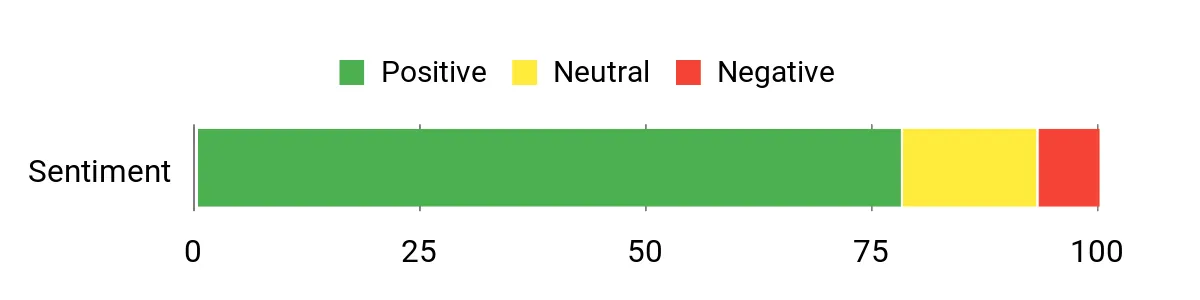
The most useful review themes to check are sustained gaming performance, display size, speaker quality, standby drain, software stability, and the cost of adding the keyboard or stylus.
Sentiment note: The chart below is preserved from the source article, but its sample size and methodology are not stated. Treat it as directional only and read recent verified-purchase reviews on the retailer page before buying.
Situational Benefits
|
Situation |
How It Helps |
|---|---|
|
Streaming and Media |
The 13.2-inch high-resolution display and eight speakers create a more immersive experience than smaller, basic tablets. |
|
Mobile Gaming |
The Snapdragon 8 Elite and high-refresh display provide strong performance headroom, although maximum refresh rate depends on app support. |
|
Work and Multitasking |
A large 7:5 screen and Open Canvas-style multitasking make documents, split-screen apps, and research easier to manage. |
|
Long Sessions |
The large battery and fast-charging support reduce downtime, but actual runtime varies with brightness, games, and network use. |
Ease of Use
|
Feature |
Expected Learning Curve |
|---|---|
|
Initial Setup |
Generally easy |
|
Split-Screen Multitasking |
Moderate |
|
Refresh-Rate Controls |
Moderate |
|
Accessory Setup |
Moderate; accessories may be separate |
Key Benefits
- 13.2-inch 3.4K LCD with up to 144Hz refresh
- Snapdragon 8 Elite performance for demanding apps and games
- Eight-speaker audio system for richer media playback
- 12,140mAh battery with support for up to 80W charging
- Large workspace for multitasking and entertainment
Check Current Amazon Availability
The Xiaomi Pad 7 uses an 11.2-inch 3200 × 2136 LCD—not AMOLED—with a refresh rate of up to 144Hz and peak brightness rated up to 800 nits. That combination makes it well suited to reading, streaming, note-taking, and everyday multitasking.
The Snapdragon 7+ Gen 3 is capable for productivity and casual-to-moderate gaming, while the 8,850mAh battery supports 45W charging. HyperOS 2 includes multitasking and AI-assisted features, but feature availability can vary by software version, language, account, and region.
Who should buy this: Students, commuters, and value-conscious users who want a high-resolution screen and responsive performance without paying for the largest flagship models.
Who should avoid this: Buyers specifically seeking OLED black levels, cellular connectivity, or guaranteed keyboard and stylus inclusion.
Buyer Feedback Check
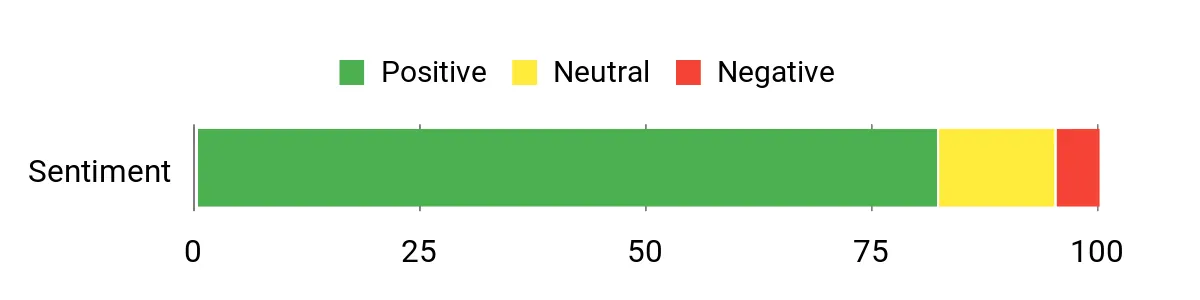
Check recent feedback for regional software behavior, app optimization, accessory availability, screen uniformity, charging accessories, and whether the exact configuration matches the advertised RAM and storage.
Sentiment note: The chart below is preserved from the source article, but its sample size and methodology are not stated. Treat it as directional only and read recent verified-purchase reviews on the retailer page before buying.
Situational Benefits
|
Situation |
How It Helps |
|---|---|
|
Streaming |
The 3.2K LCD, Dolby Vision support, and quad speakers make it a strong midrange media tablet. |
|
Remote Work |
The 3:2 display shape gives documents and split-screen apps more vertical room than many widescreen tablets. |
|
Notes and Creative Tasks |
High refresh and active-stylus support can make writing and sketching feel smoother, but the pen may be sold separately. |
|
On the Go |
The 11.2-inch size and 500g-class weight are easier to carry than the largest tablets in this roundup. |
Ease of Use
|
Feature |
Expected Learning Curve |
|---|---|
|
Initial Setup |
Generally easy |
|
Daily Navigation |
Generally easy |
|
Multitasking |
Moderate |
|
AI and Cross-Device Features |
Moderate; availability varies |
Key Benefits
- 11.2-inch 3.2K LCD with up to 144Hz refresh
- Snapdragon 7+ Gen 3 for responsive midrange performance
- 8,850mAh battery with 45W charging support
- Dolby Vision and quad-speaker support for media
- Compact enough for regular travel and study use
Check Current Amazon Availability
The Yoga Tab Plus is built around a 12.7-inch 3K display, Snapdragon 8 Gen 3 performance, generous memory, and a productivity-focused accessory setup. It is a good fit for note-taking, sketching, document work, presentations, and media.
The linked listing is positioned as a keyboard bundle and the source article identifies the Tab Pen Pro as included. Because retailer packages can change, confirm that the keyboard, pen, stand, charger, RAM, and storage shown on the page are included in the exact configuration you select.
Who should buy this: Students, creators, remote workers, and users who want a near-laptop setup without sourcing every accessory separately.
Who should avoid this: Buyers who need full desktop-class software, many physical ports, or the smallest possible travel tablet.
Buyer Feedback Check
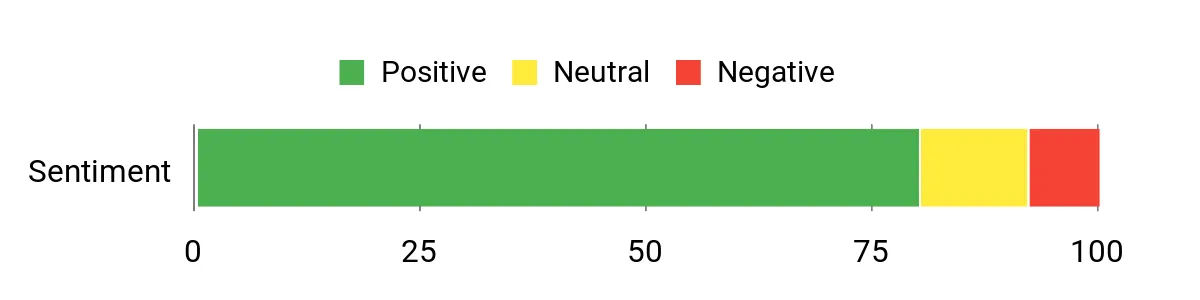
The most important buyer-review themes are keyboard stability, pen latency, stand durability, desktop-mode usefulness, app compatibility, speaker quality, and whether all advertised accessories arrived in the box.
Sentiment note: The chart below is preserved from the source article, but its sample size and methodology are not stated. Treat it as directional only and read recent verified-purchase reviews on the retailer page before buying.
Situational Benefits
|
Situation |
How It Helps |
|---|---|
|
Sketching and Notes |
The large 3K workspace and active pen support provide room for handwriting, annotations, and creative drafts. |
|
Working Away From a Desk |
A keyboard-and-stand setup can make email and document work more practical in cafés, classrooms, or meetings. |
|
Presentations |
The large display, stand, and strong speakers help with small-group sharing and hands-free use. |
|
Entertainment |
A large high-resolution panel and Harman Kardon-tuned speaker system improve movies, music, and video calls. |
Ease of Use
|
Feature |
Expected Learning Curve |
|---|---|
|
Initial Setup |
Generally easy |
|
Keyboard Use |
Generally easy |
|
Pen Features |
Moderate |
|
Desktop-Style Workflow |
Moderate; Android app support varies |
Key Benefits
- Large 12.7-inch 3K display for work and creative tasks
- Snapdragon 8 Gen 3 performance with generous memory
- Keyboard-and-pen-focused bundle in the linked listing
- Strong speaker system for calls and entertainment
- Useful alternative for buyers who want a laptop-like Android setup
Check Current Amazon Availability
The Redmi Pad 2 focuses on practical value. Its 11-inch 2560 × 1600 LCD supports up to a 90Hz refresh rate, while the MediaTek Helio G100-Ultra is appropriate for browsing, video, school apps, and casual games.
A 9,000mAh battery, quad speakers, and microSD expansion up to the supported limit make it useful for offline media libraries and long entertainment sessions. It is not the right choice for demanding 3D games, heavy video editing, or buyers expecting flagship multitasking speed.
Who should buy this: Budget shoppers, families, students, and users who mainly stream, browse, read, join video calls, and play lighter games.
Who should avoid this: Power users who need premium gaming performance, fast USB data transfer, a flagship camera system, or a desktop replacement.
Buyer Feedback Check
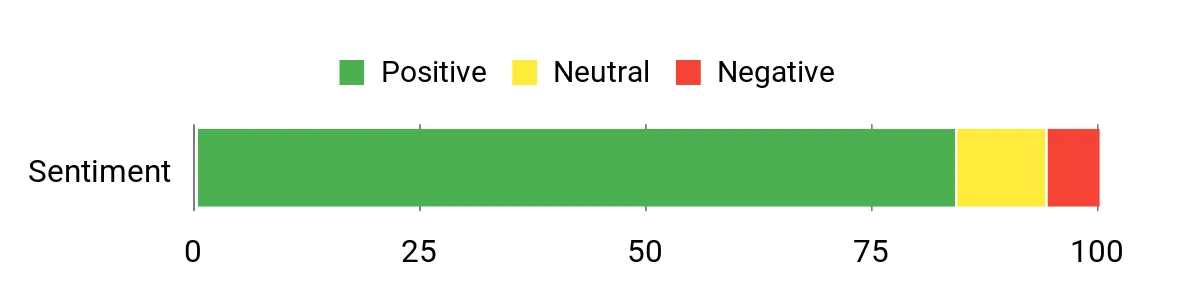
Check recent feedback for app responsiveness, memory management, display brightness, speaker balance, charging speed, microSD behavior, and whether the listing is Wi-Fi-only or a cellular variant.
Sentiment note: The chart below is preserved from the source article, but its sample size and methodology are not stated. Treat it as directional only and read recent verified-purchase reviews on the retailer page before buying.
Situational Benefits
|
Situation |
How It Helps |
|---|---|
|
Binge Watching |
The 2.5K display and quad speakers provide a better media experience than many entry-level tablets. |
|
Casual Gaming |
The 90Hz refresh rate improves perceived smoothness, but the processor is better suited to lighter titles and moderate settings. |
|
Study and Reading |
Expandable storage, a large battery, and an 11-inch screen make it practical for notes, PDFs, and course videos. |
|
Travel |
The battery capacity and offline storage options are useful on flights and trips, though the 510g weight is not ultra-light. |
Ease of Use
|
Feature |
Expected Learning Curve |
|---|---|
|
Initial Setup |
Generally easy |
|
Media Playback |
Generally easy |
|
Storage Expansion |
Moderate |
|
Performance Tuning for Games |
Moderate |
Key Benefits
- 11-inch 2.5K LCD with up to 90Hz refresh
- 9,000mAh battery for extended everyday use
- Quad speakers for streaming and video calls
- MicroSD support for larger offline libraries
- Strong feature mix for a budget-oriented Android tablet
Check Current Amazon Availability
The Samsung Galaxy Tab S10 Ultra offers the biggest screen in this roundup: a 14.6-inch Dynamic AMOLED 2X panel with a 2960 × 1848 resolution, 120Hz refresh rate, and anti-reflective treatment. The S Pen is included, and the tablet also supports microSD expansion and IP68 water and dust resistance.
Its 11,200mAh battery supports 45W charging, and the large display is excellent for art, notes, media, and multi-window productivity. The main drawbacks are portability and product age: it is a previous-generation flagship in 2026, so it makes the most sense when the current price is competitive with newer premium tablets.
Who should buy this: Artists, Samsung ecosystem users, accessibility-focused buyers, and anyone who wants an exceptionally large display for media or multitasking.
Who should avoid this: Frequent travelers, one-handed readers, and buyers who do not need a 14.6-inch screen or who prefer the newest flagship generation.
Buyer Feedback Check
Check recent reviews for size and weight, battery life at high brightness, keyboard-cover cost, app scaling on the 14.6-inch display, S Pen workflow, and whether a newer model offers better value at the time of purchase.
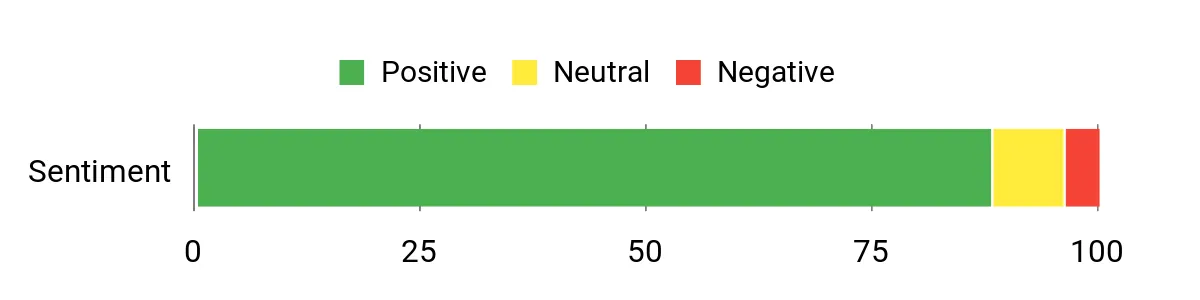
Sentiment note: The chart below is preserved from the source article, but its sample size and methodology are not stated. Treat it as directional only and read recent verified-purchase reviews on the retailer page before buying.
Situational Benefits
|
Situation |
How It Helps |
|---|---|
|
Creative Work |
The large Dynamic AMOLED 2X display and included S Pen provide a spacious canvas for drawing, annotations, and photo edits. |
|
Multitasking |
Samsung multi-window tools and the large screen make side-by-side documents, calls, and research easier to manage. |
|
Media Viewing |
Deep contrast, a 120Hz panel, and strong speakers deliver the most cinematic display experience in this group. |
|
Accessibility |
Large interface elements, adjustable text, and a wide workspace can improve readability for users who benefit from a bigger screen. |
Ease of Use
|
Feature |
Expected Learning Curve |
|---|---|
|
Initial Setup |
Generally easy |
|
S Pen Use |
Generally easy |
|
Advanced Multitasking |
Moderate |
|
Portability |
More difficult due to size and weight |
Key Benefits
- 14.6-inch Dynamic AMOLED 2X display with 120Hz refresh
- Included S Pen for notes and creative work
- MicroSD expansion and IP68 durability
- 11,200mAh battery with 45W charging support
- Large workspace for Samsung DeX and multi-window use
Check Current Amazon Availability
FAQ
How Do I Choose the Right Android Tablet for My Needs?
Start with your main use case. Choose a high-refresh display and faster processor for gaming; a large, high-contrast screen and good speakers for entertainment; an active stylus and low-latency pen support for notes or art; and a keyboard, strong multitasking software, and enough RAM for productivity. Then check weight, battery, connectivity, storage, and update support.
Is OLED Always Better Than LCD?
OLED typically offers deeper blacks and stronger contrast, which benefits movies and dark-room viewing. A good LCD can still be sharp, bright, color-rich, and smoother at a high refresh rate. Panel quality, brightness, calibration, resolution, and reflectivity matter as much as the display technology label.
Will Keyboards and Styluses Work With These Tablets?
Compatibility is model-specific. Bluetooth keyboards are broadly supported, while magnetic keyboards and active styluses usually require a matching accessory. Confirm the exact model, connector, pen protocol, pressure sensitivity, and package contents. Do not assume the product image means every accessory is included.
How Much RAM and Storage Should I Buy?
For streaming, reading, and light browsing, an entry configuration can be sufficient. For multitasking, large games, creative apps, and longer useful life, prioritize more RAM and at least 256GB of storage when practical. MicroSD support is helpful for media files but may not replace fast internal storage for apps and games.
How Long Will an Android Tablet Stay Useful?
Useful life depends on processor headroom, RAM, storage, battery health, and the manufacturer’s update policy. Keep the operating system and apps current, avoid extreme heat, manage storage, and use a protective case. Verify the current update commitment for the exact model and region before buying.
Do These Tablets Include a Charger, Keyboard, or Stylus?
Package contents vary by brand, region, and retailer bundle. Samsung includes the S Pen with the Galaxy Tab S10 Ultra, while OnePlus accessories are generally separate. Xiaomi, Redmi, and Lenovo package contents can vary, so read the current Amazon listing and manufacturer package details before checkout.
Wrapping Up
The OnePlus Pad 3 is the best all-around choice here for flagship speed, gaming, audio, and a large high-refresh display. The Xiaomi Pad 7 is the more balanced midrange option for buyers who want a sharp screen and responsive everyday performance in a smaller format.
Choose the Yoga Tab Plus when a keyboard-and-pen workflow matters most, but verify the exact bundle contents. The Redmi Pad 2 is the strongest budget-oriented choice for streaming, browsing, study, and expandable storage.
The Samsung Galaxy Tab S10 Ultra remains the standout for an extra-large premium screen, S Pen use, and Samsung multitasking, but its size and previous-generation status mean you should compare its current value carefully before purchasing.
Detailed Comparison
| Product Name | Image | Display Quality | Processor & Performance | Battery & Charging | Unique Highlights |
|---|---|---|---|---|---|
| OnePlus Pad 3 |
 |
13.2" LCD, 3392 × 2400, up to 144Hz | Snapdragon 8 Elite; best performance headroom in this group | 12,140mAh; supports up to 80W charging with compatible equipment |
|
| Xiaomi Pad 7 |
 |
11.2" LCD, 3200 × 2136, up to 144Hz, 800-nit peak rating | Snapdragon 7+ Gen 3; strong midrange multitasking | 8,850mAh; supports 45W charging |
|
| Lenovo Yoga Tab Plus |
 |
12.7" 3K display, 2944 × 1840, anti-reflective treatment | Snapdragon 8 Gen 3 with generous memory for creative and office work | Large battery; actual endurance and charger inclusion vary by configuration |
|
| Redmi Pad 2 |
 |
11" LCD, 2560 × 1600, up to 90Hz | MediaTek Helio G100-Ultra; suitable for everyday use and casual gaming | 9,000mAh; 18W charging support |
|
| Samsung Galaxy Tab S10 Ultra |
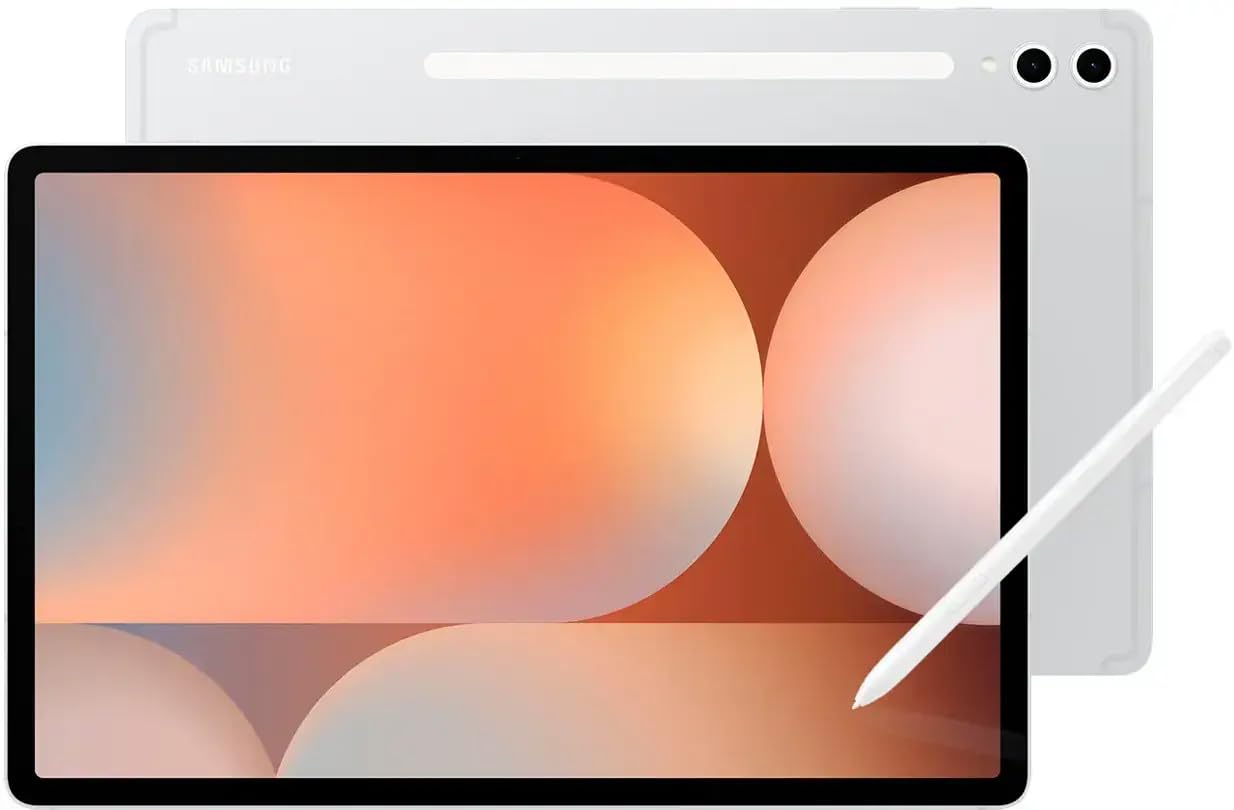 |
14.6" Dynamic AMOLED 2X, 2960 × 1848, 120Hz | Premium processor and Samsung multitasking features for demanding use | 11,200mAh; supports 45W charging |
|
This roundup is reader-supported. When you click through affiliate links, we may earn a referral commission on qualifying purchases.
