
You need to keep your drone flights legal, traceable, and easier to manage. A good Remote ID broadcast module gives older or non-standard drones a practical way to broadcast required identification and location information without replacing the whole aircraft.
Below you’ll find compact Remote ID modules that balance battery life, size, setup, mounting options, and compatibility. Each pick is aimed at a different type of pilot, from casual park flyers to hobbyists who move one module between several aircraft.
Affiliate disclosure: This guide is reader-supported. We may earn a commission from qualifying Amazon purchases at no extra cost to you. As an Amazon Associate I earn from qualifying purchases.
Top Picks
| Category | Product | Best For |
|---|---|---|
| 🏆 Best Overall | Ruko R111S RC Aircraft GPS Tracker / RID Module | Most pilots who want a small module with GPS tracking and a buzzer |
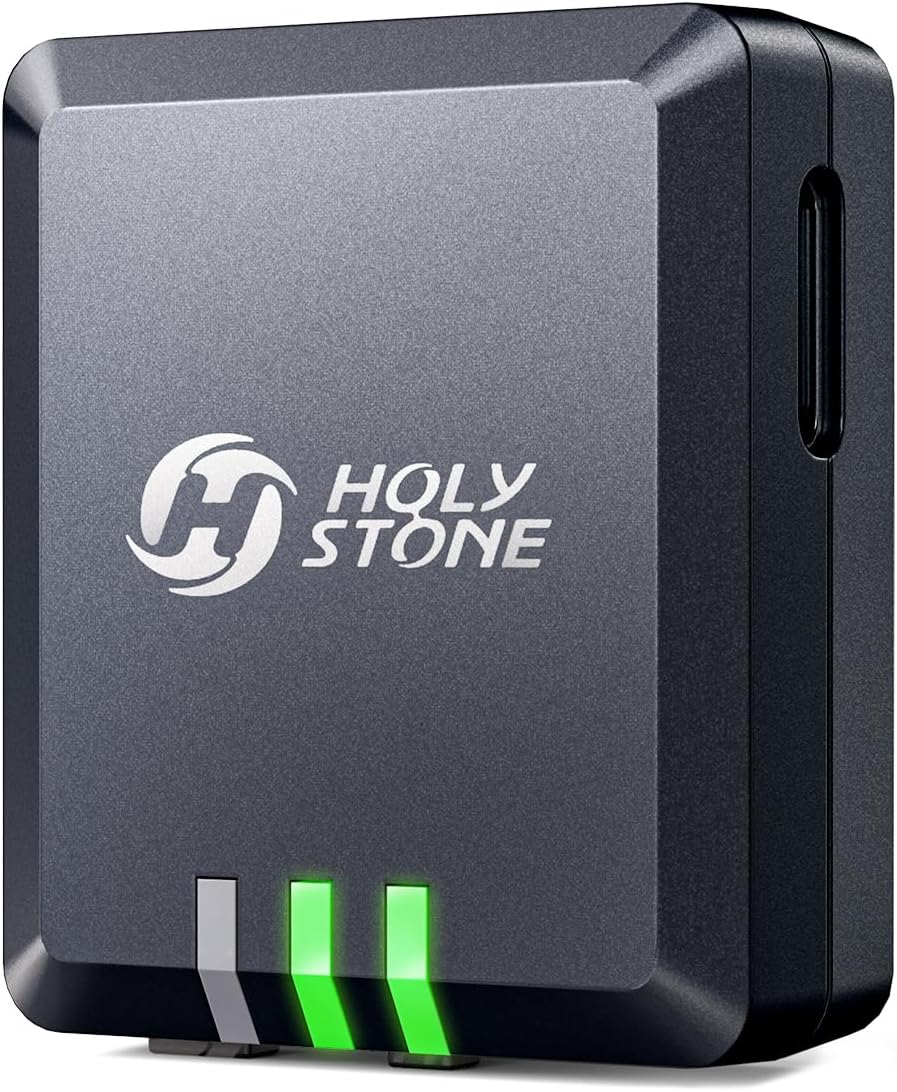
| 🧩 Best for Holy Stone Drones | Holy Stone FAA Compliant Remote Identification Broadcast Module | Owners of compatible Holy Stone and listed drone models |
| ⚡ Best Battery Life | Bwine B112 FAA Compliant Remote ID Module (5-Hour Battery) | Longer practice sessions and multi-flight days |
| 🔊 Best for Recovery & Alerts | Gleesfun G115S Remote ID Module with Buzzer | Pilots who want an audible recovery aid |
| 💡 Best Weather-Resistant Pick | Potensic FAA Compliant Remote Identification Broadcast Module (IP54) | Outdoor pilots who want splash and dust resistance |
Quick Verdict
| Choose This Module | If You Want | Main Check Before Buying |
|---|---|---|
| Ruko R111S | A compact all-around option with GPS tracking, a buzzer, and flexible mounting | Confirm app setup steps and FAA serial number registration |
| Holy Stone Remote ID Module | A simple module for compatible Holy Stone and listed GPS drones | Verify your exact drone model is supported |
| Bwine B112 | Long advertised runtime in a light add-on design | Check mounting position and GPS lock before takeoff |
| Gleesfun G115S | A small module with a buzzer for easier recovery | Review setup instructions before your first flight |
| Potensic Remote ID Module | A more rugged IP54-rated module for routine outdoor flying | Plan setup before heading to the field |
How We Picked These Remote ID Modules
You want a Remote ID module that solves the compliance problem without adding too much weight, setup friction, or battery anxiety. We focused on modules advertised for FAA Remote ID use, then looked at whether each option gives you practical features for real flying: battery life, size, mounting accessories, app or computer setup, GPS behavior, recovery features, and weather resistance.
We also looked for clear buyer fit. Some modules are better for one drone brand, while others make more sense if you move a broadcast module between several aircraft. Because FAA and product details can change, you should still confirm the current Declaration of Compliance status, serial number requirements, and exact aircraft compatibility before flying.
Deal tip: Recreational drones that weigh 250 grams or less don't need FAA registration or Remote ID. See sub-250-gram picks like the DJI Mini 4K and Potensic ATOM 2 in our October Prime Day drone deals.
Ruko R111S Remote ID Module

If you need a no-fuss way to add Remote ID broadcasting to an older or hobby drone, the Ruko R111S is the strongest all-around pick here. It is designed to be small enough for compact aircraft, and it adds GPS tracking plus a buzzer, which can help when you need to locate a downed aircraft after a rough landing.
The advertised runtime is long enough for several short flights, and the Type-C charging setup makes it easier to top up between sessions. The included Velcro, tape, zip ties, and mount are useful if you fly more than one model and want a module that can move between aircraft.
The main thing to watch is setup. Give yourself time to bind the module, confirm the serial number, and verify the broadcast before your first real flight. Once it is configured, this is a practical choice for park sessions, club meets, casual aerial photography, and test flights with legacy drones.
What People Say
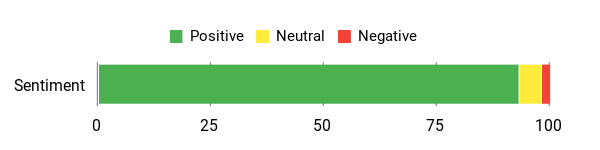
Users generally like the compact size, GPS tracking, and recovery buzzer. Setup may take a few tries, so the first configuration is best done at home before you head to a flying field.
Overall Sentiment: Positive
🗣️ Geoffrey Raiser
Built-in beeper and accurate GPS made finding a small lost module straightforward; setup took a few tries but the Ruko Scanner app and the QR on the box got me connected and reporting speed/altitude accurately.
🗣️ Dirty Bird
Very easy to set up and configure, quick USB-C charge (~40 minutes), useful LEDs for status and GPS lock, and compact enough to fit on even smaller RC airframes.
When It Helps
| Situation | How It Helps |
|---|---|
| Park or backyard flights | You get a small add-on module that does not make your setup feel bulky. |
| Recovering a lost plane | The GPS plus beeper gives you both a location reference and an audible cue. |
| Club meets and sanctioned events | It helps you show that your aircraft has a Remote ID broadcast module attached and configured. |
| Traveling between fields | Quick mounting options make it easier to move the module between drones listed in your inventory. |
Ease Of Use
| Feature | Ease Level |
|---|---|
| Installation | Easy |
| Pairing/Setup | Moderate |
| Charging | Easy |
| App management | Moderate |
Who Should Buy This
- You fly older drones that need a Remote ID broadcast module.
- You want GPS tracking and a buzzer in one compact add-on.
- You move between multiple hobby aircraft and need flexible mounting.
Who Should Avoid This
- You want a drone with built-in Standard Remote ID instead of a removable module.
- You do not want to spend time on app setup, serial number registration, and broadcast testing.
Why You’ll Like It
- Provides Remote ID broadcasting for compatible legacy drones.
- Built-in beeper and GPS tracking help with recovery.
- Small and light design limits impact on flight feel.
- Type-C charging is convenient for field use.
- Multiple mounting accessories make it easier to move between aircraft.
Live listing note: Amazon ratings, review counts, and availability change often. Check the current listing before you buy.
Check Product Details on Amazon
Holy Stone Remote ID Module

If you fly a compatible Holy Stone GPS drone, this Remote ID broadcast module is the most straightforward fit in the lineup. It is built as a practical add-on for listed models, so it is best for pilots who want to stay within the same brand ecosystem instead of piecing together a more universal setup. Other Holy Stone Remote ID hardware has also been reported by pilots to work with some non-Holy-Stone drones, but that isn’t guaranteed for this specific listing — always check the compatible-models list on the exact product page before buying.
The product details emphasize FAA Remote ID compliance support and built-in battery protections such as overcharge, over-discharge, and low-temperature safeguards. That makes it a sensible option for casual flights, family outings, and everyday practice sessions where you want compliance handled with as little extra hardware as possible.
The key limitation is compatibility. Do not assume this module fits every drone just because it is a Remote ID module. Check your exact aircraft model, the current listing details, and the FAA Declaration of Compliance information before buying or flying.
What People Say
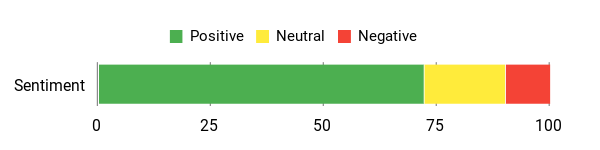
Product details and buyer feedback emphasize compliance support and simple everyday use. This is most appealing when your drone appears on the compatible model list and you want a brand-matched module.
Overall Sentiment: Positive
🗣️ Feature Bullet
FAA Regulation Compliance: Holy Stone is committed to working out a solution to the US FAA Declaration of Compliance for our rc drone consumers; here we got the Remote ID Module Parts to solve the FAA Compliance issue. No more worry about the FAA Regulations.
🗣️ Feature Bullet
Safety and Performance: Holy Stone Remote ID broadcast Module Parts with Protection for overcharging, over-discharging protection, and low temperatures, allow all our Holy Stone Drone Pilots to fly the Holy Stone Drones with Camera for Adults 4K without worries.
When It Helps
| Situation | How It Helps |
|---|---|
| Local park flights | You can fly a compatible drone with a dedicated broadcast module attached and configured. |
| Group meets or club events | It gives you a simple way to show that your drone has Remote ID support. |
| Photography sessions | The module focuses on compliance support without adding a complex setup process. |
| Travel and field testing | It can be useful when moving between locations where Remote ID compliance is expected. |
Ease Of Use
| Feature | Ease Level |
|---|---|
| Installation | Easy |
| Pairing/Setup | Moderate |
| Daily maintenance | Easy |
| Compatibility checks | Moderate |
Who Should Buy This
- You own a listed compatible Holy Stone drone.
- You want a simple brand-matched Remote ID module.
- You prefer a basic compliance add-on over extra recovery features.
Who Should Avoid This
- Your drone model is not clearly listed as compatible.
- You want a module marketed as broadly universal across many aircraft.
- You need a built-in buzzer for recovery.
Why You’ll Like It
- You get Remote ID broadcasting support without reworking a compatible drone.
- It is a sensible match for listed Holy Stone aircraft.
- Battery protection features help reduce everyday charging concerns.
- The simple design keeps setup more approachable for casual pilots.
Live listing note: Amazon ratings, review counts, and compatibility details can change. Check the current listing and your exact drone model before you buy.
Check Product Details on Amazon
Bwine B112 Remote ID Module
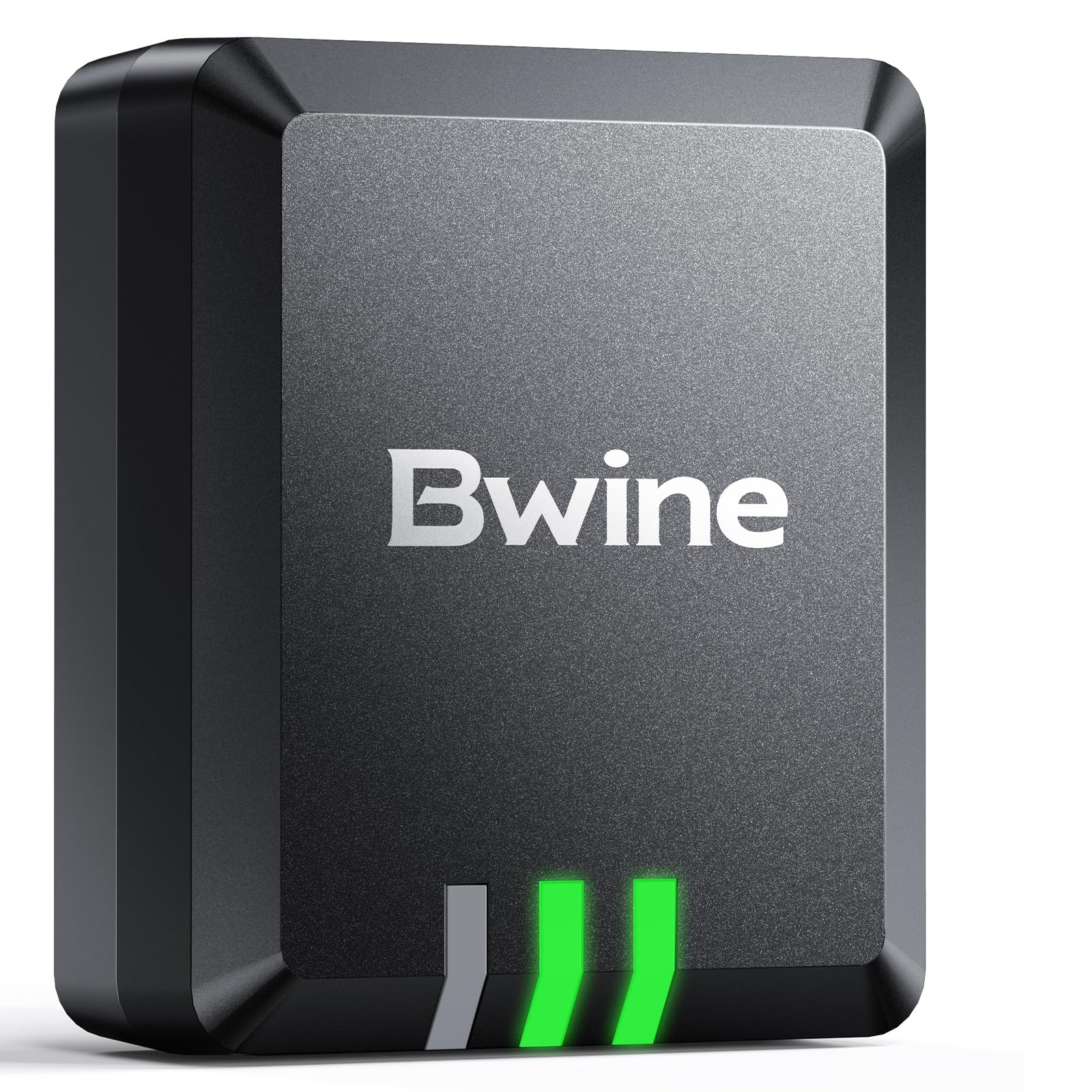
If battery life is your biggest concern, the Bwine B112 stands out because it is advertised with up to 5 hours of runtime. That makes it a practical pick if you fly several short sessions in one day or spend longer periods practicing takeoffs, landings, and basic maneuvers.
The design is small and light, so it should be easier to mount without throwing off balance on many drones that can physically carry an add-on module. The included Velcro, tape, zip ties, and adhesive base make it more flexible if you switch between aircraft.
As with any Remote ID module, do not treat “wide compatibility” as a guarantee. Check your drone weight, mounting surface, GPS visibility, FAA serial number process, and the current product documentation before your first flight.
What People Say
Buyers generally focus on the small size, simple mounting, and long advertised runtime. The main setup reminder is to wait for a good GPS lock and confirm the broadcast before takeoff.
Overall Sentiment: Positive
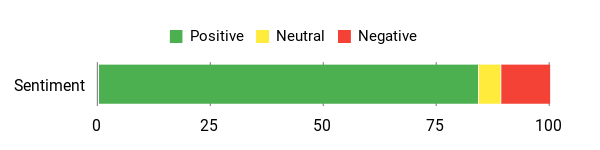
Setup theme: Owners value straightforward mounting and a small form factor, but first-time setup should be done carefully so the module has time to lock GPS and broadcast correctly.
Use-case theme: The B112 makes the most sense for pilots who want longer advertised runtime in a lightweight Remote ID add-on.
When It Helps
| Situation | How It Helps |
|---|---|
| Park and backyard flying | Lets you add Remote ID support without bulky hardware. |
| Aerial photography or mapping | GPS reporting can help with location awareness and recovery if something goes wrong. |
| Club meets and events | A longer advertised runtime helps reduce charging stress during group flying. |
| Switching between drones | Included Velcro, tape, zip ties, and an adhesive base help with quick mounting changes. |
Ease Of Use
| Feature | Ease Level |
|---|---|
| Installation | Easy |
| Pairing/Setup | Moderate |
| Charging | Easy |
| Mounting between drones | Easy |
| App management | Moderate |
Who Should Buy This
- You want a lightweight Remote ID module with long advertised battery life.
- You fly multiple short sessions and do not want to charge between every flight.
- You need flexible mounting accessories for different aircraft.
Who Should Avoid This
- You want a brand-specific module for one exact drone model.
- You need weather resistance as a priority.
- You do not want to verify GPS lock before each flight.
Why You’ll Like It
- Broadcasts Remote ID for compatible drones that need an add-on module.
- Advertised high GPS accuracy helps with tracking and recovery.
- Compact 13.5g design keeps weight low.
- Advertised 5-hour runtime is useful for longer flying days.
- Multiple mounting accessories support multi-drone setups.
Live listing note: Amazon ratings, review counts, and product details change. Confirm the current specs and compatibility on the live listing.
Check Product Details on Amazon
G115S Remote ID Module
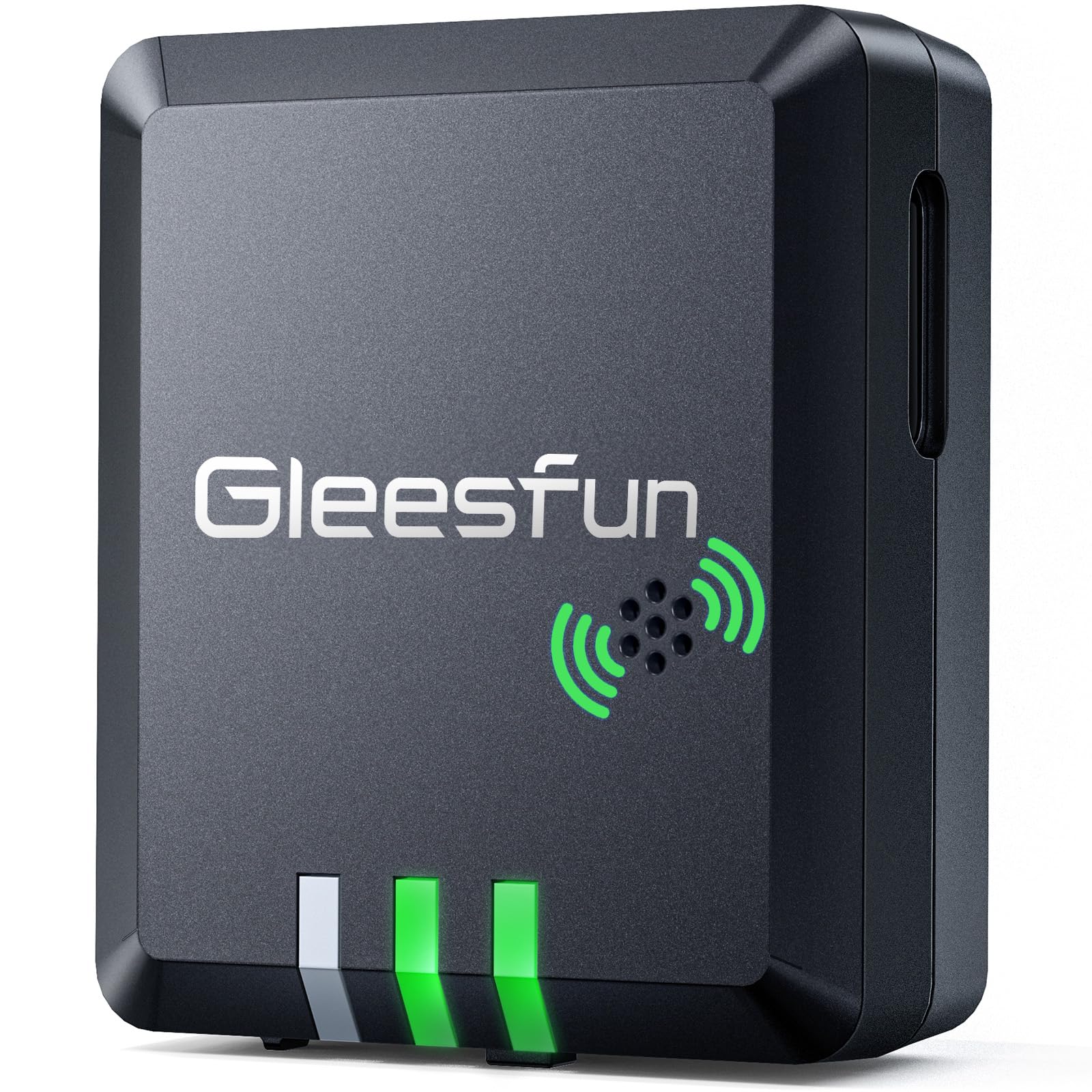
If recovery matters as much as compliance, the Gleesfun G115S is worth a close look. It combines Remote ID broadcasting with a built-in buzzer, so it can help you find a downed aircraft faster than GPS coordinates alone.
The light design makes it suitable for many drones that can carry an add-on module, and the advertised 5-hour runtime is helpful for longer practice sessions. The included Velcro, tape, and zip ties also make it easier to move between aircraft when needed.
The main hesitation is setup clarity. A few users mention that instructions could be better, so plan to configure it before field use. Test the GPS lock, app connection, buzzer, and broadcast signal before relying on it for a real flight.
What People Say
Owners like the small size, simple mounting, and recovery-focused buzzer. The most common caution is to spend a few minutes with setup and GPS lock before takeoff.
Overall Sentiment: Positive
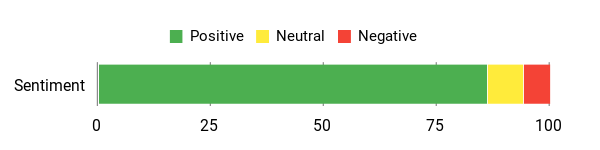
🗣️ Kenneth Norman
Easy to set up and very light — worked perfectly on my 700 g drone to make it compliant in the USA, and I didn’t notice any change in flight behavior.
🗣️ Erick Hernandez
Simple to use and a must if you add guards or bigger batteries that push you over 250 g — pairing was straightforward and it handled typical park flights well.
When It Helps
| Situation | How It Helps |
|---|---|
| Park and backyard flying | Keeps your casual sessions simpler while adding Remote ID broadcast support. |
| Aerial photography and mapping | Position reporting and the buzzer can help if you lose sight of your craft after landing. |
| Club meets and public events | Lets you demonstrate Remote ID support without adding a large module. |
| Switching between drones | Included Velcro, tape, and zip ties make it easier to move the module between aircraft. |
Ease Of Use
| Feature | Ease Level |
|---|---|
| Installation | Easy |
| Pairing/Setup | Moderate |
| Charging | Easy |
| Mounting between drones | Easy |
| Using buzzer/controls | Easy |
Who Should Buy This
- You want a Remote ID module with a built-in buzzer.
- You fly in grass, brush, or larger areas where recovery can be harder.
- You want a small, lightweight module for hobby aircraft.
Who Should Avoid This
- You prefer the clearest possible first-time setup experience.
- You need a brand-specific module for one exact aircraft.
- You want IP-rated water and dust resistance as the top priority.
Why You’ll Like It
- Broadcasts Remote ID for compatible legacy drones.
- Built-in buzzer helps you locate a lost drone faster.
- Claimed GPS accuracy under 3 m supports tracking and recovery.
- Compact 13.5 g design keeps weight low.
- Advertised 5-hour runtime helps on longer flying days.
- Includes Velcro, tape, and zip ties for flexible mounting.
Live listing note: Amazon ratings, review counts, and availability change often. Review the current listing before making a final decision.
Check Product Details on Amazon
Potensic Remote ID Module

If you fly outdoors often and want a module with more environmental protection, the Potensic Remote ID module is the most durable-feeling option in this roundup. Its IP54 rating is useful for dust and light splashes, which can matter when you fly from dry fields, gravel lots, or damp grass.
The module is advertised with Bluetooth 5.1, Type-C charging, claimed GPS accuracy under 3 m, and more than four hours of runtime. It is a practical choice for casual flights, club meetups, and photo sessions where you want a rechargeable module that is easier to mount and move.
Setup is the main thing to plan around. Some owners mention GPS lock time or initial configuration steps, so handle setup before you travel to the field. Confirm that the module broadcasts correctly through a scanner app before relying on it.
What People Say
Owners appreciate that it can appear on scanner apps, mounts securely, and has responsive support behind it. A few pilots mention GPS lock time and setup quirks, so this is best for buyers who do not mind doing a careful first configuration.
Overall Sentiment: Positive
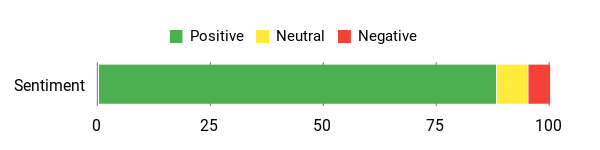
🗣️ Deb
Support was responsive and fixed a firmware issue that caused the unit to broadcast the wrong location; after an exchange the replacement worked reliably and the team followed up to ensure it was OK.
🗣️ Duncan
Showed up on scanner apps, strong hook-and-loop mounting, clear instructions and a helpful video — made me feel my heavier off-brand drone was legal to fly; GPS lock took a bit but it worked as expected.
When It Helps
| Situation | How It Helps |
|---|---|
| Park and backyard flying | Lets you add Remote ID support while keeping the setup compact and rechargeable. |
| Club meets and public events | Makes it easier to demonstrate Remote ID broadcasting to organizers or other pilots. |
| Aerial photography sessions | Location reporting can support recovery if you lose sight of the aircraft after landing. |
| Switching between aircraft | Supplied tape, dual-lock, and a camera mount help you move the module without permanent changes. |
Ease Of Use
| Feature | Ease Level |
|---|---|
| Installation | Easy |
| Pairing/Setup | Moderate |
| Charging | Easy |
| Mounting between drones | Easy |
| GPS lock time | Moderate |
Who Should Buy This
- You fly outdoors and want IP54 splash and dust resistance.
- You want a rechargeable module with flexible mounting accessories.
- You value support and setup resources when firmware or configuration issues come up.
Who Should Avoid This
- You need the fastest possible first-time setup.
- You want the lightest listed module in this roundup.
- You fly only indoors or in controlled spaces where weather resistance does not matter.
Why You’ll Like It
- Broadcasts Remote ID information for compatible legacy drones.
- IP54-rated for dust and splash resistance during routine outdoor use.
- Claimed GPS accuracy under 3 m helps with location reporting and recovery.
- Advertised over four hours of battery life with Type-C charging.
- Bluetooth 5.1 support and advertised long transmission range improve visibility.
- Includes mounting options such as 3M tape, dual-lock, and a camera mount.
Live listing note: Amazon ratings, review counts, and availability are not fixed. Check the live product page for the latest details.
Check Product Details on Amazon
Before You Buy A Remote ID Module
- Check FAA compliance: Confirm the module appears in the FAA Declaration of Compliance system before relying on it.
- Register correctly: Add the module serial number and drone information in DroneZone as required for your flyer type.
- Verify compatibility: Check your drone model, payload capacity, mounting surface, and app requirements.
- Test before flight: Confirm GPS lock and Remote ID broadcast with a scanner app before takeoff.
- Watch the weight: A small module can still affect balance on lightweight drones.
- Plan charging: Charge the module before every session and keep a Type-C cable in your flight bag when supported.
FAQ
How Do I Choose The Right Remote ID Module For My Drone?
Start with compatibility, FAA compliance, and battery life. Make sure the module is advertised for Remote ID use, check whether your drone model is listed, and confirm the serial number and Declaration of Compliance details before flying.
Then compare the practical details: weight, mounting accessories, GPS behavior, charging time, app setup, and whether you need extras like a buzzer or IP54 protection. If you move one module between several aircraft, make sure your registration setup allows that workflow.
Will Adding A Remote ID Module Make My Drone FAA-Compliant?
A Remote ID broadcast module is designed to help drones without built-in Standard Remote ID meet the broadcast requirement, but it does not remove your other responsibilities. You still need to register your drone when required, list the module serial number properly, follow airspace rules, and keep the drone within visual line of sight when operating with a broadcast module.
Before you fly, confirm that the device is configured with the correct registration information and that it broadcasts the required information correctly.
How Do I Install, Test, And Maintain A Remote ID Module For Reliable Use?
Charge the module fully, install firmware updates if available, and program the module according to the manufacturer’s instructions. Mount it securely in a place where the antenna has a clear signal path and where the module will not interfere with propellers, sensors, GPS, or the drone’s center of gravity.
Before each flight, wait for a solid GPS lock and verify the broadcast with a Remote ID scanner app. Replace worn adhesive mounts, keep charging cables in your kit, and retest the module after moving it to another aircraft. If your module has a buzzer, test it on the ground so you know how to use it during recovery.
Can I Move One Remote ID Module Between Drones?
Usually yes, but the rules differ by flyer type. Recreational pilots can typically use one registered module across all of their recreationally registered drones. Part 107 (commercial) operators generally need to register a separate module for each aircraft that isn’t otherwise Remote ID compliant, using that drone’s own FAA registration number in DroneZone. Check the current DroneZone instructions for your flyer type before relying on one module across multiple drones.
Do Sub-250g Drones Need A Remote ID Module?
It depends on how and why you fly. Some drones under 250 g may not need registration for purely recreational use, but rules can change based on use case, added accessories, and whether the drone is registered. If you add guards, larger batteries, lights, or other accessories, check the takeoff weight and current FAA requirements before assuming you are exempt.
What Customers Prefer
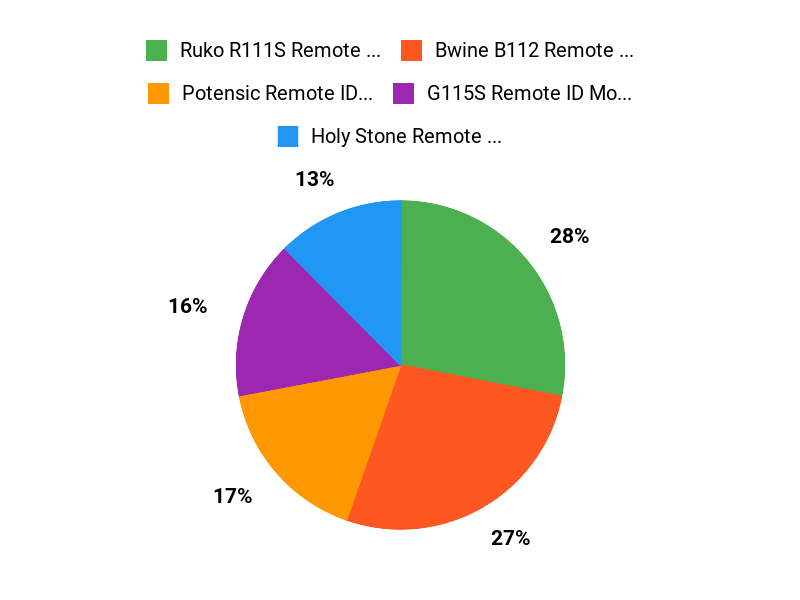
When choosing between these Remote ID modules, buyers usually focus on exact drone compatibility, low weight, easy mounting, reliable GPS lock, battery life, and whether the setup process is clear. Recovery features like a buzzer matter if you fly in grass, brush, or larger fields, while weather resistance matters more if you fly outdoors often.
Wrapping Up
If you want the best all-around Remote ID add-on, start with the Ruko R111S. It gives you a compact design, GPS tracking, a recovery buzzer, and flexible mounting in one package.
Choose the Holy Stone module if your drone is on its compatible model list and you want a simple brand-matched option. Pick the Bwine B112 when long advertised runtime is your top priority, or the Gleesfun G115S if a buzzer for recovery matters most. The Potensic unit is the better choice when IP54 dust and splash resistance are important.
Whichever module you choose, confirm FAA Declaration of Compliance status, register the serial number correctly, test the broadcast before takeoff, and make sure the module is mounted securely before every flight.
| Product | Image | Best Fit | Battery Life | Compatible Devices | Weight |
|---|---|---|---|---|---|
| Holy Stone FAA Compliant Remote Identification Module |
 |
Best for compatible Holy Stone and listed GPS drones | Check live listing | HS720, HS720E, HS720G, HS720R, HS600, F11GIM, F11PRO, F7, V11, Mini 4, Mini2 SE, Mini 3, Air 3, ATOM SE | 2.89 ounces |
| Ruko R111S RC Aircraft GPS Tracker |
 |
Best overall compact module with GPS and buzzer | Advertised around 3 hours | Wide multi-brand fit: Ruko, many DJI models, Phantom, Inspire, Matrice, FPV builds & more (confirm your exact drone model) | 0.476 ounces |
| Bwine B112 FAA Compliant Remote ID Module |
 |
Best for long advertised runtime | Advertised up to 5 hours | Most drones that can safely carry an add-on module; verify before buying | 13.5 grams |
| G115S Remote ID Module for Drone |
 |
Best for buzzer-based recovery help | Advertised up to 5 hours | DJI Mini 2, Mini 3, Mavic 3, Avata 2, HS720 series; verify exact model compatibility | 0.48 ounces |
| Potensic FAA Compliant Remote ID Module |
 |
Best for IP54 dust and splash resistance | Advertised over 4 hours | ATOM SE, HS720 series, and other drones >249g; verify before buying | 0.67 ounces |
This Roundup is reader-supported. When you click through links we may earn a referral commission on qualifying purchases.
