As an Amazon Associate I earn from qualifying purchases.
You need equipment that speeds up inspections, improves safety, and reduces rework. In 2026, a jobsite drone can help you survey large areas faster, capture high-resolution progress photos, document safety conditions, and share visual updates without sending someone onto a roof, ladder, or lift for every basic check.
Choosing the right drone saves time and improves documentation, but the best model depends on your jobsite workflow. For most small contractors, the right choice is a portable camera drone for progress photos, roof checks, client updates, and basic site overviews. For survey-grade mapping, precise measurements, or BIM deliverables, look for an RTK/PPK workflow and compatible mapping software before you buy.
Quick Verdict
Best overall: DJI Mini 3 (DJI RC) gives the strongest balance of image quality, flight time, portability, and controller convenience. Best value: DJI Mini 4K is the easy pick if you want 4K footage and a lightweight kit at a lower cost. Best non-DJI feature set: Potensic ATOM 2 is useful if you want 4K video, high-resolution photos, and multiple batteries in a compact kit. Best for longer inspection sessions: Ruko F11PRO 2 gives you two batteries, GPS assistance, and waypoint-style tools, but it is heavier and may require extra registration steps depending on your location and use case.
Top Picks
| Category | Product | Best For |
|---|---|---|
| 🏆 Best Overall | DJI Mini 3 (DJI RC) | Balanced jobsite documentation |
| 💰 Best Value | DJI Mini 4K Camera Drone Combo | Budget-friendly 4K progress photos |
| ⚡ Best Features for Price | Potensic ATOM 2 | High-resolution photos and extra batteries |
| 🎯 Best For Inspections & Waypoints | Ruko F11PRO 2 | Longer sessions and repeated site passes |
How We Picked These Drones
You want a drone that fits real construction workflows, not just casual aerial video. We prioritized camera quality, gimbal stabilization, flight time, included batteries, controller convenience, transmission reliability, portability, repairability, and overall value. We also looked for practical jobsite uses such as roof inspection photos, progress reporting, basic layout checks, client updates, and repeatable flight paths where supported.
We treated survey-grade work separately. None of these models should be presented as a replacement for a professional RTK mapping drone, LiDAR payload, or licensed survey workflow. If you need legal measurements, tight tolerances, volumetric reports, or BIM-ready outputs, confirm RTK/PPK support, ground control workflows, photogrammetry compatibility, insurance requirements, and local drone rules before buying.
Jobsite safety note: Construction flights may count as commercial work in many regions. Check local aviation rules, registration requirements, Remote ID rules, airspace restrictions, jobsite permissions, insurance, and pilot certification requirements before flying. Keep visual line of sight, avoid flights over workers, and set a clear takeoff and landing zone.
DJI Mini 4K (62-min)

If you need a compact drone that you can actually take to a jobsite without a complicated setup, this is a smart value pick. You get 4K video, a lightweight frame, and simple takeoff and return controls that help you start quickly when you only need a few progress images or a short overview clip.
For everyday construction use, it works best for roof overview photos, progress reporting, client updates, and small-site layout checks. It is not the right tool for survey-grade mapping or close obstacle-heavy inspection work because it does not offer the advanced obstacle sensing found on higher-end drones.
Who should buy this: Small contractors, remodelers, roofers, and real estate-adjacent teams that need affordable 4K jobsite visuals.
Who should avoid this: Teams that need RTK accuracy, thermal imaging, LiDAR, heavy wind performance, or advanced obstacle avoidance.
What People Say
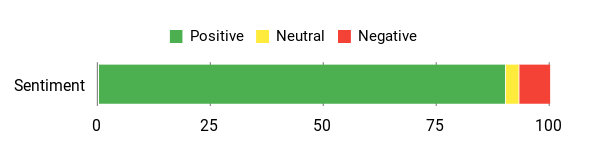
Common buyer feedback is generally positive around portability, easy setup, stable 4K footage, and useful battery-combo options. The main caution is that longer jobsite sessions need spare batteries and careful planning.
Overall Sentiment: Positive
Long-Term Cost Benefits
Using a drone for routine visual checks can reduce ladder use, speed up progress documentation, and lower the need for repeat site visits. Over time, the biggest savings come from faster communication and fewer interruptions during inspections.
Return On Investment
You may see ROI if the drone replaces occasional outsourced aerial photos, shortens reporting time, or helps you spot issues earlier. The value is strongest when you use it consistently for documentation rather than only occasional marketing clips.
Situational Benefits
| Situation | How It Helps |
|---|---|
| Roof Overviews | You can capture quick 4K images without sending someone up for every basic visual check. |
| Progress Reporting | Aerial photos help owners and stakeholders understand site progress faster. |
| Stockpile & Layout Checks | Top-down images help you review material placement and site flow without stopping crews. |
| Marketing & Client Updates | 4K footage and QuickShots can create simple clips for portfolios, listings, and project updates. |
Versatility
You can use it as a weekday documentation tool and a weekend creative camera. The compact kit is easy to carry, and extra batteries make it more practical for multiple short flights in one visit.
Safety Features
Helpful safety features include Return To Home, stable GPS hovering, automatic takeoff and landing, and altitude controls. It lacks advanced obstacle avoidance, so keep a clear line of sight and leave generous space around buildings, cranes, trees, and workers.
Durability
The lightweight design is convenient, but jobsite dust and debris can still be hard on exposed parts. Keep the drone clean, inspect props before every flight, and store batteries safely between jobs.
Problem Solving Ability
It solves the everyday problem of getting fast aerial photos for documentation, claims, progress updates, and basic checks without hiring a specialist for every small need.
Indoor / Outdoor Usability
It is best for outdoor work where GPS and transmission range can help. Indoor flights are possible only with extra caution because positioning support is limited and obstacle risk is higher.
Key Benefits
- Compact and lightweight design under 249 g
- 4K footage with a 3-axis gimbal for steadier visuals
- Battery-combo options for multiple short jobsite flights
- Beginner-friendly controls and Return To Home support
- Useful for progress photos, roof overviews, and client updates
- Strong value for teams that do not need survey-grade features
Best for: Budget-friendly jobsite documentation and portable 4K progress photos.
DJI Mini 3 (DJI RC)
If you want the most balanced option here for jobsite documentation, the DJI Mini 3 is the strongest all-around pick. The camera and gimbal setup are a step up for clear progress photos, and the DJI RC controller means you do not have to rely on your phone every time you fly.
For construction use, that makes a real difference. You can keep the kit ready for repeat progress shots, roof checks, stockpile overviews, facade photos, and client updates. Battery life is strong for a mini drone, and the compact size makes it easy to bring from one job to another.
Who should buy this: Contractors who want a better camera experience, a dedicated screen controller, and reliable everyday site documentation.
Who should avoid this: Buyers who need omnidirectional obstacle avoidance, RTK mapping, thermal imaging, or heavy-duty enterprise features.
What People Say
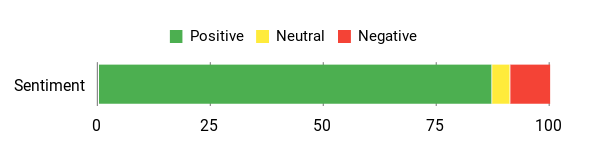
Common buyer feedback highlights easy flight controls, strong portability, steady footage, and good battery performance for a small drone. The main limitation to keep in mind is the lack of advanced obstacle sensing.
Overall Sentiment: Positive
Long-Term Cost Benefits
Using this drone regularly for inspections and progress photos can reduce time spent gathering visual proof manually. It can also cut back on repeated requests for subcontractor photos and make owner updates easier to prepare.
Return On Investment
The ROI is strongest when you use it for repeat documentation, not one-off flights. It can replace some outsourced aerial shoots and shorten the time between identifying a site issue and sharing it with the right person.
Situational Benefits
| Situation | How It Helps |
|---|---|
| Roof Inspections | You can capture close, high-resolution photos without sending someone onto a ladder for every initial check. |
| Progress Reporting | Aerial overviews quickly show what changed between site visits and make reports easier to understand. |
| Stockpile & Layout Checks | Top-down images help you confirm material placement, access routes, and site organization. |
| Marketing & Client Updates | 4K vertical video and QuickShots help you create short project clips with less editing. |
Versatility
The Mini 3 works as a fast inspection camera during the week and a creative aerial camera outside work. The DJI RC controller and automated flight modes make it easier to capture consistent shots without a complicated setup.
Safety Features
It includes GPS Return To Home, precise hovering, and automatic takeoff and landing. It still requires careful piloting because it does not have the multi-directional obstacle sensing found on higher-end Mini Pro models.
Durability
The lightweight frame is portable, but jobsite conditions are not gentle. Check propellers, keep dust away from motors, avoid flying in rain, and store batteries in a safe case.
Problem Solving Ability
It streamlines the need for quick, repeatable aerial images for inspections, claims, and progress records without hiring a specialist for basic documentation.
Indoor / Outdoor Usability
Best for outdoor use where GPS lock and transmission are reliable. Indoor use is possible only with careful manual control, open space, and an experienced pilot.
Key Benefits
- 4K footage on a 3-axis mechanical gimbal for stable imagery
- Lightweight, portable design that is easy to carry between jobs
- Longer single-battery flight time than many compact drones
- Built-in DJI RC display so you do not always need a phone
- True vertical shooting for social-ready clips
- Good fit for repeat progress photos and roof overview checks
Best for: Contractors who want the best overall balance of camera quality, flight time, and controller convenience.
Potensic ATOM 2

If you want a compact alternative to DJI for routine site checks and simple marketing clips, the Potensic ATOM 2 is worth comparing. Its biggest appeal is the mix of stabilized video, high-resolution photo modes, automated shooting features, and multi-battery kit options.
For construction use, this is best as a documentation and content drone. It can help with progress images, roof overviews, layout checks, and quick client clips. It is not a substitute for enterprise survey equipment, and you should verify current app support, battery bundle contents, and mapping compatibility before purchase.
Who should buy this: Buyers who want a compact feature-rich kit with extra batteries and strong still-photo appeal.
Who should avoid this: Teams that need proven enterprise mapping support, RTK precision, thermal payloads, or the broadest accessory ecosystem.
What People Say
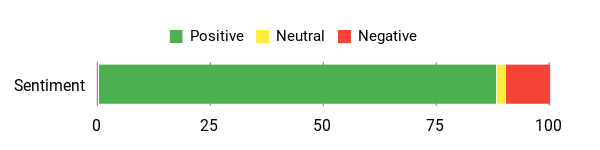
Common buyer feedback points to easy controls, good image quality for the size, and strong value in the bundled accessories. Practical cautions include careful battery planning and avoiding water, dust, and rough landings.
Overall Sentiment: Positive
Long-Term Cost Benefits
Using this drone for routine inspections can reduce repeat site visits, speed up reporting, and help you create your own client-facing visuals. The multi-battery setup can also reduce downtime during longer visits.
Return On Investment
You can recoup value if it helps you document issues faster, reduce outsourced aerial content, and avoid multiple trips for simple visual checks. The return depends on how often you use the drone in a repeatable workflow.
Situational Benefits
| Situation | How It Helps |
|---|---|
| Roof Inspections | You can capture high-resolution close-ups for initial checks before deciding whether a person needs to access the roof. |
| Progress Reporting | Aerial overviews make status updates clearer and help reduce back-and-forth questions. |
| Low-Light Checks | Camera settings and processing may help in early-morning or dusk conditions, but do not rely on it for critical safety inspection in poor light. |
| Marketing & Client Updates | Automated shots, vertical shooting, and tracking modes can help you create short clips with less editing time. |
Versatility
You can use it for weekday inspections, weekend marketing clips, and quick roof checks. Its mix of automated modes and manual control makes it approachable while still giving you room to improve shot quality.
Safety Features
Look for GNSS positioning, Return-to-Home, and auto takeoff or landing support in the selected kit. It still requires cautious line-of-sight flying because compact drones in this class usually do not replace advanced obstacle sensing.
Durability
Its compact build is convenient for transport, but construction sites are dusty and unpredictable. Inspect propellers, avoid water exposure, and protect the camera and gimbal during storage.
Problem Solving Ability
It helps you capture repeatable aerial visuals without relying on an outside operator for every progress report, claim photo, or client update.
Indoor / Outdoor Usability
Best outdoors where GNSS positioning and transmission perform reliably. Indoor flights need careful manual control and should be limited to open, controlled spaces.
Key Benefits
- 4K video and high-resolution photo modes for crisp site imagery
- Light, foldable frame that is easy to carry between jobs
- 3-axis gimbal support for more stable footage
- AI tracking, QuickShots, and vertical shooting for fast clips
- Multi-battery kit options for longer total session time
- Good option if you want a compact non-DJI alternative
Best for: Buyers who want a feature-rich compact drone kit for progress photos and client-friendly clips.
Ruko F11PRO 2

If you need a larger consumer drone for longer basic inspection sessions, the Ruko F11PRO 2 is the most jobsite-oriented non-DJI option in this list. The two-battery setup is helpful when you need several short flights in one visit, and GPS-assisted controls make it more approachable for newer pilots.
The tradeoff is weight and compliance. Because it is heavier than the sub-249 g options, you should pay closer attention to registration, Remote ID, transport, and local operation rules. It is a practical pick for visual documentation, but not a replacement for a professional mapping or surveying system.
Who should buy this: Teams that want longer total flight sessions, GPS assistance, and waypoint-style features for repeated visual passes.
Who should avoid this: Buyers who want the lightest possible drone, the simplest regulatory path, or enterprise-grade accuracy.
What People Say
Common buyer feedback highlights easy setup, dependable return-to-home behavior, useful battery endurance, and solid camera output for casual inspections and social clips. The main cautions are low-light limits and battery care over time.
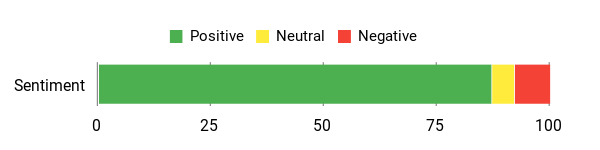
Overall Sentiment: Positive
Long-Term Cost Benefits
Using the drone for inspections and progress photos can cut repeat site visits, reduce unnecessary ladder use, and speed up documentation. Over time, the savings come from faster decisions and fewer delays.
Return On Investment
You may see ROI through faster site assessments, fewer outsourced aerial clips, and clearer client updates. Plan for normal upkeep such as propellers, batteries, storage, and possible repairs.
Situational Benefits
| Situation | How It Helps |
|---|---|
| Roof Inspections | Capture roof details and problem areas before deciding whether hands-on access is needed. |
| Progress Reporting | Aerial photos can make weekly reports clearer and help stakeholders see the state of the site quickly. |
| Repeated Site Passes | GPS and waypoint-style tools can help you repeat similar visual routes when the selected mode supports your workflow. |
| Marketing & Client Updates | Stable footage and automated flight modes can help produce simple project clips without a dedicated video crew. |
Versatility
This works for weekday inspections, marketing clips, and broad site overviews. It is especially useful when you value battery endurance and simple GPS safety features over ultralight portability.
Safety Features
Look for GPS positioning, Return-to-Home, auto takeoff or landing, and beginner flight modes in the selected kit. These features help, but they do not replace safe flight planning, line-of-sight operation, and site crew coordination.
Durability
The larger body can feel more substantial than mini drones, but it still needs routine care. Watch battery health, replace damaged propellers, and avoid dusty takeoffs when possible.
Problem Solving Ability
It solves the need for longer visual inspection sessions and repeatable aerial records without relying on an outside operator for every jobsite update.
Indoor / Outdoor Usability
Best outdoors where GPS and longer-range transmission are useful. Indoor flights are not ideal unless the space is open, controlled, and flown by someone experienced.
Key Benefits
- High-resolution photo positioning and 4K video for site imagery
- Two included batteries for longer total inspection time
- GPS-based Return-to-Home and beginner-friendly controls
- Waypoint-style and intelligent flight modes for repeated shots
- Good choice for broad site overviews and roof checks
- More suitable for longer sessions than controller-free mini drones
Best for: Longer visual inspection sessions and repeated site passes where a heavier drone is acceptable.
Before You Buy a Drone for Construction
- Define the job: Progress photos, roof checks, marketing clips, and basic documentation need different gear than survey-grade mapping.
- Check rules first: Commercial flights, jobsite flights, roof inspections, and paid project documentation may require certification, registration, Remote ID, insurance, or airspace approval.
- Plan batteries: Real-world flight time is often lower than ideal lab claims, especially in wind or cold weather.
- Think about data: Decide how you will name files, store photos, back up footage, and share images with clients or crews.
- Protect the drone: Dust, debris, wind, cranes, cables, and workers all increase risk on construction sites.
- Know when to upgrade: If you need accurate measurements, orthomosaics, 3D models, or legal survey outputs, choose an RTK/PPK mapping workflow instead.
FAQ
What Features Should You Prioritize When Choosing a Drone For Construction Work?
Start with the actual task. For progress photos and visual inspections, prioritize a stable gimbal, clear 4K footage, reliable GPS hovering, practical battery life, and a controller you can use comfortably on site. For mapping, measurements, and survey-style deliverables, prioritize RTK/PPK support, ground control workflows, photogrammetry compatibility, consistent GSD, and export formats that work with your software.
Also consider wind resistance, spare batteries, propeller availability, repair support, app stability, storage workflow, and how easy it is to train more than one operator.
Do You Need To Register Your Drone Or Get A Pilot License For Construction Flights?
In many regions, construction flights can be treated as commercial or non-recreational operations. That may mean registration, pilot certification, Remote ID compliance, insurance, jobsite permission, and airspace approval. In the U.S., for example, work or business flights generally fall under Part 107 rules, and registered drones must follow Remote ID requirements where applicable. Always check your local rules before flying.
How Should You Use Drones Practically On A Construction Site For Inspections, Progress Tracking And Surveys?
Build a repeatable workflow. Fly from safe launch zones, brief nearby workers, avoid flying over people, keep visual line of sight, and use consistent angles for progress comparisons. For reports, use clear file names, dates, project names, and backup folders so photos are easy to find later.
For surveys, do not rely on a basic camera drone alone. Use RTK/PPK, ground control points, planned overlap, known altitude settings, and the correct photogrammetry or BIM workflow. If the output affects payment, safety, permitting, or legal boundaries, use a qualified professional.
Which Drone Is Best For a Small Contractor?
For most small contractors, the DJI Mini 3 is the best all-around choice because it combines strong image quality, solid flight time, and the convenience of a built-in-screen controller. If budget matters most, the DJI Mini 4K is the better value pick.
Are These Drones Good Enough For Roof Inspections?
They can help with initial visual checks, overview photos, and documentation from safer angles. They should not replace hands-on inspection when you need to confirm structural issues, moisture problems, code details, or hidden damage. Use them as a first-look tool, then send a qualified person when closer inspection is required.
Contractors Top Picks
When contractors compare these drones, the choice comes down to documentation quality, battery workflow, portability, and compliance. Choose the DJI Mini 3 if you want the best overall balance and a dedicated controller. Choose the DJI Mini 4K if you want the lowest-cost 4K jobsite documentation option. Choose the Potensic ATOM 2 if you want a compact kit with strong photo-focused features. Choose the Ruko F11PRO 2 if longer sessions and waypoint-style tools matter more than staying under the lightest weight class.
Wrapping Up
You now have a focused short list of drones selected for practical construction documentation. If you need the best all-around balance of image quality, flight time, and control convenience, the DJI Mini 3 is the top pick. If portability and value matter most, the DJI Mini 4K combo is the easiest budget recommendation. For a feature-rich compact alternative, consider the Potensic ATOM 2. For longer visual inspection sessions, consider the Ruko F11PRO 2 as long as you are comfortable with its heavier weight and compliance requirements.
Match the drone to the size of your sites, the quality of images you need, your local rules, and whether you need repeatable visual documentation or true survey-grade outputs.
| Product | Image | Best Fit | Flight Time | Camera Resolution | Weight | CTA |
|---|---|---|---|---|---|---|
| DJI Mini 4K Camera Drone Combo |
 |
Best Value | Up to about 31 minutes per battery; longer total time with battery swaps | 4K UHD / 12 MP | Under 249 grams | Check Details |
| DJI Mini 3 (DJI RC) |
 |
Best Overall | Up to about 38 minutes under ideal conditions | 4K video / up to 48 MP photos | About 248 grams with standard battery | Check Details |
| Potensic ATOM 2 Drone |
 |
Best Features for Price | Varies by bundle and battery count | 4K video / high-resolution photo mode | Check the selected kit listing | Check Details |
| Ruko F11PRO 2 Drone |
 |
Best for Longer Sessions | Two-battery kit; confirm current listing details | High-resolution photos / 4K video positioning | Heavier than sub-249 g mini drones | Check Details |
This Roundup is reader-supported. When you click through links we may earn a referral commission on qualifying purchases.

