
The best TV mount should fit your television, your wall or ceiling structure, and the way you actually watch. Screen size alone is not enough; weight, VESA pattern, mounting surface, extension, tilt, and swivel all matter.
For most large-TV setups, ECHOGEAR MaxMotion EGLF2 is our top pick because it combines a 125-lb limit with 22 inches of extension and broad swivel. For a lighter small or midsize TV, USX MOUNT XMM006-1 is the better value.
We compared current listings, manufacturer specifications, installation guidance, compatibility limits, and safety information.
Best TV Mounts Compared
| Product | Best for | Screen range | Weight limit | Motion & reach |
|---|---|---|---|---|
|
Mid-range
|
Large TVs and flexible viewing | 42–90 inches | 125 lbs | 22-inch extension, up to 130° swivel |
|
Budget
|
Small and midsize TVs | 26–65 inches | 77 lbs | 16.7-inch extension, up to ±90° swivel |
|
Premium
|
Premium large-screen installations | 42–90 inches | 125 lbs | 28-inch extension, ±57° swivel |
|
Premium
|
Motorized ceiling installations | 40–85 inches | 110 lbs | Motorized 0° to -75° tilt |
Best TV Mount: Our Top Picks
1. ECHOGEAR MaxMotion EGLF2

Bottom line: The ECHOGEAR MaxMotion EGLF2 is the strongest all-around wall-mount choice here for a compatible large TV. Its 22-inch reach and wide swivel make it useful when your viewing position changes.
- Screen range: 42–90 inches, suited to many large televisions
- Weight limit: 125 lbs, verify TV weight including accessories
- VESA range: 200×100–600x400mm, covers many large-TV patterns
- Movement: 22-inch extension, 130° swivel, -15°/+5° tilt
The EGLF2 extends far enough to turn a large screen toward another seating area or improve access to rear ports. It then retracts to about 2.4 inches, which keeps it reasonably close to the wall for a full-motion design.
ECHOGEAR specifies compatibility with 16- to 24-inch stud spacing. That makes wall layout an important check before ordering, especially if your studs, masonry, or desired TV centerline do not match the mount plate.
- 125-lb capacity for many large TVs
- Extends up to 22 inches
- Up to 130° of swivel
- Includes a drill template and mounting hardware
- Not as flush as a fixed wall mount
- VESA support stops at 600x400mm
- Stud-spacing requirements can limit placement
2. USX MOUNT XMM006-1

Bottom line: The USX MOUNT XMM006-1 gives compatible small and midsize TVs useful tilt, swivel, and extension without the size of a large-screen bracket.
- Screen range: 26–65 inches, aimed at smaller and midsize TVs
- Weight limit: 77 lbs, lower than the large-screen picks
- VESA range: 75×75–400x400mm, supports common compact patterns
- Movement: 16.7-inch extension, ±90° swivel, -15°/+5° tilt
The mount can retract to about 2.81 inches, then pull forward when you need an off-center viewing angle or rear-cable access. Post-installation leveling also gives you a small correction range after the wall plate is secured.
The live linked Amazon variant is listed for 26–65-inch TVs. Some older XMM006 documentation references a narrower screen range, so weight and VESA compatibility should be treated as the decisive checks rather than screen size alone.
- Budget-friendly full-motion design
- VESA support down to 75x75mm
- Extends up to 16.7 inches
- Includes post-installation leveling adjustment
- 77-lb limit rules out heavier large TVs
- VESA support stops at 400x400mm
- Shorter reach than the two larger wall mounts
3. SANUS VLF728

Bottom line: The SANUS VLF728 is the premium wall-mount option for a compatible large TV when long extension and a relatively slim parked profile matter most.
- Screen range: 42–90 inches, built for large displays
- Weight limit: 125 lbs, matches the ECHOGEAR capacity
- VESA range: 200×200–600x400mm, verify your exact pattern
- Movement: 28-inch extension, ±57° swivel, -15°/+5° tilt
Its 28-inch extension is the longest among the wall mounts in this roundup. That extra reach can help a TV clear a nearby cabinet, recess, or wall edge while improving access to ports and cables.
When retracted, SANUS lists the VLF728 at about 2.15 inches from the wall. The brushed-metal exterior and in-arm cable management also make sense when the bracket may remain partly visible in a finished living room.
- Longest wall-mount extension in this roundup
- 125-lb capacity
- Retracts to about 2.15 inches
- Integrated cable-management features
- Premium price tier
- VESA support tops out at 600x400mm
- Large full-motion hardware requires careful structural installation
4. VIVO MOUNT-E-FD85
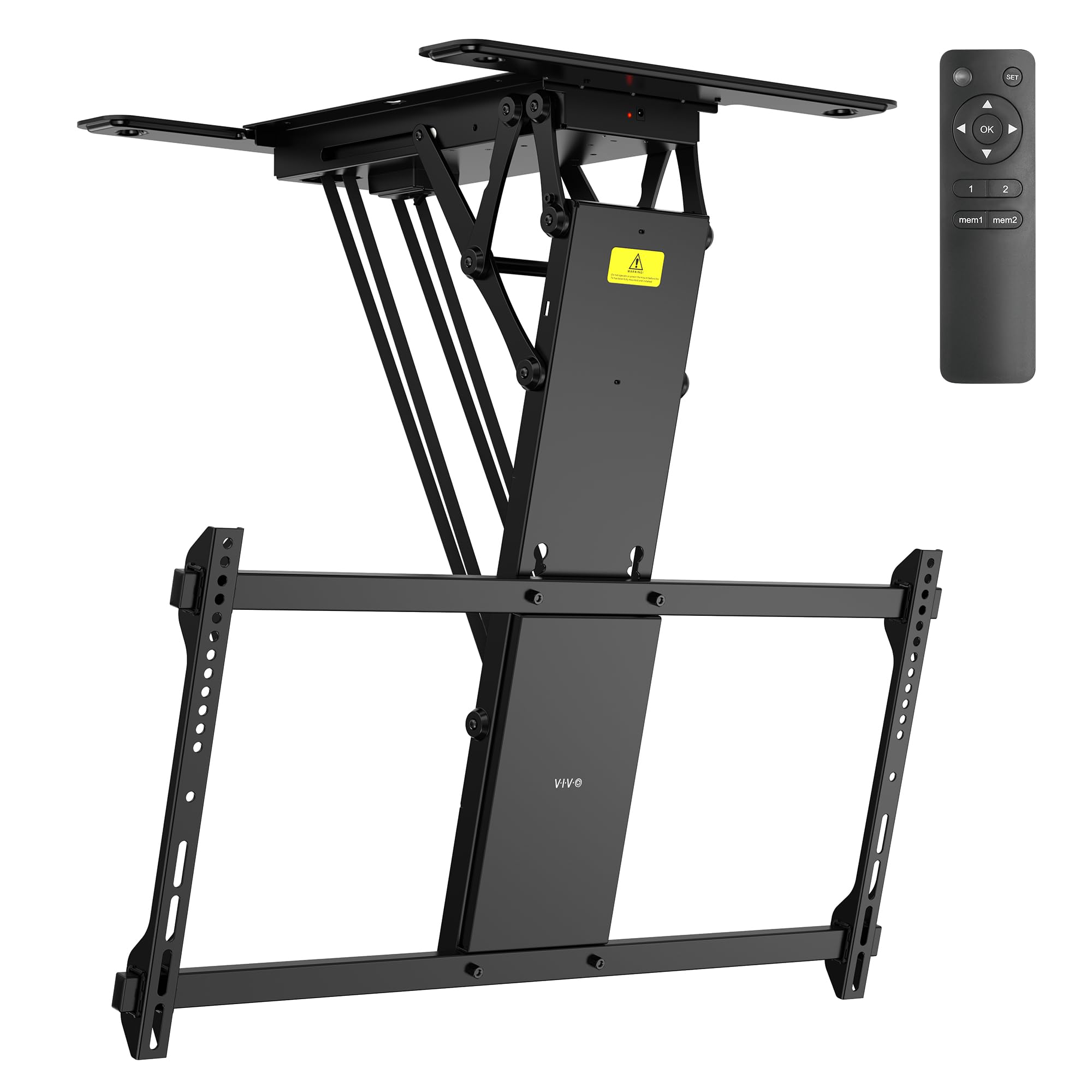
Bottom line: The VIVO MOUNT-E-FD85 is a specialist choice for rooms where wall mounting is impractical. It motorizes the screen between a folded ceiling position and a downward viewing angle.
- Screen range: 40–85 inches, including many large TVs
- Weight limit: 110 lbs, verify TV plus attached accessories
- VESA range: 200×100–800x400mm, widest range here
- Movement: motorized 0° to -75° tilt, 4.4–30-inch height range
VIVO lists the mount for flat and pitched ceilings with standard 16-inch ceiling-beam spacing. The dual-motor system uses an RF remote with memory positions, while the current version also supports Tuya app control plus Amazon Alexa and Google Home.
This design does not replace a side-to-side articulating wall mount. You also need power access and enough ceiling clearance for the television to fold safely. For screens over 65 inches, VIVO advises checking VESA-hole position carefully because it can affect clearance.
- Motorized flip-down movement
- Works with flat and pitched ceilings
- Supports VESA patterns up to 800x400mm
- RF remote plus app and compatible voice control
- Requires suitable ceiling structure and power access
- Does not provide side-to-side swivel
- Large TVs need careful folded-clearance planning
ECHOGEAR MaxMotion EGLF2 vs USX MOUNT XMM006-1: Is the Upgrade Worth It?
The main difference is capacity and movement range. The ECHOGEAR is built for larger televisions and provides more extension, while the USX MOUNT is a simpler value option for lighter screens.
- Weight capacity: ECHOGEAR supports 125 lbs versus 77 lbs for USX MOUNT.
- Extension: ECHOGEAR reaches 22 inches versus 16.7 inches.
- VESA range: ECHOGEAR reaches 600x400mm; USX MOUNT stops at 400x400mm.
- Best fit: Pay for the larger mount only when your TV or viewing layout benefits from it.
Which TV Mount Should You Buy?
- Large TV with changing viewing angles: get the ECHOGEAR MaxMotion EGLF2.
- Smaller TV on a tighter budget: get the USX MOUNT XMM006-1.
- Premium installation with maximum wall reach: get the SANUS VLF728.
- No practical wall-mount location: get the VIVO MOUNT-E-FD85 if your ceiling structure is suitable.
How We Chose
- Compatibility: We compared screen range, weight limits, VESA patterns, and structural requirements.
- Useful movement: Extension, swivel, tilt, retracted depth, and ceiling travel were compared where applicable.
- Primary sources: Manufacturer product pages, manuals, technical sheets, and the live linked Amazon listings were prioritized.
- Safety checks: We searched manufacturer and official recall information and only flag a product when positive evidence supports it.
- Owner feedback: Retailer and forum feedback was checked for recurring issues; isolated comments were not treated as established trends.
Safety and Installation Checks Before You Mount a TV
- Find the structure: Never assume drywall alone can carry a heavy TV and articulating bracket.
- Follow the exact manual: Fasteners and approved surfaces differ among mounts.
- Plan for leverage: A full-motion arm creates more leverage when the television is extended.
- Protect cables: Leave enough slack for the full movement range without pinching power or HDMI cables.
- Lift with help: Use a second person when positioning a large television onto the bracket.
How to Choose the Best TV Mount
Check Weight and VESA Compatibility First
Find your TV’s weight without its stand and measure or look up its VESA hole pattern. Both must fall within the mount’s limits. Do not assume a bracket fits simply because the advertised screen-size range includes your TV.
Match the Mount to the Wall or Ceiling
Wall mounts normally need approved wood framing, concrete, or masonry attachment. Ceiling models need suitable joists or beams. If the structure is hidden, unusual, damaged, or made from steel studs, verify the installation method before choosing a mount.
Choose Only the Motion You Will Use
Fixed mounts keep the screen closest to the wall. Tilting mounts help when the TV sits above your normal eye line. Full-motion mounts make sense for off-center seating, changing glare, corner-adjacent layouts, or frequent rear-cable access.
For the widest wall-mounted adjustment in this group, the ECHOGEAR MaxMotion EGLF2 balances reach and swivel well.
Measure Extension and Retracted Depth
Long extension can help a screen clear cabinets, recesses, or nearby walls, but it also places the television farther from the mounting surface. If reach matters most, the SANUS VLF728 extends to 28 inches.
Plan Around Ports, Cables, and Outlets
Look at the back of the television before drilling. Rear-facing HDMI ports may need more clearance than side-facing ports. Power cables and HDMI leads also need enough slack to move safely through the mount’s full extension and swivel range.
Know When a Ceiling Mount Makes Sense
A ceiling mount is useful when wall space is unavailable or when you need the screen stored above a bed, workbench, or other area. The VIVO MOUNT-E-FD85 fits that use case, but ceiling framing and folded clearance must be confirmed first.
Mistakes to Avoid When Buying a TV Mount
- Shopping by screen size alone: Check weight and VESA before anything else.
- Ignoring the mounting surface: Confirm framing or approved masonry before drilling.
- Buying more movement than needed: A simpler mount can sit closer to the wall.
- Forgetting cable clearance: Check ports, plugs, outlets, and full arm travel before installation.
- Assuming maximum swivel is guaranteed: TV width and nearby walls can reduce the usable angle.
FAQs
How do I choose the right TV mount?
Start with your TV’s weight and VESA pattern, then confirm the mount’s screen-size range and the structure you are attaching it to. After compatibility is confirmed, choose fixed, tilting, full-motion, or ceiling mounting based on viewing position, glare, cable access, and how often you expect to move the screen.
Can I install a TV mount myself?
Yes, if you are comfortable locating structural framing, drilling accurately, and following the manufacturer’s instructions. Use a second person for lifting and alignment. Hire a qualified installer when framing is uncertain, steel studs or masonry need special hardware, wiring is concealed, or a pitched-ceiling installation makes the load path difficult to verify.
Will my TV fit these mounts?
Only if your TV stays within the mount’s stated weight limit, supported screen range, and VESA pattern. Also check screw diameter and depth, rear-port clearance, TV width, and the location of the VESA holes. Those details can change how far a mount swivels, tilts, retracts, or clears a ceiling.
Can I mount a TV directly to drywall?
Not with the heavy-duty mounts in this guide. Drywall is a finish surface, not the structural attachment these products require. Follow the mount maker’s instructions and fasten into approved wood framing, concrete, masonry, or suitable ceiling structure. If you cannot positively identify the structure, have an installer assess the wall before drilling.
Do I need a full-motion TV mount?
Choose full motion when you need to turn the screen toward different seats, pull it forward for cable access, or adjust the angle as glare changes. If the TV stays centered in front of one seating position, a fixed or tilting mount can be simpler, lighter, and closer to the wall.
What does VESA mean on a TV mount?
VESA is the standardized spacing between the mounting holes on the back of a TV, measured in millimeters horizontally and vertically. A 400×400 pattern, for example, has holes spaced 400 mm apart in both directions. Your TV’s VESA pattern must fall within the mount’s supported range before installation.
Are motorized ceiling TV mounts safe for large TVs?
They can be safe when the exact TV, mount, fasteners, ceiling structure, and installation method all meet the manufacturer’s limits. For the VIVO MOUNT-E-FD85, confirm the 110-lb capacity, supported VESA pattern, ceiling framing, screen clearance, and power access. Large screens also benefit from two-person lifting during installation.
Final Verdict
For most buyers searching for the best TV mount for a large screen, the ECHOGEAR MaxMotion EGLF2 offers the most useful balance of capacity, extension, and swivel. Its specifications also cover a broader range of large-TV installations than the smaller USX MOUNT option.
The right choice still depends on your exact TV and structure, so verify weight, VESA, framing, stud or beam spacing, and clearance before drilling.
For a compatible lighter TV, consider the USX MOUNT XMM006-1; for a premium wall installation with more reach, consider the SANUS VLF728.

