You spend hours at your keyboard whether you are gaming, creating, or working, so the right wireless mechanical keyboard should do more than remove a cable. It should deliver responsive input, a layout that fits your desk, switches that feel comfortable, dependable battery life, and software you can live with.
This guide compares three strong but different choices. The ASUS ROG Strix Scope II 96 Wireless gives you near-full-size function in a compact frame, the Corsair K100 AIR targets buyers who prefer an ultra-thin full-size board, and the SteelSeries Apex Pro TKL Wireless focuses on adjustable actuation for competitive gaming.
Quick Verdict
Choose the ASUS ROG Strix Scope II 96 Wireless for the best balance of compact size, numpad access, hot-swappable switches, and flexible wireless modes. Pick the Corsair K100 AIR when a slim full-size layout matters most. Choose the SteelSeries Apex Pro TKL Wireless when adjustable actuation and rapid-trigger controls matter more than a numpad.
Top Wireless Mechanical Keyboard Picks
|
Category |
Product |
Best For |
|---|---|---|
|
🏆 Best Overall |
A compact layout that keeps the numpad, tri-mode connectivity, and hot-swappable switches. |
|
|
⭐ Best Low-Profile |
Full-size gaming and productivity in an unusually slim aluminum frame. |
|
|
🚀 Best Adjustable Actuation |
Competitive gaming, rapid trigger, and per-key actuation control. |
How We Chose
We prioritized dependable 2.4GHz wireless performance, useful Bluetooth support, switch quality, layout efficiency, battery claims, software features, build quality, and honest limitations. We also checked whether each linked Amazon listing still matched the exact product described in the article.
Before You Buy
- Choose your layout first: A 96% board keeps a numpad, TKL gives your mouse more room, and full-size preserves every standard key.
- Match the switch feel: Linear switches feel smooth, tactile switches add a bump, and adjustable magnetic switches let you tune actuation.
- Check the connection mode: Use 2.4GHz wireless or USB for gaming. Bluetooth is better for device switching and routine work.
- Read the listing condition: Older models may appear as used, renewed, or limited-stock offers even when the keyboard itself remains relevant.
- Expect battery variation: RGB brightness, wireless mode, sleep settings, and usage patterns can change real-world runtime.
You get the most balanced option in this shortlist. The compact layout saves desk space without removing the numpad, while the wireless modes let you move between a gaming PC, work computer, and Bluetooth devices. Hot-swappable sockets also give you a practical upgrade path if your switch preference changes.
Why You’ll Like It
- 96% layout keeps number and function keys in a smaller footprint
- Bluetooth, 2.4GHz SpeedNova, and wired USB connectivity
- Hot-swappable, pre-lubed ROG NX Snow linear switches on this listing
- PBT doubleshot keycaps on the linked configuration
- Detachable wrist rest and three tilt positions
Who Should Buy This
Pick it if you use a numpad but still want more mouse room, or if you switch between work and gaming devices. It also suits buyers who want mainstream-brand support without giving up switch customization.
Who Should Avoid This
Skip it if you prefer the wider spacing of a traditional full-size keyboard or want a simple software-free setup. The compressed navigation cluster takes a little adjustment, and deeper lighting or remapping controls rely on ASUS software.
What Buyers Often Mention
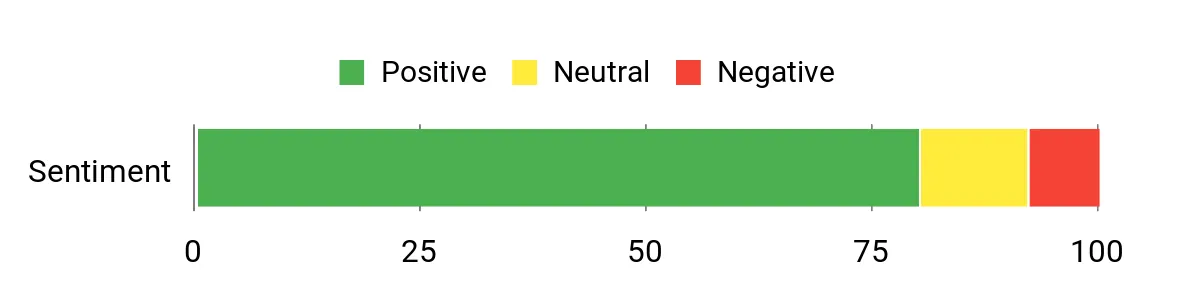
Prior feedback commonly praised the smooth switch feel, solid construction, and space-efficient layout. Software complexity and premium positioning are the main reasons to compare it carefully before ordering. The chart below reflects the source article’s earlier sentiment snapshot and may not represent current reviews.
Check Product Details on Amazon
This keyboard solves a specific problem: you want full-size controls and mechanical feedback without the height of a traditional mechanical board. Its short switch travel can feel quicker for typing and gaming, while multi-device Bluetooth support helps it work across a desktop, laptop, and other compatible devices.
Why You’ll Like It
- Ultra-thin full-size design with an aluminum frame
- Slipstream wireless, multi-device Bluetooth, and wired USB-C modes
- Cherry MX Ultra Low Profile tactile mechanical switches
- Dedicated macro keys, media controls, and volume roller
- Manufacturer-rated battery life up to 50 hours with RGB or up to 200 hours with lighting off
Who Should Buy This
Choose it if you want a full numpad, low-profile keys, and strong multi-device support. It is especially appealing for a shared gaming and productivity desk where a tall keyboard feels bulky.
Who Should Avoid This
Avoid it if you prefer deep key travel, want hot-swappable switches, or need a budget-friendly board. Low-profile tactile switches have a distinct feel, so buyers moving from tall mechanical switches may need time to adapt.
What Buyers Often Mention
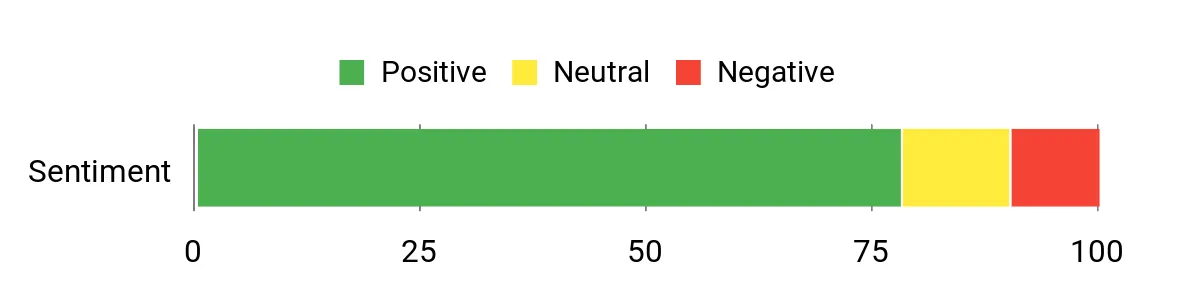
Prior feedback often praised the slim construction, responsive wireless connection, and useful media controls. Common hesitation centers on the premium cost, software preferences, and whether the shallow switch feel matches the buyer. The chart below reflects the source article’s earlier sentiment snapshot and may not represent current reviews.
Check Product Details on Amazon
The Apex Pro TKL Wireless is the specialist pick. Adjustable actuation lets you make movement keys highly sensitive while keeping other keys deeper to reduce accidental presses. The TKL shape also leaves more room for wide mouse movement, which makes the layout attractive for competitive shooters.
Why You’ll Like It
- Per-key actuation adjustment from 0.1 to 4.0 mm
- Rapid trigger and two-actions-on-one-key programming
- 2.4GHz wireless, Bluetooth 5.0, and USB-C connectivity
- Compact TKL layout with PBT keycaps and an OLED display
- Strong control for competitive gaming profiles
Who Should Buy This
Choose it if you play competitive games and will use adjustable actuation, rapid trigger, and profile customization. It also suits buyers who want a premium TKL board with both Bluetooth and low-latency wireless.
Who Should Avoid This
Skip it if you need a numpad, prefer simple plug-and-play controls, or do not want to verify seller and product condition. Battery life, connectivity, and software reliability are also worth checking in recent buyer feedback.
What Buyers Often Mention
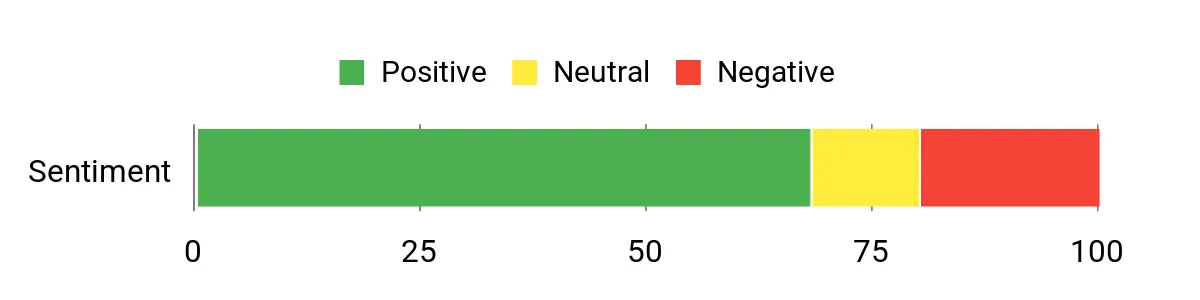
Customization, switch feel, and compact desk use are common positives. Recent feedback also includes concerns about battery behavior, wireless connection consistency, software, and long-term reliability, so review the newest comments before buying. The chart below reflects the source article’s earlier sentiment snapshot and may not represent current reviews.
Check Current Amazon Availability
Wireless Keyboard Comparison
| Product Name | Image | Layout | Connectivity | Switch Type | Battery Guidance |
|---|---|---|---|---|---|
| ASUS ROG Strix Scope II 96 Wireless Mechanical Gaming Keyboard |
 |
96% with numpad | USB, 2.4GHz SpeedNova, Bluetooth | ROG NX Snow linear, hot-swappable | Up to 1,500 hours over 2.4GHz under manufacturer test conditions; lighting and use affect runtime. |
| Corsair K100 AIR Wireless RGB Mechanical Gaming Keyboard |
 |
Full-size, ultra-thin | USB, Slipstream wireless, Bluetooth | Cherry MX Ultra Low Profile tactile | Up to 50 hours with RGB or up to 200 hours with backlighting off. |
| SteelSeries Apex Pro TKL Wireless HyperMagnetic Gaming Keyboard |
 |
Tenkeyless | USB-C, 2.4GHz, Bluetooth 5.0 | OmniPoint 2.0 adjustable magnetic | Exact current runtime was not confirmed; RGB, sleep settings, and wireless mode affect results. |
Wireless Mechanical Keyboard FAQ
Will a Wireless Keyboard Add Noticeable Latency?
A modern 2.4GHz gaming connection can feel very responsive in normal and competitive use. Bluetooth is convenient for work and device switching, but 2.4GHz wireless or USB-C is usually the better choice when consistent gaming response matters most.
Should I Choose 96%, TKL, or Full-Size?
Choose 96% when you need a numpad but want to save desk space. Choose TKL when mouse room matters more than number entry. Choose full-size when spreadsheets, shortcuts, and dedicated controls are central to your workflow.
Are Low-Profile Switches Better for Typing?
Low-profile switches reduce finger travel and can feel quick, but they are not automatically better. Some typists prefer the deeper travel and cushioning of standard mechanical switches. Your comfort depends on key height, actuation force, wrist position, and typing style.
Do You Need Adjustable Actuation?
Adjustable actuation is most useful for competitive players who want very sensitive movement keys or different trigger depths across a profile. For routine work and casual gaming, a well-chosen fixed mechanical switch is usually simpler and more cost-effective.
How Can You Improve Wireless Battery Life?
Lower RGB brightness, shorten the lighting timeout, use sleep mode, and switch to Bluetooth for light office work when appropriate. Keep firmware updated and charge through the recommended USB connection. Battery life claims are estimates, so expect your settings to affect the result.
What Should You Check on an Older Amazon Keyboard Listing?
Confirm whether the offer is new, used, or renewed. Check the seller, included accessories, return policy, warranty coverage, exact generation, and switch type. Product condition matters as much as the model name when an older keyboard remains on Amazon.
Final Recommendation
Best choice for most buyers: ASUS ROG Strix Scope II 96 Wireless
It offers the strongest balance of layout efficiency, wireless flexibility, switch customization, and everyday usability. The Corsair K100 AIR is the better fit for low-profile full-size fans, while the SteelSeries Apex Pro TKL Wireless makes the most sense for competitive players who will actively use adjustable actuation.
Before ordering, open the Amazon listing and confirm the current seller, condition, switch version, included accessories, and return terms.
