
The 2025 13-inch MacBook Air with M4 is still worth considering in 2026 if you find it at a clear discount and 256GB of storage is enough for you. It remains a fast, quiet, 2.7-pound ultraportable with a 13.6-inch Liquid Retina display, 16GB of unified memory, a 12MP Center Stage camera, MagSafe, and two Thunderbolt 4 ports. However, it is no longer the current MacBook Air: Apple released the M5 model in March 2026 with 512GB of starting storage and newer wireless hardware.
Bottom line: choose the M4 Air for value when its live price is meaningfully below the current M5 Air. If the price gap is small, the M5 model is easier to justify because it starts with twice the storage and a newer chip. For the M4 itself, the main strengths are portability, battery life, the display, and everyday performance; the main limitations are the 256GB base SSD, two-port layout, 60Hz display, and fanless cooling for long sustained workloads.
Last updated: September 11, 2026 · Specs rechecked against Apple’s 13-inch MacBook Air (M4, 2025) technical specifications and the current MacBook Air with M5 announcement.
Affiliate disclosure: As an Amazon Associate, we earn from qualifying purchases. If you buy through an Amazon link on this page, we may receive a commission at no extra cost to you.
Review method: This update is a research-based evaluation of the 13-inch M4 configuration. We verified Apple’s published specifications, compared it with the current M5 Air, and used clearly attributed independent lab results where noted. We do not claim hands-on measurements that were not performed for this article.
Quick Answer
The 2025 MacBook Air 13-inch with M4 is best for students, remote workers, travelers, writers, and light creators who want a light Mac and can live with 256GB of local storage. In 2026, buy it for the discount rather than because it is the newest Air. If its price is close to the M5 MacBook Air, choose the M5 for 512GB base storage and newer hardware.
Key Takeaways
- Apple specifies a 10-core CPU, 8-core or 10-core GPU, 16GB starting unified memory, and a 256GB SSD for the M4 generation.
- The 13.6-inch 2560-by-1664 Liquid Retina display is rated at 500 nits, while the 12MP Center Stage camera improves video-call framing.
- Apple rates battery life at up to 18 hours of video streaming and up to 15 hours of wireless web; real runtime depends on workload and brightness.
- Two Thunderbolt 4 ports, MagSafe 3, and a headphone jack cover basic needs, and M4 supports up to two 6K external displays at 60Hz in addition to the built-in display.
- The current M5 Air starts with 512GB storage, so the M4’s value in 2026 depends heavily on its live discount and whether 256GB is enough for your workflow.
Deal tip: Thinking about a MacBook Air? Our October Prime Day laptop deals cover the MacBook Air 13 with M4 and M5, plus the 15-inch model and the MacBook Pro 14.
MacBook Air M4 vs M5: Which Makes More Sense in 2026?
| Decision Factor | 13-inch M4 Air (2025) | 13-inch M5 Air (2026) |
|---|---|---|
| Starting storage | 256GB SSD | 512GB SSD |
| Starting memory | 16GB unified memory | 16GB unified memory |
| Display | 13.6-inch, 2560×1664, 500 nits | 13.6-inch, 2560×1664, 500 nits |
| Wireless | Wi-Fi 6E, Bluetooth 5.3 | Wi-Fi 7, Bluetooth 6 |
| Apple battery rating | Up to 18 hours video / 15 hours web | Up to 18 hours video / 15 hours web |
| Best reason to buy | A meaningful discount if 256GB is enough | Newer chip and twice the base storage |
Decision rule: compare live prices before buying. The M4 Air is the value option only when its discount compensates for the smaller 256GB base SSD. If the two generations are priced close together, the M5 model is the stronger long-term buy on specifications alone.
TL;DR
| Feature | Verdict |
|---|---|
| Ease of Use | ⭐️⭐️⭐️⭐️⭐️ 🎨 – macOS, Touch ID, MagSafe, and the Apple ecosystem make daily use straightforward |
| Performance | ⭐️⭐️⭐️⭐️⭐️ ⏱️ – M4 remains fast for productivity, multitasking, photo work, and light video editing |
| Display | ⭐️⭐️⭐️⭐️ 🎨 – 13.6-inch 500-nit Liquid Retina is sharp and colorful, but it remains a 60Hz LCD |
| Camera & Audio | ⭐️⭐️⭐️⭐️ 🔍 – 12MP Center Stage camera, three-mic array, and four-speaker system are strong for calls and media |
| Portability & Battery | ⭐️⭐️⭐️⭐️⭐️ ⏱️ – 2.7-pound weight and Apple’s up-to-18-hour video rating make portability a core strength |
Editorial note: the stars in the TL;DR table are our qualitative assessment of each category, not retailer customer ratings.
2025 MacBook Air M4 Review: Who It Is Best For

Best For: Students, remote workers, travelers, writers, and light creators who want a light Mac and can work within 256GB of local storage.
Price Positioning: Previous-generation value buy — compare the live M4 price directly with the current M5 Air before purchasing.
One-Line Verdict: Still a strong ultraportable in 2026 when discounted; skip it if the price is close to the M5 Air.
The 2025 MacBook Air M4 is easy to recommend for routine productivity because its strengths line up with common portable-laptop needs: low weight, silent fanless operation, a sharp display, a strong webcam, and enough memory for typical multitasking. Apple lists the 13-inch model at 2.7 pounds and 0.44 inch thick, so it is genuinely easy to carry between home, class, work, and travel.
The M4 and 16GB of unified memory are well suited to browsers, office apps, research, video calls, coding at a moderate scale, photo editing, and occasional light video edits. The main buying question in 2026 is not whether the M4 is capable; it is whether this 256GB configuration is discounted enough versus the newer M5 Air. Buyers with large local photo or video libraries should factor in external storage or move to a higher-capacity model.
Configuration reviewed: 13-inch MacBook Air (2025) with M4, 16GB unified memory, 256GB SSD storage, and Midnight finish. Apple also sold higher-storage and higher-memory M4 configurations. In 2026, compare this exact configuration with the current M5 Air before buying because the M5 generation starts at 512GB.
Pros and Cons
| Pros | Cons |
|---|---|
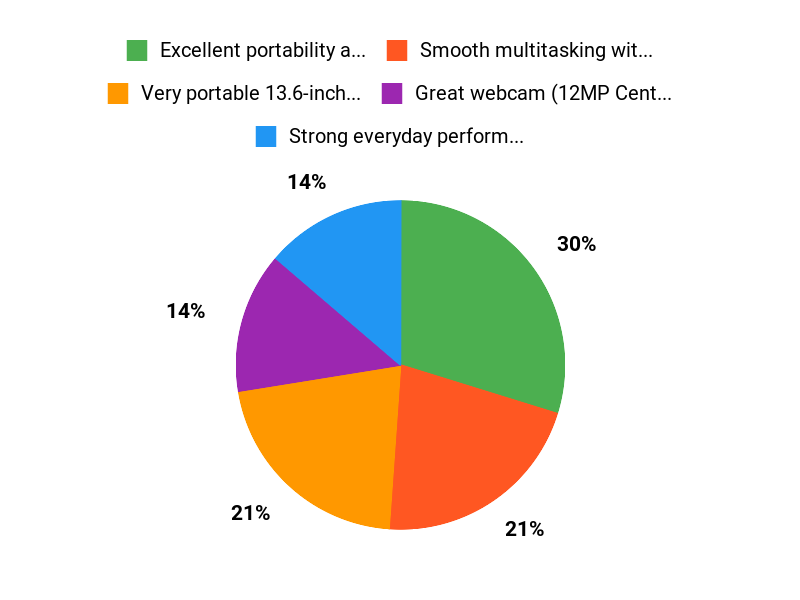
| ✅ Excellent portability and solid build quality | ❌ Limited to two Thunderbolt ports plus MagSafe, so you may need dongles |
| ✅ Smooth multitasking with 16GB unified memory | ❌ Base storage of 256GB may fill up quickly if you keep lots of large files locally |
| ✅ Great webcam with 12MP Center Stage and a strong microphone array | ❌ Fanless cooling can reduce sustained performance during long, heavy CPU or GPU workloads |
| ✅ Long battery life for a full day of typical use | ❌ 60Hz display and limited game compatibility make it a weaker fit for gaming-focused buyers |
| ✅ Seamless integration with other Apple devices | ❌ Midnight finish can show fingerprints and smudges more than lighter colors |
What Independent Testing Shows
Independent testing gives useful context beyond Apple’s advertised specifications. Laptop Mag’s 13-inch M4 review measured 15 hours 30 minutes in its battery test and 463 nits of display brightness. Its tested 512GB configuration also posted a Geekbench 6 multi-core score of 14,849. Those numbers should not be treated as guaranteed results for every configuration, but they show that the M4 Air can combine strong productivity performance with long unplugged runtime.
For the exact base configuration covered here, Apple specifies a 10-core CPU, 8-core GPU, 16GB unified memory, 256GB SSD, 13.6-inch 2560-by-1664 display rated at 500 nits, and support for up to two external 6K displays at 60Hz. Apple rates battery life at up to 18 hours of video streaming and up to 15 hours of wireless web. These are controlled test claims, so your real battery life will vary with brightness, browser choice, calls, creative apps, and connected devices.
What People Say
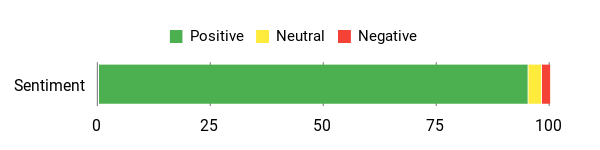
The customer excerpts below are positive and highlight portability, speed, setup, charging, and battery life. Two excerpts are not enough to represent every buyer, so treat them as examples rather than a statistical summary of all customer feedback.
Overall sentiment of the excerpts shown: Positive
🗣️ Lesley Ware
Everything I need in a laptop. The size is perfect, it’s lightweight, and it’s super fast and powerful. Charges fast, love the magnetic charging, slim and light weight, and it’s super easy to use with all my devices connected.
🗣️ Rebekah
This is my first MacBook and so far so good. It’s super fast, the build quality is strong and it’s lightweight. The setup was easy and the battery life has proven to be excellent.
Long-Term Cost Benefits
The strongest long-term value comes from buying the right storage capacity at the start. Memory and internal storage are not user-upgradable, so a 256GB model that forces you to replace the laptop early can erase the savings of buying the older generation. Cloud storage or an external SSD can extend its usefulness if your local-storage needs are modest.
Apple does not publish a simple guaranteed number of future macOS major-version upgrades for this model, and resale value changes with condition and market demand. Treat those factors as potential benefits, not fixed savings. The practical advantage you can evaluate today is that the M4 model starts with 16GB of unified memory rather than the 8GB base memory found on some older Air generations.
Return On Investment
For a 2026 buyer, the return on investment depends on the price gap to the M5 Air. The M4 makes the most financial sense when its discount is large enough to offset the 256GB base SSD and older wireless hardware. If you would immediately add paid cloud storage or an external SSD, include that cost in your comparison.
The non-price return is portability and low-friction daily use. A 2.7-pound, fanless laptop with strong battery life, Touch ID, MagSafe, and tight iPhone integration can reduce setup friction for students, travelers, and office users. That benefit is real, but it should not override a poor price comparison with the newer model.
Situational Benefits
| Situation | How It Helps |
|---|---|
| Commuting and travel | Lightweight design and long battery life make it easy to work on trains, in planes, or between meetings. |
| Video calls and remote meetings | 12MP Center Stage camera plus three-mic array keeps you centered and audible without needing extra gear. |
| Creative editing on the go | M4 chip and 16GB memory let you edit photos and short videos smoothly, with the Liquid Retina display helping you see detail clearly. |
| School and note-taking | Fast wake, strong battery life, and a compact footprint make it easy to carry between classes and work sessions. |
| Home office use | Support for up to two external 6K displays at 60Hz, Touch ID, and Thunderbolt 4 make it flexible for a desk setup, though a hub may still be useful. |
Ease Of Use
| Feature | Ease Level |
|---|---|
| Setup and device pairing | Easy |
| Daily multitasking and apps | Easy |
| Video calls and webcam | Easy |
| Ports and external displays | Moderate |
| Managing storage | Moderate |
Aesthetic Appeal
Clean, modern look in Midnight color with a slim profile; the Liquid Retina display adds crisp visuals that make content look premium. The aluminum body feels sturdy, the keyboard looks minimal, and the overall design works well in classrooms, offices, coffee shops, and travel settings.
The Midnight finish is stylish, but it may show fingerprints more than lighter finishes. If that bothers you, keep a microfiber cloth nearby or consider a lighter color in the same MacBook Air line.
Innovation
Compared with the M3 Air it replaced, the M4 generation’s most useful changes were the newer M4 chip, a 12MP Center Stage camera, Thunderbolt 4, and support for two external displays while still using the built-in screen. The chassis, 13.6-inch 60Hz Liquid Retina display, MagSafe layout, and two-port design remained broadly familiar.
That matters for upgrade decisions. Owners of older Intel or M1 Air models get a much larger jump in design, camera, and performance than recent M2 or M3 owners. In 2026, the M5 Air further raises the comparison bar with 512GB starting storage, Wi-Fi 7, Bluetooth 6, and a newer chip.
Brand Trustworthiness
Apple provides official technical documentation, service options, a large accessory ecosystem, and ongoing macOS security and feature updates. Broad Mac adoption also makes it easier to find setup guides, docks, cases, external-storage options, and troubleshooting resources.
The main ownership tradeoff is limited internal upgradeability. Unified memory and internal SSD capacity are not designed as user-upgradable components, so choose the configuration around your expected storage and memory needs before buying.
Problem Solving Ability
This MacBook addresses four common needs well: portable everyday performance, clear video calls, long unplugged sessions, and integration with other Apple devices. It is especially convenient if you already use an iPhone or iPad and rely on features such as AirDrop, iCloud, Messages, passwords, and continuity tools.
It is less suitable if your main needs are large local storage, sustained rendering or export workloads, high-refresh gaming, many built-in ports, or Windows-only software. In those cases, compare the current M5 Air with more storage, a MacBook Pro with active cooling and more ports, or a Windows workstation before buying.
Key Benefits
- 2.7-pound, 0.44-inch-thick design that is easy to carry every day
- Strong everyday performance from the M4 chip and 16GB memory
- 12MP Center Stage camera and improved audio for clear video calls
- 256GB SSD is workable for cloud-first use, but it is the key limitation versus the 512GB-base M5 Air
- Apple Intelligence support plus strong iPhone and iPad integration inside the Apple ecosystem
- Quiet, fanless design that stays distraction-free in classrooms, meetings, and shared spaces
- Touch ID for quick sign-ins, app approvals, and secure purchases
Retailer rating shown for this model: 4.8/5 — confirm the current U.S. Amazon rating and rating count at publication because retailer totals change over time.
Related Guides
FAQ
Is The MacBook Air M4 Still Worth Buying In 2026?
Yes, but only at the right price. The M4 Air is still fast enough for browsing, office apps, research, coding, video calls, photo editing, and light video work, and 16GB of unified memory is a solid baseline. Its 2.7-pound body, 13.6-inch display, 12MP Center Stage camera, and long battery life remain competitive for everyday portable use.
The reason to hesitate is the newer M5 Air. Apple’s 2026 model starts with a 512GB SSD, while this M4 configuration has 256GB. If the M4 is substantially cheaper and you are comfortable using cloud or external storage, it can be a smart value buy. If the price difference is small, the M5 is the better default because it gives you more base storage and newer hardware.
The Midnight finish looks premium but can show fingerprints more readily than lighter finishes. If appearance matters, plan to wipe it with a soft microfiber cloth rather than choosing it solely for smudge resistance.
How Does Battery Life And Performance Hold Up In Real-World Use?
Apple rates the M4 Air for up to 18 hours of video streaming and up to 15 hours of wireless web. In an independent test, Laptop Mag recorded 15 hours 30 minutes on its battery benchmark. Real results vary with workload, brightness, Wi-Fi conditions, connected accessories, browser choice, and background apps.
If you do long exports, 3D work, or extended high-load gaming, remember that the Air is fanless. It stays silent, but active-cooled laptops are better suited to sustained peak workloads. For normal battery care, use optimized battery charging, keep macOS updated, and avoid extreme temperatures; see our guide on how to keep battery health.
Pro Tip: If you plan to use the MacBook Air for photo libraries, video projects, or school files over several years, compare the 256GB model with a higher-storage option before buying. Storage is usually the first limitation most long-term users notice.
What Practical Tips Should You Know About Storage, Ports, And The Camera?
Treat the 256GB SSD as the main decision point. Use iCloud or another cloud service for documents and photos, or move large media libraries to an external SSD if you expect local storage to fill quickly. The laptop includes MagSafe 3, two Thunderbolt 4 ports, and a 3.5mm headphone jack. Apple confirms support for up to two external displays up to 6K at 60Hz in addition to the built-in display.
The 12MP Center Stage camera and improved mics make video calls crisp, and Touch ID is quick to set up for secure unlocking and payments. For maintenance, back up with Time Machine, keep macOS updated for Apple Intelligence and security improvements, and protect the Midnight finish with a soft cloth or a thin case if you want extra scratch resistance.
Who Should Skip This MacBook Air?
Skip this M4 configuration if you already know 256GB will feel restrictive, run heavy professional workloads for hours, want a high-refresh display for gaming, need more built-in ports, or depend on Windows-only software. Also skip it when its live price is close to the 2026 M5 MacBook Air, because the newer model starts with 512GB storage.
Consider a MacBook Pro if active cooling, more ports, or higher sustained performance matters more than low weight. Consider the M5 Air if you want the same general ultraportable format with newer hardware and more base storage.
Is 16GB Unified Memory Enough?
Yes. For most students, remote workers, writers, researchers, and light creators, 16GB unified memory is a sensible baseline for browser tabs, office apps, messaging, video calls, photo work, and moderate multitasking.
More memory can help if you routinely edit large video projects, run several virtualized or development workloads, work with very large design files, or keep multiple memory-heavy apps open all day. Because unified memory is not user-upgradable, choose more at purchase if those workloads are central to your work.
Why Customers Choose It
In 2026, the strongest reason to choose this M4 Air is value. If a discount puts it well below the current M5 Air, you still get a thin 2.7-pound aluminum laptop, 16GB of unified memory, a sharp 13.6-inch display, strong battery life, a 12MP Center Stage camera, and silent fanless operation.
It is especially attractive to people upgrading from an older Intel or M1 Air who want a major jump without moving to a heavier MacBook Pro. Recent M2 or M3 Air owners have less reason to upgrade unless the camera, external-display support, performance gain, or a specific price makes the change worthwhile.
Wrapping Up
The 2025 MacBook Air M4 remains a capable ultraportable, but its place in the market changed after the M5 Air arrived in March 2026. The M4 still gives you fast everyday performance, 16GB of unified memory, a vivid 13.6-inch Liquid Retina display, a 12MP Center Stage camera, Touch ID, MagSafe, and strong battery life in a 2.7-pound fanless design.
For students, remote workers, travelers, writers, and light creators, the decision comes down to price and storage. Buy the M4 when its discount is meaningful and 256GB is enough; choose the M5 when prices are close or you want 512GB of base storage and newer hardware. Check the live retailer price before deciding.
