
A good desktop for drone video editing should keep imports, proxy creation, timeline work, and exports moving without forcing you to fight storage or memory limits. Your needs change with the footage: short 1080p reels are easier to handle than long native 4K timelines with noise reduction, effects, or heavy color work.
Our top verified pick is the Dell Pro Tower QCT1250 because the linked configuration now pairs a 14-core Core i5-14500 vPro with DDR5 memory in a current tower platform. For a lower-cost route, the Dell OptiPlex 5060 (Renewed) gives you 32GB RAM and a 1TB SSD in the listed configuration.
We checked the linked ASINs, compared current listing data with manufacturer documentation, and reviewed support and safety records. Two HP listings have conflicting current configuration data, so their original specs are preserved with a clear check-first warning.
Desktop for Drone Video Editing Compared
| Product | Best for | Processor | Memory / storage | Graphics |
|---|---|---|---|---|
|
Premium
|
CPU-first editing and future upgrades | Core i5-14500 vPro, 14C/20T | 16GB DDR5 / 512GB SSD | Intel UHD 770 |
|
Mid-range
|
Light-to-moderate edits if the listed configuration matches | Listed: Core i7-10700F | Listed: 32GB DDR4 / 1TB SSD | Listed: GeForce GT 610 2GB |
|
Mid-range
|
Proxy editing if the 32GB / 1TB variant is selected | Listed: Core i5-12500, 6 cores | Listed: 32GB DDR4 / 1TB SSD | Listed: Intel UHD 770 |
|
Mid-range
|
Small desks and lighter editing | Core Ultra 5 225, 10C/10T | 16GB DDR5 / 512GB SSD | Intel UHD Graphics |
|
Budget
|
Budget proxy workflows and short projects | Core i7-8700, 6C/12T | 32GB DDR4 / 1TB SSD | Intel UHD 630 |
Desktop for Drone Video Editing: Our Top Picks
1. Dell Pro Tower QCT1250

Bottom line: The Dell Pro Tower QCT1250 is the strongest verified CPU-first option here for proxy-heavy 4K, 1080p editing, and an upgrade-minded desktop setup. The catch is that the linked configuration has 16GB RAM, 512GB storage, and integrated graphics.
- Processor: Core i5-14500 vPro, 14 cores / 20 threads, strong CPU headroom
- Memory: 16GB DDR5, workable but tighter than 32GB
- Storage: 512GB PCIe SSD, fast but limited for raw footage
- Graphics: Intel UHD 770, best suited to proxy-based editing
The linked ASIN now points to Dell’s newer Pro Tower family rather than the 3030 configuration described in the original copy. Its Core i5-14500 vPro gives you six performance cores, eight efficiency cores, and 20 threads, which is a useful base for proxy creation, media management, and CPU-heavy export work.
The main limits are memory, storage, and graphics. Sixteen gigabytes can handle lighter work, but 32GB gives more breathing room for 4K projects and multitasking. A 512GB SSD also fills quickly with drone footage, so plan on fast external storage or an internal upgrade. For heavy grading, noise reduction, or complex effects, use a stronger dedicated GPU.
- Current 14-core Intel CPU platform
- DDR5 memory with documented upgrade options
- Front USB-C plus HDMI and DisplayPort
- Tower chassis leaves room for future upgrades
- Linked configuration has only 16GB RAM
- 512GB SSD is small for large drone libraries
- Integrated graphics limit demanding native 4K effects

Check Product Details on Amazon
HP Pavilion Desktop Tower Computer

3. HP Pro Tower 290 G9

Bottom line: The HP Pro Tower 290 G9 is appealing on paper for proxy editing because the article lists a Core i5-12500, 32GB RAM, and 1TB SSD. Current indexes for this ASIN show different memory and storage variants, so confirm that you are selecting the 32GB / 1TB version.
- Processor: Listed Core i5-12500, 6 cores, solid everyday CPU base
- Memory: Listed 32GB DDR4, useful for 4K proxy workflows
- Storage: Listed 1TB PCIe SSD, room for active projects
- Graphics: Listed Intel UHD 770, integrated graphics for lighter work
If the article’s listed configuration is the one you receive, it has the memory and storage balance many drone editors want for property flyovers, event clips, travel footage, and social deliverables. The Core i5-12500 is also a capable six-core processor for proxy generation and general editing tasks.
Integrated Intel graphics remain the limiting factor. They can support basic previews and proxy workflows, but they are not a substitute for a dedicated GPU in demanding effects or color work. Because current indexed pages show multiple memory and storage variants, check the exact selection before checkout.
- Listed 32GB RAM suits heavier multitasking
- Listed 1TB SSD gives practical project space
- Core i5-12500 is a capable six-core desktop CPU
- Integrated graphics keep the system simple for lighter work
- Current indexed sources show conflicting RAM and storage variants
- Integrated graphics limit demanding effects and grading
- Exact linked configuration could not be confirmed reliably

Check Product Details on Amazon
4. Dell Slim ECS1250

Bottom line: The Dell Slim ECS1250 is the best verified space-saving option here for short drone clips, social edits, and proxy-based work. Its Core Ultra 5 225 and built-in SD card reader are useful, but 16GB RAM and integrated graphics set the ceiling.
- Processor: Core Ultra 5 225, 10 cores / 10 threads, current compact platform
- Memory: 16GB DDR5, enough for lighter editing and proxies
- Storage: 512GB M.2 PCIe NVMe SSD, fast but easy to fill
- Graphics: Intel UHD Graphics, integrated graphics for lighter workloads
Dell’s current documentation confirms a Core Ultra 5 225 configuration with 16GB DDR5 and a 512GB M.2 SSD. The front media card reader is convenient when your drone workflow starts with removable cards, and USB-C plus multiple display outputs help keep a small desk organized.
This is still a light-to-moderate editing machine. The slim case, 16GB of memory, and integrated graphics make it a better fit for 1080p, short 4K projects, and proxy workflows than for long native 4K timelines with heavy effects. If your projects grow, memory and storage are the first upgrades to consider.
- Compact chassis fits small desks
- Core Ultra 5 225 is a current 10-core desktop processor
- Built-in media card reader simplifies imports
- DDR5 memory and NVMe storage support responsive everyday work
- 16GB RAM leaves less room for larger 4K projects
- 512GB SSD fills quickly with drone media
- Integrated graphics are not ideal for heavy effects or grading

Check Product Details on Amazon
5. Dell OptiPlex 5060 (Renewed)

Bottom line: The Dell OptiPlex 5060 (Renewed) is the best verified value option here if you mainly edit shorter clips and proxies. The listed 32GB RAM and 1TB SSD are useful, but the older Core i7-8700 and integrated graphics limit long-term headroom.
- Processor: Core i7-8700, 6 cores / 12 threads, older but usable
- Memory: 32GB DDR4, helpful for multitasking and proxy projects
- Storage: 1TB SSD, practical space for active edits
- Graphics: Intel UHD 630, integrated graphics for lighter workloads
Dell’s OptiPlex 5060 platform supports the six-core, 12-thread Core i7-8700, and the linked renewed configuration is listed with 32GB RAM and a 1TB SSD. That makes it a sensible low-cost workstation for 1080p work, short drone reels, client review drafts, and proxy-based 4K editing.
The tradeoff is age and refurbisher variability. You are buying an older platform with integrated graphics, so it is not the right base for heavy GPU effects or the longest useful upgrade life. Check seller warranty, return terms, included accessories, chassis size, and the exact ports on the unit you receive.
- 32GB RAM gives useful multitasking headroom
- 1TB SSD provides more active-project space than 512GB options
- Core i7-8700 offers six cores and 12 threads
- Renewed pricing can lower the cost of a capable proxy-editing setup
- Older platform has less future headroom
- Intel UHD 630 is limited for demanding GPU effects
- Condition, accessories, and warranty depend on the refurbisher

Check Product Details on Amazon
Dell Pro Tower QCT1250 vs Dell OptiPlex 5060: Is the Upgrade Worth It?
The newer Dell Pro Tower gives you a much more current CPU platform and DDR5 memory, while the renewed OptiPlex 5060 gives you more RAM and storage in the listed configuration for a lower-cost entry point. Neither linked setup is a strong out-of-box choice for heavy GPU effects.
- CPU platform: the Dell Pro uses a 14-core / 20-thread Core i5-14500 vPro; the OptiPlex uses a 6-core / 12-thread Core i7-8700.
- Memory and storage: the Dell Pro listing has 16GB / 512GB; the renewed OptiPlex lists 32GB / 1TB.
- Graphics: both rely on integrated Intel graphics, so demanding effects still call for a stronger GPU.
- Purchase type: the Dell Pro is a current platform; the OptiPlex is renewed, so seller condition and warranty matter more.
Which Desktop for Drone Video Editing Should You Buy?
- You want the newest verified CPU platform: get the Dell Pro Tower QCT1250.
- You want the lowest-cost verified route with 32GB RAM: get the Dell OptiPlex 5060 (Renewed).
- You have a small desk and value an SD card reader: get the Dell Slim ECS1250.
- You edit mostly proxy-based 4K and want upgrade room: get the Dell Pro Tower QCT1250.
- You mainly cut short social clips and want a compact current system: get the Dell Slim ECS1250.
How We Chose
- Processor first: we favored modern multi-core CPUs because proxy creation, media handling, and many export tasks lean heavily on the processor.
- Memory and storage: 32GB is the safer target for larger 4K projects, while fast SSD storage keeps active media and cache files responsive.
- Graphics reality: integrated graphics can work for proxies and lighter edits, but heavy grading and GPU effects need a stronger dedicated GPU.
- Live product checks: we matched the linked ASINs against current indexed listing data and manufacturer specifications where available, and checked manufacturer support and safety records.
- Owner trends: we only add owner feedback when the same pattern appears across at least two independent non-Amazon sources; no new owner-trend claims met that bar here.
How to Choose a Desktop for Drone Video Editing
CPU: Start With a Modern Multi-Core Processor
The processor affects proxy generation, project loading, many exports, and general timeline responsiveness. A newer multi-core desktop CPU gives you more headroom when your editor, browser, media manager, and background tasks run together. Among the verified options here, the Dell Pro Tower QCT1250 has the strongest current CPU platform.
RAM: 32GB Is the Safer Target for 4K
Sixteen gigabytes can work for short 1080p edits and lighter proxy workflows, but 32GB gives you more room for 4K projects, longer timelines, and multitasking. If you choose a 16GB system, check whether memory is user-upgradeable and budget for expansion before your projects become larger.
GPU: Integrated Graphics Have Clear Limits
Integrated graphics can handle basic preview work, lighter 1080p projects, and proxy-based 4K editing. They are not ideal for advanced color grading, temporal noise reduction, complex effects, or long native 4K timelines. If those tasks define your workflow, prioritize a desktop with a modern dedicated GPU rather than choosing only by CPU and RAM.
Storage: Keep Active Projects on a Fast SSD
Drone footage consumes space quickly. A fast NVMe or PCIe SSD is the right place for your editing app, cache, proxies, and active projects, while completed projects and raw footage should also exist on separate backup storage. A 1TB drive is easier to live with than 512GB when you keep several projects active.
Ports: Plan for Cards, Drives, and Displays
Look for enough USB-A and USB-C ports for card readers and external drives, plus HDMI or DisplayPort for your monitors. Ethernet is useful for NAS workflows. If direct card imports matter, the Dell Slim ECS1250 is convenient because Dell lists a front media card reader.
Upgrade Room: Check the Chassis and Power Supply
A tower usually gives you more flexibility than a sealed all-in-one, but case size and power supply still matter. Before adding a dedicated GPU, confirm physical clearance, available power connectors, power-supply capacity, and cooling. For memory or storage upgrades, check the manufacturer manual for supported capacities and slot availability.
Mistakes to Avoid When Buying a Desktop for Drone Video Editing
- Buying on CPU alone: a strong processor cannot replace enough RAM, fast storage, or a suitable GPU.
- Assuming every variant is identical: marketplace listings can group several RAM and storage configurations under similar names.
- Ignoring storage growth: 4K drone media, proxies, cache, and exports can fill a 512GB drive quickly.
- Overestimating integrated graphics: proxy editing is different from heavy native 4K effects and grading.
- Skipping upgrade checks: verify power, clearance, slots, and supported memory before planning future parts.
FAQs
What specs should you prioritize for a drone video editing desktop?
Prioritize a modern multi-core CPU, 32GB RAM when possible, a fast NVMe SSD, and enough ports for card readers, external drives, and monitors. If you edit native 4K, use heavy effects, run noise reduction, or color grade often, a modern dedicated GPU should move much higher on your list.
Can integrated graphics handle drone footage?
Yes, integrated graphics can handle lighter 1080p projects and proxy-based 4K workflows. They are not ideal for heavy GPU-accelerated effects, advanced color grading, temporal noise reduction, or long native 4K timelines. For those jobs, choose a desktop with a capable dedicated GPU or a tower that can accept one.
Is 16GB RAM enough for drone video editing?
Sixteen gigabytes can be enough for short 1080p edits and lighter proxy workflows, especially if you keep background apps under control. For 4K drone footage, multiple applications, larger project files, or longer timelines, 32GB is a safer target and gives you more room before memory becomes a bottleneck.
Do you need a dedicated GPU for 4K drone video editing?
Not always. Proxy-based 4K editing can work on integrated graphics when effects are light and your editor is configured carefully. A dedicated GPU becomes much more important for native high-bitrate 4K playback, GPU-accelerated effects, noise reduction, motion graphics, and heavier color work where integrated graphics can slow the workflow.
How much SSD storage is practical for drone footage?
A 512GB SSD can work for the operating system, apps, and a small active project, but drone footage and cache files can fill it quickly. A 1TB drive gives you more working room. Keep raw footage backed up separately, and use additional internal, external, or network storage for completed projects.
Are refurbished desktops good for video editing?
A refurbished desktop can be good value for light editing if it has enough RAM, SSD storage, and a processor that still meets your software needs. The tradeoff is variability in condition, warranty, accessories, and seller quality. Check the return policy, exact chassis and ports, and test the system promptly after it arrives.
How can you speed up drone footage imports and editing?
Use a fast card reader, copy footage to an SSD before editing, create proxies for demanding 4K files, and keep cache files on fast storage. Back up raw clips before deleting them from the drone card. Wired Ethernet can also improve transfers if your footage lives on a NAS or another networked system.
What Buyers Prefer
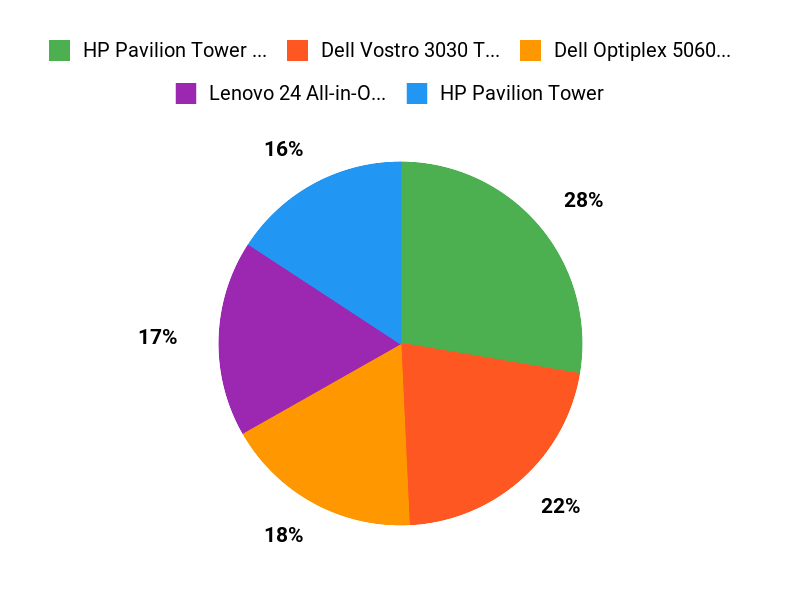
For current buying decisions, focus on the verified specs and configuration notes above. The Dell Pro Tower QCT1250 is the strongest verified CPU-first pick, the Dell Slim ECS1250 is the compact choice, and the renewed OptiPlex 5060 is the value route. Marketplace configurations can change, so confirm the exact listing before checkout.
Final Verdict
The best desktop for drone video editing in this group depends on how much native 4K work you do and how soon you expect to upgrade. None of these linked configurations is a dedicated GPU workstation, so proxy workflows remain the practical path for heavier footage.
The Dell Pro Tower QCT1250 stands out because its current 14-core Intel platform gives you the strongest verified CPU foundation here while preserving tower upgrade flexibility.
For a lower-cost verified option, see the Dell OptiPlex 5060 (Renewed). For a smaller current system, consider the Dell Slim ECS1250.
| Product | Image | Best For | Processor | RAM | Storage | Amazon |
|---|---|---|---|---|---|---|
| Dell 3030 Tower Desktop PC |
 |
Best overall balance | 14th Gen Intel Core i5-14400 | 32GB DDR5 | 2TB PCIe SSD | Check Details |
| HP Pavilion Desktop Tower Computer |
 |
CPU-first editing base | Intel Core i7-10700F | 32GB DDR4 | 1TB PCIe NVMe SSD | HP Pavilion Desktop Tower Computer |
| HP Pro Tower 290 G9 |
 |
Compact daily editing | Intel Core i5-12500 | 32GB DDR4 | 1TB PCIe SSD | Check Details |
| Dell Slim Desktop ECS1250 |
 |
Small desk and light edits | Intel Core Ultra 5 | 16GB DDR5 | 512GB M.2 SSD | Check Details |
| Dell Optiplex 5060 (Renewed) |
 |
Budget refurbished setup | Intel i7-8700 | 32GB DDR4 | 1TB SSD | Check Details |

1 thought on “Best Drone Video Editing Desktops for 2026”