Disclosure: As an Amazon Associate, we earn from qualifying purchases. If you click a link on this page and make a purchase, we may receive a small commission at no extra cost to you.
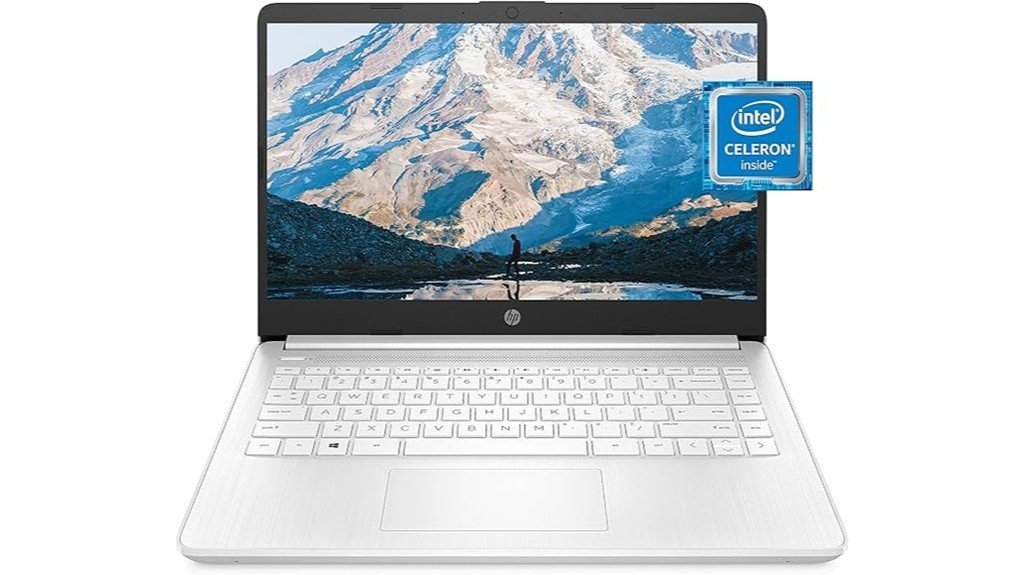
Choosing a budget laptop is not only about the lowest price. You need to know whether it can handle your daily tabs, documents, video calls, streaming, and light school or work tasks without slowing you down too much. The HP 14 Laptop, model 14-dq0040nr in Snowflake White, is built for simple everyday computing with a compact 14-inch design, Intel Celeron N4020 processor, 4 GB RAM, and 64 GB storage. It is easy to carry and practical for basic use, but it is not made for heavy multitasking, gaming, or large software installs.
Quick Verdict
Rating: Recommended with caveats
Best For: Students, casual users, and buyers who need a lightweight laptop for browsing, email, documents, and streaming.
Bottom Line: The HP 14 Laptop is a sensible pick if your work is light and you value portability. Its main tradeoff is the limited 4 GB RAM and 64 GB storage, which can feel restrictive if you keep many apps or browser tabs open.
| Specification | Detail |
|---|---|
| Brand | HP |
| Model | 14-dq0040nr |
| Color | Snowflake White |
| Product Type | 14-inch everyday laptop |
| Display | 14-inch HD display, 1366 x 768 resolution |
| Bezel | 6.5 mm micro-edge bezel with 79% screen-to-body ratio |
| Processor | Intel Celeron N4020 |
| Graphics | Intel UHD Graphics 600 |
| Memory | 4 GB RAM |
| Storage | 64 GB storage |
| Battery Life | Up to 11.5 hours for video playback, with real-world time depending on use |
| External Display Support | HDMI port for connecting an external monitor |
| Weight | Approximately 3.24 pounds |
| Best Use | Web browsing, email, documents, online classes, video streaming, and light everyday tasks |
Overview
The HP 14 Laptop stands out as a compact and efficient device tailored for users seeking a balance between functionality and portability. It features a 14-inch HD display with a 6.5 mm micro-edge bezel, resulting in a 79% screen-to-body ratio. This design helps keep the laptop easy to carry while giving you more screen area than a thicker-bezel design.
Powered by an Intel Celeron N4020 processor, the laptop is aimed at routine tasks rather than demanding workloads. With 4 GB RAM and 64 GB storage, it can cover basic needs such as writing, browsing, watching videos, and using web-based tools. (model 14-dq0040nr, Snowflake White). Ideal for individuals valuing mobility and simplicity, this laptop works best when you keep your expectations realistic.
Before You Buy: The 4 GB RAM and 64 GB storage are the key limits. This laptop is better for light use than for gaming, video editing, heavy multitasking, or storing many large files directly on the device.
What Is the HP 14 Laptop?
The HP 14 Laptop 14-dq0040nr is a budget-friendly 14-inch notebook made for everyday users who need a simple computer for common tasks. Its main appeal is the balance of low weight, compact size, and basic performance for work that does not require high-end hardware.
The Intel Celeron N4020 processor, Intel UHD Graphics 600, 4 GB RAM, and 64 GB storage place it in the entry-level category. That means it is a better fit for browsing, streaming, email, school assignments, and cloud-based documents than for large desktop apps or demanding creative software.
The Snowflake White finish and thin profile help it look cleaner than many budget laptops. The 14-inch screen also makes it easier to carry than a full-size 15.6-inch laptop, while still giving you enough room for basic writing and web work.
Who Should Buy It?
Best For
- Students who mainly use Google Docs, Microsoft Office online, email, and learning portals.
- Casual home users who want a light laptop for browsing, shopping, video calls, and streaming.
- Travelers who need a compact secondary laptop instead of a larger everyday machine.
Skip If
- You need a laptop for gaming, video editing, coding with heavy tools, or advanced design work.
- You often keep many Chrome tabs, desktop apps, and background programs open at once.
- You need large internal storage for photos, videos, offline files, or software downloads.
Detailed Features
Moving from the general overview to a more practical review, the HP 14 Laptop‘s design, display, processor, memory, and storage are the main factors to consider. Each part supports light use, but each part also has clear limits.
Design and Portability
The laptop’s sleek, thin profile is one of its biggest strengths. At approximately 3.24 pounds, it is easy to carry between rooms, classes, coffee shops, or travel bags. That makes it more convenient than heavier laptops if you do not want a bulky device.
The Snowflake White finish gives the device a clean look, while the compact 14-inch size helps it fit into smaller backpacks and desk setups. This makes it useful for buyers who need a simple laptop for mobile daily use.
Display Quality
The 14-inch HD display has a resolution of 1366 x 768. It is suitable for browsing, documents, video streaming, and online classes, but it is not as sharp as a Full HD screen. If you read small text for long periods or want extra screen detail, this is one area to compare carefully.
The 6.5 mm micro-edge bezel creates a 79% screen-to-body ratio. This helps the laptop feel more modern and gives you a more open viewing area without making the body too large.
Processor and Everyday Performance
The Intel Celeron N4020 processor is built for basic computing. It can handle tasks such as web browsing, email, word processing, streaming, and simple online tools. It is not designed for heavy creative programs or demanding multitasking.
For best results, keep your workflow light. A few browser tabs, one document, and a streaming app are more realistic than running several apps at once. The laptop can feel more responsive when you close unused tabs and avoid large background tasks.
Graphics and Streaming
The Intel UHD Graphics 600 supports everyday visual tasks and media playback. It is suitable for watching videos, using web apps, and handling light visual content. It is not a gaming graphics solution, so buyers should not expect strong performance with modern games or graphics-heavy software.
The original listing language notes 4K streaming support, but the built-in display itself is HD. That means the laptop can support certain 4K media workflows through its hardware and external display options, while the internal screen remains 1366 x 768.
Memory and Storage
The laptop includes 4 GB RAM, which is enough for light use but limited for heavier work. This is one of the main reasons the HP 14 is better for simple daily tasks than for power users.
The 64 GB storage also requires careful file management. After the operating system and built-in apps, your available space may be limited. Cloud storage, external drives, and regular file cleanup can make the laptop easier to live with.
Pro Tip: Use cloud storage or an external drive for photos, videos, and large downloads. Keeping the internal 64 GB storage clean can help the laptop feel smoother for everyday tasks.
How It Performs in Real Use
For School and Online Classes
The HP 14 Laptop can work well for students who use browser-based learning tools, typed assignments, email, and video lessons. Its lightweight body is useful if you carry it between home, class, and study spaces. The limited RAM means students should avoid opening too many tabs during online classes.
For Home Browsing and Email
For basic home use, the laptop covers common needs such as checking email, reading articles, shopping online, and watching videos. It is a practical fit for users who do not need a high-performance machine. Keeping the device focused on one or two tasks at a time will usually give you a better experience.
For Streaming and Entertainment
The 14-inch HD screen and Intel UHD Graphics 600 make the laptop usable for Netflix, YouTube, and other streaming services. The screen size is comfortable enough for personal viewing, though users who want sharper detail may prefer a Full HD display. The HDMI port also gives you the option to connect an external monitor or TV.
For Travel or Secondary Use
At around 3.24 pounds, this model is easy to pack as a travel or backup laptop. It is useful for checking email, editing documents, joining calls, and handling light work away from your main computer. Its low storage capacity is less of a problem if most of your files are saved in the cloud.
Setup Tips Before First Use
Start by removing apps you do not need and signing into only the services you actually use. This can help reduce background activity and save storage space. You should also run system updates before using the laptop for school or work, since updates can improve stability and security.
Set up cloud storage early if you plan to save documents, photos, or downloads. With 64 GB storage, it is better to avoid filling the drive with large media files. You can also keep a small external drive or USB storage device for backup files.
For a more comfortable desk setup, connect an external monitor through HDMI when you need more screen space. This is helpful for long writing sessions, spreadsheets, or split-screen work.
Connectivity and External Monitor Support
The HP 14 Laptop supports external monitors through its HDMI port. This is useful if you want a larger screen for work, school, or entertainment at home. A simple external monitor setup can make the device feel more flexible, especially when the built-in 14-inch HD screen feels too small.
External display support is also useful for presentations, remote work, and longer writing sessions. Since the internal screen is HD, connecting to a larger monitor may improve comfort when you need more workspace.
Keyboard and Daily Comfort
The keyboard is suitable for everyday typing, school notes, email, and documents. The article notes that this laptop does not feature a backlit keyboard, so low-light use may be less convenient. If you often work at night or in dim rooms, this limitation is worth considering before you buy.
The compact 14-inch layout helps keep the laptop portable, but buyers moving from a larger laptop may need a little time to adjust. For long typing sessions, a laptop stand, external keyboard, or desk monitor can improve comfort.
Pros and Cons
Although the HP 14 Laptop offers several appealing features, it is essential to weigh its strengths and limits before buying. The laptop’s design and portability are strong advantages, while the memory and storage are the clearest compromises.
Pros
- Portable 14-inch design is easy to carry for school, travel, and home use.
- Micro-edge display gives the laptop a cleaner look and better screen-to-body ratio.
- Intel Celeron N4020 is suitable for browsing, documents, email, and light streaming.
- HDMI support allows you to connect an external monitor for more workspace.
- Budget-friendly feature set makes sense for simple everyday computing needs.
Cons
- 4 GB RAM limits heavy multitasking and can feel tight with many browser tabs.
- 64 GB storage requires careful file management, cloud storage, or external storage.
- HD display is usable, but not as sharp as a Full HD screen.
- No backlit keyboard may be inconvenient for low-light typing.
Is It Worth the Price?
The HP 14 Laptop is best viewed as a budget laptop for light everyday use. It offers strong value for the price if your main needs are browsing, email, online schoolwork, document editing, and streaming.
The most value goes to buyers who want portability and simple function instead of premium speed or large storage. It is not the best fit if you need a laptop that can handle demanding apps, heavy multitasking, or long-term storage of large files.
For a basic secondary laptop, student laptop, or travel-friendly device, it is worth considering. For your main work machine, compare it against laptops with more RAM, more storage, and a sharper display.
How It Compares to Alternatives
Compared with larger budget laptops, the HP 14 is easier to carry and better for small desks or travel bags. A 15.6-inch laptop may give you a larger screen and more comfortable typing space, but it will usually be less portable.
Compared with Chromebooks, this HP model may appeal more to buyers who prefer a Windows-style laptop experience. A Chromebook may be better if almost all of your work happens inside a browser and you want a very simple system. The HP 14 makes the most sense if you want a compact Windows laptop for light everyday use.
Concluding Thoughts
In evaluating the overall value of the HP 14 Laptop, practicality emerges as the main theme. The device combines performance with portability for users who want freedom from bulky technology. The Intel Celeron N4020 processor provides enough power for routine tasks, while the compact design enhances mobility.
Despite its modest storage and RAM, the laptop fulfills essential computing needs without unnecessary bulk. The micro-edge HD display helps maximize screen space, and the HDMI port adds flexibility for external monitor use. In sum, the HP 14 Laptop is a pragmatic choice for users seeking efficiency and simplicity.
Related Guides
Frequently Asked Questions
How long does the battery last on a single charge?
The HP 14 Laptop’s battery lasts up to 11.5 hours on a single charge for video playback, per the stated specifications for the 14-dq0040nr. Real-world battery life varies based on screen brightness, apps, browser tabs, streaming, and background updates.
Does the laptop support external monitors?
Yes. The HP 14 Laptop supports external monitors through its HDMI port, which lets you expand your workspace for documents, video, browsing, or presentations. This is helpful if the 14-inch HD screen feels too small for long work sessions.
Is the keyboard backlit for low-light use?
The HP 14 Laptop does not feature a backlit keyboard. If you often type in dim rooms, at night, or during travel, you may want to use an external light or compare models that include keyboard backlighting.
Can the RAM be upgraded for better performance?
The article treats the 4 GB RAM as a fixed limitation for this HP 14 configuration. Because upgrade information can vary by exact SKU and seller listing, buyers who plan to upgrade memory should confirm service details before purchase.
What is the weight of the laptop for carrying around?
The HP 14 Laptop weighs approximately 3.24 pounds. That makes it easy to carry for students, commuters, travelers, and home users who move between rooms often.
Is 64 GB storage enough for daily use?
It can be enough if most of your work is browser-based and you use cloud storage for files. It may feel limited if you download large apps, save many photos, store videos, or keep lots of offline files.
Is the HP 14 Laptop good for gaming?
This laptop is not a good choice for modern gaming. The Intel Celeron N4020, Intel UHD Graphics 600, and 4 GB RAM are better suited for light computing, streaming, documents, and web use.
Who should skip this laptop?
You should skip it if you need fast multitasking, lots of local storage, a Full HD display, a backlit keyboard, or strong performance for demanding programs. It is designed for light everyday use, not power-user workloads.
The Bottom Line
The HP 14 Laptop 14-dq0040nr is a good fit for buyers who need a simple, lightweight laptop for browsing, documents, streaming, schoolwork, and email. Its best strengths are portability, basic usability, and budget-focused value, while its biggest limits are 4 GB RAM, 64 GB storage, and an HD display.
Buy it if your needs are light and you want an easy-to-carry laptop. Skip it if you need a faster main computer for heavy apps, large files, gaming, or demanding multitasking.
