Disclosure: As an Amazon Associate, we earn from qualifying purchases. If you click a link on this page and make a purchase, we may receive a small commission at no extra cost to you.
Choosing a compact desktop is not just about saving desk space. You need to know whether the Apple 2024 Mac Mini with the M4 chip has enough performance, ports, memory, and storage for your daily work. This review looks at its speed, design, connectivity, Apple ecosystem features, and the main tradeoffs you should consider before buying. The biggest strengths are its small 5 x 5 x 2 inch body, 1.5 pound weight, 10-core CPU, 10-core GPU, and 16-core Neural Engine, while the base 256GB SSD may feel tight if you store large files locally.
Quick Verdict
Rating: Recommended with caveats
Best For: Apple users who want a fast, quiet, compact desktop for productivity, creative work, and everyday multitasking.
Bottom Line: The Apple 2024 Mac Mini is a strong choice if you want M4 performance in a very small desktop. It is less ideal if you need large built-in storage, dedicated graphics, or a wide port setup without adapters.
Before You Buy: The base 256GB SSD may not be enough if you edit videos, store photo libraries, keep large project files, or install many apps. Plan for external storage or a higher-storage configuration if local storage matters to you.
Overview
The Apple 2024 Mac mini represents a major step forward in small desktop computing. It uses the M4 chip with a 10-core CPU and 10-core GPU, giving you strong performance in a body that weighs only 1.5 pounds and measures 5 x 5 x 2 inches. That makes it easy to place on a desk, media console, shelf, or shared workspace without the bulk of a tower PC.
The Mac mini also includes a 16-core Neural Engine, which helps with machine learning tasks and AI-assisted workflows. This matters if you use optimized creative apps, productivity tools, image features, transcription tools, or Apple ecosystem features that depend on fast on-device processing. Its release on October 29, 2024, also marks a clear shift toward more capable compact desktops for everyday users and creators.
For many buyers, the main appeal is the balance of speed, size, and Apple device integration. If you already use an iPhone, iPad, Apple keyboard, Apple display, or other Mac apps, the Mac mini can fit into your setup with less friction. The main limitation is that some buyers may outgrow the base storage or need more ports than the compact design provides.
Key Specifications
| Specification | Detail |
|---|---|
| Brand | Apple |
| Product | Apple 2024 Mac Mini |
| Chip | Apple M4 chip |
| CPU | 10-core CPU |
| GPU | 10-core GPU |
| Neural Engine | 16-core Neural Engine |
| Memory | Starts at 16GB, expandable up to 32GB |
| Base Storage | 256GB SSD |
| Dimensions | 5 x 5 x 2 inches |
| Weight | 1.5 pounds |
| Connectivity | Thunderbolt 4, USB-C, HDMI, Wi-Fi 6E, Bluetooth 5.3, optional 10Gb Ethernet |
| Apple Ecosystem | Compatible with iPhone and iPad workflows |
| Best Use | Productivity, home office work, creative apps, media use, and compact desktop setups |
What Is the Apple 2024 Mac Mini?
The Apple 2024 Mac Mini is a compact desktop computer built around Apple’s M4 chip. Unlike a laptop, it does not include a built-in screen, keyboard, or trackpad, so you pair it with your own display and accessories. This setup works well if you want a permanent desk machine with more flexibility than a laptop.
The M4 version is designed for people who want strong desktop performance without a large case. Its small footprint makes it useful for home offices, student desks, shared family rooms, content creation stations, and minimalist workspaces. Because it starts with 16GB of memory and supports up to 32GB, it is better suited for multitasking than older base models with less memory.
The Mac mini is also a practical option if you already use Apple devices. iPhone and iPad compatibility can make file sharing, messaging, calls, media transfer, and app continuity easier. This is one reason the Mac mini often appeals to buyers who want the Mac experience without paying for a MacBook screen and battery.
Detailed Features
While maintaining a compact form, the Apple 2024 Mac mini offers a robust suite of features designed to improve productivity and daily use. The M4 chip gives you a 10-core CPU, 10-core GPU, and 16-core Neural Engine in one efficient system. This helps the Mac mini feel fast in common tasks like browsing, office work, streaming, photo edits, light video work, and app switching.
The memory configuration is also important. Starting at 16GB gives you more room for multiple browser tabs, Microsoft 365 apps, creative software, email, messaging, and background tasks. If you plan to keep the computer for several years or run heavier apps, the option to configure up to 32GB gives you more headroom.
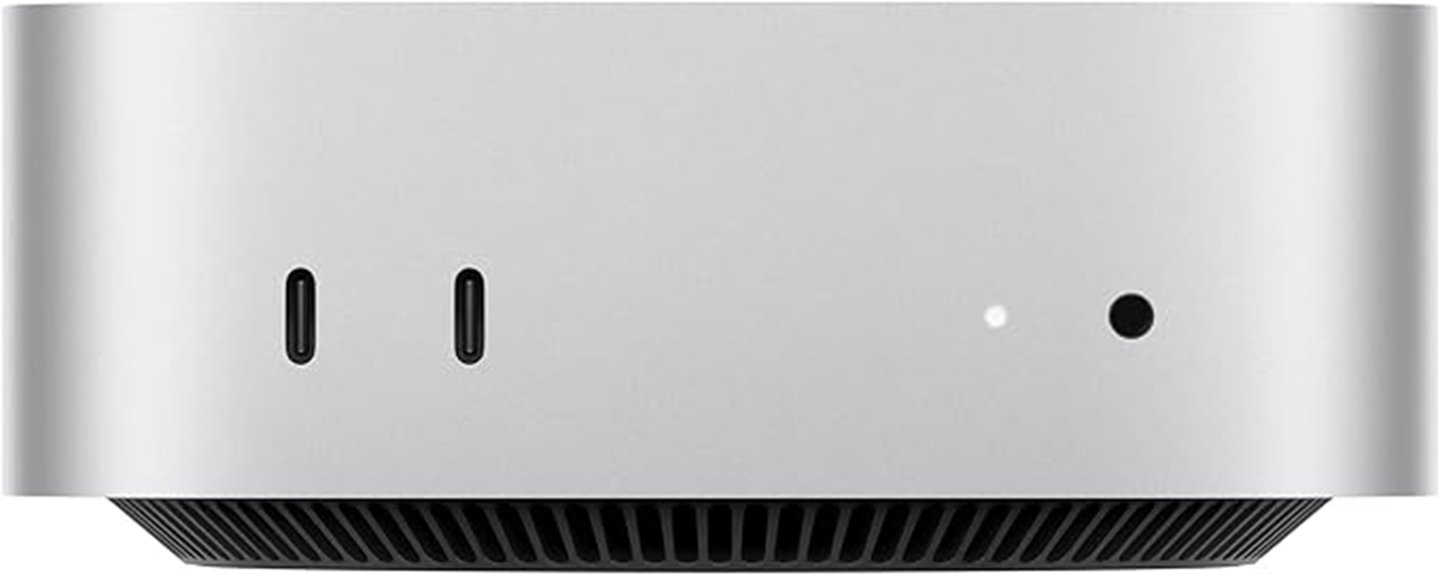
Connectivity is another strength. The Mac mini supports Thunderbolt 4, USB-C, HDMI, Wi-Fi 6E, Bluetooth 5.3, and optional 10Gb Ethernet. That gives you several ways to connect displays, drives, audio gear, hubs, keyboards, mice, and network hardware. Still, the compact design means you should check your exact accessory needs before buying.
Design and Build Quality
The biggest design benefit is the size. At 5 x 5 x 2 inches, the Apple 2024 Mac Mini is much easier to place than a traditional desktop tower. It can sit beside a monitor, under a raised stand, on a small shelf, or in a media setup without taking over the space.
The 1.5 pound weight also makes it easy to move when needed. You probably will not carry it around like a laptop, but you can shift it between rooms, bring it to a small studio, or rearrange your desk without much effort. This helps if you work in a small apartment, dorm, office corner, or shared workspace.
The clean Apple design fits well with minimalist desks. However, the small body also means you should plan your cable layout. If you use many external drives, displays, wired accessories, or audio interfaces, you may need a hub or dock to keep the setup tidy.
Performance
The M4 chip is the main reason to consider this Mac mini. With a 10-core CPU and 10-core GPU, it is built for fast daily performance and stronger creative handling than many older compact desktops. You can expect it to feel responsive during web browsing, document editing, video calls, spreadsheet work, streaming, and light-to-moderate creative tasks.
The 16-core Neural Engine is useful for machine learning tasks and Apple’s growing AI-focused features. This does not mean every app will feel dramatically different, but apps that use on-device intelligence may benefit. It also helps make the Mac mini feel more future-ready as more software adds AI-assisted tools.
For professional work, performance depends on your task. The Mac mini can handle many editing, design, coding, office, and media workflows well. If you work with very large video projects, heavy 3D rendering, advanced gaming, or demanding GPU-heavy tasks, you should compare it with higher-end Mac options before deciding.
Graphics and Gaming
The 10-core GPU gives the Apple 2024 Mac Mini enough graphics power for smooth display output, creative apps, photo editing, video work, and supported games. It also supports hardware-accelerated ray tracing and high-efficiency graphics features, which can improve visual performance in compatible tasks.
For casual and supported Mac gaming, the GPU can be capable. It is still not the same as buying a desktop with a dedicated high-end graphics card. If gaming is your main reason for buying a computer, especially for titles that need strong GPU support or broad Windows compatibility, this Mac mini may not be your best match.
Video Editing and Creative Work
The Apple 2024 Mac Mini can be used for professional video editing tasks, especially when your workflow fits the M4 chip’s strengths. The 10-core GPU and hardware-accelerated ProRes support can help with smoother editing performance in compatible software. This makes it appealing for creators who want a small desktop instead of a large editing machine.
For YouTube editing, social media videos, family projects, podcasts, presentations, and many business videos, the Mac mini is a practical choice. The base storage is the bigger concern. Video files can fill a 256GB SSD quickly, so an external SSD or larger storage configuration may be needed for serious editing work.
Pro Tip: If you edit video, keep project files on a fast external SSD and reserve the internal drive for macOS, apps, cache, and current working files. This helps reduce storage pressure on the base 256GB model.
Connectivity and Ports
The Mac mini supports Thunderbolt 4, USB-C, HDMI, Wi-Fi 6E, Bluetooth 5.3, and optional 10Gb Ethernet. This gives you a strong set of wired and wireless options for a compact desktop. Thunderbolt 4 is useful for fast external storage, displays, docks, and professional accessories.
HDMI support is useful if you want to connect the Mac mini to a monitor or TV without relying only on USB-C display adapters. Bluetooth 5.3 helps with wireless keyboards, mice, headphones, and speakers. Wi-Fi 6E can improve wireless performance when paired with a compatible router.
The main question is how many things you connect at once. If your setup includes several drives, a webcam, microphone, keyboard, mouse, card reader, monitor, and audio gear, you may need a dock. This is not unusual for a compact desktop, but it is worth planning before checkout.
Apple Ecosystem and Productivity
The Mac mini is especially appealing if your daily work already happens across Apple devices. Compatibility with iPhone and iPad can make it easier to move between calls, messages, photos, documents, and shared Apple services. This can save time if you use Apple devices for both personal and work tasks.
Productivity apps such as Microsoft 365 are optimized for modern Mac systems, which helps the Mac mini fit into office, school, and business workflows. You can use it for documents, spreadsheets, presentations, email, cloud storage, team meetings, and browser-based tools. The combination of small size and fast performance makes it a strong desk computer for focused work.
The Apple ecosystem is a strength, but it can also shape your buying decision. If you rely on Windows-only software, niche hardware, or PC gaming tools, check compatibility before switching. The Mac mini works best when your apps and accessories support macOS well.
Storage and Memory
The Mac mini starts with 16GB of memory, which is a helpful baseline for modern multitasking. This can support several common apps open at once, including browsers, office apps, music, video calls, notes, and creative tools. Buyers who handle heavier workloads may prefer the option to configure up to 32GB.
The base 256GB SSD is the more obvious limitation. It can work for users who store most files in iCloud, Google Drive, Dropbox, or an external drive. It may feel restrictive if you keep large photo libraries, games, video files, virtual machines, or local backups on the internal drive.
Before buying, think about your current storage use and your next three years of needs. If your current computer already uses more than 256GB, the base model may require careful file management from day one.
Cooling and Energy Use
The article’s source material describes the Mac mini’s cooling system as effective under full load, helping it maintain steady performance. This matters because compact desktops need to balance power, heat, and noise in a small case. A strong thermal design can help keep performance stable during longer work sessions.
The exact energy consumption during heavy use is not specified in the article. Still, the efficient M4 chip suggests that the Mac mini is designed to balance performance with power use. This can matter if you keep your desktop running for long workdays or use it as a shared home computer.
For most buyers, the practical takeaway is simple: the Mac mini gives you desktop performance in a small, efficient package. If your work involves constant full-load rendering, long exports, or heavy professional tasks, you should compare thermal and performance needs against higher-end Mac systems.
Who Should Buy It?
Best For
- Apple users who want a compact desktop for office work, browsing, media, and creative apps.
- Students, remote workers, and home office users who already have a monitor and accessories.
- Creators who want M4 performance in a small machine and can manage storage with an external SSD.
Skip If
- You need a built-in display, keyboard, battery, or portable laptop-style setup.
- You want a gaming PC with a dedicated high-end graphics card.
- You need a lot of internal storage and do not want to rely on external drives or cloud storage.
How It Performs in Real Use
For Daily Productivity
For everyday work, the Apple 2024 Mac Mini should feel quick and responsive. The M4 chip, 16GB starting memory, and macOS app support make it a strong fit for writing, spreadsheets, web research, email, video meetings, and multitasking. Its small size also helps keep your desk clean and focused.
For Creative Projects
For photo editing, light-to-moderate video editing, design work, and content creation, the 10-core GPU and ProRes support are useful. The main thing to watch is storage. If your projects use large media files, you should plan your external drive setup before buying the base 256GB model.
For Small Spaces
The 5 x 5 x 2 inch size makes the Mac mini a strong fit for small desks, apartments, dorm rooms, and shared home offices. It can sit out of the way while still giving you a full desktop setup. This is one of its biggest advantages over a larger tower computer.
For Long-Term Use
The M4 chip and 16GB starting memory help the Mac mini feel more prepared for future software updates than older low-memory entry-level systems. If you want to keep the computer for several years, memory and storage choices matter. Buyers with heavier workloads should consider more memory or storage at the time of purchase.
Setup Tips Before First Use
Before you set up the Mac mini, confirm that you have the basics: a monitor, keyboard, mouse or trackpad, power access, and the right cable for your display. Since the Mac mini is a desktop, it needs external accessories to function as a full computer.
Plan your ports before you connect everything. If you use HDMI for your display, USB-C for external storage, Bluetooth for input devices, and Wi-Fi for networking, the setup can stay simple. If you need several wired accessories, a Thunderbolt or USB-C dock may make your desk easier to manage.
Also plan your storage from the beginning. Keep large video files, photo libraries, archives, and backups on external storage if you choose the 256GB SSD. This helps prevent the internal drive from filling up too quickly.
Pros and Cons
Pros
- M4 chip with 10-core CPU and 10-core GPU gives strong performance for a compact desktop.
- 16-core Neural Engine supports machine learning and AI-assisted workflows.
- Small 5 x 5 x 2 inch body is easy to fit into tight workspaces.
- 1.5 pound weight makes it easy to move or reposition when needed.
- Thunderbolt 4, USB-C, HDMI, Wi-Fi 6E, Bluetooth 5.3, and optional 10Gb Ethernet support flexible setups.
Cons
- The base 256GB SSD may be limiting for video, photo, gaming, or large project workflows.
- No dedicated graphics card, so high-end gaming users may want a different system.
- Some buyers may need a dock or hub if they use many wired accessories.
Is It Worth the Price?
The Apple 2024 Mac Mini is best viewed as a premium compact desktop rather than a budget tower replacement. You are paying for the M4 chip, the very small design, strong macOS performance, and the way it works with other Apple devices. If you already own a monitor and accessories, it can be a smart buy for everyday use.
It offers strong value for users who care about speed, desk space, energy-conscious performance, and Apple ecosystem features. It is also worth considering if you want a desktop that can handle productivity and creative apps without taking up much room.
The value is weaker if you need large internal storage, dedicated gaming graphics, or many ports without extra accessories. In that case, the total cost can rise once you add a higher storage configuration, external SSD, hub, or dock.
How It Compares to Alternatives
Compared with older Mac mini models, the Apple 2024 Mac Mini stands out because of its M4 chip, improved CPU and GPU capability, better memory starting point, efficient core architecture, and hardware-accelerated ray tracing. These improvements make it more appealing for buyers who want a small desktop that still feels fast for modern apps.
If you want portability, a MacBook may be better because it includes a screen, keyboard, trackpad, and battery. If you want more graphics power or expansion for gaming, a Windows desktop with a dedicated GPU may be a better fit. The Mac mini makes the most sense if you want a small, fast Mac for a fixed desk setup.
Concluding Thoughts
Despite some limitations, Apple’s 2024 Mac Mini is a strong contender in the desktop computer market. Its M4 chip, compact size, and versatile connectivity give it a clear role for buyers who want power without a bulky setup. The design also works well for users who want a clean desk and a quiet, simple computer station.
The biggest consideration is storage. A 256GB SSD can work for cloud-first users, but it may restrict anyone with large apps, media files, or creative projects. Upgrades can also become costly, so it is better to choose the right configuration before buying.
| Strengths | Considerations |
|---|---|
| Powerful M4 chip | Limited base storage |
| Compact and lightweight | Upgrades can be costly |
| Smooth Apple integration | Ports may be insufficient for some setups |
This balance of strengths and considerations positions the Mac Mini as an appealing choice for the discerning user. It is especially practical for buyers who want a small desktop with modern Apple performance and do not mind planning storage and accessories carefully.
Frequently Asked Questions
How does the Mac Mini handle gaming performance with its GPU?
The Mac Mini’s 10-core GPU can handle supported games and graphics tasks with solid performance. It also supports hardware-accelerated ray tracing, but it is not a direct replacement for a dedicated high-end gaming GPU.
Can the Mac Mini be used for professional video editing tasks?
Yes, the Mac Mini can handle many professional video editing tasks thanks to the M4 chip, 10-core GPU, and hardware-accelerated ProRes support. For large projects, the base 256GB SSD may be restrictive, so external storage is strongly worth considering.
What is the energy consumption of the Mac Mini during heavy use?
The exact energy consumption during heavy use is not specified in the article. The M4 chip is designed for efficient performance, so the Mac Mini should appeal to buyers who want strong speed without a large desktop tower.
Is the Mac Mini’s cooling system effective under full load?
The Mac Mini’s cooling system is described as effective under full load, helping the computer maintain stable performance. This is important for a compact desktop because heat control can affect longer creative and productivity sessions.
How does the Mac Mini compare to previous models in terms of performance?
The 2024 Mac mini improves on previous versions with the M4 chip, stronger CPU and GPU capability, improved memory support, efficient core architecture, and hardware-accelerated ray tracing. These upgrades make it better suited for modern multitasking and creative workflows.
Is 256GB enough storage for the Apple 2024 Mac Mini?
It can be enough if you use cloud storage, stream media, and keep large files on an external drive. It may not be enough if you edit video, store photo libraries, install many large apps, or keep local project files.
Do you need a monitor and accessories with the Mac Mini?
Yes. The Mac Mini is a desktop computer, so you need a display, keyboard, and mouse or trackpad. You may also need cables, a hub, or a dock depending on your monitor and accessories.
Who should skip the Apple 2024 Mac Mini?
Skip it if you need a portable computer with a built-in screen and battery. You may also want another system if your main needs are high-end gaming, large internal storage, or many built-in ports without adapters.
The Bottom Line
The Apple 2024 Mac Mini is a strong buy if you want a fast, compact Mac desktop with the M4 chip, 10-core CPU, 10-core GPU, and useful Apple ecosystem features. It is best for productivity, small workspaces, and many creative tasks, but you should skip it if you need a laptop, dedicated gaming graphics, or lots of internal storage. The main strength is powerful performance in a tiny body, while the main limitation is the base 256GB SSD.

