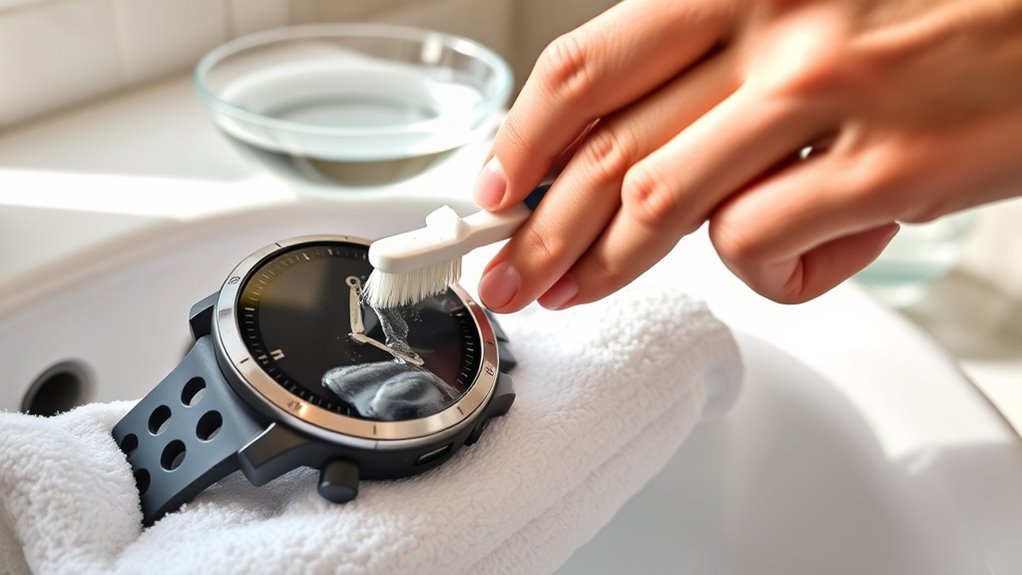
Cleaning a Garmin watch band safely starts with knowing what the band is made from. Silicone or TPU, nylon or fabric, leather, and metal all need different care. The safest approach is to follow Garmin’s material-specific guidance, remove sweat and residue regularly, rinse or wipe only as appropriate for the material, and let the band dry completely before wearing it again.
Quick Answer
To clean a Garmin watch band safely, match the method to the material. Rinse silicone or TPU with water; wash nylon or fabric in cold water with mild soap if needed; wipe leather and metal with a soft lint-free cloth. Let every band dry completely before wearing it again, and avoid bleach, abrasives, and soaking in cleaning agents.
Key Takeaways
- Identify the band material before cleaning because Garmin recommends different methods for silicone/TPU, nylon or fabric, leather, and metal.
- Silicone and TPU usually need only a fresh-water rinse and complete drying.
- Wash nylon or fabric in cold water, using mild soap only when needed for stubborn dirt or stains.
- Clean leather and metal with a soft, clean, lint-free cloth instead of soaking them.
- Garmin permits rubbing alcohol or a 70% isopropyl-alcohol pad on silicone and metal in specific situations, but not on fabric or leather.
- Do not use bleach, abrasive cleaners, metal polish, ultrasonic cleaners, or prolonged soaking in cleaning agents.
At a Glance
| Time Required | A few minutes for cleaning, plus enough air-drying time for the band to become completely dry. |
| Difficulty | Easy |
| Tools Needed | Fresh water, a soft lint-free cloth, and mild soap for nylon or fabric when needed. Rubbing alcohol or a 70% IPA pad may be used only on compatible silicone/TPU or metal bands. |
| Cost | Usually no extra cost if you already have water, a lint-free cloth, and mild soap. |
Identify Your Garmin Watch Band Material
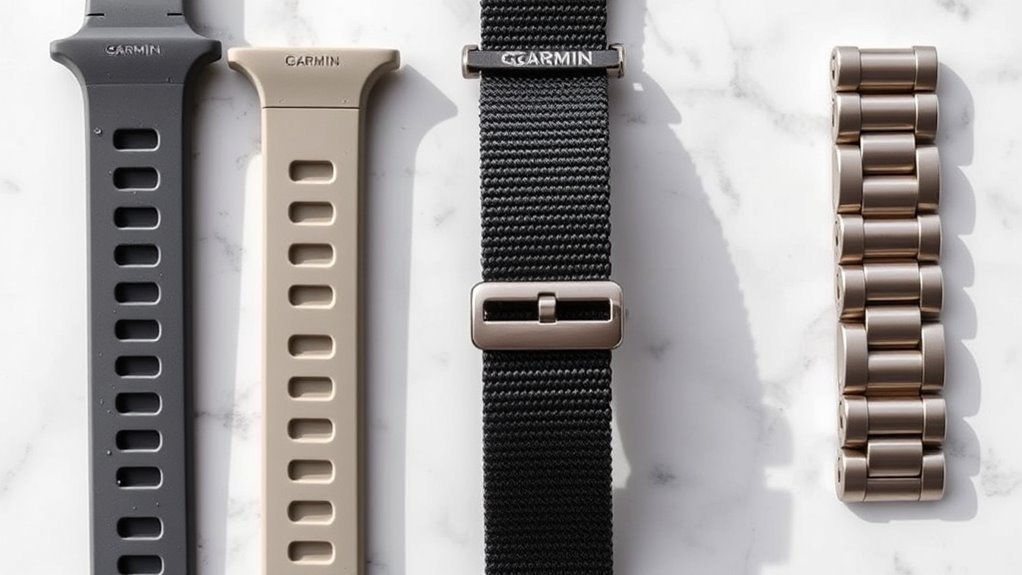
Before cleaning begins, identify the Garmin watch band material. Garmin gives different care instructions for silicone or TPU elastomer bands, nylon or fabric straps, leather bands, and metal bands.
Silicone and TPU bands are common for workouts because they tolerate sweat and water well. Nylon and fabric straps are breathable but hold more moisture, so they need enough drying time after washing. Leather is intended mainly for casual wear and should not be repeatedly exposed to sweat or water. Metal bands are durable but need gentle cleaning to protect their cosmetic finish.
Garmin’s current wear-and-care guidance is the best starting point when choosing a cleaning method. If the instructions in the owner manual for your specific watch or band are more restrictive, follow the model-specific manual.
Note: Garmin recommends cleaning its wearable devices and accessory bands a couple of times per week and after activities to remove sweat and residue and help prevent odor.
Clean Silicone Garmin Watch Bands
Silicone and TPU Garmin bands are generally the simplest to clean. Garmin’s normal recommendation is a fresh-water rinse followed by complete drying.
- Rinse the silicone or TPU band with fresh water to remove sweat and ordinary residue.
- Wipe away remaining moisture with a soft, clean, lint-free cloth.
- Let the band dry completely before wearing it again.
If lotion, sunscreen, insect repellent, or similar residue remains, Garmin says rubbing alcohol can be used with a lint-free cloth on silicone or TPU. Garmin also permits a 70% isopropyl-alcohol pad on silicone bands. After using alcohol, rinse the band with water and let it dry before wearing it.
Warning: Do not clean a Garmin band with bleach, and do not submerge the watch or band in a bowl or container of cleaning agent. Garmin also advises against ultrasonic cleaners.
There is no need to routinely soak a silicone Garmin band in warm soapy water for 10 or 15 minutes. A water rinse is the manufacturer’s recommended starting point.
Wash Garmin Nylon Straps
Nylon and fabric Garmin straps absorb more moisture than silicone, so thorough washing and drying are especially important. Garmin recommends cold water rather than a vinegar soak.
- Wash the nylon or fabric strap in cold water.
- If stubborn dirt or stains remain, work in a small amount of mild soap or mild detergent by hand.
- Rinse thoroughly with fresh water until no soap remains.
- Hang the strap or lay it flat and allow it to dry completely before wearing it again.
Current Garmin owner manuals for nylon straps also advise against putting the strap in a washing machine or dryer. See Garmin’s nylon strap cleaning instructions.
Pro Tip: If a nylon band starts to smell after workouts, focus first on a thorough cold-water wash, complete rinsing, and full air drying. Avoid masking the odor with fragrance or leaving detergent trapped in the fabric.
Do not use disinfectant wipes or rubbing alcohol on fabric or nylon bands unless the instructions for that exact product specifically allow it. Garmin’s general disinfectant guidance excludes fabric bands.
Clean Leather Garmin Bands
Leather Garmin bands require more restraint because repeated exposure to sweat, water, and aggressive cleaners can change their appearance.
- Wipe the band with a soft, clean, lint-free cloth.
- If dirt buildup will not come off with a dry cloth, lightly dampen the cloth with water and wipe gently.
- Let the leather dry completely before wearing it again.
Garmin’s general care guidance notes that leather or suede bands are intended for casual wear rather than vigorous activity. It also warns that leather cleaners and polishes may cause discoloration.
Some Garmin owner manuals for particular watches mention leather conditioner, so model-specific instructions may differ. For a general Garmin cleaning guide, however, a soft cloth with minimal moisture is the safest baseline.
Do not soak a leather band, scrub it aggressively, apply a vinegar mixture, or use disinfectant wipes or rubbing alcohol on it.
Clean Metal Garmin Watch Bands
Metal Garmin watch bands should be cleaned gently to avoid scratching or dulling their finish.
- Wipe the band with a soft, clean, lint-free cloth.
- If necessary, lightly dampen the cloth with water and wipe around the links and clasp.
- Dry the band completely before wearing it again.
Garmin says not to use metal polish or abrasive products to clean or refinish a metal watch band because they can damage the cosmetic finish.
If disinfection is needed, Garmin permits a 70% isopropyl-alcohol pad on metal bands. If a disinfecting wipe is used on a compatible Garmin device or band, Garmin recommends rinsing afterward to remove chemical residue that could irritate the skin.
For Garmin bands, the safest cleaning method is usually the least aggressive method that matches the material.
How Often Should You Clean a Garmin Watch Band?
Garmin recommends cleaning the wearable, accessory band, and charging area a couple of times per week and after each activity to remove accumulated sweat and residue.
The practical frequency depends on how the watch is used. Someone who runs, cycles, works outdoors, or wears the watch during sweaty workouts may need to rinse or clean the band after nearly every session. A casually worn leather or metal band may need less frequent cleaning, but visible dirt, residue, or moisture should still be addressed promptly.
Avoid unnecessary aggressive cleaning. More frequent cleaning does not require harsher chemicals or hard scrubbing.
Clean the Band After Swimming, Sweat, or Sunscreen Exposure
Workout sweat, salt water, chlorine, sunscreen, lotion, and insect repellent can leave residue on a Garmin watch and band. After a sweaty workout, rinse an appropriate water-resistant band and dry it fully.
Garmin recommends thoroughly soaking and rinsing compatible watches with fresh water after exposure to chlorine, salt water, or sunscreen during swimming or diving so deposits are removed. Do not use a high-pressure water jet on the watch because pressure can damage certain sensors.
For silicone or TPU residue from sunscreen, lotion, or insect repellent, rubbing alcohol on a lint-free cloth may be used according to Garmin’s care guidance, followed by a fresh-water rinse.
Leather bands should be kept away from swimming and repeated sweat exposure whenever possible.
Dry and Reattach Your Garmin Band
Drying is part of the cleaning process, not an optional final step. Garmin repeatedly advises allowing the band and watch to dry completely before use or charging.
Pat Dry Thoroughly
After rinsing or wiping the band, gently blot surface water with a soft microfiber or lint-free cloth. Pay attention to the clasp, band holes, edges, and other areas where droplets can remain.
Avoid aggressive rubbing, especially on leather, coated metal, or woven fabric.
Air Dry Completely
After removing surface moisture, leave the band in open air until it is dry throughout. Nylon and fabric may take considerably longer than silicone because water can remain inside the weave.
There is no universal 30-minute drying rule. Temperature, humidity, material, thickness, and how wet the band became all affect drying time.
Do not speed drying with a clothes dryer or other strong heat source. Garmin specifically says nylon straps should not be placed in a dryer.
Reattach After Drying
If the band was removed before cleaning, reattach it only after it is completely dry.
- Check the band for cracking, torn fabric, damaged hardware, or other wear.
- Reconnect both sides according to the attachment system used on your Garmin model.
- Confirm the pins or latches are fully seated and secure before wearing the watch.
If any part remains damp, allow more drying time. Wearing a wet band can trap moisture against the skin, and moisture around electrical contacts should also be avoided before charging.
Avoid Garmin Band Cleaning Mistakes
The most common cleaning mistakes come from treating every Garmin band as if it were made from the same material. A product that is acceptable on silicone or metal may be inappropriate for leather or fabric.
Some bands reach a point where cleaning stops helping. Silicone that has gone tacky or nylon that holds odour after washing is telling you it is done, and a replacement costs far less than the watch — see our band guide by QuickFit size.
Harsh Chemical Damage
Garmin says not to clean its devices or bands with bleach. It also warns against abrasive cleaners, metal polish on metal bands, and submerging bands in cleaning agents.
Alcohol needs a more specific rule than a blanket ban:
- Silicone/TPU: rubbing alcohol may be used for certain residues and a 70% IPA pad is permitted.
- Metal: a 70% IPA pad is permitted.
- Nylon/fabric: do not use disinfectant under Garmin’s general guidance.
- Leather: do not use disinfectant or rubbing alcohol.
When alcohol is used on an approved silicone or metal band, follow Garmin’s directions and rinse away residue when instructed.
Overcleaning Risks
Regular cleaning is useful, but aggressive cleaning is not. Hard brushes, abrasive pads, strong cleaners, repeated soaking, and vigorous scrubbing can damage finishes, leather, or fabric.
Clean often enough to remove sweat and residue, but use the gentlest manufacturer-approved method for the material.
Drying Mistakes
Do not put on a band that still feels damp. Fabric can retain moisture inside the weave even when the surface looks dry.
- Blot water instead of rubbing aggressively.
- Let the band air dry completely.
- Do not put nylon straps in a clothes dryer.
- Do not reconnect the watch to its charger while the watch or electrical contacts are still wet.
Complete drying helps protect the watch, the band, and the skin underneath it.
When Cleaning Is Not Enough
Cleaning cannot repair a physically damaged watch band. Inspect the strap while it is off the wrist and consider replacing it if you find cracking, a torn weave, a broken clasp, loose attachment hardware, severe deterioration, or damage that prevents the band from securing the watch safely.
If odor remains after a nylon or fabric strap has been properly washed, thoroughly rinsed, and fully dried, repeat a mild manufacturer-approved wash rather than increasing chemical strength.
If skin irritation develops, remove the watch and give the skin time to recover. Garmin advises keeping the watch clean and dry and avoiding an overly tight fit. Persistent, painful, blistering, or worsening skin problems should be evaluated by an appropriate healthcare professional rather than treated only by changing the cleaning routine.
Frequently Asked Questions
Can I use alcohol wipes to clean my Garmin?
It depends on the material. Garmin permits a 70% isopropyl-alcohol pad on the watch exterior, silicone bands, and metal bands. It advises against disinfectants on fabric and leather. For silicone residue from lotion, sunscreen, or insect repellent, rubbing alcohol on a lint-free cloth may also be used, followed by rinsing with water.
How do I get odor out of a Garmin watch band?
For silicone or TPU, rinse with fresh water and dry completely. For nylon or fabric, wash in cold water and use mild soap if needed, then rinse thoroughly and allow the strap to dry completely. Avoid fragrance, vinegar, bleach, or stronger cleaners simply to cover an odor.
How do I clean a stainless-steel Garmin watch band?
Wipe the metal band with a soft, clean, lint-free cloth. Lightly dampen the cloth with water if needed, then dry the band completely. Garmin advises against metal polish and abrasives. A 70% isopropyl-alcohol pad may be used on a metal band when disinfection is needed.
Why is my Garmin watch causing a rash?
Moisture, sweat, residue, friction, an overly tight fit, or individual skin sensitivity can contribute to irritation. Garmin recommends keeping the watch clean and dry and not wearing it too tightly. Remove the watch if irritation develops and allow the skin to recover. Seek medical advice if the reaction is severe or persistent.
Can I soak my Garmin band in soapy water?
Do not routinely submerge Garmin bands in cleaning agents. Garmin’s general guidance calls for rinsing silicone or TPU with water, washing nylon or fabric in cold water with mild soap when needed, and wiping leather and metal. Follow any more specific instructions in the owner manual for your exact band.
How often should I clean my Garmin watch band?
Garmin recommends cleaning its wearable devices and accessory bands a couple of times per week and after activities to remove sweat buildup and residue. Active users may therefore rinse or clean the band after most workouts.
Conclusion
Cleaning a Garmin watch band safely is mostly about using the right method for the material. Silicone and TPU normally need a fresh-water rinse; nylon and fabric need cold water and mild soap when necessary; leather should be wiped with minimal moisture; and metal should be cleaned with a soft lint-free cloth. Garmin allows alcohol on certain silicone and metal surfaces but not on fabric or leather. Avoid bleach, abrasives, unnecessary soaking, and ultrasonic cleaning, and always let the band dry completely before wearing it again.
Sources
- Garmin Watch Wear and Care Tips — material-specific cleaning methods, cleaning frequency, disinfectant guidance, and post-swim care.
- Garmin: Cleaning the Charging Contacts on a Garmin Wearable — 70% isopropyl-alcohol guidance, bleach restrictions, disinfectant precautions, and ultrasonic-cleaner warning.
- Garmin Venu 4 Series Owner’s Manual: Cleaning the Nylon Strap — mild-detergent hand washing, drying, and washing-machine/dryer precautions.
- Garmin fēnix 9 Series Owner’s Manual: Device Care — general cleaning, complete drying, leather-band care, and skin-irritation precautions.

