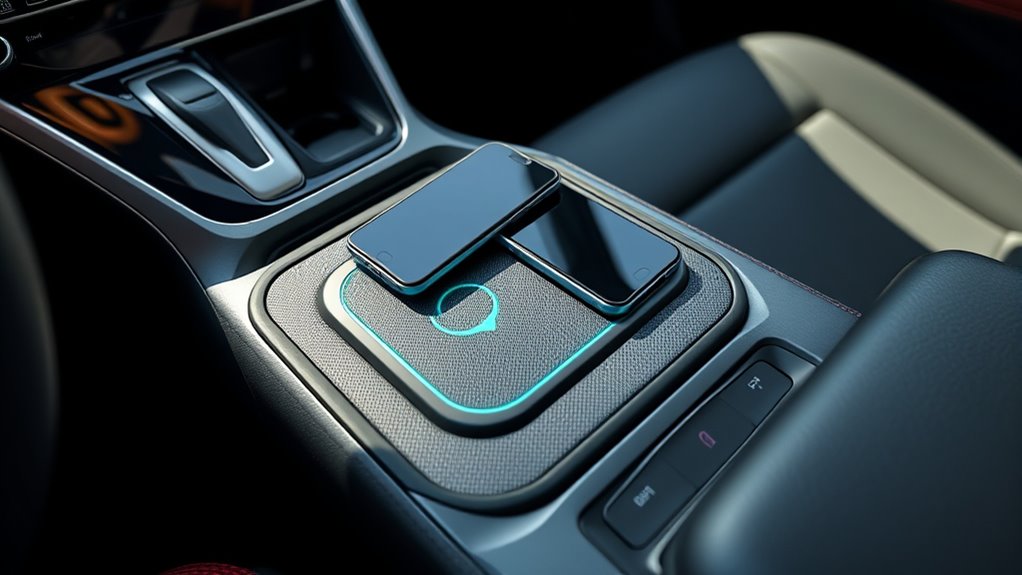
The 2026 RAV4 XSE PHEV wireless charger is a convenient way to power a compatible smartphone without plugging in a cable. However, there is an important difference between the XSE and some other RAV4 trims: the U.S. XSE has one wireless charging position, not two. Understanding where to place your phone, how charging works, and what causes interruptions will help you use the feature reliably.
Quick Answer
The U.S.-spec 2026 Toyota RAV4 XSE Plug-in Hybrid has one Qi-compatible wireless phone charger with a charging indicator. Place one compatible phone flat on its charging area. To charge a second phone, use a USB-C port. Thick cases, metal accessories, poor alignment, and excessive heat can interrupt wireless charging.
Key Takeaways
- Toyota lists one Qi-compatible wireless charger for the 2026 RAV4 XSE PHEV, rather than a dual charging pad.
- Place one compatible smartphone on the charging surface, with its wireless charging coil aligned over the charging area.
- The XSE has two front USB-C charging ports rated at up to 45W each, giving you a practical way to charge additional devices.
- Remove thick cases, magnetic accessories, metal objects, and other obstructions if charging fails.
- Wireless phone charging does not require Remote Connect, Wi-Fi Connect, or another Toyota Connected Services subscription.
- The wireless phone charger and the plug-in hybrid battery charging system are separate features with different purposes.
Does the 2026 RAV4 XSE PHEV Have a Dual Wireless Charger?
)
No. The U.S.-spec 2026 RAV4 XSE PHEV has one Qi-compatible wireless phone charger. Toyota’s published equipment guide identifies a single wireless charging position for the XSE grade.
The dual wireless charging arrangement belongs to other equipment configurations, including the 2026 RAV4 Limited hybrid. The Limited is not a U.S. plug-in hybrid trim.
This distinction matters because an owner might expect both front occupants to charge their phones wirelessly at the same time. On the XSE PHEV, one person can use the built-in wireless charger while the other uses a USB-C connection.
According to the Toyota 2026 RAV4 Sales Consultant Guide, the XSE includes one Qi-compatible wireless phone charger and multiple USB-C ports.
The XSE provides one built-in wireless charging position. Its USB-C ports are the practical solution when more than one phone needs power.
For owners who want an organized cabin, this arrangement still reduces cable clutter. The wireless pad provides a dedicated charging area, while the USB-C connections offer flexibility for passengers and other devices.
How Does the RAV4 Wireless Charging Pad Work?
The RAV4 XSE PHEV wireless charger uses Qi inductive charging. Instead of transferring electricity through a physical connector, the system uses a magnetic field between coils inside the charging pad and a compatible phone.
When the coils align properly and charging conditions are acceptable, the charger transfers power to the phone’s battery. The phone manages how much power it accepts.
Wireless charging can work while the vehicle is stationary or moving, provided the required vehicle power mode is active and the phone remains positioned correctly.
How Qi Wireless Charging Works
Qi is a wireless charging standard developed by the Wireless Power Consortium. It allows compatible smartphones and charging equipment to exchange power without a charging cable.
For the RAV4’s built-in system to work, the phone must support an appropriate Qi charging profile. The charging surface and the phone’s internal receiving coil also need suitable alignment.
A phone that charges correctly on another Qi pad may still perform differently in a vehicle because of its case, dimensions, coil position, or supported charging profile.
The Wireless Power Consortium’s Qi certification guidance explains how certified devices are tested for compatibility, safety, and interoperability.
Unlike a wired charger, the system does not require a cable connection to the phone. However, it also does not automatically provide the highest charging speed advertised by the phone manufacturer.
How Can You Tell Whether Your Phone Is Charging?
The XSE wireless charger includes a charging indicator. You can also check the battery symbol on your smartphone to confirm that the phone is receiving power.
Toyota’s general wireless charging guidance describes an amber indicator during active charging and a green indicator when charging is complete. Exact indicator behavior can vary between systems.
If the phone does not show a charging symbol, adjust its position slightly and check the charging indicator again.
Do not assume that placing a phone on the surface guarantees charging. A phone may sit on the pad without receiving power if its internal coil is not aligned or its battery protection system has paused charging.
Where Should You Place Each Phone?
On the 2026 RAV4 XSE PHEV, place one Qi-compatible phone flat on the designated wireless charging area. A second phone should use one of the available USB-C charging ports.
Unlike a genuine dual-pad system, the XSE does not provide separate left and right wireless charging zones for two phones.
Follow these steps to position your phone:
- Park safely before setting up your phone.
- Turn on the vehicle’s required accessory or power mode.
- Locate the designated wireless charging surface in the front console area.
- Remove any objects already resting on the charging surface.
- Place your Qi-compatible phone flat, with its screen facing upward.
- Align the phone’s charging coil with the pad’s charging area.
- Check the charging indicator and the phone’s battery symbol.
If charging fails, move the phone slightly rather than repeatedly lifting it away. Some smartphones have charging coils that are not positioned exactly at the center of the device.
For the second phone, connect a suitable cable to a front USB-C charging port.
The XSE’s front USB-C charging ports are rated at up to 45W. That is the port’s rated output, not a guarantee that every connected smartphone will charge at 45W.
This setup gives both front occupants a practical way to charge their phones during a commute or longer trip.
Why Do Some Phones Charge Slowly or Stop Charging?
Wireless charging problems usually come from poor alignment, incompatible accessories, charging-profile differences, or heat. The charger may reduce power or stop charging to protect the phone and charging system.
The following table explains the most common situations and their likely solutions.
| Problem | Possible Cause | What to Do |
|---|---|---|
| Charging never starts | Poor alignment or incompatible phone | Reposition the phone and confirm Qi compatibility. |
| Charging starts and stops | Phone movement, case interference, or heat | Remove the case, improve alignment, and allow cooling. |
| Battery percentage rises slowly | Limited wireless charging power or active phone functions | Reduce demanding phone activity or use USB-C charging. |
| Charging stops when the phone gets hot | Thermal protection | Remove the phone and let it cool before retrying. |
| One phone works but another does not | Different charging coils, cases, or supported profiles | Test the affected phone without its case and verify its charging support. |
Wireless charging generally produces more heat than a comparable efficient wired connection. Its actual speed can also change as the phone warms up or approaches a full battery.
Some phones reduce charging power when navigation, video, or other demanding functions are running. Battery protection settings can also limit charging.
If dependable charging speed matters more than cable-free convenience, the XSE’s USB-C ports are a useful alternative.
How to Fix RAV4 XSE PHEV Wireless Charging Issues
Start with the simplest causes before assuming the wireless charging pad is defective. Most basic checks involve the phone’s placement, accessories, and charging conditions.
- Confirm compatibility. Make sure your smartphone supports Qi wireless charging.
- Check vehicle power. Verify that the required vehicle power mode is active.
- Remove extra objects. Clear the charging surface of keys, coins, cards, and accessories.
- Adjust alignment. Center the phone over the charging zone and check its battery indicator.
- Test without the case. Remove thick or magnetic cases and attached accessories.
- Allow cooling. If the phone or pad is unusually hot, stop charging until it cools.
- Test another Qi phone. Compare results with another compatible device to help isolate the problem.
- Seek service if necessary. If multiple compatible phones fail under normal conditions, have a Toyota service technician inspect the system.
For general operation and indicator guidance, Toyota provides official wireless charging instructions. The applicable owner’s manual should take priority if your XSE’s controls or indicators differ.
Check Pad Alignment and Surface Condition
Correct alignment is especially important because Qi charging depends on the position of two coils. The phone may appear properly placed while its internal charging coil is outside the pad’s effective charging area.
First, place the phone flat on the charging surface. If the charging indicator does not show successful operation, move the phone slightly and check again.
Inspect the surface for dust, loose objects, or spilled liquid. Clean it gently with a suitable soft cloth, following Toyota’s interior cleaning guidance.
Do not pour water or cleaning chemicals directly onto the charging pad.
Also check whether the phone shifts during ordinary driving. A phone that slides away from the effective charging area can stop receiving power.
Remove Phone Cases and Other Interference
Cases and attachments can interfere with charging, especially when they increase the distance between the phone and the charging surface.
For a reliable compatibility test, remove the phone case completely. This is particularly helpful for cases with magnetic rings, metal plates, built-in stands, or card holders.
Qi2 or MagSafe-compatible accessories do not automatically guarantee ideal charging performance on every older-style Qi charging surface.
If the phone works normally without its case, the accessory is a likely cause of the problem. You may need a different case or use wired charging.
Warning: Never place coins, metal plates, credit cards, or other foreign objects between a phone and an active wireless charger. Metal objects can become hot, and cards or electronics may be damaged. Stop charging if the phone or pad becomes unusually hot.
If the charging problem continues after these checks, consider whether the issue occurs with one phone or several devices. A problem affecting multiple compatible phones is more likely to require vehicle-side diagnosis.
How the Charging Pad Helps in Daily Driving
The XSE PHEV’s wireless charger offers a convenient place to power a compatible smartphone while keeping the cabin organized. You can place a phone on the charging surface without connecting and disconnecting a cable on every trip.
This feature is most useful for maintaining your phone’s battery during normal driving, especially when it is properly aligned and remains within a comfortable temperature range.
However, the pad does not replace every wired charging need. A USB-C connection may be preferable during heavy phone use or whenever wireless charging becomes inconsistent.
There are three practical charging options worth distinguishing:
| Charging Method | Purpose | Key Detail |
|---|---|---|
| Qi wireless charger | Charge one compatible phone | Cable-free, but alignment and heat affect performance |
| Front USB-C charging ports | Charge additional phones or devices | Two front charging ports rated up to 45W each |
| Plug-in hybrid vehicle charging port | Recharge the vehicle’s traction battery | XSE supports an 11-kW onboard AC charger and CCS1 DC fast charging |
The vehicle’s high-voltage battery charging equipment does not determine how quickly the wireless phone pad charges your smartphone. These are separate electrical systems.
What RAV4 Connected Features Add Convenience?
The 2026 RAV4 XSE PHEV includes several connected technologies beyond phone charging. They support remote vehicle access, navigation, emergency assistance, and maintenance information.
These services work independently of the wireless charging pad, although keeping your smartphone charged can make their mobile features easier to use.
- Safety Connect: Provides supported emergency assistance, automatic collision notification, enhanced roadside assistance, and stolen vehicle assistance features.
- Service Connect: Provides vehicle health reports, maintenance alerts, and service reminders.
- Remote Connect: Supports compatible Toyota app functions such as remote locking, unlocking, vehicle status checks, and remote climate or start functions where available.
- Drive Connect: Provides features such as cloud navigation, Intelligent Assistant, and Destination Assist with supported subscription access.
- Wi-Fi Connect: Offers a vehicle hotspot and supported integrated streaming features through a compatible subscription.
Toyota’s 2026 Audio Multimedia and Connected Services chart lists the U.S. XSE PHEV with five-year minimum Safety Connect and Service Connect trials, one-year Remote Connect and Drive Connect trials, and a 30-day Wi-Fi Connect trial.
Continued use of certain connected services requires a paid subscription after the applicable trial. Available features also depend on network access, activation, and service terms.
The XSE’s 12.9-inch multimedia touchscreen supports wireless Apple CarPlay and Android Auto, allowing compatible smartphones to connect without a USB data cable.
However, wireless smartphone projection and wireless phone charging are different functions. A phone can connect to the infotainment system without resting on the Qi charging pad.
For additional model specifications, Toyota provides the 2026 RAV4 Plug-in Hybrid model information, including its trim lineup and available technology.
Frequently Asked Questions
Does the 2026 RAV4 PHEV Have Fast Charging?
Yes. The U.S. 2026 RAV4 XSE PHEV supports CCS1 DC fast charging for its traction battery and has an 11-kW onboard AC charger. This capability is separate from wireless smartphone charging. The built-in Qi phone pad does not automatically provide the same charging speed as a dedicated fast phone charger.
What Are the Key Features of the 2026 RAV4 XSE PHEV?
The 2026 RAV4 XSE PHEV combines a 324-horsepower plug-in hybrid powertrain with an EPA-estimated 52-mile electric driving range. It also includes a 12.9-inch multimedia touchscreen, heated and ventilated front seats, wireless smartphone connectivity, and one Qi wireless phone charger. The XSE supports DC fast charging through a CCS1 port.
Does the 2026 RAV4 Have Wireless Charging?
Yes, wireless phone charging is offered on selected 2026 Toyota RAV4 trims. The U.S. RAV4 XSE PHEV has one Qi-compatible charger, while the RAV4 Limited hybrid offers dual Qi wireless charging. Equipment differs by trim, so the XSE should not be treated as a two-phone wireless charging system.
How Do You Turn On a RAV4 Hybrid With the Key?
To start a RAV4 Hybrid or Plug-in Hybrid, keep the registered smart key inside the vehicle, shift to Park, press the brake pedal, and press the Power button. Confirm that the READY indicator appears before driving. If the key is not detected, check its battery and follow the owner’s manual backup starting procedure.
Does the RAV4 Wireless Charger Need a Toyota Subscription?
No. The built-in wireless phone charger does not require Remote Connect, Wi-Fi Connect, or another Toyota Connected Services subscription. It works as vehicle charging equipment when the required power and compatibility conditions are met. Connected Services subscriptions apply to separate features such as remote vehicle access and cloud-based functions.
Conclusion
The 2026 Toyota RAV4 XSE PHEV provides a practical wireless charging solution, but it has one Qi charging position rather than a dual pad. Correct phone placement, compatible accessories, and temperature management are the main factors behind reliable operation.
For two phones, use the wireless charger for one device and a USB-C port for the other. If wireless charging remains unreliable after basic checks, try another compatible phone before arranging a Toyota service inspection.
Sources
- Toyota 2026 RAV4 Sales Consultant Guide: XSE single Qi charger, Limited dual charging, USB-C equipment, XSE electric range, and vehicle charging capabilities.
- Toyota Wireless Charging Instructions: General charger operation, indicator behavior, placement, and safety precautions.
- Wireless Power Consortium — Qi Certified Products: Qi compatibility, certification, and interoperability.
- Toyota 2026 Audio Multimedia and Connected Services Feature Applicability: XSE PHEV connected features and service trial periods.
- Toyota 2026 RAV4 Plug-in Hybrid: Official model lineup, performance, equipment, and multimedia information.