A good OBD2 scanner can help you understand a Toyota Tundra warning light before you start replacing parts or booking diagnostic work. Some scanners are designed mainly for check-engine codes and emissions data, while others can access Toyota systems such as ABS, SRS, transmission modules, service functions, and supported bidirectional tests.
The best OBD2 scanner for your Toyota Tundra depends on how deep you want to diagnose. For basic check-engine troubleshooting, a simple wired reader may be enough. If you maintain your own truck and want access beyond the engine computer, a Toyota-compatible multi-system or full-system scanner is the better choice.
Updated for 2026. Scanner functions can vary by Toyota Tundra model year, ECU, trim, software version, and tool firmware. Always confirm the exact function you need before ordering.
Affiliate disclosure:. As an Amazon Associate I earn from qualifying purchases. This roundup is reader-supported. When you click an Amazon link, we may earn a commission from qualifying purchases at no extra cost to you.
Quick Verdict
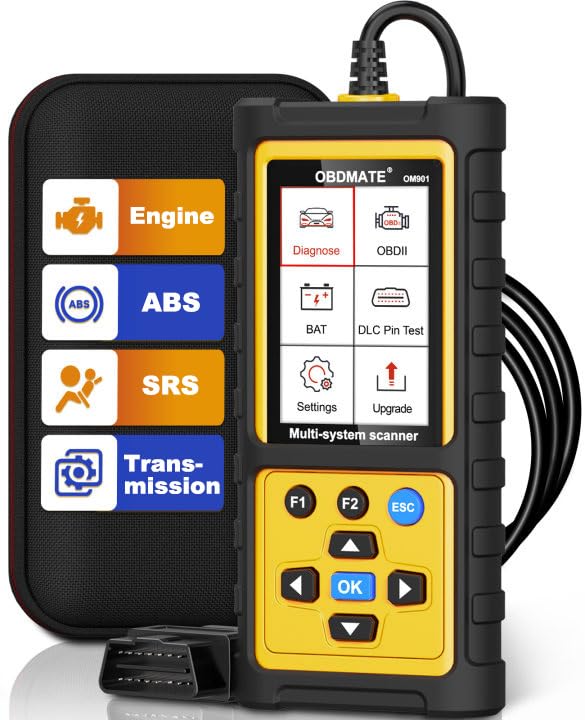
Best overall: The OBDMATE OM901 is a useful middle ground between a basic check-engine reader and a more complex diagnostic tablet because it adds supported engine, transmission, ABS, and SRS diagnostics.
Best advanced Toyota/Lexus option: The LAUNCH Creader Elite 2.0 is the stronger choice for buyers who specifically need full-system access and supported bidirectional functions.
Best Toyota-specific option for supported older Tundras: The OBDMATE OM701 provides Toyota/Lexus/Scion-focused diagnostics and service functions, but its enhanced vehicle coverage is listed through 2023, so owners of newer trucks should verify compatibility carefully.
Best simple code reader: The Autel AL319, FOXWELL NT201, VDIAGTOOL VD10, and Autel MS309 make more sense if your main goal is check-engine codes and emissions readiness rather than ABS, SRS, or advanced Toyota service work.
Compatibility Note Before You Buy
Generic OBD-II compatibility is not the same as Toyota full-system compatibility. A basic scanner may communicate perfectly with the Tundra’s emissions-related engine computer while still being unable to access ABS, airbags, transmission modules, TPMS functions, service resets, or active tests.
Confirm your exact Tundra model year and the exact function you need before purchasing, especially for 2022-and-newer trucks and advanced service procedures.
Top Picks
|
Category |
Product |
Best For |
|---|---|---|
|
🏆 Best Overall |
Engine, transmission, ABS and SRS diagnostics |
|
|
🚀 Best Advanced |
Toyota/Lexus full-system and supported active tests |
|
|
🎯 Best Toyota-Specific |
Supported Toyota/Lexus/Scion vehicles through 2023 |
|
|
🔧 Best for DIY Repairs |
Basic engine-code troubleshooting and live data |
|
|
🎯 Best for Beginners |
Simple CEL, live-data and emissions checks |
|
|
💰 Best Value |
Affordable plug-and-play engine diagnostics |
|
|
🪙 Best Compact Pick |
Roadside code reading and emissions readiness |
|
|
🛠️ Best DTC Library |
Engine diagnostics with a large code library |
|
|
💸 Budget Pick With Voltage Check |
Basic engine diagnostics plus battery-voltage checking |
How These Scanners Were Selected
The lineup focuses on the diagnostic jobs that matter most to Tundra owners: reading and clearing engine trouble codes, checking freeze-frame information, viewing live data, checking emissions readiness, accessing additional Toyota modules, and performing supported service or active-test functions.
More advanced tools receive preference when they provide meaningful Toyota-specific capability, while simpler code readers are included for buyers who do not need ABS, SRS, transmission, programming, or bidirectional functions. Ease of use, update support, portability, diagnostic depth, and clear limitations were also considered.
OBDMATE OM901
Best for: Tundra owners who want more diagnostic depth than an engine-only reader without moving straight to a more complicated tablet scanner.
The OM901 is designed to go beyond generic check-engine diagnostics by adding access to supported transmission, ABS, and SRS systems. It also provides the standard OBD-II functions most DIY owners expect, including trouble-code reading and clearing, live data, freeze frame, emissions readiness, O2 monitoring, and vehicle information.
The 3.5-inch color display is larger than the screens used on many basic handheld code readers. That can make live information and menus easier to follow in the garage or inside the cab.
Why You’ll Like It
- Goes beyond engine-only diagnostics
- Supports engine, transmission, ABS and SRS diagnostics on compatible vehicles
- Includes full standard OBD-II functions
- 3.5-inch color display
- Useful middle ground between basic readers and advanced tablets
Who Should Avoid It
Skip it if you specifically need Toyota bidirectional controls, coding, key functions, or a particular maintenance reset that is not clearly listed for your Tundra. The OM901 is a multi-system diagnostic reader, not a substitute for every dealer-level function.
Review Snapshot
The sentiment graphic below comes from the original source article. Marketplace reviews change over time, so check the current Amazon listing for the latest feedback rather than treating this image as current review data.
Check Product Details on Amazon
LAUNCH X431 Creader Elite 2.0 FGC OBD2 Scanner

OBDMATE OM701

Best for: Owners of supported Toyota Tundra model years who specifically want Toyota-focused diagnostics and common maintenance functions.
The OM701 is designed specifically around Toyota, Lexus, and Scion systems rather than acting only as a universal engine-code reader. Its enhanced vehicle coverage is listed through 2023, which makes it potentially useful for many earlier Tundra generations but a poor choice to buy blindly for a 2024-or-newer truck.
Available functions can include full-system code access and multiple maintenance procedures such as oil reset, throttle relearn, ABS bleeding, steering-angle calibration, battery-related functions, and other supported routines. Function availability still depends on the exact vehicle.
TPMS caution: Do not assume this tool replaces a dedicated TPMS activation/relearn device. Its TPMS capability is limited and vehicle-dependent.
Why You’ll Like It
- Designed specifically for Toyota, Lexus and Scion
- Access beyond standard engine OBD-II diagnostics
- Multiple maintenance and reset functions on supported vehicles
- Useful handheld format for DIY service work
Who Should Avoid It
Owners of 2024-and-newer Tundras should not assume compatibility because the enhanced coverage is listed through 2023. Also confirm any specialized service function before buying.
Review Snapshot
The sentiment graphic below is retained from the original source article and is not presented as current marketplace review data.
Check Current Amazon Availability
FOXWELL NT201

Best for: DIY owners who want straightforward engine diagnostics without an app, subscription, or complicated setup.
The NT201 handles the core OBD-II jobs many owners actually need: reading and clearing engine trouble codes, checking freeze-frame information, monitoring live data, and checking I/M readiness before emissions testing.
Limitation: It is an engine-focused code reader. It is not the right choice for Tundra ABS, SRS, transmission-module diagnostics, coding, or bidirectional controls.
Key Benefits
- Reads and clears engine trouble codes
- Displays live data and freeze-frame information
- Supports I/M readiness checks
- Wired operation with no phone required
- Good fit for straightforward DIY troubleshooting
Review Snapshot
The sentiment graphic below comes from the original source article and should not be treated as current review statistics.
Check Product Details on Amazon
Autel AL319

Best for: Beginners who want quick check-engine answers without pairing a phone or learning advanced diagnostic software.
The AL319 provides the core functions needed for basic Tundra engine diagnostics. It can retrieve and clear supported generic and manufacturer-specific powertrain codes, show code definitions, display live PCM data and freeze-frame information, and check emissions-monitor readiness.
The dedicated I/M readiness function is particularly convenient if you want to check whether emissions monitors have completed after repairs or after codes were cleared.
Key Benefits
- Simple plug-and-play setup
- Reads and clears engine-related OBD-II trouble codes
- Displays live PCM data and freeze frame
- One-touch I/M readiness function
- No phone or Bluetooth pairing required
Limitation: This is not an ABS, SRS, transmission, TPMS, coding, or bidirectional scanner.
Review Snapshot
The sentiment graphic below is retained from the original source article and is not presented as current marketplace review data.
Check Product Details on Amazon
VDIAGTOOL VD10

Best for: Buyers who want a low-complexity scanner for routine engine-code work.
The VD10 covers the essential OBD-II functions most budget shoppers need. It reads and clears engine trouble codes, displays live data and freeze frame, checks emissions readiness, and retrieves vehicle information where supported.
Its wired design means there is no app, account, Bluetooth connection, or separate battery to manage.
Key Benefits
- Plug-and-play operation
- Engine-code reading and clearing
- Live data and freeze-frame viewing
- I/M readiness checking
- Suitable for OBD-II-compliant light trucks
Limitation: The VD10 is an engine OBD-II reader and does not provide Toyota full-system diagnostics.
Review Snapshot
The sentiment graphic below is retained from the source article. Check Amazon for current customer feedback.
Check Product Details on Amazon
Autel MS309

Best for: Keeping a compact scanner in the glovebox or toolbox for quick CEL checks.
The MS309 focuses on straightforward OBD-II diagnostics. It can retrieve and clear supported codes, show on-screen DTC definitions, display freeze-frame information, retrieve vehicle information where available, and check emissions readiness.
Its smaller feature set is also part of its appeal: there are fewer menus to work through when you simply want to know why the check-engine light came on.
Key Benefits
- Compact handheld design
- Reads and clears supported OBD-II codes
- On-screen code definitions
- Freeze-frame viewing
- I/M readiness status
Limitation: Choose a more advanced scanner if you need live-data graphing, Toyota module access, active testing, or maintenance functions.
Review Snapshot
The sentiment graphic below comes from the original source article and should not be treated as live review data.
Check Product Details on Amazon
Motivora V600
Best for: Owners who want a basic scanner with more on-device trouble-code reference information.
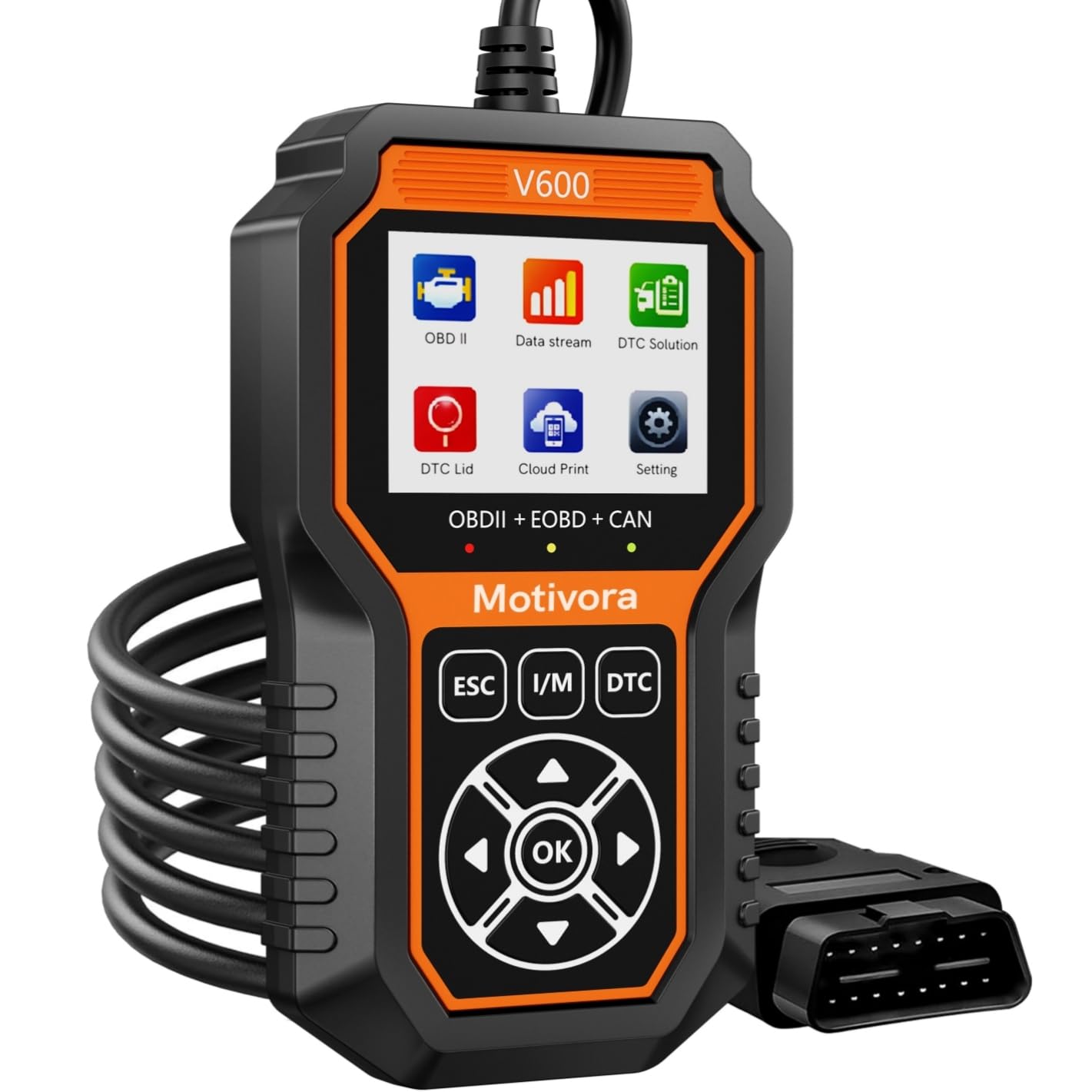
The V600 handles engine trouble codes, live data, freeze-frame information, I/M readiness and supported O2/EVAP monitoring. Its large code library can reduce the amount of separate searching needed when a diagnostic trouble code appears.
Limitation: It remains an engine-focused OBD-II tool. It does not replace an ABS, SRS, transmission or Toyota full-system scanner.
Key Benefits
- Large built-in DTC reference library
- Reads and clears engine codes
- Live-data display
- Freeze-frame and I/M readiness functions
- Supported O2 and EVAP diagnostic functions
Review Snapshot
The sentiment graphic below is retained from the original article and should not be treated as current Amazon review data.
Check Product Details on Amazon
UMEIJA OBD-V620

Best for: Budget-focused owners who want basic engine diagnostics plus a quick look at battery voltage.
The OBD-V620 provides routine engine-code functions including code reading and clearing, live data, freeze frame, I/M readiness and supported emissions-related checks. Its battery feature is useful for viewing voltage, but it should not be confused with a full battery health or load tester.
Important limitation: The battery function checks voltage rather than complete battery health, and this scanner does not provide ABS diagnostics.
Key Benefits
- Reads and clears engine OBD-II codes
- Displays live data and freeze frame
- Supports I/M readiness
- Supported O2 and EVAP functions
- Battery-voltage checking
Review Snapshot
The sentiment graphic below is retained from the original article and is not presented as current marketplace review data.
Check Product Details on Amazon
Before You Buy
- Decide how deep you need to diagnose: A CEL reader is much cheaper than a Toyota full-system scanner, but it cannot replace one.
- Confirm the exact model year: Toyota compatibility can change between generations and modules.
- Confirm the exact function: “Toyota compatible” does not automatically mean ABS bleeding, TPMS relearn, key programming, battery registration, coding, or every active test is supported.
- Record codes before clearing them: Clearing codes may erase useful freeze-frame information and reset emissions readiness monitors.
- Check software terms: Update periods, added vehicle software and advanced-function access may differ between product packages.
- Do not ignore serious warnings: A scanner is a diagnostic aid, not proof that a truck is safe to keep driving.
Engine-Only vs Full-System Scanners
| Capability | Basic OBD-II Reader | Toyota Multi/Full-System Tool |
|---|---|---|
| Check-engine codes | Usually yes | Yes |
| Freeze frame | Usually yes | Usually yes |
| Emissions readiness | Usually yes | Usually yes |
| Engine live data | Model dependent | Usually yes |
| ABS/SRS diagnostics | No | Supported models/functions only |
| Transmission module diagnostics | No | Supported models/functions only |
| Bidirectional active tests | No | Advanced tools only |
| Service resets/calibrations | No | Vehicle and function dependent |
FAQ
Will Any OBD2 Scanner Work With A Toyota Tundra?
A standard OBD-II scanner can handle emissions-related engine diagnostics on a compatible Tundra, but that does not mean it can access every Toyota control module. If you need ABS, SRS, transmission, TPMS, service resets, coding, or bidirectional tests, look for enhanced Toyota coverage and confirm your exact model year.
What Is The Best OBD2 Scanner For A Toyota Tundra?
The OBDMATE OM901 is the strongest general-purpose choice in this lineup if you want engine, transmission, ABS and SRS diagnostics without moving to a more advanced tablet-style tool. The LAUNCH Creader Elite 2.0 makes more sense when supported Toyota/Lexus full-system access and bidirectional testing are priorities.
Do I Need A Bidirectional Scanner?
Not for ordinary check-engine troubleshooting. Bidirectional capability becomes useful when you need the scanner to command a supported component or system rather than simply read information from it. Examples can include operating actuators or carrying out certain service procedures.
Can A Basic Scanner Read ABS Or Airbag Codes?
Usually not. Products such as the Autel AL319, Autel MS309, VDIAGTOOL VD10, FOXWELL NT201, Motivora V600 and UMEIJA OBD-V620 are primarily standard engine OBD-II readers. Choose an enhanced scanner if ABS or SRS diagnostics are important.
Can A Scanner Tell Me If My Tundra Is Safe To Drive?
No. A scanner provides diagnostic information, but it cannot guarantee that a vehicle is safe. A flashing check-engine light, oil-pressure warning, overheating, severe misfire, braking problem, or major drivability problem should be treated seriously.
Should I Clear Trouble Codes Immediately?
No. Record the codes and check any available freeze-frame information first. Clearing codes can remove useful diagnostic evidence and reset emissions monitors.
Which Scanner Is Best For A Beginner?
The Autel AL319 is one of the easiest starting points because it uses a wired connection, provides on-screen code information, supports live PCM data and freeze frame, and includes a dedicated emissions-readiness function. The FOXWELL NT201 and VDIAGTOOL VD10 are also straightforward choices.
Which Scanner Is Better For Older Toyota Tundras?
The OBDMATE OM701 is worth considering when you have a supported Tundra through the listed 2023 coverage range and want Toyota-focused module access and maintenance functions. Confirm the exact year and function before ordering.
Comparison Table
| Product | Diagnostic Level | Standout Feature | Main Limitation | Best For |
|---|---|---|---|---|
| OBDMATE OM901 | Enhanced multi-system | Engine, transmission, ABS and SRS | Not a full dealer-level Toyota tool | Best overall balance |
| LAUNCH Creader Elite 2.0 | Advanced full-system | Supported bidirectional Toyota/Lexus tests | Functions vary by model, ECU and package | Advanced DIY diagnostics |
| OBDMATE OM701 | Toyota-focused full-system | Toyota/Lexus/Scion service functions | Enhanced coverage listed through 2023 | Supported older Tundras |
| FOXWELL NT201 | Engine OBD-II | Live data and I/M readiness | No ABS/SRS/transmission access | DIY engine troubleshooting |
| Autel AL319 | Engine OBD-II | One-touch I/M readiness and live PCM data | No enhanced Toyota modules | Beginners |
| VDIAGTOOL VD10 | Engine OBD-II | Simple live data and freeze frame | Engine diagnostics only | Value buyers |
| Autel MS309 | Engine OBD-II | Compact code and readiness checks | Very basic diagnostic depth | Glovebox use |
| Motivora V600 | Engine OBD-II | Large DTC reference library | No ABS/SRS/transmission diagnostics | Engine-code research |
| UMEIJA OBD-V620 | Engine OBD-II | Battery-voltage check | No ABS and no full battery-health test | Budget basic diagnostics |
Final Recommendation
Choose the OBDMATE OM901 if you want the best balance between simplicity and deeper diagnostics. Its supported engine, transmission, ABS, and SRS access makes it more useful for Tundra ownership than an engine-only reader without adding as much complexity as a professional diagnostic tablet.
Choose the LAUNCH Creader Elite 2.0 if supported full-system Toyota/Lexus diagnostics and bidirectional testing are important. Verify your exact truck and intended procedure first.
Choose the OBDMATE OM701 if you own a supported earlier Tundra and specifically want Toyota-focused diagnostics and maintenance functions.
Choose the Autel AL319, FOXWELL NT201, or VDIAGTOOL VD10 if your needs are limited to check-engine diagnostics, live data, freeze frame, and emissions readiness. Paying for an advanced scanner provides little benefit if you will never use enhanced Toyota modules or active tests.
Wrapping Up
The best OBD2 scanner for a Toyota Tundra is not necessarily the scanner with the longest feature list. It is the one that supports your truck and the diagnostic job you actually need to perform.
For routine check-engine troubleshooting, a basic reader can save time and provide useful information without much setup. For ABS, SRS, transmission faults, Toyota service functions, or bidirectional testing, step up to an enhanced Toyota-compatible scanner and confirm the exact model-year coverage before buying.
Affiliate disclosure: This roundup is reader-supported. When you click through qualifying Amazon links, we may earn a referral commission at no extra cost to you.

