You want a head unit that modernizes your Toyota Tundra without headaches. Upgrading the factory stereo can give you better navigation, safer hands-free calling, improved sound, and access to wireless Apple CarPlay or Android Auto so you can stay connected while you drive. In this guide, you’ll find options for different Tundra model years, budgets, and screen-size preferences, plus the fitment details that matter before you order.
Focus on model-year compatibility, JBL or non-JBL fitment, harness support, and real-world sound performance to get the best result for your Tundra.
Affiliate disclosure:. As an Amazon Associate I earn from qualifying purchases. This roundup is reader-supported. When you click through links, we may earn a referral commission on qualifying purchases.
Quick Verdict
Best all-around choice: The Dasaita G13 8GB+256GB is the strongest pick for many 2014–2021 Tundra owners who want a clean factory-style upgrade with wireless CarPlay, Android Auto, strong storage, and a 10.2″ screen.
Best for newer trucks: The Dasaita Vivid 14″ is the best match here for 2022–2025 Tundra owners who want a larger screen and a more premium interface.
Best budget-style upgrade for older Tundras: The KuTaiTai 10.1″ unit gives 2007–2013 Tundra owners a lower-cost way to add modern phone connectivity, GPS, and a backup-camera-ready setup.
Before You Buy: Fitment Checklist
- Confirm your Tundra year: 2007–2013, 2014–2021, and 2022–2025 units usually use different dash kits and harnesses.
- Check JBL vs non-JBL: Some products support factory JBL amps, while others are intended for non-JBL trucks only.
- Verify factory camera support: Backup camera retention may require the correct CANbus adapter or camera input harness.
- Match your dash layout: Large factory screens, trim packages, climate controls, and Sequoia fitment can change compatibility.
- Test before reassembly: Confirm steering wheel controls, sound, Bluetooth, CarPlay, Android Auto, radio, and camera before putting the dash back together.
Top Picks
|
Category |
Product |
Score |
|---|---|---|
|
🏆 Best Overall for 2014–2021 Tundra |
Dasaita G13 Tundra Head Unit (Android 13, 8GB+256GB, 10.2″ QLED) |
94/100 |
|
💰 Best Value for Older Tundra |
86/100 |
|
|
⚡ Best Large Screen for 2022–2025 Tundra |
92/100 |
|
|
🔊 Best Sound-Focused Budget Pick |
88/100 |
|
|
💡 Best Lower-Cost Dasaita for 2014–2021 |
89/100 |
|
|
🎯 Best for Older Non-JBL Tundra |
85/100 |
|
|
🚀 Most Advanced for 2007–2013 Tundra |
90/100 |
How We Picked The Best Head Units
You need a head unit that fits your truck, works with the right OEM systems, and gives stable phone connectivity. We prioritized: 1) Compatibility and fit for specific Tundra model years; 2) JBL and non-JBL compatibility notes where available; 3) Wireless CarPlay and Android Auto support; 4) Screen quality and touch responsiveness; 5) Audio hardware, EQ control, and amplifier support; 6) Ease of installation, including plug-and-play harnesses and included components; 7) Feedback about stability, boot time, sound quality, and support; 8) Value for the feature set. We also favored units that can retain steering wheel controls, backup camera input, and factory amp integration when the correct harness or version is used.
Dasaita G13 Tundra Head Unit, 8GB+256GB

If you want a big leap from the stock radio in a 2014–2021 Tundra, this Dasaita G13 is the strongest all-around pick in this list. You get a crisp 10.2″ QLED screen, Android 13 hardware, 8GB RAM, 256GB storage, wireless CarPlay and Android Auto, plus built-in GPS. The extra storage and memory make it a better fit if you want to run apps, maps, music, and split-screen features without feeling boxed in.
For day-to-day driving, it makes maps, calls, and music easier to use. For road trips, the bigger display, audio tuning, and app support make the cabin feel more modern. With the correct version and harness, it is designed to retain key factory-style functions such as steering wheel controls, backup camera input, and amp integration.
The main thing to check before buying is your truck’s exact trim and audio system. If your Tundra has a JBL setup, confirm the harness and CANbus compatibility before ordering.
What People Say
Owners say this type of upgrade can bring a major sound and feature improvement with a mostly straightforward install. Most praise the modern interface and connectivity, while a few mention minor touchscreen quirks or rare resets.
Overall Sentiment: Positive
🗣️ Richard
Easy, mostly plug-and-play install that retained factory steering wheel controls, backup camera and JBL amp. Boots faster than stock and sound quality is a major step up. Occasional reset reported but otherwise very reliable.
🗣️ Josh
Works like an Android 13 tablet in your dash: SIM slot, Wi-Fi hotspot friendly, and surprisingly good built-in amp. Touchscreen could be a bit more responsive but wireless Android Auto and CarPlay worked well.
Ease Of Use
|
Feature |
Ease Level |
|---|---|
|
Installation |
Easy to Moderate |
|
Initial Setup |
Moderate |
|
Smartphone Integration |
Easy |
|
Touchscreen Responsiveness |
Moderate |
|
Daily Operation |
Easy |
Who Should Buy This
Choose this one if you have a compatible 2014–2021 Tundra and want the best balance of screen quality, storage, speed, wireless phone integration, and audio tuning.
Who Should Avoid This
Skip it if you have a 2007–2013 or 2022+ Tundra, or if you cannot confirm the correct harness for your factory audio setup.
Durability
Build quality appears solid for daily use, but like most Android head units, long-term reliability depends on secure installation, firmware stability, heat management, and correct wiring.
Key Benefits
- Designed for many 2014–2021 Toyota Tundra dashboards
- Android 13 with 8GB RAM and 256GB storage for smoother multitasking
- Wireless Apple CarPlay and Android Auto for easier phone use
- Custom EQ and audio outputs for more sound-control flexibility
- 10.2″ QLED touchscreen with split-screen and off-road display features
Check Product Details on Amazon
Dasaita G13 Tundra Head Unit, 6GB+64GB
This Dasaita G13 is the more modest 6GB RAM and 64GB storage version for many 2014–2021 Tundra owners. It keeps the same general appeal as the higher-storage model: a 10.2″ QLED screen, Android 13, wireless CarPlay and Android Auto, GPS, Wi-Fi support, and a factory-style dash fit.
It makes sense if you want a modern interface and strong everyday features but do not need as much onboard storage. Maps, music, calls, and basic apps should feel much easier than the stock unit, while DTS audio and EQ settings give you more control over sound.
Because this version has less storage than the 8GB+256GB model, it is better for drivers who mainly use CarPlay, Android Auto, radio, and navigation instead of loading many Android apps directly onto the unit.
What People Say
Buyers appreciate the straightforward install, modern connectivity, and improved audio control while keeping a factory-style look. The most important buyer note is still fitment: confirm your dash layout and audio system before ordering.
Overall Sentiment: Positive
🗣️ Verified Buyer
Mostly plug-and-play install that retained steering wheel controls, backup camera and the OEM JBL amplifier. Boots faster than the stock unit and the improved audio output made a noticeable difference.
🗣️ TruckFan
Feels like running an Android tablet in the dash. SIM slot and Wi-Fi made it easy to use navigation and streaming without my phone, and wireless CarPlay and Android Auto worked reliably during testing.
Ease Of Use
|
Feature |
Ease Level |
|---|---|
|
Installation |
Easy to Moderate |
|
Initial Setup |
Moderate |
|
Smartphone Integration |
Easy |
|
Touchscreen Responsiveness |
Moderate |
|
Daily Operation |
Easy |
Who Should Buy This
Choose it if you want a Dasaita-style 2014–2021 Tundra upgrade but do not need the larger 256GB storage configuration.
Who Should Avoid This
Avoid it if you plan to install many Android apps directly on the unit or want the fastest, highest-storage Dasaita option in this roundup.
Durability
It has an OEM-style fit and solid feature set, but long-term satisfaction will depend on correct harness selection, clean installation, and firmware support.
Key Benefits
- Designed for many 2014–2021 Toyota Tundra dashboards
- Android 13 with 6GB RAM and 64GB storage
- Wireless Apple CarPlay and Android Auto for easy phone use
- 10.2″ QLED touchscreen with split-screen support
- DTS audio and EQ controls for more flexible sound tuning
Check Product Details on Amazon
Dasaita Vivid 14″ Tundra Head Unit
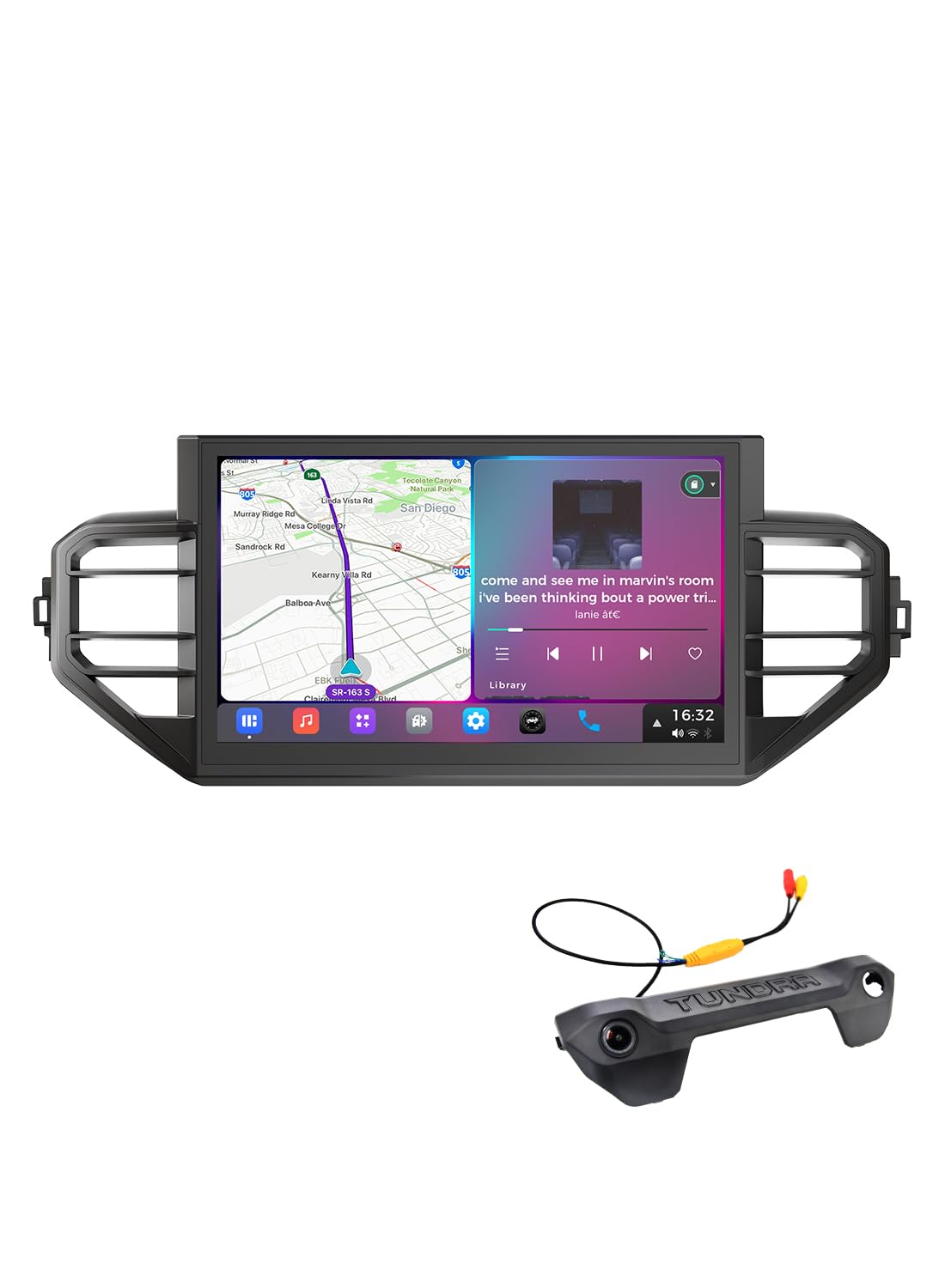
If you’re looking to modernize a 2022–2025 Tundra without hacking up the dash, this Dasaita Vivid is the premium large-screen option in this list. The 14″ QLED display gives maps, camera views, and media controls much more room than a typical 10″ unit. It also includes Android 13, 8GB RAM, 256GB storage, wireless CarPlay, Android Auto, built-in GPS, and advanced audio controls.
Daily driving feels more modern because maps, playlists, calls, and settings are easier to see at a glance. For long trips or off-road driving, the split-screen layout and gyroscope/off-road mode can be useful. With the correct harness and setup, it is intended to retain important factory-style functions such as steering wheel controls and JBL amp integration.
This is the pick to consider if your main goal is a bigger display and newer-generation Tundra fitment. It is not the right choice for 2007–2021 trucks.
What People Say
Owners and product details highlight an easier swap into newer Tundras, a noticeably bigger and clearer screen, improved connectivity for navigation and streaming, and better audio control while keeping many factory-style features intact.
Overall Sentiment: Positive
🗣️ Listing Details
The unit is described as a mostly plug-and-play stereo that retains A/C info, steering wheel controls, the OEM JBL amplifier and door open hint, and it supports aftermarket backup cameras.
🗣️ Connectivity Notes
Connectivity is a standout on paper: wireless Apple CarPlay plus wired and wireless Android Auto, BT 5.0, built-in 4G LTE and 5G Wi-Fi, and 8GB/256GB for apps and media.
Ease Of Use
|
Feature |
Ease Level |
|---|---|
|
Installation |
Easy to Moderate |
|
Initial Setup |
Moderate |
|
Smartphone Integration |
Easy |
|
Touchscreen Responsiveness |
Moderate |
|
Daily Operation |
Easy |
Who Should Buy This
Choose this one if you own a compatible 2022–2025 Tundra and want the biggest, most modern screen in this roundup.
Who Should Avoid This
Skip it if you own a 2007–2021 Tundra or prefer a smaller, more factory-like display size.
Durability
It has an OEM-style fitment approach and a stronger hardware spec sheet. Long-term reliability should still be judged carefully because larger Android head units depend on firmware support, heat control, and proper installation.
Key Benefits
- Large 14″ optically bonded QLED display with split-screen support
- Designed for many 2022–2025 Toyota Tundra dashboards
- Android 13 with 8GB RAM and 256GB storage
- Wireless CarPlay and Android Auto plus built-in network options
- DTS audio, 15-band EQ, and off-road gyroscope features
Check Product Details on Amazon
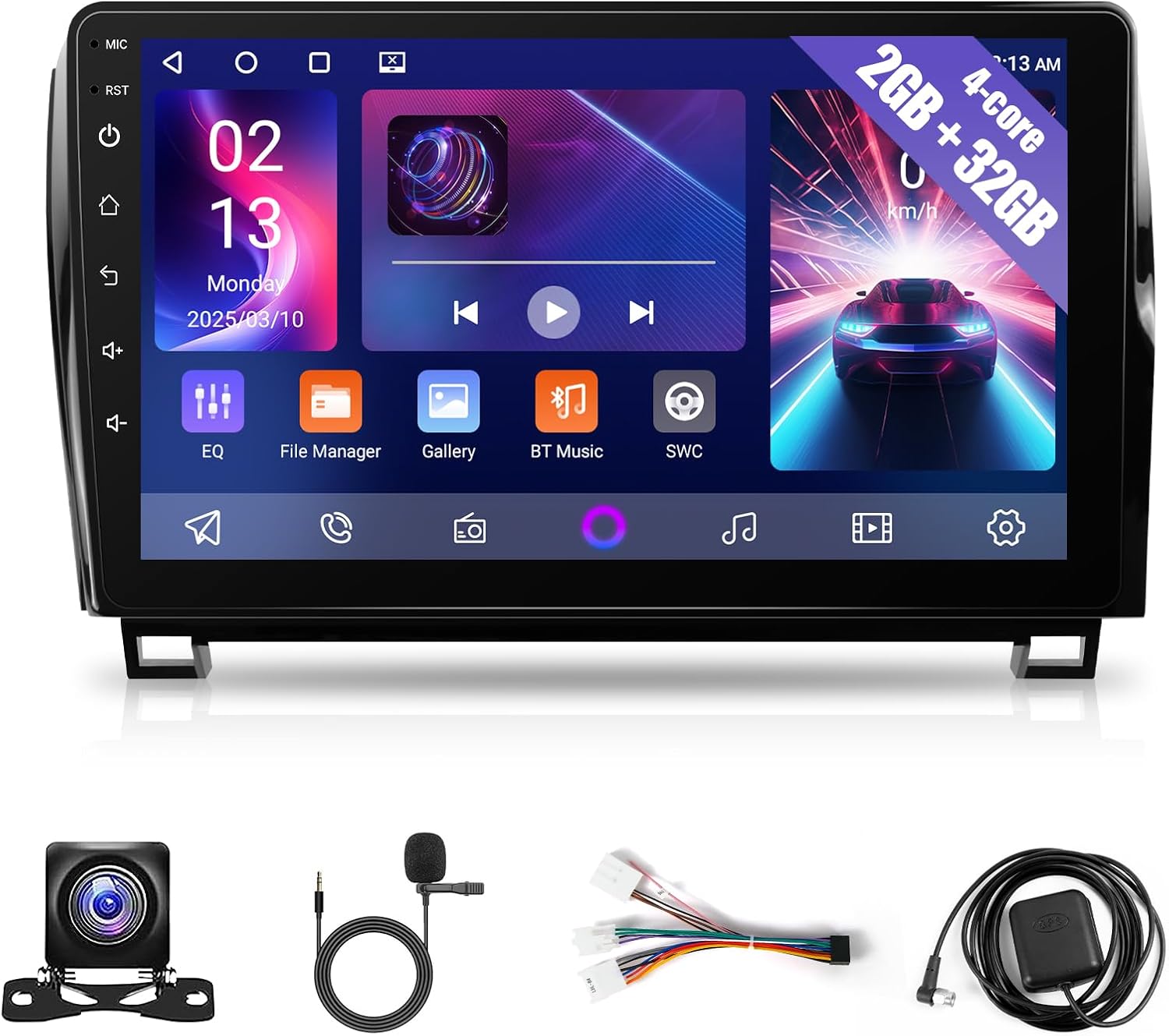
KuTaiTai 10.1″ Head Unit
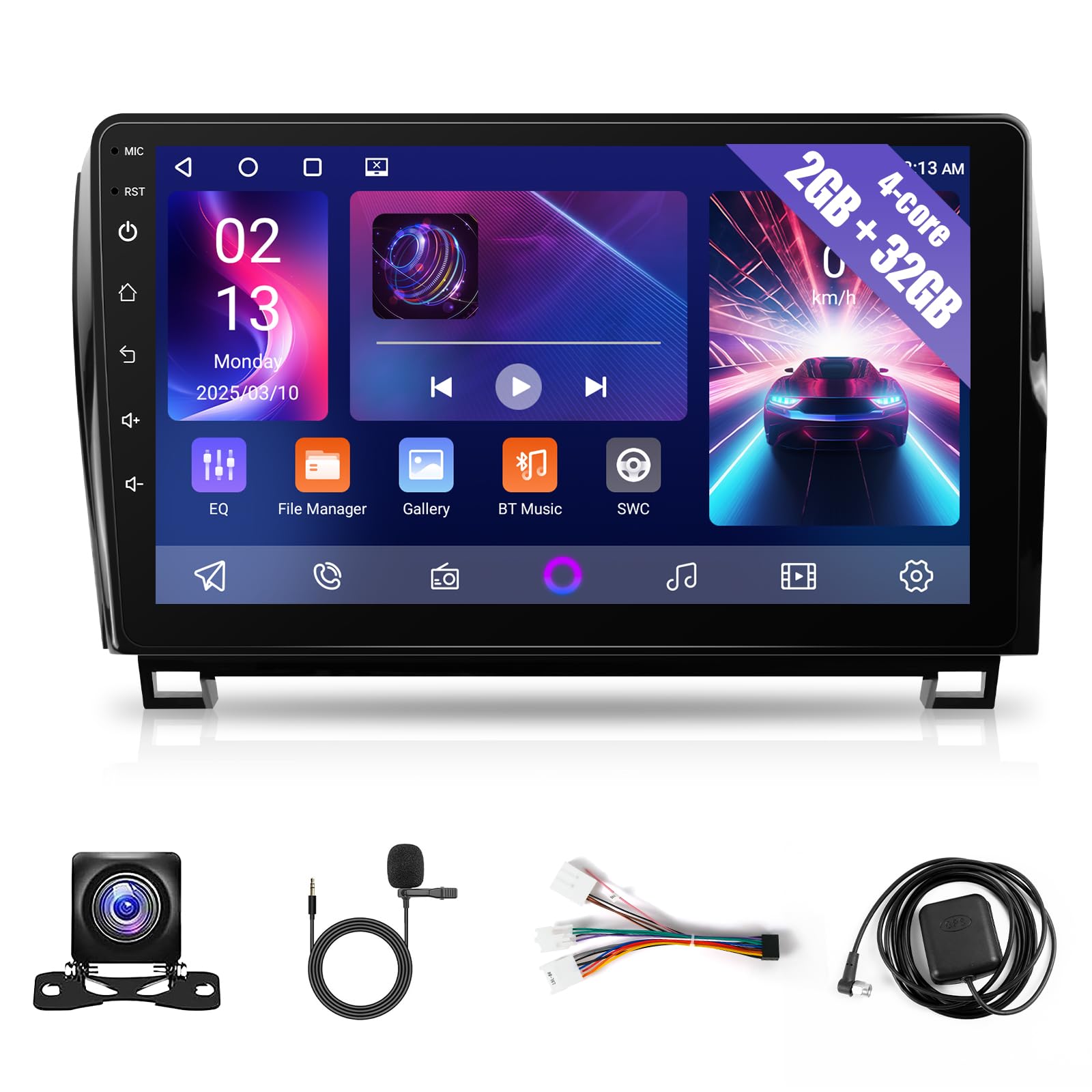
If you’re upgrading an older Tundra or Sequoia and want modern connectivity without a dash full of adapters, this KuTaiTai 10.1″ unit is built around a simple idea: give you a large touchscreen, phone mirroring, and navigation while keeping the dash close to a factory-style look. It is a practical option for many 2007–2013 Tundra owners who want CarPlay, Android Auto, MirrorLink, GPS, Wi-Fi, and backup-camera support.
The 2GB RAM and 32GB storage make it more of a budget-friendly daily-use choice than a heavy app machine. It is best if you plan to rely on your phone for most apps through CarPlay or Android Auto.
Before ordering, confirm whether your truck uses JBL audio, a large factory screen, or a special trim harness. Getting the right version matters more than buying the biggest screen.
What People Say
The biggest wins are the easy dash upgrade and modern phone connectivity. Buyers like the integrated look, navigation support, and steering-wheel-control compatibility when installed with the right harness.
Overall Sentiment: Positive
🗣️ Product Details
The unit is described as a plug-and-play radio that fits many factory dashboards, with no wiring modifications needed for compatible setups, and it helps retain an OEM-style appearance.
🗣️ Feature Bullet
Connectivity is emphasized: wireless Apple CarPlay, Android Auto and MirrorLink plus built-in GPS and Wi-Fi so you can use online or offline navigation and mirror phone apps.
Ease Of Use
|
Feature |
Ease Level |
|---|---|
|
Installation |
Easy to Moderate |
|
Initial Setup |
Moderate |
|
Smartphone Integration |
Easy |
|
Touchscreen Responsiveness |
Moderate |
|
Daily Operation |
Easy |
Who Should Buy This
Choose it if you own a compatible 2007–2013 Tundra and want a value-focused upgrade for CarPlay, Android Auto, navigation, and a larger touchscreen.
Who Should Avoid This
Skip it if you want premium processing power, a higher-storage Android system, or confirmed JBL integration without seller verification.
Durability
Specs point to useful daily performance for basic infotainment upgrades. Long-term durability feedback is limited, so installation quality and harness compatibility should be checked carefully.
Key Benefits
- Large 10.1″ IPS touchscreen for clearer maps and media
- Designed for many 2007–2013 Tundra and 2008–2018 Sequoia dashboards
- Wireless Apple CarPlay, Android Auto, and MirrorLink
- Built-in GPS and Wi-Fi for online or offline navigation
- Backup camera support and steering-wheel-control support with compatible setups
Check Product Details on Amazon
GYVCBREU 10.1″ Android Head Unit
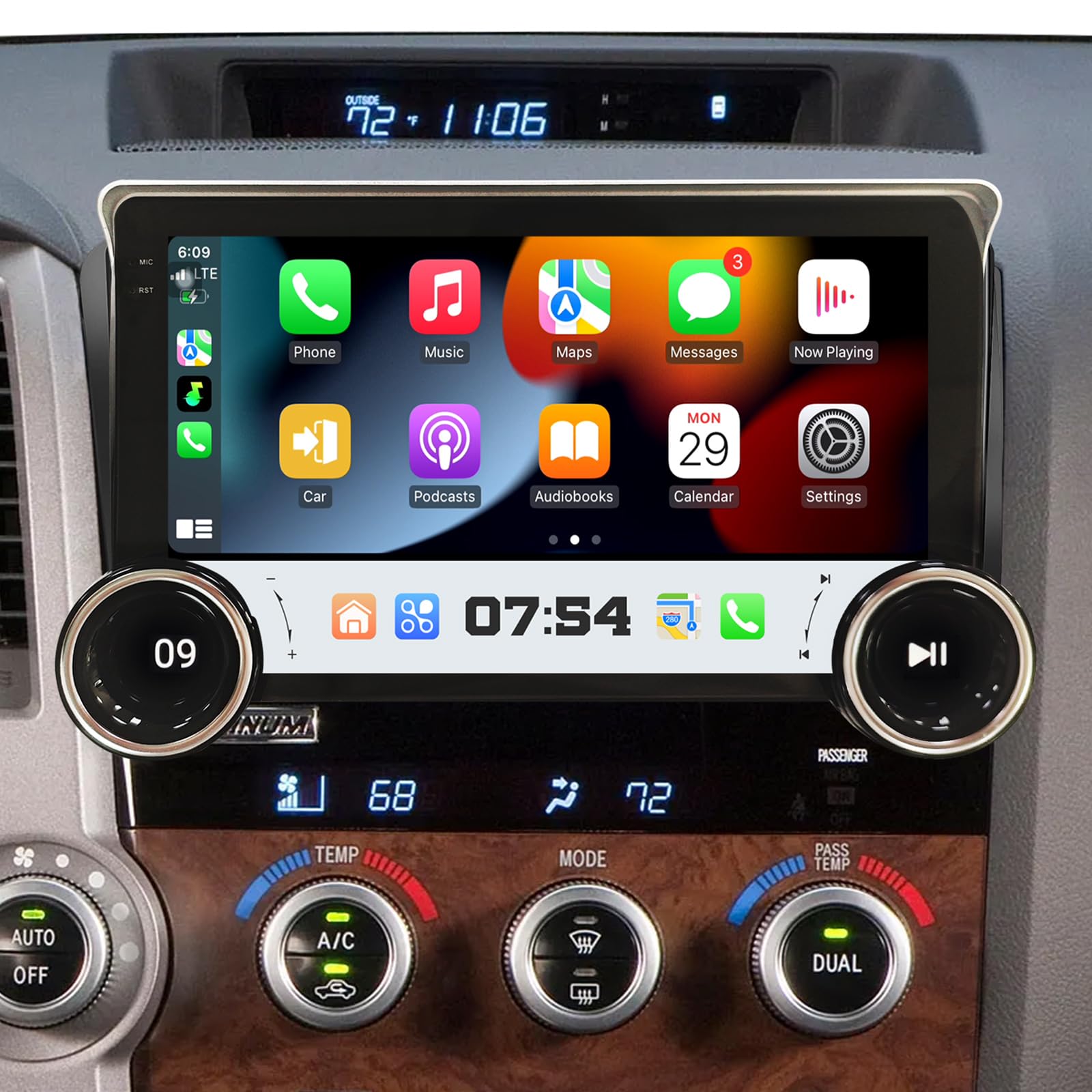
If you want to modernize an older non-JBL Tundra or Sequoia without turning the dash into a tangle of adapters, this GYVCBREU 10.1″ unit is worth a look. It is built to fit many 2007–2013 Tundra and 2008–2018 Sequoia dashboards and gives you a large touchscreen, wireless and wired phone integration, GPS, Wi-Fi, and backup-camera support.
In everyday driving, you’ll appreciate hands-free calls, easier access to maps and music, and steering-wheel-control support on compatible setups. For longer trips or weekend driving, split-screen navigation, offline map support, and the included AHD backup camera can make parking and route planning less stressful.
The key limitation is the non-JBL fitment note. If your truck has a JBL factory amp, ask the seller to confirm compatibility before you buy.
What People Say
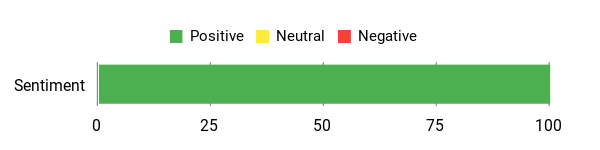
Owners like how it modernizes older trucks with a big screen, phone integration, and backup camera support. The main caution is to match the product version to your factory audio system.
Overall Sentiment: Positive
🗣️ Older Tundra Owner
The Android car stereo offers a feature-packed multimedia experience for compatible 2007–2013 Tundra and 2008–2018 Sequoia non-JBL setups. The large touchscreen, Bluetooth, DSP settings, steering wheel control support, CarPlay, Android Auto, Wi-Fi, GPS, and backup camera are the main highlights.
🗣️ Mark
This Android stereo brings a useful tech upgrade to older models. The touchscreen is responsive, GPS navigation, Bluetooth and Android Auto work smoothly, and backup camera integration is useful. Install was straightforward, though you may need patience to ensure all connections are set up correctly.
Ease Of Use
|
Feature |
Ease Level |
|---|---|
|
Installation |
Easy to Moderate |
|
Initial Setup |
Moderate |
|
Smartphone Integration |
Easy |
|
Touchscreen Responsiveness |
Moderate |
|
Daily Operation |
Easy |
Who Should Buy This
Choose this one if you have a compatible 2007–2013 Tundra without JBL and want a practical Android 13 upgrade with CarPlay, Android Auto, GPS, and a backup camera path.
Who Should Avoid This
Avoid it if your truck has a JBL factory amp and you cannot confirm the correct compatible harness or version.
Durability
It is built as a direct dash replacement with a plug-and-play-style harness and included rear camera. Long-term durability feedback is still limited, so treat long-term expectations cautiously.
Key Benefits
- Large 10.1″ touchscreen for clearer maps and media
- Built-in GPS with online and offline map support
- Wireless and wired Apple CarPlay and Android Auto plus MirrorLink
- Designed for many older Tundra and Sequoia non-JBL dashboards
- Includes AHD backup camera support and steering-wheel-control support
Check Product Details on Amazon
Cogamichi 10-Inch 8-Core Head Unit

If you want to bring an older Tundra into the present without a lot of dash surgery, this Cogamichi 10″ unit is built for that. It is designed for many 2007–2013 Tundra and 2008–2012 Sequoia non-JBL dashboards and gives you wireless CarPlay, Android Auto, a bright 10″ touchscreen, GPS, Wi-Fi, and enough memory for everyday infotainment use.
In daily driving, you’ll notice easier hands-free calls, faster access to maps, and steering-wheel-control support on compatible trucks. For road trips, split-screen navigation, offline maps, and backup-camera-ready input make long drives and tight parking easier.
The product positioning is strongest for non-JBL vehicles. If your truck has a JBL factory system, verify compatibility before ordering instead of assuming it will work.
What People Say
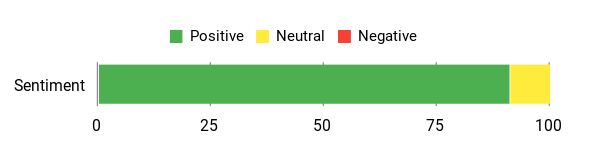
Owners praise the big screen, quick boot, and phone integration. People often mention that it fits neatly and helps keep steering wheel buttons working when the harness is matched correctly.
Overall Sentiment: Positive
🗣️ Tundra Owner
It fit a 2007 Tundra well. The included harness had matching OEM-style connectors, so there was no need to splice or cut wires. The unit booted fast and did not feel laggy during use.
🗣️ Daily Driver
The touchscreen is responsive and bright, and it supports both Apple CarPlay and Android Auto. Bluetooth pairing was quick, and the USB-C connectivity helped with cleaner cable management.
Ease Of Use
|
Feature |
Ease Level |
|---|---|
|
Installation |
Easy to Moderate |
|
Initial Setup |
Moderate |
|
Smartphone Integration |
Easy |
|
Touchscreen Responsiveness |
Easy |
|
Daily Operation |
Easy |
Who Should Buy This
Choose this unit if you have a compatible 2007–2013 non-JBL Tundra and want smoother phone integration, a responsive 10″ display, and stronger everyday performance than the most basic budget units.
Who Should Avoid This
Skip it if you have a JBL system and cannot confirm compatibility, or if you want a larger storage configuration for running many onboard apps.
Durability
It uses a direct dash-replacement design with an OEM-style harness. User feedback points to reliable daily use, but long-term performance should still be watched because aftermarket Android units can vary by firmware and installation quality.
Key Benefits
- Large 10″ touchscreen for clearer maps and media
- Wireless Apple CarPlay and Android Auto for hands-free use
- 8-core CPU with 4GB RAM and 32GB storage
- Designed for many 2007–2013 Tundra and 2008–2012 Sequoia non-JBL dashboards
- Backup-camera-ready design and steering-wheel-control support
Check Product Details on Amazon
Dasaita Android 13 Car Stereo

If you want to modernize a 2007–2013 Tundra without turning the dash into a wiring project, this Dasaita unit gives you a 10.2″ display, Android 13, and both wireless CarPlay and Android Auto. It is the more advanced older-Tundra choice in this list because it combines stronger memory than basic budget units with features such as GPS, 5G Wi-Fi support, 4G LTE support, DTS tuning, and an off-road inclinometer.
In everyday driving, you get easier hands-free calls, a clearer map view, and faster access to music and navigation. For longer trips, split-screen navigation, built-in GPS, and hotspot or SIM support can make route changes and streaming easier.
As with any Tundra head unit, confirm factory JBL compatibility, camera support, and steering wheel control retention before buying.
What People Say
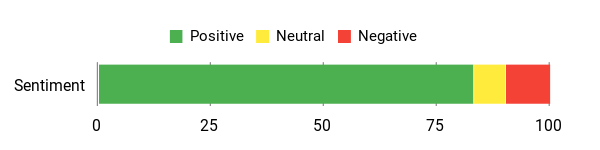
Owners often mention the crisp screen, quick boot, and reliable wireless CarPlay or Android Auto pairing. Many appreciate the audio boost and steering-wheel-control support, while a few buyers report firmware or freezing issues that may require updates or support.
Overall Sentiment: Positive
🗣️ Tom P
Installed this in a 2012 Toyota Sequoia. Installation was easy with the help of videos and it works well. Screen is crisp and clear, the system is quick, and wireless CarPlay connects easily.
🗣️ Blake Watkins
Customer support helped troubleshoot a power issue with pictures and videos until it was resolved. The stereo itself looks sleek, fits the Tundra well, and includes many features to set up.
Ease Of Use
|
Feature |
Ease Level |
|---|---|
|
Installation |
Easy to Moderate |
|
Initial Setup |
Moderate |
|
Smartphone Integration |
Easy |
|
Touchscreen Responsiveness |
Easy |
|
Daily Operation |
Easy |
Who Should Buy This
Choose this one if you have a compatible 2007–2013 Tundra and want a stronger older-truck upgrade with good memory, modern connectivity, and more advanced audio and app features.
Who Should Avoid This
Avoid it if you want the lowest-cost possible upgrade or do not want to deal with firmware settings, feature setup, or compatibility checks.
Durability
It is built as a direct replacement with OEM-style harness compatibility. User feedback points to solid performance and helpful support, but firmware updates and secure mounting are worth checking.
Key Benefits
- Large 10.2″ laminated touchscreen for clearer navigation and media
- Wireless Apple CarPlay plus wired and wireless Android Auto
- 6GB RAM and 64GB ROM on Android 13
- Built-in inclinometer for off-road roll and pitch awareness
- Improved audio control with built-in amplifier and optical output support
Check Product Details on Amazon
FAQ
How Do I Know Which Aftermarket Head Unit Will Fit My Toyota Tundra?
Start with your truck’s model year and dash layout. A 2007–2013 Tundra unit will not usually fit the same way as a 2014–2021 unit, and 2022–2025 Tundras use a different setup again. Match the product listing to your exact model year before comparing features.
Next, confirm whether your truck has a factory JBL amplifier or a non-JBL system. Some aftermarket radios are made for non-JBL trucks only, while others may need a specific CANbus harness to retain the amp, steering wheel controls, and backup camera. If you are unsure, send your model year, trim, factory screen size, and audio system details to the seller or installer before ordering.
Will I Keep Factory Features Like Steering Wheel Controls, Backup Camera, And JBL Sound?
In many cases, yes, but it depends on the unit, harness, CANbus adapter, and your factory audio system. Plug-and-play-style kits often include the wiring needed for steering wheel controls and camera input, but factory JBL systems can be more complicated.
Do not assume every head unit will retain every factory feature. Check the listing notes for JBL, non-JBL, factory camera, parking sensors, climate display, microphone, and amplifier support. If sound is too loud, too weak, or distorted after installation, you may need to adjust gains, EQ settings, or amp integration.
Should I Choose A 10″ Or 14″ Tundra Head Unit?
Choose a 10″ to 10.2″ unit if you want a cleaner factory-style look and a display that feels large without dominating the dash. This size is common for older Tundra upgrades and works well for maps, music, calls, and backup camera viewing.
Choose a 14″ unit if you have a compatible newer Tundra and want a more tablet-like display. A larger screen can make navigation and split-screen use easier, but it may look less factory and can cost more.
Is More RAM And Storage Worth It?
More RAM and storage matter most if you plan to run Android apps directly on the head unit, use split-screen often, store offline maps, or keep media on the device. For basic CarPlay and Android Auto use, a lower-storage unit can still work well because your phone handles most of the app load.
If you want the smoothest long-term experience, 6GB to 8GB RAM is more appealing than a basic 2GB setup. If budget matters most and you mainly use phone projection, a 2GB or 4GB unit may still be enough.
What Should I Expect During Installation And Daily Use?
Expect installation to be mostly straightforward if the unit is advertised for your exact Tundra year and audio system, but still test everything before reassembling the dash. Connect the unit, turn on the truck, and confirm sound, camera, steering wheel controls, Bluetooth, radio, CarPlay, Android Auto, GPS, and Wi-Fi before tightening trim pieces.
For daily use, wireless CarPlay and Android Auto make maps, calls, messages, and music easier to control. Common issues include Bluetooth pairing trouble, Android Auto auto-launching, camera signal mismatch, weak GPS signal, or occasional freezes. Most problems are easier to fix before the dash is fully reassembled.
When Should I Use A Professional Installer?
Use a professional installer if your Tundra has a JBL factory amp, a factory navigation screen, extra camera features, or if you are not comfortable removing dash panels. A clean install helps protect trim pieces, wiring, steering wheel controls, camera function, and factory audio features.
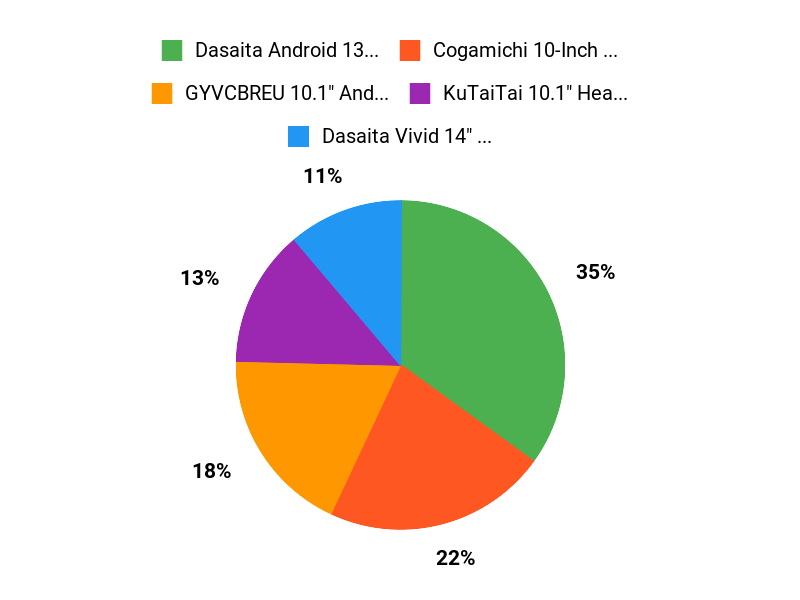
What Buyers Prefer
Most buyers choose based on fitment first, then screen size, phone integration, sound control, and storage. The Dasaita G13 8GB+256GB is favored when you want a balanced 2014–2021 upgrade with strong hardware, while the Dasaita Vivid 14″ is the better match for 2022–2025 owners who want the largest display. Older Tundra owners usually compare the KuTaiTai, GYVCBREU, Cogamichi, and Dasaita G12 based on JBL compatibility, memory, screen size, and how much setup they want to handle.
Wrapping Up
You’re upgrading to get better navigation, safer hands-free controls, easier phone integration, and improved audio. The best head unit for your Toyota Tundra is the one that fits your exact year, dash layout, and audio system.
If you want the best all-around upgrade for a 2014–2021 Tundra, choose the Dasaita G13 10.2″ Android 13 model with 8GB RAM and 256GB storage. If you own a 2022–2025 Tundra and want the biggest display, the Dasaita Vivid 14″ is the most natural fit. If you have a 2007–2013 Tundra, compare the KuTaiTai, GYVCBREU, Cogamichi, and Dasaita G12 based on JBL compatibility, budget, memory, and how advanced you want the system to be.
| Product | Image | Best For | Display Size | Memory | Connectivity | Special Highlights | Details |
|---|---|---|---|---|---|---|---|
| Dasaita Tundra Head Unit 8GB+256GB |
 |
Best overall for 2014–2021 Tundra | 10.2 Inches | 8GB RAM + 256GB Storage | Bluetooth, HDMI, USB, Wi-Fi |
|
Check Details |
| Dasaita Tundra Head Unit 6GB+64GB |
|
Lower-cost Dasaita for 2014–2021 Tundra | 10.2 Inches | 6GB RAM + 64GB Storage | Bluetooth, HDMI, USB, Wi-Fi |
|
Check Details |
| Dasaita Vivid 14″ Head Unit for Toyota Tundra |
 |
Best large screen for 2022–2025 Tundra | 14 Inches | 8GB RAM + 256GB Storage | Bluetooth, 4G LTE/5G Wi-Fi |
|
Check Details |
| KuTaiTai Car Radio Stereo for Tundra |
 |
Best value-style older-Tundra upgrade | 10.1 Inches | 2GB RAM + 32GB Storage | Bluetooth, USB, Wi-Fi |
|
Check Details |
| GYVCBREU 10.1″ Android Car Radio for Tundra |
 |
Best for older non-JBL Tundra | 10.1 Inches | 2GB RAM + 64GB ROM | Bluetooth, USB, Wi-Fi |
|
Check Details |
| Cogamichi 8-Core Car Radio for Tundra |
 |
Best sound-focused budget pick | 10 Inches | 4GB RAM + 32GB Storage | Bluetooth, Wi-Fi |
|
Check Details |
| Dasaita Android 13 Car Stereo for Tundra |
 |
Most advanced for 2007–2013 Tundra | 10.2 Inches | 6GB RAM + 64GB Storage | Bluetooth, USB, Wi-Fi |
|
Check Details |
This Roundup is reader-supported. When you click through links we may earn a referral commission on qualifying purchases.

