Disclosure: As an Amazon Associate, we earn from qualifying purchases. If you click a link on this page and make a purchase, we may receive a small commission at no extra cost to you.
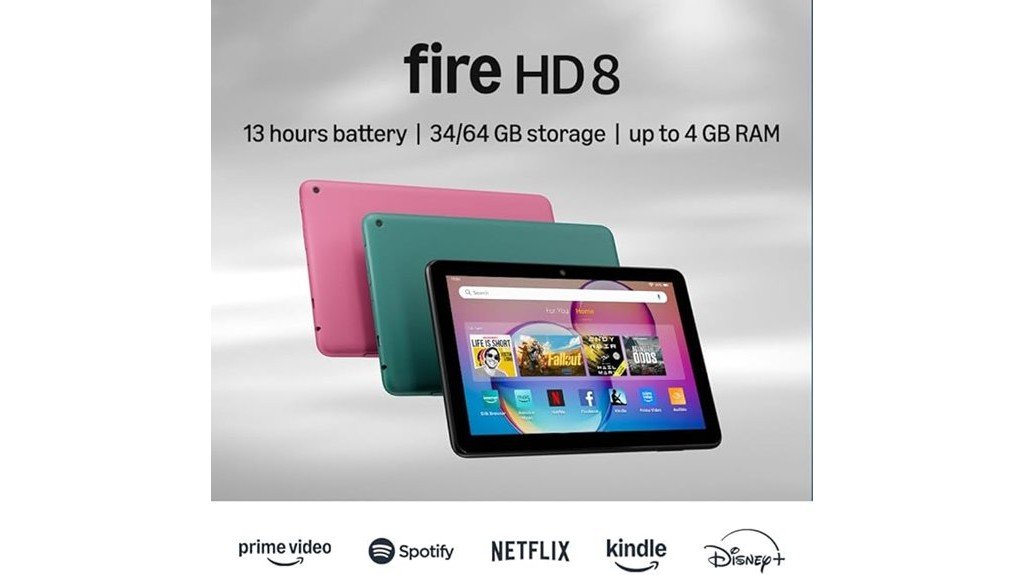
Choosing a budget tablet can be tricky because low price often means tradeoffs in speed, storage, apps, or display quality. The Amazon Fire HD 8 Tablet is built for everyday entertainment, reading, browsing, video calls, and light productivity without the cost of a premium tablet. It gives you an 8-inch HD display, 3GB RAM, a hexa-core processor, USB-C charging, Alexa support, and expandable storage, but it also keeps you inside Amazon’s app ecosystem. This review helps you decide whether the Fire HD 8 is a smart buy for your daily use or too limited for what you need.
Quick Verdict
Rating: Recommended with caveats
Best For: Budget buyers who want a compact tablet for streaming, reading, browsing, Alexa, and simple family use.
Bottom Line: The Amazon Fire HD 8 Tablet is a strong value if you want a portable entertainment device with long battery life and easy Amazon services. Skip it if you need Google Play services, advanced productivity apps, or laptop-level performance.
| Specification | Detail |
|---|---|
| Brand | Amazon |
| Product Type | Fire HD 8 tablet |
| Display | 8-inch HD display |
| Processor | Hexa-core processor |
| Memory | 3GB RAM |
| Battery Life | Up to 13 hours |
| Weight | 11.88 ounces |
| Connectivity | Dual-band Wi-Fi, Bluetooth 5.2 |
| Port | USB-C 2.0 |
| Cameras | 2 MP front camera, 5 MP rear camera |
| Video Recording | 1080p HD video recording |
| Voice Assistant | Alexa integration |
| Storage | Expandable memory supported |
| Main Limitation | Relies on the Amazon Appstore and does not include Google Play services by default. |
Overview
The Amazon Fire HD 8 tablet is made for buyers who want a small, affordable tablet for media, reading, browsing, video calls, and smart home control. Its 8-inch HD display gives you a better viewing area than a phone while still keeping the device easy to carry around the house, on a commute, or during travel.
Performance comes from a hexa-core processor and 3GB RAM, which is enough for common tasks like streaming, email, web browsing, eBooks, kids’ content, and light multitasking. The battery life is one of its stronger points, with up to 13 hours of use depending on settings, apps, brightness, and connection use.
The main tradeoff is software freedom. The Fire HD 8 depends on the Amazon Appstore, so it is better for Amazon services, streaming apps, Kindle reading, Alexa, and basic apps than for users who need the full Google Play app catalog.
Before You Buy: The Amazon Fire HD 8 is not the best choice if you rely on Google Play services, Google-only apps, or advanced work apps. Check that your must-have apps are available in the Amazon Appstore before you buy.
What Is the Amazon Fire HD 8 Tablet?
The Amazon Fire HD 8 Tablet is a compact entertainment tablet with an 8-inch HD screen, Alexa voice support, front and rear cameras, Bluetooth connectivity, Wi-Fi, and USB-C charging. It is designed for everyday use rather than heavy gaming, professional editing, or full laptop replacement.
You can use it for movies, shows, Kindle books, audiobooks, music, web browsing, recipes, casual games, and smart home controls. The 2 MP front camera also makes it useful for simple video calls, while the 5 MP rear camera can handle basic snapshots and 1080p HD video recording.
Because it weighs 11.88 ounces, it is easier to hold for longer reading or streaming sessions than many larger tablets. That portability is one of the biggest reasons to consider it if you want a simple device for daily entertainment.
Detailed Features
The Amazon Fire HD 8 tablet combines practical hardware with Amazon’s software ecosystem. Its strongest features are portability, battery life, expandable storage, Alexa support, and basic connectivity for accessories.
- Dual-band Wi-Fi and Bluetooth 5.2: These connections help with streaming, browsing, wireless headphones, speakers, and keyboards.
- USB-C (2.0) port: USB-C makes charging simpler and also supports basic data transfer when connected to a computer.
- Camera setup: The 2 MP front camera is useful for video calls, while the 5 MP rear camera supports photos and 1080p HD video recording.
- Alexa integration: Alexa lets you control music, ask questions, check news, set timers, and manage compatible smart home devices hands-free.
These features make the tablet a useful tool for entertainment and light productivity. It is best viewed as a low-cost everyday tablet, not as a premium iPad or laptop replacement.
Design and Portability
The Fire HD 8 has a compact design built around an 8-inch screen. That size works well if you want something larger than a phone but smaller and easier to hold than a full-size tablet. It fits better in bags, backpacks, bedside drawers, and travel cases.
At 11.88 ounces, it is light enough for reading in bed, watching videos on the couch, or carrying from room to room. This makes it especially useful for students, casual readers, parents, and anyone who wants a simple screen for home and travel use.
The compact size does mean the screen is not as roomy as a 10-inch tablet. If you often split-screen, edit documents, or watch movies with a larger display preference, a bigger tablet may feel more comfortable.
Display Quality
The 8-inch HD display is a practical fit for streaming, browsing, Kindle reading, and casual games. It gives you enough screen space to enjoy videos without making the device bulky.
For everyday use, the display is one of the main reasons this tablet makes sense. It is comfortable for recipes in the kitchen, shows in bed, reading on the go, and quick browsing. You should not expect premium tablet sharpness, but the screen is suitable for the tablet’s budget-friendly purpose.
Performance and Everyday Speed
The hexa-core processor and 3GB RAM help the Amazon Fire HD 8 handle basic tasks smoothly. It is built for streaming video, checking email, reading, browsing, playing casual games, and using common entertainment apps.
You may notice limits if you push it with heavy games, many open apps, or more demanding productivity tasks. For simple everyday use, the performance is practical. For professional work, advanced multitasking, or high-end gaming, it is not the right device.
Pro Tip: For smoother daily use, keep only your most-used apps installed, close apps you are not using, and move media files to expandable storage when possible.
Battery Life
Battery life is one of the Fire HD 8’s strongest practical features. The tablet offers up to 13 hours of use, which makes it helpful for streaming, reading, browsing, and travel days when you do not want to charge often.
Actual battery life depends on screen brightness, Wi-Fi use, Bluetooth use, apps, video streaming, and background activity. Lowering brightness and turning off unused connections can help stretch battery life during long sessions.
Connectivity and Accessories
The Fire HD 8 includes dual-band Wi-Fi for internet use and Bluetooth 5.2 for pairing with wireless accessories. You can connect Bluetooth headphones, speakers, or keyboards, which makes the tablet more flexible for entertainment and light typing.
The USB-C 2.0 port is useful for charging and file transfer. If you want to move documents, photos, or videos from a computer, you can connect the tablet with a USB-C cable and organize files through the tablet’s storage.
[Amazon Products Picked for You]

【Wide Compatibility — Stylus Pen for iPad 2018-2026】This active stylus pen for iPad is compatible with iPad 2018-2026 models: iPad 6th-11th Gen, iPad Pro 11"/12.9"/13" M4, iPad Air 3/4/5/M2/M3/M4, iPad Mini 5/6/7. Designed exclusively as an iPad pencil for Apple tablets — not compatible with earlier iPad models, iPhone, or Android devices.

Pencil-Style Design for Natural Writing - Designed with a classic pencil-style body, this stylus pen for iPad feels familiar, balanced and easy to hold for note-taking, sketching, studying, signing documents and daily touchscreen use. The slim shape gives your iPad pencil a more natural writing feel without a bulky digital pen look.

[How to Use]- Long press the control button 3S to turn ON/OFF the pen, when the light is flashing, the pen is discoverable via Bluetooth, when connected, you can display the power of the pen on your iPad and use the shortcut function. If the pen doesn't work after turning on, please follow the steps to disconnect the Bluetooth connection between your iPad and Apple Pencil: Settings > Bluetooth > Apple Pencil > tap "i" > Forget this device
Camera and Video Call Use
The tablet includes a 2 MP front camera and a 5 MP rear camera. The front camera is the more practical one for most users because it supports simple video calls with family, friends, or work contacts.
The rear camera can capture basic photos and 1080p HD video. It is useful for quick scans, casual shots, or simple clips, but it should not replace a modern smartphone camera if photo quality matters most to you.
Alexa and Smart Home Control
Alexa integration makes the Fire HD 8 more useful around the home. You can ask for music, news, weather, timers, reminders, and smart home controls without needing to pick up another device.
This feature is especially useful in the kitchen, bedroom, or living room. You can use the tablet as a small control hub for compatible smart home devices, though Alexa performance may vary by app, connection quality, and how you use the device.
Amazon Appstore and App Limits
The biggest limitation is app availability. The Fire HD 8 does not include Google Play services by default, so some apps you use on Android phones may be missing or limited on this tablet.
For buyers who mainly use Amazon Prime Video, Kindle, Audible, browser apps, music, streaming services, and simple games, this may not be a serious issue. For buyers who depend on Google apps, school apps, work apps, or niche Android tools, the app limit can become frustrating.
Who Should Buy It?
Best For
- Budget buyers who want a compact tablet for streaming, reading, and browsing.
- Amazon users who already use Kindle, Prime Video, Audible, Alexa, or Amazon Appstore apps.
- Travelers or casual users who want long battery life and a lightweight device.
Skip If
- You need Google Play services or specific Google apps.
- You want a tablet for heavy gaming, advanced multitasking, or professional work.
- You prefer a larger screen for movies, documents, or split-screen use.
How It Performs in Real Use
For Streaming and Entertainment
The Fire HD 8 is well-suited for watching shows, movies, and short videos. The 8-inch HD screen is large enough for personal viewing, while the compact body keeps it easy to hold during longer sessions.
For Reading and Browsing
The tablet works well for Kindle books, web articles, recipes, emails, and casual browsing. Its light weight makes it comfortable for reading in bed or carrying in a bag.
For Travel
The 11.88-ounce body and up to 13-hour battery life make it useful for road trips, flights, hotel stays, and waiting rooms. Downloaded books, videos, or music can make it more useful when Wi-Fi is limited.
For Family and Home Use
The tablet can serve as a shared home device for video calls, Alexa commands, streaming, light games, and simple browsing. Its compact size also makes it easy to move between rooms.
Setup Tips Before First Use
Before using the Fire HD 8 as your main entertainment tablet, sign in to your Amazon account, update the software, connect Wi-Fi, and check the Amazon Appstore for your must-have apps. This helps you avoid surprises after purchase.
You should also adjust screen brightness, set up Alexa if you plan to use voice controls, and review storage options if you want to download videos, books, or music. If multiple people will use the device, set clear profiles or usage settings where available.
File Transfer and Storage Tips
To transfer files, connect the Amazon Fire HD 8 to your computer with a USB-C cable. After the connection is recognized, you can drag and drop compatible files into the tablet’s storage and keep documents, videos, photos, or music organized.
Expandable memory is helpful if you plan to store media. Use internal storage for apps and important files, then use expandable storage for downloaded videos, photos, books, and other media when supported.
Pros and Cons
Pros
- Compact 8-inch HD screen works well for reading, streaming, and browsing.
- Up to 13 hours of battery life supports long entertainment sessions.
- 3GB RAM and hexa-core processor are suitable for common everyday tasks.
- Bluetooth 5.2, dual-band Wi-Fi, and USB-C add useful modern connectivity.
- Alexa support makes it helpful for smart home control and hands-free use.
Cons
- Amazon Appstore limits app choice compared with Google Play services.
- Not ideal for demanding games, heavy multitasking, or professional work.
- The 8-inch screen may feel small if you prefer larger displays.
Is It Worth the Price?
The Amazon Fire HD 8 Tablet offers strong value for the price if you need a simple device for streaming, reading, browsing, and casual home use. It gives you the core features most budget tablet buyers care about: a portable screen, long battery life, Alexa, Bluetooth, Wi-Fi, cameras, USB-C, and expandable storage.
It is worth considering if you already use Amazon services or want a low-cost tablet that does not need to handle demanding work. The biggest value limit is app selection, so the deal makes the most sense when the Amazon Appstore covers the apps you actually use.
[Amazon Products Picked for You]

Premium Experience & Budget-Friendly Cost: While high-end tablets demand four-figure prices, the Jeazans Android tablet delivers premium performance at an affordable cost. Tailored for budget-savvy users, it balances essential features-crisp display, responsive 8-core processing, and latest Android 16 OS-with seamless multitasking power. Equipped with 36(6+30)GB RAM, 64GB ROM (expandable to 1TB via TF card, not included), it combines robust storage with lag-free performance. Pre-installed Google Play ensures instant access to top apps for those who refuse to compromise on quality or budget
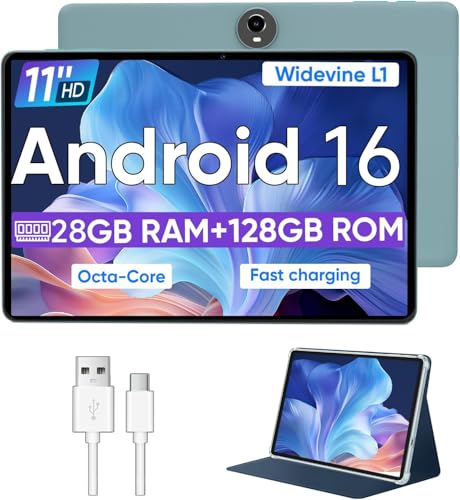
Octa-Core Android 16 Tablet - The WXUNJA C5 Android tablet offers superior performance at an affordable price point. This 11 inch tablet features an Unisoc T606 octa-core CPU and the latest Android 16 OS, enabling it to run everyday apps and most games with ease. Users can now enjoy seamless multitasking without lag.

Latest Android Tablet - This android tablet features a quad-core processor, android 15 OS and a 10.1" IPS screen, its smooth operation enables seamless video playback, gaming, and multitasking.
How It Compares to Alternatives
Compared with higher-end tablets, the Fire HD 8 focuses more on affordability and entertainment than premium display quality, advanced performance, or broad app freedom. Larger tablets may be better for productivity, drawing, schoolwork, or split-screen use.
The Fire HD 8 makes the most sense if you want a compact Amazon-friendly device for common daily tasks. If you need Google Play services, more advanced apps, or stronger hardware, compare it with standard Android tablets or iPad models before deciding.
[Amazon Products Picked for You]

COMPACT SIZE, COMPACT FUN – The Lenovo Tab One is compact, efficient, and provides non-stop entertainment everywhere you go. It’s lightweight and has a long-lasting battery life so the fun never stops.

【Android 14 Tablet】 The tablets use the latest android 14 system, with enhanced functionality and compatibility compared to the previous generation. Tablet with certification of Google Mobile Service (GMS) and pre-installed Google Play, supports Facebook, Twitter, YouTube, Tiktok, Line, Instagram and other trendy social apps. Suitable for working, studying, entertainment, etc.

【Hall Effect Joysticks】Upgraded. Robust and long-lasting. Offering higher precision and sensitivity.
Concluding Thoughts
The Amazon Fire HD 8 tablet has real limits, but it remains a solid option for budget-conscious consumers who want a portable entertainment device. Its compact body, useful battery life, and simple Amazon integration make it easy to recommend for casual everyday use.
A solid choice for budget-conscious consumers seeking portable entertainment.
- Affordability: The price point is attractive for buyers who do not want to spend on a premium tablet.
- Portability: Its compact design makes it easy to carry and use around the home or while traveling.
- Performance: The hexa-core processor and 3GB RAM handle basic tasks efficiently.
- App Ecosystem: It does not support Google Play services by default, but it still works well for many Amazon Appstore apps and Amazon services.
In short, the Fire HD 8 is best for everyday entertainment, simple browsing, and Amazon-friendly use. It is not the right pick for buyers who need full Android app freedom or advanced productivity features.
Frequently Asked Questions
How do I transfer files to the Amazon Fire HD 8 Tablet?
Connect the tablet to your computer using a USB-C cable. Once the device is recognized, you can drag and drop compatible files into the tablet’s storage and keep your folders organized.
Can the Amazon Fire HD 8 connect to external devices via Bluetooth?
Yes. The Amazon Fire HD 8 supports Bluetooth 5.2, so you can pair it with compatible headphones, speakers, or keyboards for wireless listening and light typing.
Is the Amazon Fire HD 8 compatible with Google Play services?
The Fire HD 8 does not include Google Play services by default. It relies on the Amazon Appstore, so check your required apps before buying.
How do I perform a factory reset on the Amazon Fire HD 8?
Go to Settings, choose Device Options, then select Reset to Factory Defaults. Confirm the reset only after backing up important files because this will erase your data and restore the tablet to its original settings.
What are the best practices for extending battery life on the Amazon Fire HD 8?
Reduce screen brightness, turn off unused Wi-Fi or Bluetooth, close background apps, enable battery saver mode, and keep the software updated. These steps can help you get more use between charges.
Is the Fire HD 8 good for video calls?
Yes, it can handle simple video calls with its 2 MP front camera. It is best for casual calls rather than professional camera quality.
Who should skip the Amazon Fire HD 8?
Skip it if you need Google Play services, advanced work apps, heavy multitasking, or high-end gaming performance. It is better for entertainment, reading, browsing, and Amazon-based services.
The Bottom Line
The Amazon Fire HD 8 Tablet is a smart buy for budget shoppers who want a compact tablet for streaming, reading, browsing, Alexa, and simple everyday use. Its main strengths are portability, battery life, and value, while its biggest limitation is the restricted Amazon Appstore. Choose it if your needs are simple, but compare other tablets if Google Play services or stronger productivity tools matter to you.
