Disclosure: This review contains affiliate links. As an Amazon Associate, we earn from qualifying purchases. If you click a link on this page and make a purchase, we may receive a small commission at no extra cost to you. This does not influence our assessment.
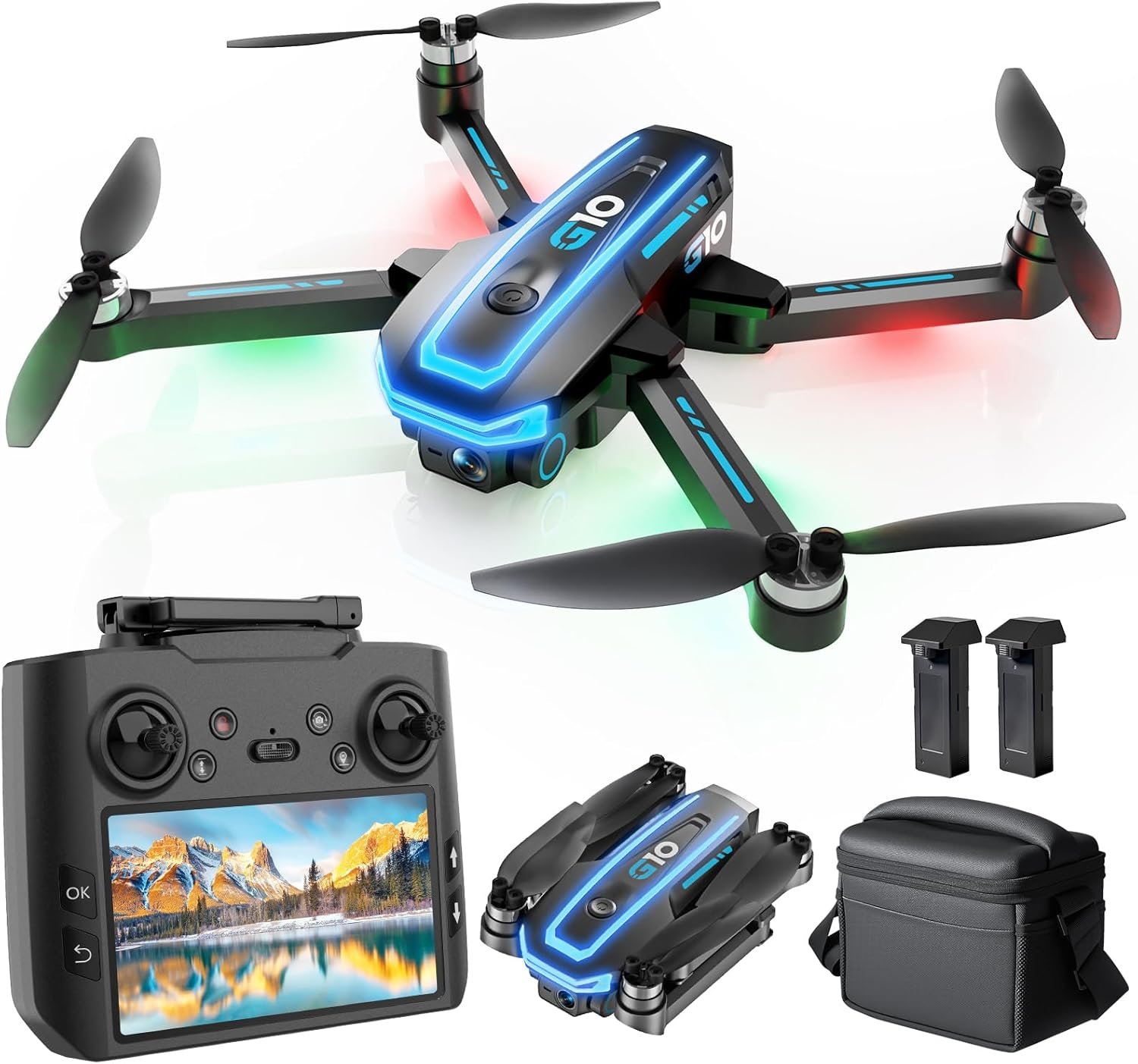
Buying a first GPS drone is stressful because the specification sheets all look similar and the real differences only show up after you fly. You need controls that forgive mistakes, GPS that actually holds position, and a camera good enough that the purchase feels worthwhile. The UFLYTOO LA G10 targets exactly that buyer, pairing a 4K stills camera with a remote controller that has its own built-in display, GPS Return-to-Home, and Follow Me tracking. It is also listed under 250g, which simplifies the paperwork for recreational flyers in the U.S. This review breaks down what the G10 genuinely delivers, what the marketing overstates, and whether you should spend more.
Quick Verdict
Rating: 8.8/10 — Recommended with caveats
Best for: First-time pilots, travelers, families, and casual creators who want GPS safety features without tying up a phone for the live view.
Not for: Paid video work, windy coastal flying, or anyone who needs stabilized motion footage.
Bottom line: The LA G10 delivers a genuinely uncommon feature at this level — a screen-equipped controller — alongside GPS Return-to-Home, brushless motors, and a complete travel kit. The real tradeoff is stabilization: this is a drone for casual clips and stills, not smooth cinematic video.
How We Evaluated This Drone
We want to be straightforward about our method, because it affects how much weight you should give this review.
This assessment is based on verification of the manufacturer’s published specifications against the Amazon product listing, the official UFLYTOO LA G10 user manual, and independent retailer listings — cross-referenced with the documented behaviour of comparable sub-250g GPS drones. It is not a hands-on flight test, and we do not claim flight-time measurements, wind-tolerance figures, or image-quality samples of our own.
Where the manufacturer’s claims are internally consistent and typical for the hardware class, we say so. Where they are ambiguous, optimistic, or contradicted by other listings, we flag it explicitly rather than repeating the marketing copy. The section below on unverified claims is the most important part of this review.
Why This Drone Stands Out
- No-phone flying: The controller carries a 4.5-inch FHD display, so the live feed appears without pairing a smartphone. That removes app installs, firmware prompts, and Bluetooth pairing from every single flight — a meaningful convenience for beginners, and uncommon at this level.
- Beginner safety net: GPS Return-to-Home with three separate triggers, GPS-plus-optical-flow position hold, and one-button takeoff and landing substantially reduce flyaway anxiety during early practice.
- Smart flight modes: Follow Me and Point of Interest orbit let you capture hands-free clips without advanced stick technique.
- Travel-ready: A foldable airframe, the sub-249g weight listing, and an included carrying case make this far easier to pack than a full-size drone kit.
- Complete kit: The box includes the drone, the screen-equipped remote, two batteries, a 32GB SD card, cables, spare parts, a carrying case, and tutorial material. You are not buying a bare airframe and then discovering you need another $80 of accessories.
Before You Buy: The UFLYTOO LA G10 is a casual GPS drone, not a cinema drone. Buy it for easy flying, travel stills, and hobby use — not for RAW workflows, long-range professional filming, obstacle avoidance, or reliable performance in wind.
Specifications at a Glance
| Specification | Detail |
|---|---|
| Brand | UFLYTOO LA |
| Model | G10 (ASIN B0F93J8KRX) |
| Product type | Foldable GPS camera drone |
| Still images | 3840 × 2160 (approx. 8.3 MP), JPEG |
| Video | MP4 recording to SD card, with live FPV feed to the controller |
| Lens | Wide-angle (listed as 117° or 120° depending on retailer), 90° manually adjustable tilt |
| Stabilization | Electronic only — no mechanical 3-axis gimbal |
| Controller screen | 4.5-inch FHD display, non-touch |
| Weight | Listed under 249g |
| Motors | Brushless |
| Batteries | 2 × 2200 mAh intelligent Li-Po included |
| Claimed flight time | Up to 45 minutes combined across both batteries — roughly 22 minutes per pack under ideal conditions |
| Positioning | GPS combined with optical-flow sensing for stable hover |
| Return-to-Home | Three triggers: manual (Smart RTH), low battery, and signal-loss failsafe |
| Smart modes | Follow Me, Point of Interest (360° orbit) |
| Other features | Headless mode, two speed settings, emergency stop, low-battery warning, night LEDs, one-button start |
| Obstacle avoidance | None |
| In the box | Drone, remote with screen, 2 batteries, 32GB SD card, carrying case, cables, spare parts, tutorials |
| Best use | Beginner GPS flying, travel stills, family clips, social content, practice flights |
Manufacturer Claims We Could Not Independently Verify
Three specification claims on this product deserve scrutiny before you buy. None of them make the G10 a bad drone — but each is commonly misread, and a buyer who misreads them will be disappointed.
1. The “45 minute” flight time is a combined figure. That number describes both batteries added together, not a single flight. In practice, expect somewhere in the low twenties per pack in calm conditions, and meaningfully less in wind, cold, or fast flight. Manufacturer flight-time claims across this category are generally measured in still air, hovering, at moderate temperature — conditions you will rarely fly in.
2. “4K” describes the stills, not necessarily the video pipeline. The camera captures 3840 × 2160 photographs. Video is recorded as MP4, but budget drones in this bracket frequently interpolate or downscale video relative to their headline photo resolution, and the listing does not publish a separate video bitrate or frame rate specification. Treat the video as good casual footage rather than true 4K delivery until you have tested it yourself.
3. The 90° tilt is a manual mount, not a stabilized gimbal. You can angle the camera down before or during flight, which is genuinely useful for framing. But there is no mechanical 3-axis stabilization compensating for pitch, roll, and yaw. Any smoothing comes from electronic stabilization, which crops the frame and cannot fully remove jello, vibration, or wind-induced wobble. This is the single biggest difference between the G10 and drones costing three to four times as much.
We also could not confirm the maximum transmission range or wind-resistance rating from primary documentation, and retailer listings disagree on whether the lens is 117° or 120°. Neither materially changes the recommendation, but both are worth knowing before you form expectations.
What Is the UFLYTOO LA G10?
The UFLYTOO LA G10 is a foldable GPS camera drone built for beginners who want more capability than a toy drone without stepping up to premium pricing. Its defining feature is the remote controller with an integrated 4.5-inch display, which shows the live FPV view without a phone attached.
Around that, the drone adds GPS Return-to-Home, Follow Me, Point of Interest orbit, brushless motors, two batteries, and a carrying case. That combination suits casual travel clips, family outings, walking shots, simple outdoor footage, and low-pressure practice sessions.
The camera is best understood as social-ready rather than professional. You get 4K stills and MP4 video, but you should not expect the stabilization, dynamic range, or grading latitude of a drone with a true three-axis gimbal and a larger sensor.
Real-World Performance
Setup and ease of use
The phone-free startup is a real quality-of-life advantage. Power on the drone and remote, wait for GPS lock, calibrate if prompted, and you are airborne — no app updates, no account creation, no pairing delays. For first-time pilots, removing that friction makes practice sessions considerably less stressful, and it means a flight is still possible when your phone is at 8%.
Flight stability and range
Brushless motors combined with GPS and optical-flow position hold should make the G10 feel considerably more planted than a brushed toy drone. In calm conditions, expect it to hold position well enough for learning, framing landscape shots, and running the smart modes. Wind remains the clear limitation: a sub-250g airframe simply has very little mass to resist gusts, and no amount of motor quality changes that physics. Plan your flying around calm weather, particularly when recording.
Camera quality
Think social-ready stills and acceptable everyday MP4 video. The wide-angle lens and adjustable tilt help frame landscapes, coastlines, roads, and group shots. Stills are the stronger output here, because a photograph does not expose the absence of mechanical stabilization the way a moving shot does. For travel memories, simple reels, and hobby clips, the results are useful. For anything requiring smooth motion, they will not be.
For travel and family outings
The foldable design, the sub-249g listing, and the included carrying case make the LA G10 far easier to bring along than a larger drone kit. The controller screen also cuts packing friction, because you do not need to preserve phone battery just to see the live view during a day out.
For learning GPS flight
One-button takeoff and landing, GPS hover, headless mode, and Return-to-Home give new pilots a safer practice path. You should still learn manual stick control, battery discipline, and emergency landing habits — the automation is a safety net, not a substitute for skill — but these features make the first few flights genuinely less intimidating.
For hands-free shots
Follow Me and Point of Interest handle basic movement while you walk, cycle slowly, or frame a subject. Use them only in open areas with clear visibility, no crowds, and enough space to take manual control if the drone drifts. Remember there is no obstacle sensing on this aircraft: in an automated mode, the drone will fly into a tree without hesitating.
Feature-by-Feature Review
Controller and display
The built-in 4.5-inch screen is the strongest convenience feature on this drone. Most competitors at this level depend on a phone app, which introduces pairing steps, update prompts, battery drain, and incoming-call interruptions mid-flight. The G10 sidesteps all of that.
The tradeoff is that the screen is non-touch, so menu navigation happens through physical buttons, and like most budget FPV displays it will be harder to read in direct sunlight. Flying with the sun behind you, seeking shade for the pilot position, or using a simple sun hood all help.
GPS safety features
Return-to-Home matters for new pilots because it gives the aircraft a defined recovery behaviour. On the G10 it operates in three distinct ways: Smart RTH, triggered manually when you want the drone back; Low Battery RTH, triggered automatically as the pack approaches critical; and Failsafe RTH, triggered automatically when the aircraft loses the controller signal.
None of this replaces safe flying habits. Keep line of sight, confirm the home point has been recorded before takeoff, check the return altitude is set above nearby obstacles, and inspect the landing zone. RTH flies a straight line home — it does not route around anything in the way.
Brushless motors
The brushless design is a meaningful upgrade over the brushed motors in most entry-level drones. Brushless motors are more efficient, quieter, and considerably more durable, which translates to better outdoor performance and a longer service life. They also handle sustained load better, which matters when the drone is fighting a light breeze.
They do not, however, overcome the weight problem. A light drone still drifts in wind, and video suffers first. Calm days produce dramatically better results.
Camera and framing
The 3840 × 2160 stills, wide-angle lens, and 90° adjustable tilt give practical framing control. Angling downward for roads, yards, beaches, and landscapes opens up far more compositions than a fixed forward-facing camera allows, and this is a genuine advantage over cheaper drones with no tilt at all.
The camera is built for casual sharing. It is the wrong choice if you need high-end stabilization, advanced colour grading, RAW capture, or professional real estate footage.
Battery reality check
The two included batteries add real value, because beginners need repetition more than they need any single feature. A single pack disappears quickly when you are learning stick control, testing RTH behaviour, and practising smooth turns.
Set expectations correctly, though. Plan around roughly 20 minutes of usable air time per pack in good conditions, and less when it is cold, windy, or you are flying fast. Land at 25–30% rather than pushing to the warning — Li-Po packs sag under load as they deplete, and a low-battery emergency at altitude is the most common way beginners lose a drone. Buying a third battery is the single best follow-up purchase.
Kit value
The 32GB SD card, case, cables, spare parts, and tutorial material make the package feel complete. You can start flying without immediate add-on purchases, though spare propellers, a landing pad, and a larger card are all sensible additions over time.
Pro Tip: Practise Return-to-Home, one-button landing, and low-speed turns in a wide open field before you ever use Follow Me or Point of Interest. Your footage improves the moment the emergency controls feel automatic, because you stop flying tentatively.
Pros and Cons
Pros
- 4.5-inch FHD screen on the controller means no phone is needed to fly.
- Three-mode GPS Return-to-Home, Follow Me, and Point of Interest give beginners a real safety net.
- Under 249g, which exempts U.S. recreational flyers from registering the aircraft.
- Brushless motors deliver quieter, sturdier, more efficient flight than toy-grade alternatives.
- Two batteries, 32GB card, and a case included — strong starter value with no immediate add-ons required.
- 90° adjustable tilt gives framing flexibility that most drones at this level lack entirely.
Cons
- No mechanical gimbal — video will not match stabilized drones, and this is the defining limitation.
- The screen is non-touch and difficult to read in bright sunlight.
- The light sub-250g airframe struggles in strong wind.
- No obstacle avoidance of any kind, which matters most in automated modes.
- The “45 minute” flight claim is combined across two batteries, not per flight.
- No RAW capture or advanced manual camera controls.
Who Should Buy the UFLYTOO LA G10?
Best For
- First-time pilots who want training-wheel safety features: RTH, GPS hover, headless mode, one-key takeoff and landing.
- Travellers and families who value packability, fast setup, and simple controls.
- Budget content creators who want hands-free clips from Follow Me and orbit modes.
- Anyone who hates app-dependent hardware and wants to fly without a phone in the loop.
Skip If
- You need cinema-level stabilization for paid video work.
- You need ultra-long range, RAW workflows, or manual camera controls.
- You fly in windy or coastal areas where a heavier drone would be safer.
- You expect obstacle avoidance as a safety backstop.
Setup Tips Before Your First Flight
A beginner GPS drone performs best when it is prepared carefully. Charge both batteries fully, inspect every propeller for nicks or warping, format the 32GB card in the drone rather than on a computer, and choose a wide open area with minimal wind.
Wait for a solid GPS lock before takeoff — not a partial one. If the drone requests compass or gyro calibration, complete it well away from cars, metal fencing, buried utilities, reinforced concrete, and large speakers, all of which distort the magnetic reading and are the leading cause of erratic first flights. Confirm the home point has registered before you leave the ground.
Tips for Getting the Best Footage
- Calibrate before the first flight of every new location, including compass and gyro steps when prompted.
- Shoot during golden hour and angle the camera downward to reduce sky blow-out, which is the most common failure mode on small-sensor drone cameras.
- Use slow, small stick inputs. Without a mechanical gimbal, smoothness has to come from your hands. Quick turns and sudden climbs are what make casual drone footage look amateur.
- Use Follow Me for simple activities such as walking or slow cycling, in open ground only, and never near crowds.
- Fly forward and level for your most usable clips. Complex movements expose stabilization limits; simple push-ins and reveals hide them.
- Keep line of sight at all times, check local airspace rules, and rehearse RTH before you need it.
- Start with short flights close to your takeoff point until you understand this specific aircraft’s battery behaviour, signal strength, and landing accuracy.
Flight Safety and Legal Notes
The sub-250g weight matters for U.S. recreational flyers because aircraft under that threshold do not require FAA registration when flown purely for recreation. Two important qualifications apply.
First, the TRUST test is still required. Every recreational flyer in the U.S. must pass The Recreational UAS Safety Test regardless of aircraft weight, and must carry proof of completion. It is free and takes a few minutes online.
Second, the weight exemption disappears the moment the flight is not purely recreational. If you fly for any business purpose — including monetized content, real estate photography, or client work — you are operating under Part 107, which requires a Remote Pilot Certificate and aircraft registration regardless of weight. Remote ID broadcast requirements likewise apply to registered aircraft; sub-250g recreational flights are currently exempt, but commercial operation is not.
Rules outside the U.S. differ substantially, and several jurisdictions apply camera-based rather than weight-based thresholds. Check your national aviation authority before flying abroad.
Do not treat Return-to-Home as a guarantee. RTH helps during signal loss and low battery, but obstacles in the return path, poor GPS conditions, an incorrectly recorded home point, or an RTH altitude set below nearby treetops can all still result in a crash. Read the manual and rehearse in clear space before flying anywhere near trees, water, buildings, or roads.
Is It Worth the Price?
The UFLYTOO LA G10 represents strong value because it bundles several things beginners actually want: GPS position hold, three-mode Return-to-Home, brushless motors, a foldable airframe, two batteries, a case, and a controller with its own display. Assembled separately, that feature set normally costs considerably more.
Its value is highest for buyers who prioritise easy setup and safe practice over image quality. The included accessories genuinely reduce the need for immediate add-on purchases, which matters when you are not yet sure how much you will use a drone.
It is the wrong purchase if your primary goal is video quality. If footage smoothness is the point, the money is better spent on a drone with a true three-axis gimbal — and it is worth waiting and saving rather than buying twice.
How It Compares to the Alternatives
Against basic toy drones, the G10 is a clear step up. GPS hover, Return-to-Home, brushless motors, and the screen-equipped controller transform outdoor flying from stressful to manageable, and toy drones without GPS drift constantly in any breeze.
Against other budget GPS drones, the controller screen is the differentiator. Most competitors in this bracket require a phone; if app dependence irritates you, that alone may decide the purchase.
Against premium drones from established brands, the G10 is cheaper and simpler but does not compete on the things that matter most for video: mechanical stabilization, sensor size, obstacle sensing, transmission range, and app ecosystem. A gimbal-equipped drone costs substantially more and produces footage in a different category.
The LA G10 makes most sense if you want a complete starter kit with phone-free flying and realistic expectations about the camera. If professional video, obstacle sensing, or editing flexibility are your priorities, compare higher-end camera drones before you buy.
Related Guides
Frequently Asked Questions
Do I need to register this drone in the U.S.?
Not for recreational flying, because the drone is under 250g. However, you must still pass the free TRUST safety test, carry proof of it, and follow local rules. If you fly for any commercial purpose you must register the aircraft and operate under Part 107 regardless of weight.
Can I fly without a phone?
Yes. The controller has a 4.5-inch FHD screen showing the live FPV feed and flight information, so no phone is needed for normal operation. The screen is not a touchscreen, so you navigate settings with physical buttons.
Does it really fly for 45 minutes?
No — that figure is the combined total across both included batteries, not a single flight. Expect roughly 20 minutes or so per pack in calm conditions, and less in wind, cold weather, or fast flying. This is the most commonly misunderstood specification on the listing.
Does it have a gimbal?
Not a mechanical one. The camera has a 90° adjustable tilt mount, which lets you angle it downward, but there is no motorised three-axis stabilization. Any smoothing is electronic, which crops the frame and cannot eliminate wind-induced wobble. This is the main reason the drone suits stills better than motion footage.
Does it have obstacle avoidance?
No. There are no obstacle sensors on this aircraft. This matters most during Follow Me, Point of Interest, and Return-to-Home, when the drone flies its own path and will not deviate around anything in the way. Only use automated modes in genuinely open space.
Does it return home automatically?
Yes, in three ways: manually when you press the RTH button, automatically when the battery gets critically low, and automatically as a failsafe if the drone loses controller signal. Practise this in open ground so you know how it behaves, and always check the return altitude clears nearby obstacles.
How does it handle wind?
The brushless motors help, but physics does not. Any drone under 250g has very little mass to resist gusts, so it will drift and your video will show it. Fly on calm days for the best results, and be especially cautious near coastlines, ridgelines, and building corners where wind accelerates unpredictably.
Is the UFLYTOO LA G10 good for travel?
Yes. It is foldable, comes with a carrying case, and is listed under 249g, which simplifies both packing and paperwork. Check the drone regulations of any country you are visiting first, and carry batteries in your cabin baggage, as airlines prohibit Li-Po cells in checked luggage.
Is the camera good enough for YouTube or social media?
For casual social clips, travel footage, and simple outdoor shots, yes — particularly if you fly smoothly and shoot in good light. For paid video work, heavy colour grading, or footage that needs to look genuinely smooth, you will want a drone with mechanical stabilization and a larger sensor.
Can beginners use Follow Me safely?
Only after they are comfortable with manual control and Return-to-Home. Because the drone has no obstacle sensing, Follow Me will track you straight into a tree or power line without hesitating. Use it in wide open spaces, keep the drone in sight, and stay ready to take manual control.
What should I buy alongside it?
A third battery is the highest-value addition, since practice time is what improves your flying fastest. Spare propellers are essential because they are the first thing to break, and a landing pad keeps dust and grass out of the motors on rough ground.
Who should skip this drone?
Skip it if you need professional stabilization, RAW capture, obstacle sensing, or long-range filming. It is designed as a first GPS drone, not a production tool, and buyers expecting the latter will be disappointed by the video.
The Bottom Line
The UFLYTOO LA G10 hits a real sweet spot for beginners and casual creators: genuine GPS safety features, useful smart modes, brushless motors, and that uncommon screen-equipped controller in a featherweight, travel-ready kit. Buy it if you want an easy step up from toy drones without spending premium-drone money, and if you understand you are buying convenience and safety rather than image quality.
Skip it if you need cinema-level stabilization, obstacle avoidance, ultra-long range, or advanced camera workflows. Those are not compromises this drone makes — they are capabilities it does not have.
Our Rating: 8.8/10 · ★★★★☆ (4.4/5)
Scored as a beginner GPS drone, not against premium camera drones. Strong marks for safety features, kit completeness, and phone-free operation; points deducted for the absence of mechanical stabilization and obstacle sensing.
Ready to Buy?
Check the current price, stock, and full product details before you decide.
Disclosure
This review contains affiliate links. As an Amazon Associate, we earn from qualifying purchases. Commissions do not affect our ratings or conclusions, and we flag manufacturer claims we cannot independently confirm. Prices, specifications, and availability change frequently — always check the product page for current details before purchasing.

