Disclosure: As an Amazon Associate, we earn from qualifying purchases. If you click a link on this page and make a purchase, we may receive a small commission at no extra cost to you.
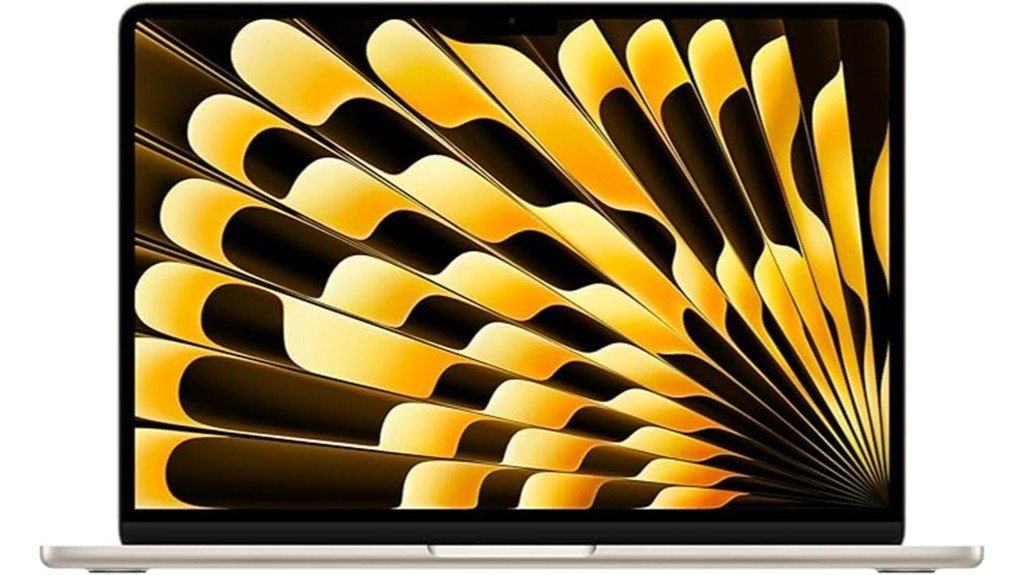
Choosing the right MacBook Air comes down to a simple question: do you want a light everyday laptop that still has enough power for serious work? The Apple 2025 MacBook Air with the M4 chip is built for students, remote workers, creators, and Apple users who value speed, portability, battery efficiency, and a clean macOS experience. Its 13.6-inch Liquid Retina display, thin 0.44-inch profile, 2.73-pound weight, Thunderbolt 4, Wi-Fi 6E, and Touch ID make it a strong daily laptop. The main tradeoff is the limited port selection, so you may still need a USB-C hub if your setup includes several monitors, memory cards, wired accessories, or older devices.
Quick Verdict
Rating: Recommended with caveats
Best For: Apple users who want a thin, fast, quiet, and portable laptop for school, office work, browsing, writing, video calls, light creative work, and everyday multitasking.
Bottom Line: The 2025 MacBook Air delivers strong M4 performance in a very light body, with a sharp Liquid Retina display and modern wireless connectivity. It is less ideal if you need many built-in ports, upgradeable hardware, or workstation-level performance for heavy professional editing.
Overview
The 2025 Apple MacBook Air is a compact laptop built around the M4 chip. It measures 8.46 x 11.97 x 0.44 inches and weighs 2.73 pounds, which makes it easy to carry between home, school, work, and travel. The article-supported configuration includes a 10-core CPU, 8-core GPU, and 16-core Neural Engine, giving you enough power for multitasking, web apps, office work, streaming, video calls, and many creative tasks.
The 13.6-inch Liquid Retina display has a 2560-by-1664 resolution and supports 1 billion colors, so text, images, videos, and design work appear crisp and bright. Connectivity includes Thunderbolt 4, Wi-Fi 6E, Bluetooth 5.3, and support for older USB-C devices through the Thunderbolt ports. It also includes Touch ID and the Magic Keyboard, giving you quick login, secure authentication, and a comfortable typing setup.
| Specification | Detail |
|---|---|
| Brand | Apple |
| Product | 2025 MacBook Air |
| Chip | Apple M4 chip |
| CPU | 10-core CPU |
| GPU | 8-core GPU |
| Neural Engine | 16-core Neural Engine |
| Display | 13.6-inch Liquid Retina display |
| Resolution | 2560-by-1664 |
| Color Support | Supports 1 billion colors |
| Dimensions | 8.46 x 11.97 x 0.44 inches |
| Weight | 2.73 pounds |
| Connectivity | Thunderbolt 4, Wi-Fi 6E, Bluetooth 5.3 |
| Keyboard | Magic Keyboard |
| Security | Touch ID and privacy-focused Apple security features |
| Available Colors Mentioned | Starlight, Midnight, Space Gray, and Silver |
What Is the Apple 2025 MacBook Air?
The Apple 2025 MacBook Air is a thin, lightweight macOS laptop designed for everyday productivity and mobile use. It keeps the Air’s familiar slim design while adding the M4 chip, which helps improve performance and power efficiency for common tasks like writing, browsing, email, spreadsheets, video calls, and content consumption.
This model is also a strong fit for users who want a high-quality display without moving up to a heavier laptop. The 13.6-inch Liquid Retina display, 2560-by-1664 resolution, and support for 1 billion colors make it useful for streaming, photo viewing, design previews, and general creative work. The 2.73-pound weight is one of its biggest advantages if you carry your laptop daily.
The MacBook Air is not meant to replace a fully loaded workstation. Its limited built-in ports can be restrictive, and buyers with heavy professional workflows may want to compare it with higher-end MacBook models before deciding.
Before You Buy: Check your accessory needs before choosing this MacBook Air. If you use HDMI displays, SD cards, wired keyboards, Ethernet, or multiple USB-A devices, you may need a separate USB-C or Thunderbolt hub.
Who Should Buy It?
Best For
- Students and office users who want a light laptop with strong everyday speed.
- Apple users who value macOS, Touch ID, the Magic Keyboard, and a clean device ecosystem.
- Writers, remote workers, and casual creators who need a sharp display and easy portability.
Skip If
- You need many built-in ports without using adapters or hubs.
- You want maximum hardware customization or upgrade flexibility after purchase.
- You handle heavy professional video editing, large 3D projects, or advanced audio workflows every day.
[Amazon Products Picked for You]

BUILT FOR EVERYDAY USE - HP 14, an entry-level, light workload configuration laptop. With up to 12 hours battery life and HP fast charge, it can keep you up and running all day long. Bring your ideas to life with the included one year subscription of Microsoft 365 including Word, Excel, and PowerPoint. Do more with AI as your personal assistant. Kickstart new projects with relevant answers, simplified solutions, and helpful advice

Laptop 180° Open Angle: This laptop's hinge opens flat to 180 degrees, giving you the flexibility to adjust the screen for presentations, team collaboration, or your ideal viewing position. Whether working, sharing, or presenting, this adjustable-screen notebook adapts to any situation with ease

EVERYDAY ORGANIZATION: Features two main compartments for ample storage space, a front utility pocket with an organizer panel and key clip, plus two exterior zippered stash pockets.
Detailed Features
The Apple 2025 MacBook Air stands out because of its M4 chip, which combines a 10-core CPU, 8-core GPU, and 16-core Neural Engine. For you, that means faster response during multitasking, smoother app switching, and better handling of modern macOS features. It is especially useful if you move between browser tabs, cloud tools, documents, video meetings, and media apps throughout the day.
Design and Portability
The 8.46 x 11.97 x 0.44-inch size keeps the laptop slim enough for backpacks, work bags, and small desks. At 2.73 pounds, it is light enough for commuting, campus use, travel, and daily carry. The Starlight color gives it a clean look, while the other mentioned colors, Midnight, Space Gray, and Silver, give you more style choices.
The thin build is a strength, but it also explains one of the biggest tradeoffs. There is not much room for a large port selection, so buyers who connect many accessories should plan their setup before buying.
Performance
The M4 chip gives the 2025 MacBook Air enough performance for common productivity work and many creative tasks. The 10-core CPU helps with multitasking, while the 8-core GPU supports graphics-related work such as media playback, design previews, light photo editing, and supported games. The 16-core Neural Engine helps with machine learning and AI-supported tasks inside compatible apps.
For everyday users, the biggest benefit is not just raw speed. It is the way the laptop can stay responsive while you switch between writing, browsing, video calls, notes, email, and streaming. Heavy editors and professional creators should still check whether the Air’s fanless-style design and port setup match their workload before buying.
Display Quality
The 13.6-inch Liquid Retina display is one of the strongest parts of this MacBook Air. With a 2560-by-1664 resolution and support for 1 billion colors, it gives you sharp text, clean images, and a pleasant viewing experience for videos, web pages, documents, and creative previews.
This display is especially useful if you work with visual content, read for long sessions, or watch media on your laptop. It is still a compact 13.6-inch screen, so users who keep several windows open at once may prefer using an external monitor at a desk.
Connectivity
The MacBook Air includes Thunderbolt 4, Wi-Fi 6E, and Bluetooth 5.3. Thunderbolt 4 gives you a fast wired connection for supported accessories, displays, drives, and docks. Wi-Fi 6E helps with modern wireless networking, while Bluetooth 5.3 supports wireless accessories like headphones, mice, keyboards, and speakers.
The main limitation is the number and variety of physical ports. If you use older USB-A accessories, HDMI cables, SD cards, or wired Ethernet, you may need an adapter or dock. This is not unusual for a thin laptop, but it is still worth planning around.
Keyboard, Security, and Privacy
The Magic Keyboard gives you a familiar typing feel for writing, email, schoolwork, coding, and office tasks. Touch ID adds quick sign-in and secure authentication, which is helpful when you unlock the laptop often or approve purchases and password prompts.
The MacBook Air also includes Apple’s privacy-focused software and security features. This matters if you use your laptop for work accounts, personal files, banking, family photos, or client documents. The tradeoff is that macOS and Apple’s software environment may feel less flexible if you prefer deep system customization.
Pro Tip: Before buying, list the devices you connect each week. If that list includes HDMI, USB-A, SD cards, or Ethernet, add a good USB-C hub to your budget.
How It Performs in Real Use
For School and Office Work
For writing papers, managing spreadsheets, joining video calls, creating presentations, and working in browser-based apps, the M4 chip gives the MacBook Air a fast and smooth feel. The light 2.73-pound body makes it easy to move between classes, meetings, coffee shops, and home.
For Remote Work
The combination of a sharp 13.6-inch display, Magic Keyboard, Touch ID, Wi-Fi 6E, and Bluetooth 5.3 works well for remote work. You can pair wireless accessories and connect to modern networks without much effort. If you work from a desk every day, a Thunderbolt dock or USB-C hub can make the setup much easier.
For Creative Tasks
The 2560-by-1664 Liquid Retina display and 1 billion color support help when you review photos, edit simple videos, create graphics, or manage content. The 8-core GPU and 16-core Neural Engine add useful support for compatible creative apps. For heavy video projects, complex timelines, or demanding professional software, you should compare it with a higher-end MacBook before deciding.
For Travel and Daily Carry
The MacBook Air’s thin 0.44-inch body and 2.73-pound weight are major advantages for travel. It fits into many bags and is easier to carry than larger laptops. The limited port selection can be more noticeable while traveling, so carrying a compact adapter is a practical idea.
Setup Tips Before First Use
Start by checking your software needs and making sure your important apps support the Apple M4 chip and your version of macOS. Most everyday apps should work well, but professional tools, older plug-ins, or niche utilities may need updates.
Next, plan your accessory setup. If you already own USB-C devices, Thunderbolt 4 should help with compatibility. If your accessories use USB-A, HDMI, or SD cards, choose a hub that matches your work habits. For desk use, an external monitor, keyboard, and mouse can make the compact 13.6-inch screen feel more comfortable for longer sessions.
Finally, use Touch ID and privacy settings early. Setting up fingerprint login, app permissions, password tools, and device security can make the laptop easier and safer to use every day.
Compatibility and Safety
The 2025 MacBook Air supports older USB-C devices through its Thunderbolt 4 ports, which helps if you already own USB-C drives, chargers, docks, or displays. Still, not every older accessory will connect directly. Some devices may need adapters, updated drivers, or macOS-compatible software.
For safety and long-term reliability, use quality charging accessories and avoid cheap, unknown adapters that may not meet proper power standards. Keep the laptop on a flat surface during heavier tasks, avoid blocking airflow around the body, and follow Apple’s setup and care guidance for charging, cleaning, and storage.
Pros and Cons
Pros
- M4 chip with 10-core CPU gives strong speed for daily productivity and multitasking.
- 13.6-inch Liquid Retina display has sharp 2560-by-1664 resolution and 1 billion color support.
- Thin 0.44-inch body and 2.73-pound weight make it easy to carry every day.
- Thunderbolt 4, Wi-Fi 6E, and Bluetooth 5.3 support modern wired and wireless setups.
- Touch ID and Magic Keyboard improve daily convenience, typing comfort, and secure access.
Cons
- Limited port selection may require a USB-C hub or Thunderbolt dock.
- Not the best fit for users who want deep hardware customization or easy upgrades.
- Basic built-in audio may not satisfy users who want a stronger speaker setup.
Is It Worth the Price?
The Apple 2025 MacBook Air is best viewed as a premium everyday laptop. You are paying for a thin design, strong M4 performance, macOS, a high-quality Liquid Retina display, Touch ID, and reliable portability rather than a large port selection or workstation-style expandability.
It is a smart buy for everyday use if you want a fast, light laptop that feels polished and easy to carry. Students, office users, writers, remote workers, and casual creators will likely get the most value from it. It is not the best fit if you need several built-in ports, a larger screen, or maximum performance for demanding professional software.
[Amazon Products Picked for You]
Sleek design: the Lenovo T210 top loader laptop carrying case offers a water-repellent fabric and clean, streamlined design that makes it perfect for college students, busy professionals, and anyone on the go

Stunning 15.6" FHD IPS Display: Experience crisp 1920x1080 resolution on this 15.6 inch laptop with an IPS panel that delivers wide viewing angles and vivid colors. The narrow-bezel design maximizes screen real estate for comfortable viewing on this Win 11 laptop, whether you're studying or working.

【Adjustable & Ergonomic】:The laptop holder elevates your notebook from 4.34” to 6.59” height (6 level height) for a perfect eye level, letting you fix posture and reduce your neck fatigue, back pain and eye strain. Very comfortable for working in home, office and outdoor.(Please Note: The two support bars must be inserted into the slots at the same level to ensure balance on both sides)
How It Compares to Alternatives
Compared with older MacBook Air models, the 2025 version’s M4 chip gives it a stronger performance foundation for modern apps and multitasking. Compared with a MacBook Pro, it is lighter and easier to carry, but less suited for heavy sustained workloads and users who want a more professional port and performance setup.
If you care most about portability, quiet everyday use, and a sharp compact display, the MacBook Air makes the most sense. If you care more about heavy editing, advanced audio work, larger displays, or a more powerful professional setup, a MacBook Pro may be worth comparing before you buy.
[Amazon Products Picked for You]

【Perfect Fit & Compatible】Specifically designed for Microsoft Surface Laptop Copilot + PC 13 inch Touchscreen(Windows 11) 2025 release (Model number: 2095). Please check that your laptop model is 2095 before purchasing (Note: different models correspond to different case,Not compatible with any other models Microsoft Surface Laptop), this case offers a precise fit that ensures full protection for your Microsoft Surface 13 inch 2095.

Cute wired mouse: The cute little mouse has unique cartoon animal shape, which designed specifically for female users or kids who have small hands. Best gift for your friends or families

【TACTICAL DURABILITY】Engineered for the daily grind and unexpected adventures. Built from 900D high-density, wear-resistant fabric, this outdoor messenger bag withstands the rigors of daily duty. Featuring reinforced stitching and rugged metal SBS zippers, it serves as a reliable military computer bag that maintains its professional shape even when fully loaded.
Concluding Thoughts
The Apple 2025 MacBook Air is a polished laptop for users who want a balance of speed, weight, display quality, and everyday convenience. The M4 chip, 13.6-inch Liquid Retina display, Touch ID, Magic Keyboard, Thunderbolt 4, Wi-Fi 6E, and Bluetooth 5.3 make it practical for school, office work, remote work, browsing, streaming, and light creative projects.
| Feature | Impact |
|---|---|
| M4 Chip Performance | Enhanced processing efficiency |
| Display and Audio Quality | Immersive multimedia experience |
| Privacy and Security | Data protection and user confidentiality |
Its biggest limitation is not the core performance, but the physical setup. If your workflow depends on several accessories, older ports, or professional studio hardware, you should plan for adapters or consider a more advanced MacBook model.
Related Guides
Frequently Asked Questions
Is the 2025 MacBook Air compatible with older MacBook accessories?
The 2025 MacBook Air supports older USB-C devices through its Thunderbolt 4 ports. Accessories that use USB-A, HDMI, Ethernet, or SD cards may need a separate adapter or hub.
How does the M4 chip compare to previous MacBook Air processors?
The article-supported M4 configuration includes a 10-core CPU, 8-core GPU, and 16-core Neural Engine. That gives this MacBook Air stronger support for multitasking, graphics work, and compatible machine learning features than older Air models.
Does the MacBook Air 2025 support gaming applications?
Yes, the M4 chip and 8-core GPU can support compatible gaming applications. It is best for casual and supported macOS games rather than buyers who want a dedicated gaming laptop.
What are the available color options besides Starlight?
The article mentions Midnight, Space Gray, and Silver as color options besides Starlight. Availability can vary by seller and configuration, so check the selected product page before ordering.
Can the MacBook Air 2025 handle professional video editing software?
The M4 chip, 10-core CPU, and 8-core GPU can handle many video editing tasks, especially lighter projects and everyday creator work. For complex timelines, heavy rendering, and frequent professional editing, compare it with a MacBook Pro before deciding.
Do you need a USB-C hub with this MacBook Air?
You may need one if you use HDMI monitors, USB-A accessories, SD cards, Ethernet, or multiple wired devices. Thunderbolt 4 is powerful, but the laptop’s slim design limits the number of built-in connection options.
Is the 13.6-inch Liquid Retina display good for daily work?
Yes, the 13.6-inch Liquid Retina display with 2560-by-1664 resolution is sharp enough for writing, browsing, video calls, streaming, and light creative work. If you keep many windows open at once, an external monitor can make desk work more comfortable.
Who should skip the 2025 MacBook Air?
Skip it if you need many built-in ports, maximum upgrade flexibility, or workstation-level performance for demanding professional software. It is better for portable everyday use than heavy studio or engineering workflows.
The Bottom Line
The Apple 2025 MacBook Air is a strong choice if you want a thin, light, and fast Mac for school, office work, remote work, browsing, video calls, streaming, and light creative tasks. Its biggest strengths are the M4 chip, 13.6-inch Liquid Retina display, modern connectivity, Touch ID, and 2.73-pound weight. Skip it if you need many built-in ports, maximum upgrade freedom, or a laptop built mainly for heavy professional workloads.
