
A curved ultrawide monitor can give you more room for games, editing timelines, spreadsheets, and side-by-side apps without adding another display. The main choice is between a desk-friendly 21:9 screen and a wider 32:9 monitor that behaves more like a dual-screen setup.
Our top pick is the LG UltraGear 45GR75DC-B because its 5120×1440 screen, 200Hz refresh rate, KVM and USB-C charging cover gaming and multi-device work. The Alienware AW3425DW is our Best value pick if 240Hz QD-OLED gaming matters more than laptop docking.
We checked the linked Amazon listings against exact-model manufacturer specifications, connectivity details, OLED-care information and current safety information before rebuilding the recommendations.
Curved Ultrawide Monitors Compared
| Product | Best for | Panel / Format | Refresh Rate | Docking |
|---|---|---|---|---|
|
Mid-range
|
Best overall | 45-inch VA, 32:9, 5120×1440 | Up to 200Hz | USB-C up to 90W, KVM |
|
Mid-range
|
Best value | 34.2-inch QD-OLED, 21:9, 3440×1440 | 240Hz | No USB-C video; 15W downstream charging |
|
Premium
|
Premium smart features | 34-inch QD-OLED, 21:9, 3440×1440 | 175Hz | No USB-C |
|
Premium
|
Best for docking | 34-inch OLED, 21:9, 3440×1440 | 240Hz | USB-C up to 140W, KVM, 2.5GbE |
Curved Ultrawide Monitors: Our Top Picks
Detailed Picks
Bottom line: The LG UltraGear 45GR75DC-B is the strongest fit here if you want one screen to handle wide gaming, several work windows and two connected computers. Its 32:9 format is the key advantage, but it needs more desk space than the 34-inch picks.
- Screen: 44.5-inch VA, large multi-window workspace
- Resolution: 5120×1440, wide Dual QHD desktop
- Refresh rate: Up to 200Hz, suited to high-frame-rate gaming
- Connectivity: USB-C up to 90W plus KVM, useful for laptops
The 32:9 aspect ratio gives you enough horizontal room for timelines, spreadsheets, dashboards or several full-height apps. Picture-by-picture support also lets you show two input sources on the same panel.
LG lists a 1500R curve, 1ms GtG response time, FreeSync Premium Pro and DisplayHDR 600 support. The VA panel avoids OLED burn-in concerns, which can make it easier to live with when your workday includes static interfaces.
The tradeoff is size. This is a wide monitor, and driving 5120×1440 near its 200Hz ceiling puts more load on your GPU than 3440×1440. Measure your desk and confirm that your computer supports the resolution and refresh rate through the connection you plan to use.
- 5120×1440 32:9 workspace can replace two smaller displays
- Up to 200Hz refresh rate
- Built-in KVM for switching connected systems
- USB-C video support with up to 90W power delivery
- No OLED burn-in risk from the VA panel
- Requires much more desk width than a 34-inch ultrawide
- VA cannot match OLED black levels and pixel response
- 5120×1440 at high frame rates demands a capable GPU
Bottom line: The Alienware AW3425DW makes sense if you want 240Hz QD-OLED performance without the width of a super-ultrawide. It gives up one-cable laptop docking to keep the focus on gaming display performance.
- Screen: 34.2-inch QD-OLED, compact ultrawide footprint
- Resolution: 3440×1440, familiar 21:9 gaming format
- Refresh rate: 240Hz, aimed at fast PC gaming
- Connectivity: DisplayPort and HDMI for video, no USB-C video input
Dell lists an 1800R curve, 0.03ms GtG response time and support for FreeSync Premium Pro, G-SYNC compatibility and VESA AdaptiveSync. The QD-OLED panel is the main reason to choose it over an LCD ultrawide when dark-room contrast and fast pixel transitions matter.
The USB-C port needs careful interpretation. Dell lists it as a downstream USB connection with up to 15W charging, not as a DisplayPort Alt Mode input. A laptop therefore needs HDMI or DisplayPort for the picture and a separate charging arrangement.
OLED panel maintenance matters for long-term desktop use. Dell provides OLED-care functions, but static taskbars, application chrome and other fixed elements still make varied content and regular panel-maintenance cycles sensible.
- 240Hz QD-OLED panel
- 0.03ms GtG manufacturer specification
- FreeSync Premium Pro and G-SYNC compatibility
- 34.2-inch 21:9 size fits more desks than 32:9 models
- HDMI and DisplayPort support high-refresh 3440×1440 input
- USB-C does not provide video input or full laptop docking
- OLED needs care with prolonged static desktop content
- A newer Alienware 34-inch generation now exists
Bottom line: The Samsung Odyssey OLED G8 G85SD combines OLED gaming with Tizen-based entertainment features. It is a better fit for a mixed gaming-and-streaming setup than for someone chasing the highest refresh rate in this group.
- Screen: 34-inch QD-OLED, 1800R ultrawide curve
- Resolution: 3440×1440, practical 21:9 desktop
- Refresh rate: Up to 175Hz, smooth for most gaming
- Connectivity: HDMI 2.1 and DisplayPort 1.4, no USB-C input
Samsung lists a 0.03ms GtG response time, FreeSync Premium Pro and G-SYNC compatibility. Its Glare Free treatment is designed to control reflections, while OLED Safeguard features manage panel heat and static-image risks.
The smart platform sets the G85SD apart. Samsung Gaming Hub, streaming apps, Wi-Fi, Bluetooth and Tizen let the monitor handle supported entertainment without keeping a PC active.
The tradeoff is complexity. Smart features add menus, accounts and software updates that are unnecessary if you only want a conventional monitor. The 175Hz maximum refresh rate is also below both 240Hz OLED models in this roundup.
- QD-OLED contrast and wide color capability
- Glare Free screen treatment
- 175Hz refresh and 0.03ms GtG specification
- Tizen and Gaming Hub add standalone entertainment options
- FreeSync Premium Pro and G-SYNC compatibility
- 175Hz is lower than the 240Hz OLED alternatives here
- No USB-C input for one-cable laptop docking
- Smart software adds features some PC-only users will not need
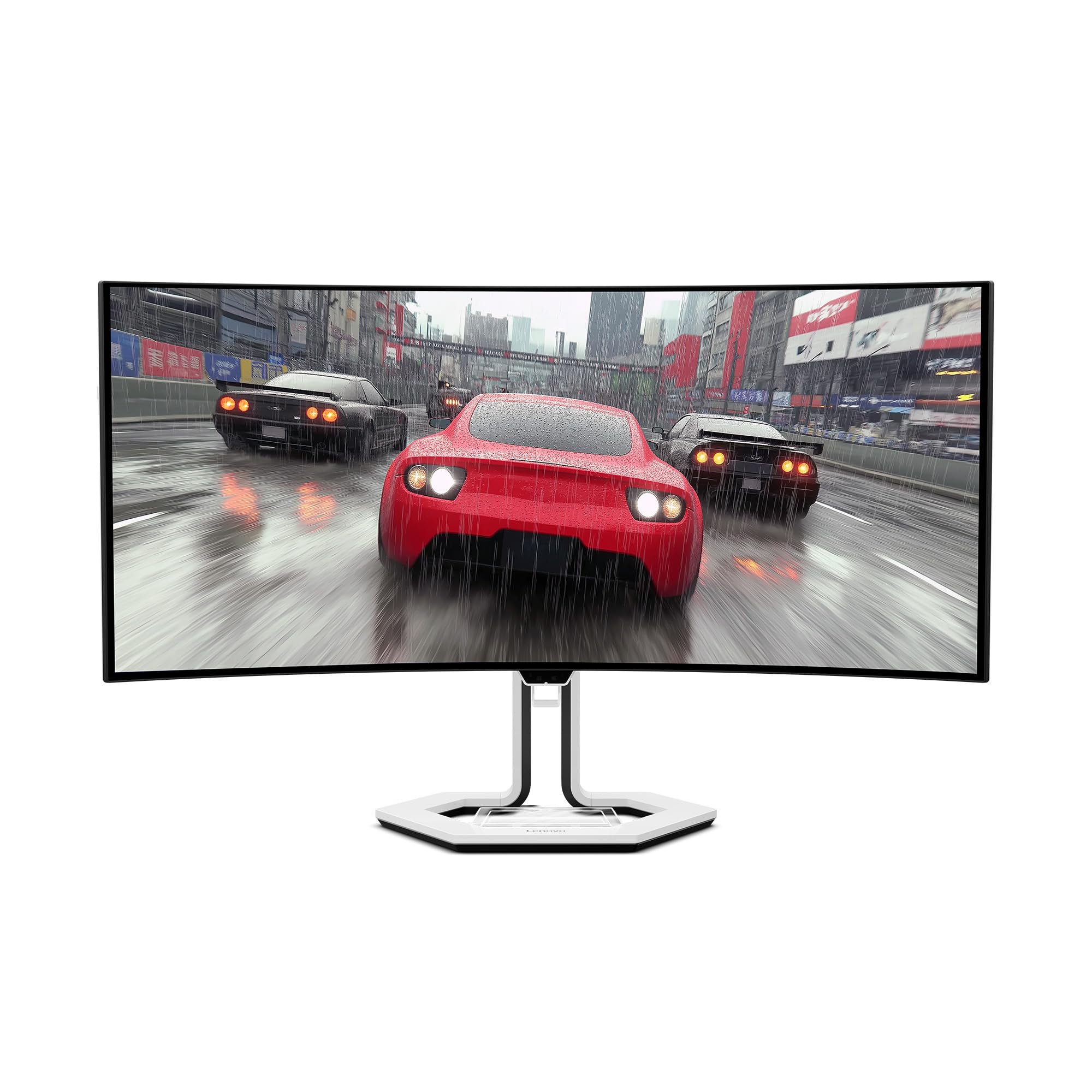
Bottom line: The Lenovo Legion Pro 34WD-10 is the most complete laptop-and-desktop hub in this group. It combines a 240Hz OLED panel with an unusually strong USB-C, KVM and Ethernet setup.
- Screen: 34-inch OLED, aggressive 800R curve
- Resolution: 3440×1440, 21:9 gaming and work space
- Refresh rate: 240Hz, suited to high-frame-rate gaming
- Connectivity: USB-C up to 140W, KVM and 2.5GbE
Lenovo lists USB-C DisplayPort Alt Mode with up to 140W power delivery, three USB-A connections, two USB-C connections and 2.5GbE Ethernet. That makes the monitor useful when a work laptop and gaming desktop share the same keyboard, mouse and network connection.
The OLED panel supports 240Hz and Lenovo lists a 0.03ms response time, 98.5% DCI-P3 coverage, 99% sRGB and DisplayHDR True Black 400. The monitor also uses an 800R curve, which wraps around your field of view more strongly than the 1800R OLED models above.
That tighter curve is a preference rather than an automatic advantage. It can feel immersive in games but may be less comfortable if you want a flatter-looking canvas for spreadsheets, design grids or shared viewing.
- 240Hz OLED panel
- USB-C supports video, data and up to 140W power delivery
- Built-in KVM supports a two-computer desk
- 2.5GbE adds wired-network passthrough
- True 10-bit color and DisplayHDR True Black 400
- 800R curve is much tighter than many 34-inch ultrawides
- OLED still requires care with long-running static content
- Extra docking hardware is unnecessary for a single-PC setup
LG UltraGear 45GR75DC-B vs Alienware AW3425DW: Is the Upgrade Worth It?
These monitors solve different problems. The LG gives you far more horizontal workspace and stronger laptop connectivity, while the Alienware trades that width for QD-OLED contrast and a higher 240Hz refresh rate.
- Screen format: LG uses 45-inch 32:9; Alienware uses a more compact 34.2-inch 21:9 layout.
- Panel: LG uses VA, while Alienware uses QD-OLED for deeper blacks and faster pixel response.
- Refresh rate: Alienware reaches 240Hz versus up to 200Hz on the LG.
- Docking: LG has USB-C video with up to 90W power delivery and KVM; Alienware does not provide full USB-C laptop docking.
Which Curved Ultrawide Monitor Should You Buy?
- Maximum horizontal workspace: get the LG UltraGear 45GR75DC-B.
- 240Hz QD-OLED without a very wide desk: get the Alienware AW3425DW.
- Gaming plus built-in streaming: get the Samsung Odyssey OLED G8 G85SD.
- OLED plus serious laptop docking: get the Lenovo Legion Pro 34WD-10.
How We Chose
- Exact-model verification: We checked each linked Amazon listing against the manufacturer’s specifications for the same model.
- Gaming hardware: We compared native resolution, aspect ratio, refresh rate, response-time method and adaptive-sync support.
- Desk usability: We checked curvature, screen format, USB-C behavior, KVM features and network connectivity where applicable.
- Long-term ownership: We reviewed manufacturer OLED-care information, current model status and safety or recall information. We did not present an owner-consensus box without a repeatable trend across multiple independent non-Amazon sources.
Curved Ultrawide Monitor Buying Guide
21:9 vs 32:9
A 34-inch 21:9 monitor is the easier fit for most desks. It gives you extra horizontal space while still behaving like one main display. A 32:9 monitor is closer to two screens joined together and is better when several full-height windows need to remain visible. For maximum workspace here, choose the LG UltraGear 45GR75DC-B.
OLED vs VA
OLED pixels produce their own light, giving OLED monitors very deep blacks and fast pixel transitions. VA LCD panels avoid OLED burn-in risk and can be a practical choice for long sessions with static applications. The Alienware, Samsung and Lenovo use OLED technology, while the LG uses VA.
Refresh Rate and GPU Performance
A higher refresh rate can make motion look smoother, but your computer still has to produce enough frames. Running 3440×1440 at 240Hz or 5120×1440 at 200Hz can be demanding in modern games. You can reduce graphics settings or use supported upscaling when the GPU cannot sustain your target frame rate.
Curvature
A lower curvature number means a tighter curve. The Lenovo’s 800R curve wraps around you more aggressively, while the LG’s 1500R and the 1800R Alienware and Samsung are gentler. Desk depth and viewing distance matter, so do not choose only from the diagonal measurement.
USB-C, KVM and Laptop Docking
USB-C ports do not all work the same way. A useful one-cable monitor connection needs DisplayPort Alt Mode for video and enough power delivery for your laptop. The Lenovo Legion Pro 34WD-10 supports up to 140W USB-C power delivery, while the LG supports up to 90W. The Alienware’s USB-C port is not a video input.
OLED Burn-In and Panel Care
OLED image retention and permanent burn-in remain possible when bright static elements stay in the same position for long periods. Built-in pixel shifting, panel maintenance and thermal controls can reduce risk but cannot guarantee that burn-in never occurs. Let maintenance cycles run and review the manufacturer’s current warranty terms.
Console Compatibility
Most console output is designed around 16:9 resolutions. A 21:9 or 32:9 monitor may therefore display black bars rather than using the entire screen. Check the monitor’s HDMI modes and your console’s supported resolutions and refresh rates before buying an ultrawide primarily for console use.
Mistakes to Avoid When Buying a Curved Ultrawide Monitor
- Shopping by diagonal alone: Compare aspect ratio, actual width and stand depth before ordering.
- Assuming every USB-C port carries video: Confirm DisplayPort Alt Mode and power-delivery specifications.
- Ignoring GPU load: Higher ultrawide resolutions require more graphics processing than standard QHD.
- Ignoring OLED maintenance: Use panel-care functions and avoid unnecessary static content.
- Assuming every game supports ultrawide: Check support for 21:9 or 32:9 in the games you play most.
FAQs
How Do I Choose a Curved Monitor?
Start with aspect ratio, resolution and physical desk fit. A 34-inch 21:9 display works well as one wide main monitor, while 32:9 gives you more room for several windows. Then compare panel type, refresh rate, curvature, adaptive sync, stand adjustment, video inputs and any USB-C or KVM features you actually need.
Will an OLED Monitor Get Burn-In?
OLED burn-in is possible when bright static elements remain in the same place for long periods. Modern monitors use pixel shifting, thermal controls and panel-maintenance routines to reduce the risk, but they cannot guarantee that it will never happen. Vary your content, use the built-in care functions and check the manufacturer’s current warranty terms.
Do I Need a Powerful GPU for an Ultrawide Monitor?
It depends on the resolution, game, settings and frame-rate target. A 3440×1440 display renders more pixels than 2560×1440, while 5120×1440 requires still more GPU work. Reaching 175Hz, 200Hz or 240Hz in demanding games may require lower settings, a stronger graphics card or supported upscaling technologies.
Is 21:9 or 32:9 Better for Work?
21:9 is easier to fit and gives you useful room for two applications side by side. A 32:9 screen gives you much more horizontal space and can replace two monitors without a center bezel. Choose 32:9 for several persistent windows and 21:9 when desk space and easier window management matter more.
Do Consoles Support Ultrawide Monitors?
Console support varies, but many consoles are designed around 16:9 output rather than native 21:9 or 32:9. That can leave black bars on the sides of an ultrawide display. Check the console’s HDMI output modes and the monitor’s supported resolutions and refresh rates instead of assuming the entire ultrawide panel will be used.
Is a 34-Inch or 45-Inch Ultrawide Better?
A 34-inch 21:9 monitor is usually easier to place and keeps the edges of the screen closer to your normal field of view. A 45-inch 32:9 monitor gives you substantially more horizontal workspace. Choose based on aspect ratio, physical width, desk depth and how many applications you want visible at the same time.
Final Verdict
The best curved ultrawide monitor in this group depends on how you divide your time between gaming and work. The LG offers the broadest workspace and useful multi-device features, while the three 34-inch OLED options prioritize picture quality, compact desk fit or specialized connectivity.
For 240Hz QD-OLED at a smaller size, compare the Alienware AW3425DW. For OLED gaming with integrated smart entertainment, consider the Samsung Odyssey OLED G8 G85SD.
| Product Name | Image | Screen Size | Resolution / Aspect Ratio | Refresh Rate | Response Time | Display Technology | Adaptive Sync Technology |
|---|---|---|---|---|---|---|---|
| LG 45GR75DC-B UltraGear Curved Gaming Monitor |
 |
45 Inches | 5120×1440 / 32:9 | Up to 200 Hz | 1 ms (GtG) | VA | FreeSync Premium Pro |
| Alienware 34 QD-OLED Curved Gaming Monitor – AW3425DW |
 |
34.2 Inches | 3440×1440 / 21:9 | 240 Hz | 0.03 ms (GtG) | QD-OLED | FreeSync Premium Pro / G-SYNC Compatible |
| Samsung 34" Odyssey OLED G8 (G85SD) |
 |
34 Inches | 3440×1440 / 21:9 | 175 Hz | 0.03 ms (GtG) | QD-OLED | FreeSync Premium Pro / G-SYNC Compatible |
| Lenovo Legion Pro 34WD-10 Curved Gaming Monitor |
 |
34 Inches | 3440×1440 / 21:9 | 240 Hz | 0.03 ms (manufacturer-listed) | OLED | FreeSync Premium Pro |

