As an Amazon Associate I earn from qualifying purchases.
The best FPV goggles for beginners are the ones that match your drone’s video system. DJI, Walksnail, HDZero and analog goggles do not work with each other, so check what your drone or air unit uses before you buy.
Below we compare six goggles. Three are digital (two DJI and one Walksnail), two are analog, and one is a phone headset. Read the “works with” note in each section first, then choose for comfort and picture quality. Last checked: October 2026. Availability varies, so check the current listing.
Top Picks
|
Category |
Product |
|---|---|
|
🏆 Best Overall |
|
|
🎯 Best for Racing |
|
|
⭐ Best Large Screen |
|
|
🔰 Best Analog Starter |
|
|
🚀 Most Comfortable Fit |
|
|
💼 Best Budget DVR |
How We Chose These FPV Goggles for Beginners
We compared the specs and owner reviews for each pair of goggles. We did not fly them ourselves. We looked at four things: the video system they work with, picture clarity and delay (latency), comfort, and extras such as a built-in DVR.
Comfort matters because you will wear goggles for long practice sessions. If you wear glasses, look for adjustable focus or swappable lenses. Goggles that press on your nose or slip will cut your flying time.
Compatibility matters most. The most common beginner mistake is buying goggles that do not match the drone’s video system. Here is what each pair works with:
- DJI Goggles 3: DJI Avata 2, Neo, Mini 4 Pro and Air 3 (with a compatible controller), plus O3 or O4 air units in custom builds.
- DJI Goggles V2: the original DJI FPV drone and the first DJI Avata only.
- Walksnail Goggles: Walksnail Avatar HD air units only.
- Fat Shark Recon Echo and EV800D: analog 5.8 GHz video transmitters only.
- DroneMask 2: drones flown with a controller that holds your phone, such as the DJI RC-N1.
DJI Goggles 3

DJI Goggles 3 have sharp micro-OLED screens, a low-delay video link and adjustable focus for glasses wearers. Real View PiP shows the world around you in a small window, so you can check your surroundings without lifting the goggles.
They work with DJI Avata 2, Neo, Mini 4 Pro and Air 3 (with a compatible controller), and with O3 or O4 air units in custom builds. They do not work with analog, Walksnail or the original DJI FPV drone. If your drone is not on that list, check before you buy.
What People Say
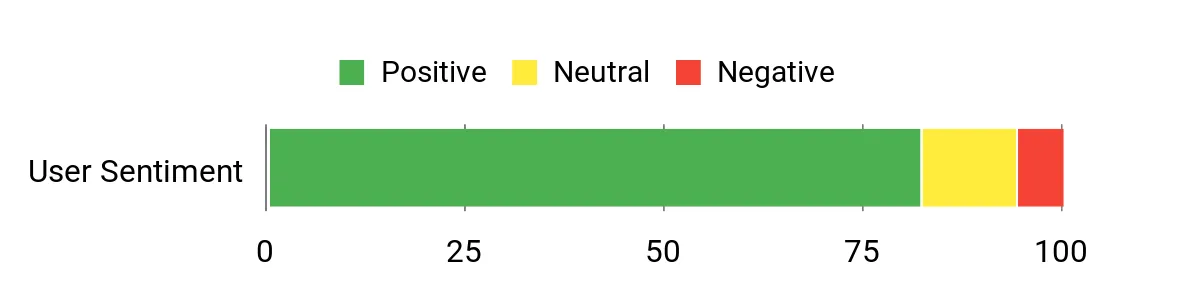
You’ll see reviewers consistently praise the picture quality and comfort, saying the image is bright and detailed and that the goggles sit more comfortably than many older models. People also note it pairs well with DJI gear and benefits from firmware updates via DJI Assistant 2, while some mention it’s not the cheapest option and to check device compatibility before buying.
Overall Sentiment: Positive
Situational Benefits
|
Situation |
How It Helps |
|---|---|
|
Learning to Fly |
Low latency and a crisp image help you react faster and learn stick inputs with less motion disorientation. |
|
Cinematic Flights |
High-resolution, stable video makes framing shots and judging distance easier when you’re capturing smooth footage. |
|
Field Practice |
Wireless streaming and reliable link performance reduce setup time so you spend more time flying and less time troubleshooting. |
|
Checking Surroundings |
Real View PiP shows your surroundings in a small window, so you can check for people or obstacles without taking the goggles off. |
Ease Of Use
|
Feature |
Ease Level |
|---|---|
|
Initial Setup |
Moderate |
|
Firmware Updates |
Moderate |
|
Pairing With DJI Gear |
Easy |
|
Diopter Adjustment |
Easy |
Versatility
Use these goggles for practice flights, relaxed cinematic flying and custom builds with an O3 or O4 air unit. They work only with DJI video systems. They can also share the live view to the DJI Fly app on your phone over Wi-Fi.
Safety Features
Low-latency transmission and Real View PiP improve situational awareness. One-tap defogging and clear HUD elements help you maintain control in changing conditions.
Comfort
The goggles include foam padding and an extra forehead pad for a lighter, less face-pressing fit. Many users report extended wear without pressure points, though fit can be subjective.
Best For
Intermediate
Key Benefits
- Very sharp Micro-OLED screens for clear detail
- Low-latency O4 transmission reduces lag and improves control
- Adjustable diopters and included padding for a personalized fit
Things to Consider
- Works only with the DJI aircraft listed above. It does not work with analog, Walksnail or the original DJI FPV drone.
- Goggles, drone and controller may all need a firmware update before they pair.
DJI Goggles V2

The DJI FPV Goggles V2 are a compact digital headset with a bright picture and a strong signal. They were made for the original DJI FPV drone and also work with the first DJI Avata.
They do not pair with the Avata 2, Neo or other aircraft that use DJI’s newer O4 link. If you own one of those, look at the DJI Goggles 3 instead. If you are buying the original FPV drone or the first Avata, the V2 is a good match.
What People Say
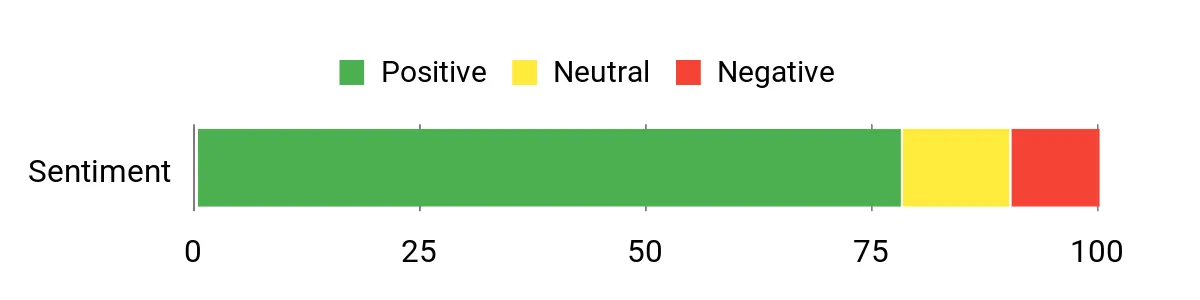
You’ll notice most users praise the V2 for its image quality and strong reception, saying it makes fast flying feel more controlled. People also mention a learning curve with menus and firmware, and some report fit or foam comfort issues depending on face shape.
Overall Sentiment: Positive
Situations
|
Situation |
How It Helps |
|---|---|
|
Racing Practice |
Sharp imagery and stable link let you focus on split-second maneuvers and line choice. |
|
Long Range Flights |
Strong signal lock keeps the feed usable farther out so you can explore without frequent dropouts. |
|
Skill Drills |
Portable form factor means you can grab the goggles for quick sessions and repeat practice runs. |
|
Gear Transition |
If you’re moving from analog to digital, the V2 provides a clear, modern view that helps you adapt to HD feeds. |
Ease Of Use
|
Feature |
Ease Level |
|---|---|
|
Initial Setup |
Moderate |
|
Menu Navigation |
Moderate |
|
Pairing With Air Units |
Easy |
|
Foam/Fit Adjustment |
Moderate |
Versatility
These goggles suit freestyle practice and relaxed flying with the original DJI FPV drone and the first Avata. They are not made for newer DJI aircraft or for analog or Walksnail gear.
Safety
Strong reception reduces unexpected signal loss and a clear display helps you judge distance and obstacles more reliably during high-speed flights.
Comfort
The unit is lightweight and portable, but fit can vary; some users swap foam to improve seal and pressure points for longer sessions.
Best For
Intermediate
Key Benefits
- Bright, high-resolution image for clear line-of-sight
- Reliable signal lock suited to racing and long-range flights
- Portable, lightweight design that travels easily
Things to Consider
- Works only with the original DJI FPV drone and the first Avata. It does not pair with the Avata 2 or Neo.
- Older design. DJI’s newer goggles use the newer O4 link.
Walksnail Goggles
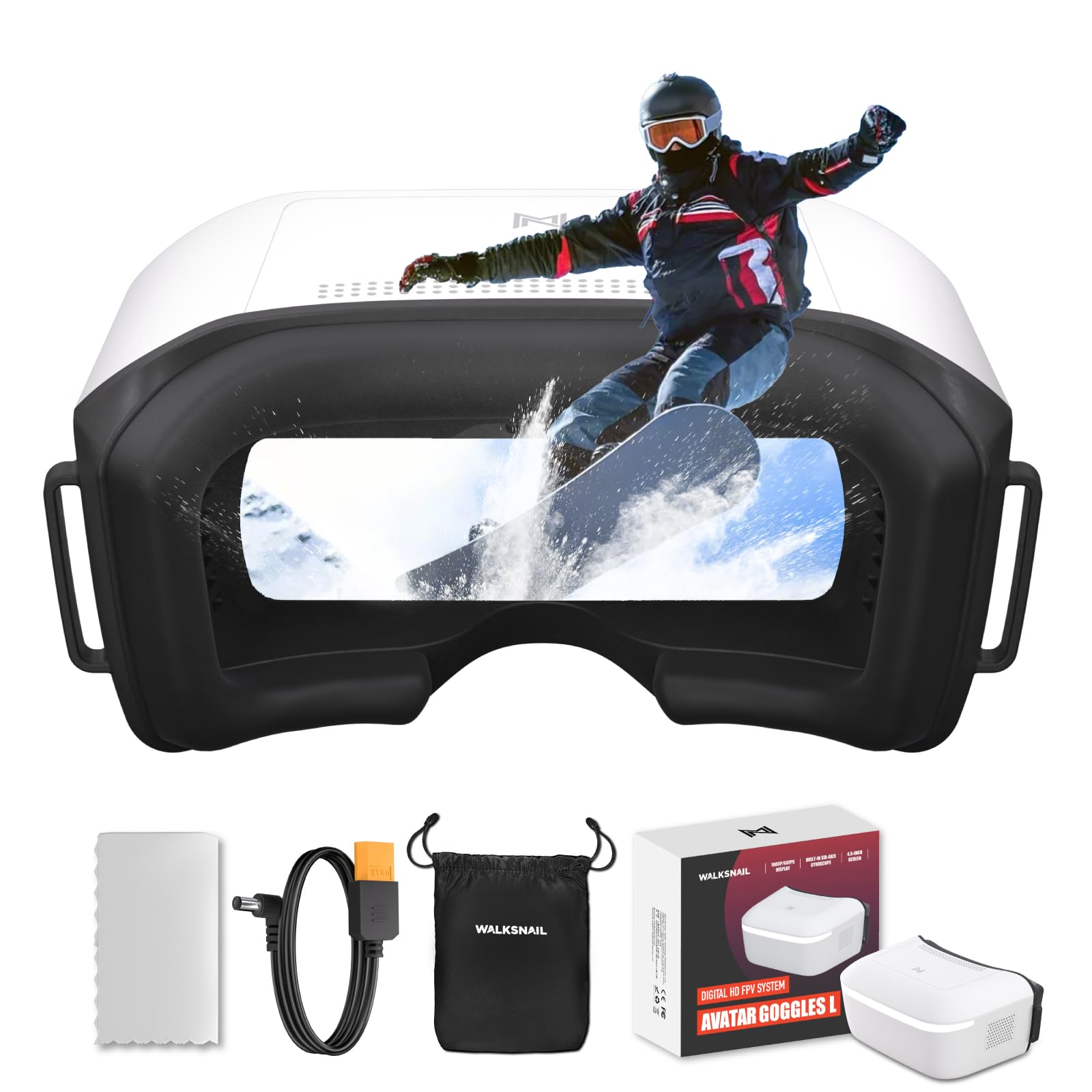
These Walksnail Avatar HD goggles have a large 4.5-inch 1080p screen, a built-in DVR (micro SD card slot) and head tracking. The single-screen box design leaves room for glasses, and custom lenses are available for vision correction.
They work only with Walksnail Avatar HD air units and cameras. They do not work with DJI or analog video. Choose them only if your drone already uses Walksnail.
What People Say
Users frequently highlight the sharp, vibrant display and the convenience of the built-in DVR. Many appreciate the compact, lightweight feel which makes longer flights easier, and pilots note the swappable lenses help if you wear glasses or need vision tweaks.
A common nitpick is that the foam and strap may need aftermarket tweaks for a perfect seal on some faces.
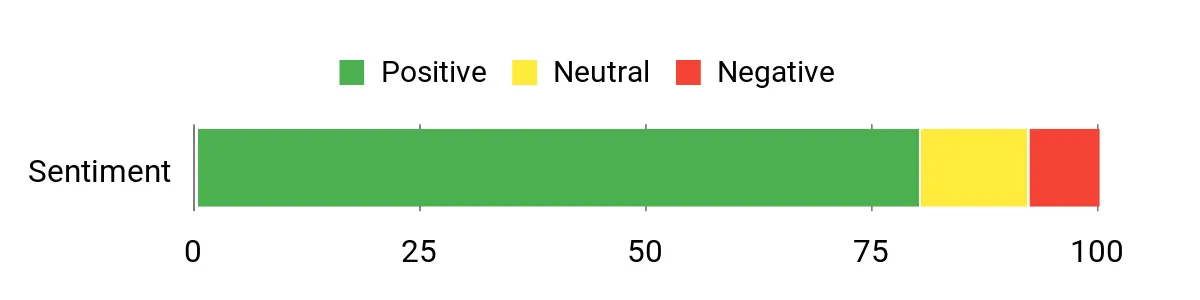
Overall Sentiment: Positive
Situations
|
Situation |
How It Helps |
|---|---|
|
Daily Practice |
Large, clear image reduces eye strain during repeated training runs so you can focus on improving control. |
|
Cinematic Flights |
HD feed and DVR make it simpler to frame and review footage without carrying extra recorders. |
|
Youth Learning |
Lightweight, compact design is easier for younger pilots to wear during lessons and practice sessions. |
|
Field Testing |
Swappable lenses and head tracking let you adapt quickly to different flying conditions and pilots. |
Ease Of Use
|
Feature |
Ease Level |
|---|---|
|
Initial Setup |
Moderate |
|
DVR Recording |
Easy |
|
Swapping Lenses |
Easy |
|
Head Tracking |
Moderate |
Versatility
These goggles suit relaxed flying and racing practice with Walksnail Avatar HD gear. They do not support DJI or analog video.
Safety
A clear HD feed and head tracking help you keep spatial awareness, while on-board DVR lets you review flights for missed hazards or close calls.
Comfort
The headset is relatively light and comfortable for long sessions, though some users swap the foam or strap to get a tighter seal for their face shape.
Best For
Advanced
Key Benefits
- Large 4.5-inch 1080p display for immersive viewing
- Built-in DVR to capture flights without extra gear
- Swappable lenses and head tracking for a tailored fit and view
Things to Consider
- Works only with Walksnail Avatar HD air units, not DJI or analog.
- Owners say the foam and strap may need replacing to get a good seal.
Fat Shark Recon

The Fat Shark Recon Echo is a simple analog headset. It has a 4.3-inch 800 x 480 screen, a built-in 40-channel receiver with auto-scan, an onboard DVR and USB-C charging. It works well for short-range practice.
It is analog only, so it will not show DJI or Walksnail video. Retail listings from FPV stores show the goggles and an antenna only, so you still need an analog camera and video transmitter on your drone. Check what is in the box on your listing.
What People Say
Customers commonly praise how easy the Recon Echo is to get flying, noting the built-in receiver and DVR as handy conveniences. Users appreciate the solid build and clear display for close-range flying, while some mention limited range and the need for better-fit foam or clearer channel labeling as frequent caveats.
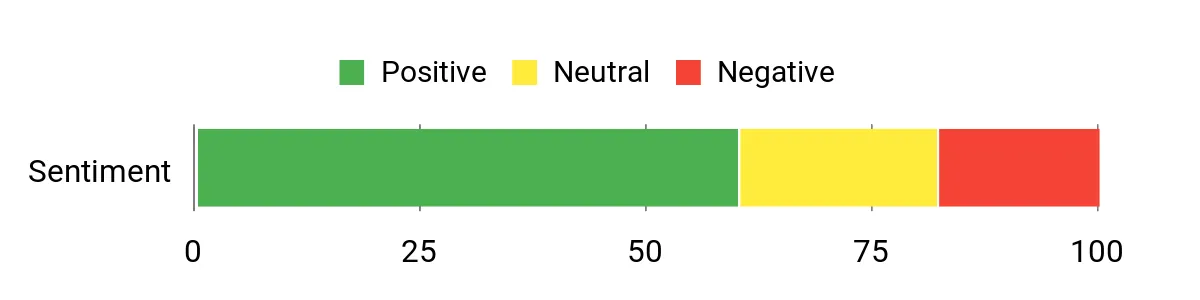
Overall Sentiment: Neutral
Situations
|
Situation |
How It Helps |
|---|---|
|
First Lessons |
Integrated features reduce the number of components you and a student must manage, letting you focus on basic control and orientation. |
|
Backyard Practice |
Compact panel view and straightforward channel scanning make quick practice runs fast and fuss-free. |
|
Field Meetups |
USB-C charging and a built-in battery mean fewer accessories to coordinate when you grab gear for a group session. |
|
Gear Testing |
Onboard DVR lets you record and review flights to diagnose pilot errors or test camera/transmitter setups. |
Ease Of Use
|
Feature |
Ease Level |
|---|---|
|
Initial Setup |
Easy |
|
Channel Scanning |
Easy |
|
DVR Recording |
Easy |
|
Wiring Camera Power |
Moderate |
Versatility
Best suited to analog workflows and short-range flying, the Recon Echo handles training, casual freestyle and quick testing. It’s less ideal for long-range or HD digital setups.
Safety
Integrated OSD gives signal and battery info so you can spot weak links, and the stable panel view helps maintain orientation during close maneuvers.
Comfort
The headset feels solid and wearable for typical sessions, though some pilots swap the foam for a tighter seal to block side light and improve fit.
Best For
Beginner
Key Benefits
- Integrated receiver and channel scanner for quick setup
- Onboard DVR captures flights without extra recorders
- USB-C charging with a built-in battery
Things to Consider
- Analog picture quality is lower than digital. The screen is 800 x 480.
- The camera and video transmitter are not part of the goggles. Check what your listing includes.
DroneMask 2

DroneMask 2 is a headset that holds your phone. It is not a full FPV goggle system. You fly with a controller that uses your phone as the screen, then slide the phone into the mask for a bigger, more immersive view. It has adjustable focus and openings that let you tap the phone screen without taking it out.
It works with controllers that clip on a phone, such as the DJI RC-N1. It does not work with controllers that have a built-in screen, such as the DJI RC. You see the same picture as on your phone, so it is a poor fit for racing.
What People Say
Buyers like the comfortable fit and the adjustable focus, which means you do not need extra lenses. Many reviewers like the screen-access holes, which let you tap the phone screen with the mask on.
A few users mention the headset feels a bit bulky and recommend trying the fit if you have a smaller face.
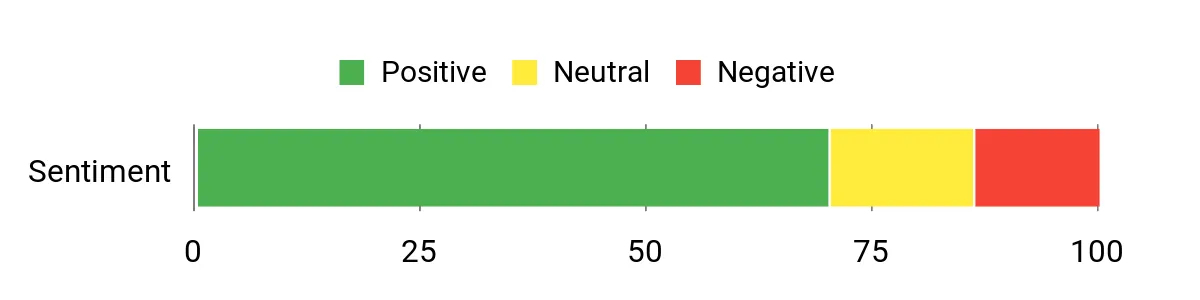
Overall Sentiment: Positive
Situations
|
Situation |
How It Helps |
|---|---|
|
Daily Practice |
Adjustable fit and focal controls reduce eye fatigue so you can run repeated drills with less discomfort. |
|
Field Setup |
Screen-access holes let you tap your phone screen without taking it out of the mask. |
|
Shared Sessions |
Easy focal adjustments and a forgiving headband make it simple to pass the goggles between pilots of different ages or eyesight. |
|
Phone Controllers |
It works with controllers that hold a phone, such as the DJI RC-N1, so you can fly with the phone screen inside the mask. |
Ease Of Use
|
Feature |
Ease Level |
|---|---|
|
Initial Setup |
Easy |
|
Focal Adjustment |
Easy |
|
Connecting Devices |
Moderate |
|
Headband Tuning |
Easy |
Versatility
Works for casual flying and cinematic shots with any drone whose app runs on your phone. It does not pair with controllers that have a built-in screen.
Safety
Clear optics and a stable fit help maintain situational awareness, and easy access to screen information makes it simpler to monitor signal and battery indicators.
Comfort
The adjustable headband and balanced weight make longer sessions manageable, and the focal controls reduce the need for corrective lenses inside the goggles for many pilots.
Best For
Beginner
Key Benefits
- Adjustable focal length adapts to different eyesight
- Patented unibody lens and screen-access holes simplify adjustments
- Works with phone-based controllers such as the DJI RC-N1
Things to Consider
- Does not work with controllers that have a built-in screen, such as the DJI RC.
- Bulky, and the lenses can fog in hot weather. Reviewers say it is a poor fit for racing.
EV800D Goggles

The EV800D is a no-frills analog headset. The 5-inch screen and built-in DVR let you see and record flights without extra gear. Dual-antenna diversity helps keep the feed usable during casual flying. It receives analog 5.8 GHz video only, so it will not show DJI, Walksnail or HDZero video. It suits backyard drills and small analog drones, and it has an AV input for other video sources.
What People Say
Customers often point to the convenience of the built-in DVR and the easy-to-read 5-inch display, saying those features make flying and reviewing footage simpler. Many reviewers appreciate the channel auto-search and dual antennas for stable reception, while common critiques mention modest resolution, basic fit and occasional signal breakup at longer ranges.
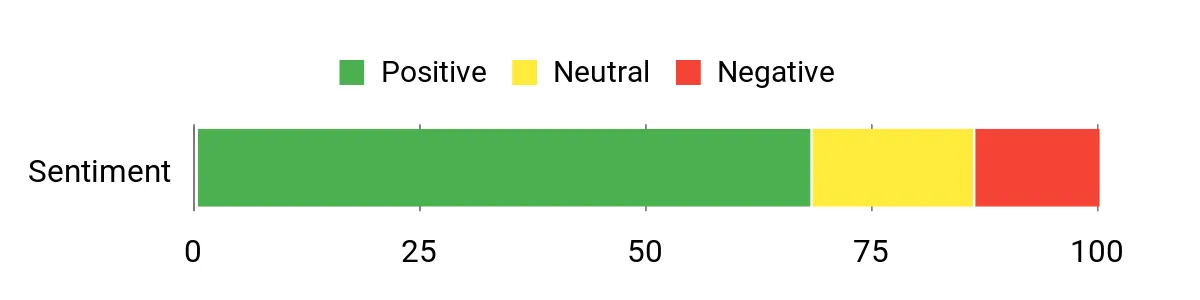
Overall Sentiment: Positive
Situations
|
Situation |
How It Helps |
|---|---|
|
Quick Practice Runs |
Large screen and simple controls get you flying quickly so you can repeat drills without fuss. |
|
Local Racing |
Fast channel scanning and diversity antennas reduce downtime between pilots and help maintain a clearer feed on short courses. |
|
Recording Flights |
Onboard DVR captures sessions so you can review lines and mistakes without adding an external recorder. |
|
Multivehicle Use |
External video input and broad channel support let you switch between drones, RC cars, and cameras with minimal reconfiguration. |
Ease Of Use
|
Feature |
Ease Level |
|---|---|
|
Initial Setup |
Easy |
|
Channel Scanning |
Easy |
|
DVR Operation |
Moderate |
|
Antenna Tuning |
Moderate |
Versatility
Best for analog FPV workflows, casual racing and multi-vehicle setups thanks to external input and broad channel support. It’s less suitable if you want an HD digital pipeline.
Safety
Channel auto-search helps you find a signal, and the larger display helps you keep track of your drone during close flying.
Comfort
At about 375 g the unit is reasonably light for short sessions, but some pilots find the foam and strap could use upgrading for a tighter seal and longer-wear comfort.
Best For
Beginner
Key Benefits
- Built-in DVR records flights without extra recorders
- Dual-antenna diversity for more reliable analog reception
- Large 5-inch screen for better situational awareness
Things to Consider
- Analog only, with an 800 x 480 screen. It will not show DJI, Walksnail or HDZero video.
- Owners report a basic fit and occasional signal breakup at longer range.
FAQ
How Do I Choose FPV Goggles?
Start with your drone. Find out which video system it uses: DJI (O3 or O4), Walksnail, HDZero or analog. Goggles must use the same system. Then compare delay, picture clarity and comfort. Glasses wearers should look for adjustable focus. A built-in DVR and good battery life are useful extras.
If you have not bought a drone yet, choose the drone first, then the goggles.
Digital Vs Analog: Which Should You Get?
Digital systems (DJI, Walksnail, HDZero) give a sharper picture. Analog gives a rougher picture, but the parts are simpler and cheaper to replace. Many reviewers recommend DJI for beginners because it is the easiest to set up. Analog is a good low-cost start if you plan to build and repair small drones.
HDZero is another digital system, known for very low delay. None of our six picks use it. You cannot mix systems: DJI goggles will not show an analog or Walksnail picture, and the reverse is also true.
Can I Use Any Goggles With My DJI Drone?
No. DJI goggles are not universal. The Goggles 3 work with the Avata 2, Neo, Mini 4 Pro and Air 3. The V2 works with the original DJI FPV drone and the first Avata. Check DJI’s compatibility list for your exact drone and controller. In the US, availability of DJI goggles and drones varies, so check the current listing.
How Can I Make Goggles More Comfortable?
Adjust the head strap and forehead pad until the goggles sit evenly and do not press on your nose. Use the diopter dial or swappable lenses if your goggles have them, so you do not need glasses inside. If light leaks in or something presses, try aftermarket foam or a different strap. Take short breaks in your first sessions so your eyes and neck can adjust.
Customer Preferences
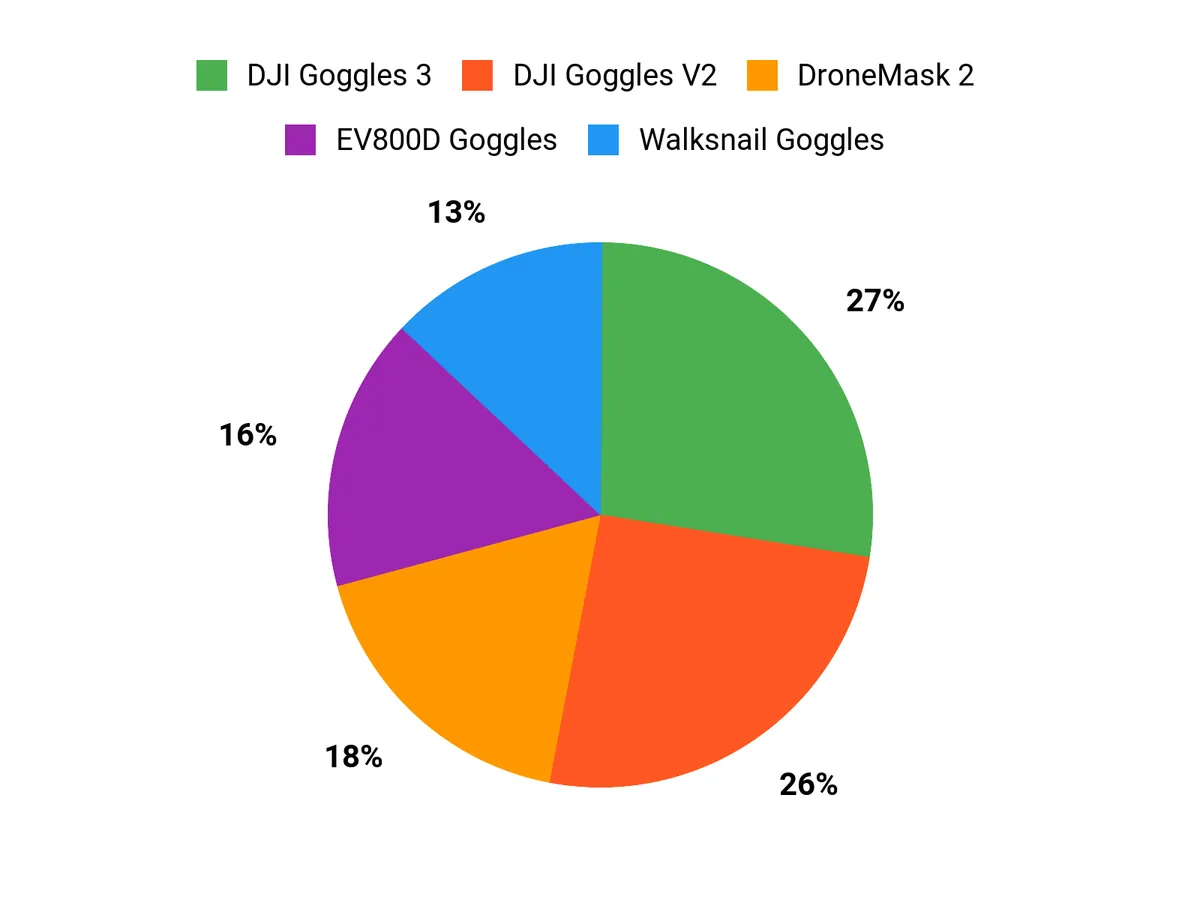
Most buyers care about picture clarity and low delay first, then comfort. DJI goggles are the easiest to pair with DJI drones. Walksnail’s larger screen and built-in DVR suit pilots who already fly Walksnail gear.
Wrapping Up
Pick by your drone first. Choose the DJI Goggles 3 if you fly the Avata 2, Neo, Mini 4 Pro or Air 3. Choose the DJI Goggles V2 only if you have the original DJI FPV drone or the first Avata. Choose the Walksnail Goggles if your drone uses Walksnail Avatar HD.
For analog, the Fat Shark Recon Echo is a simple starter, and the EV800D has a larger 5-inch screen with diversity reception and a DVR. DroneMask 2 is a phone headset for drones flown with a phone-holding controller, and it is not a full FPV system. Check the video system before you buy and you will avoid the most common beginner mistake.
| Product Name | Image | Rating | Video Resolution | Field Of View | Weight | Connectivity |
|---|---|---|---|---|---|---|
| DJI Goggles 3 |
|
See reviews on Amazon | 1920 x 1080 per eye | 44 degrees | 0.47 kg | Wi-Fi, 5.8 GHz O4 HD Transmission |
| DJI FPV Goggles V2 |
|
See reviews on Amazon | 1440 x 810 per eye | 30–54 degrees | 420 g | 2.4 / 5.8 GHz |
| CADDXFPV Walksnail Goggles L |
|
See reviews on Amazon | 1080p | N/A | 350 g (about 0.77 lb) | 5.8 GHz Walksnail Avatar HD |
| Fat Shark Recon Echo |
|
See reviews on Amazon | 800 x 480 | 55 degrees | – | 5.8 GHz |
| DroneMask 2 |
|
See reviews on Amazon | N/A | N/A | – | Phone-based controllers (e.g. DJI RC-N1) |
| EV800D FPV Goggles |
|
See reviews on Amazon | 800 x 480 | – | 375 g | 5.8 GHz analog, AV input |
This Roundup is reader-supported. When you click through links we may earn a referral commission on qualifying purchases.

