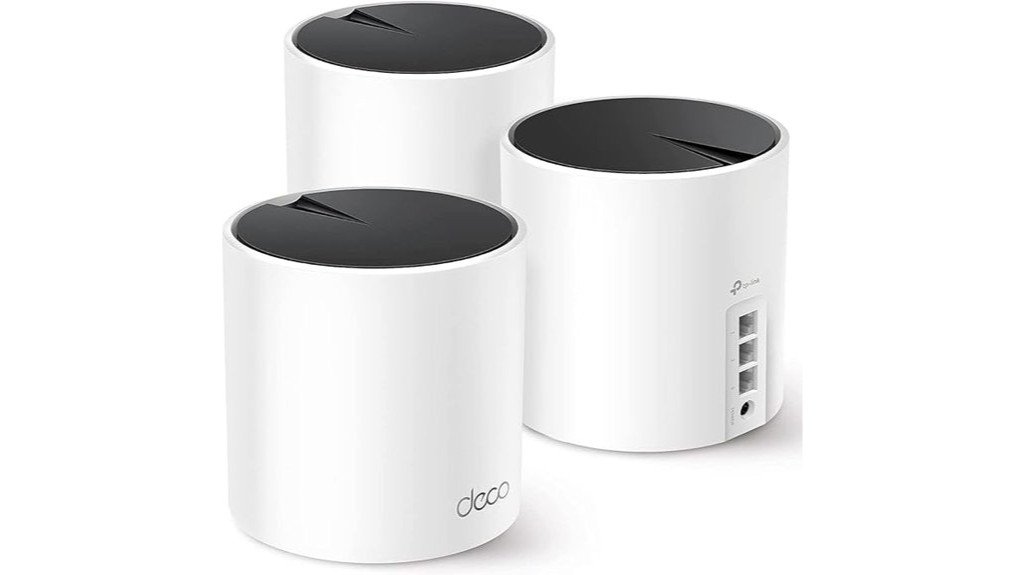
Disclosure: As an Amazon Associate, we earn from qualifying purchases. If you click a link on this page and make a purchase, we may receive a small commission at no extra cost to you.
Deal tip: The Deco X55 3-pack is one of our picks in the October Prime Day smart home deals, alongside the eero 7 mesh system, for Prime Big Deal Days on Oct 6–7.
Overview
A weak router can make a large home feel frustrating, especially when video calls, streaming, gaming, and smart home devices all compete for bandwidth. The TP-Link Deco X55 AX3000 Wi-Fi 6 Mesh System is built for buyers who want wider coverage, easier setup, and stronger device handling than a basic single router. This review looks at its real strengths, key specs, best use cases, and the tradeoffs you should know before buying. It is a strong fit for many homes, but it is not the best choice if you need multi-gig Ethernet or advanced manual router controls.
Quick Verdict
Rating: 8.7/10
Best For: Medium to large homes that need Wi-Fi 6 coverage, simple app control, Ethernet backhaul, and support for many connected devices.
Bottom Line: The Deco X55 is a smart mesh upgrade if you want up to 6500 sq. ft. of coverage, AX3000 speeds, and three Gigabit Ethernet ports per unit. Skip it if your home network needs 2.5G ports, deep manual controls, or built-in wall-mount hardware.
| Specification | Detail |
|---|---|
| Brand | TP-Link |
| Model | Deco X55 AX3000 |
| Product type | Wi-Fi 6 mesh system |
| Coverage | Up to 6500 sq. ft. with the 3-pack |
| Speed class | AX3000, 2402 Mbps on 5 GHz and 574 Mbps on 2.4 GHz |
| Device support | Up to 150 connected devices |
| Ethernet ports | 3 Gigabit Ethernet ports per unit |
| Ethernet backhaul | Supported |
| Dimensions | 4.33 x 4.33 x 4.49 inches |
| Weight | 5.02 pounds for the listed package |
| Security | TP-Link HomeShield basics, optional Pro tier, WPA3 support |
| Power | Included 12V⎓1.5A power adapter, standard AC outlet 100–240V, 50/60Hz |
What Is the TP-Link Deco X55?
The TP-Link Deco X55 is a mesh Wi-Fi system designed to replace a traditional router and range extender setup. Instead of pushing all Wi-Fi from one location, the 3-pack places multiple Deco units around your home so your devices can connect to a stronger nearby node.
This model uses Wi-Fi 6, which helps with speed, capacity, and efficiency when many devices are online. Its AX3000 speed rating combines a 2402 Mbps 5 GHz band with a 574 Mbps 2.4 GHz band, so it is better suited for streaming, work calls, gaming, and smart home devices than older Wi-Fi 5 mesh systems.
The Deco X55 also gives you three Gigabit Ethernet ports per unit. That matters if you want to wire a gaming console, desktop computer, smart TV, or use Ethernet backhaul for a more stable connection between Deco units.
Before You Buy: The Deco X55 uses Gigabit Ethernet ports, not multi-gig ports. If your internet plan or wired network needs speeds above 1 Gbps, compare it with a multi-gig mesh system before deciding.
Who Should Buy It?
Best For
- Homes that need coverage across multiple rooms, floors, or dead-zone areas.
- Families with many phones, laptops, tablets, TVs, cameras, and smart home devices.
- Buyers who want simple app setup instead of advanced router menus.
Skip If
- You need 2.5G or faster Ethernet ports for a multi-gig internet plan.
- You want deep manual controls, advanced routing features, or highly custom network settings.
- You need built-in wall-mount hardware included with each unit.
Detailed Features
The TP-Link Deco X55 AX3000 WiFi 6 Mesh System focuses on wider coverage, fast wireless performance, and simple control through the Deco app. It is built for a home where multiple users may be streaming, working, gaming, and using smart devices at the same time.
The main appeal is simple: more reliable whole-home Wi-Fi without needing a separate router, extender, and complicated setup process.
- Wi-Fi 6 technology: The AX3000 speed rating includes 2402 Mbps on 5 GHz and 574 Mbps on 2.4 GHz.
- Extensive coverage: The 3-pack covers up to 6500 sq. ft., which helps reduce dead zones in larger homes.
- Multi-device connectivity: It supports up to 150 connected devices, useful for smart homes and busy families.
- Enhanced Ethernet: Each Deco unit has 3 Gigabit Ethernet ports for wired devices or Ethernet backhaul.
- AI-driven mesh: The system adjusts network performance based on your environment and connected devices.
- Security suite: TP-Link HomeShield basics include network security, QoS, and parental controls, with optional paid Pro features and WPA3 support.
Coverage and Speed
The Deco X55 is rated for up to 6500 sq. ft. with the 3-pack, which makes it a practical option for many medium and large homes. Coverage can still vary based on walls, floor layout, appliances, and where you place each unit. Thick walls, metal surfaces, and long distances between nodes can reduce performance.
For speed, the AX3000 rating gives you a strong wireless ceiling for everyday home use. The 5 GHz band is best for high-bandwidth tasks like 4K streaming, gaming, and large downloads. The 2.4 GHz band is better for longer range and smart devices that do not need high speed.
Ethernet and Backhaul
One of the Deco X55’s best practical features is the three Gigabit Ethernet ports per unit. Many mesh systems offer fewer ports, so this design gives you more flexibility if you want to connect a console, desktop, TV, or network switch.
Ethernet backhaul is also supported. If you can connect Deco units with Ethernet, the system can use the wired connection between nodes instead of relying only on wireless communication. This can improve stability, especially in homes where walls or distance weaken wireless mesh links.
Pro Tip: Place the main Deco near your modem, then position the other units halfway between the main unit and weak Wi-Fi areas. Avoid hiding units inside cabinets or behind TVs because that can reduce signal strength.
App Control and Setup
The Deco app is designed to make setup easier than a traditional router interface. You can create the network, add Deco units, manage connected devices, adjust parental controls, and check basic network status from your phone.
This simple approach is helpful if you do not want to manage technical settings. The tradeoff is that advanced users may find the controls less flexible than a high-end standalone router. If you like custom firmware, complex firewall rules, or detailed radio tuning, the Deco X55 may feel limited.
Security and Smart Home Support
The Deco X55 includes TP-Link HomeShield basic features, including network security tools, QoS, and parental controls. It also supports WPA3, which is useful if your devices support the newer Wi-Fi security standard.
For smart homes, the Deco X55 supports a dedicated IoT network option and device isolation within Deco settings. This can help separate certain smart home devices from your main devices, which is useful if you have cameras, plugs, lights, speakers, and other connected gear.
Setup Tips Before First Use
- Start with the modem area: Connect the first Deco to your modem and complete setup in the app before placing the other units.
- Keep nodes in open spaces: A shelf or table is usually better than a cabinet, floor corner, or spot behind large electronics.
- Use Ethernet backhaul if possible: Wired backhaul can improve stability when your home has thick walls or long distances between units.
- Check older devices: Some older Wi-Fi devices may need updated settings or firmware if they struggle with newer mesh networks.
- Use wired ports wisely: Connect high-priority devices like a gaming console, desktop, or main TV when you want lower latency.
How It Performs in Real Use
For Large Homes
The 3-pack design gives you more placement flexibility than a single router. In a larger home, one Deco can handle the modem area while the other units extend coverage to bedrooms, offices, upstairs areas, or distant living spaces.
For Work From Home
The Deco X55 is useful for video calls, cloud apps, and shared home networks because it supports many devices and includes QoS controls. If your work computer supports wired Ethernet, plugging it into a nearby Deco can help create a more stable connection.
For Gaming and Streaming
The 5 GHz band and Gigabit Ethernet ports are the most important features for gaming and streaming. A wired console or PC can avoid some wireless lag, while smart TVs and streaming boxes can benefit from a stronger nearby node.
For Smart Home Devices
The Deco X55 can support up to 150 devices, which makes it useful if your home has phones, laptops, cameras, plugs, lights, sensors, and speakers. The dedicated IoT network option also helps you organize smart devices instead of crowding everything onto one main network.
Pros and Cons
The TP-Link Deco X55 has a strong feature set for the price range, but it still has limits. The biggest strengths are its Wi-Fi 6 support, 6500 sq. ft. coverage rating, 150-device capacity, and three Gigabit Ethernet ports per unit. The main weaknesses are the lack of multi-gig Ethernet and the simpler app-based control style.
Pros
- Wi-Fi 6 AX3000 speed class is strong for streaming, browsing, calls, and smart homes.
- 3-pack coverage reaches up to 6500 sq. ft. in suitable home layouts.
- Three Gigabit Ethernet ports per unit give you more wired connection options.
- Ethernet backhaul support can improve stability when you can wire the units together.
- Deco app setup is simple for non-technical users.
Cons
- Gigabit Ethernet may limit buyers with multi-gig internet plans or high-speed wired networks.
- Some older devices may need troubleshooting if they do not connect well to a modern mesh network.
- No built-in wall-mount hardware is included, so wall mounting needs a compatible third-party bracket.
Is It Worth the Price?
The TP-Link Deco X55 is worth considering if you want a clean mesh setup with Wi-Fi 6, broad coverage, and more Ethernet ports than many competing mesh nodes. It offers strong value for buyers who care about whole-home coverage and easy setup more than advanced router customization.
It makes the most sense for homes with up to 1G internet service, many connected devices, and coverage problems that a single router cannot fix. It is not the best fit if your main priority is multi-gig wired speed, very advanced networking controls, or a system with built-in mounting hardware.
How It Compares to Alternatives
Compared with the Deco X20, the Deco X55 offers faster AX3000 performance and more Ethernet ports per unit. That makes it a better choice if you want stronger wireless capacity and more wired flexibility without moving into a higher-end multi-gig system.
If you need multi-gig Ethernet, a model such as the Deco X55 Pro may be a better comparison point. If you prefer another app ecosystem, Amazon eero 6 Plus is also worth comparing, but the Deco X55 stands out for buyers who want three Ethernet ports per node and simple whole-home Wi-Fi 6 coverage.
Frequently Asked Questions
How does the TP-Link Deco X55 handle software updates?
The Deco X55 supports online upgrades through the Deco app. This helps you keep the system current without using a complicated router admin panel.
Is the Deco X55 compatible with smart home devices?
Yes, the Deco X55 is designed to work with many smart home devices and supports up to 150 connected devices. It also includes an IoT network option and device isolation features in Deco settings.
Can the Deco X55 be wall-mounted or placed on a shelf?
You can place the Deco X55 on a shelf, table, or other open surface. For wall mounting, the X55 does not include built-in mounting hardware, so you need a compatible third-party bracket.
What power source is required for the Deco X55 units?
Each Deco X55 unit uses the included 12V⎓1.5A power adapter. It connects to a standard AC outlet rated for 100–240V, 50/60Hz.
Does the Deco X55 support wired connections for gaming consoles?
Yes, each unit has three Gigabit Ethernet ports. A wired console, desktop, or TV can get a more stable connection than Wi-Fi when it is connected to a nearby Deco unit.
Does the Deco X55 work with Ethernet backhaul?
Yes, the Deco X55 supports Ethernet backhaul. If your home has Ethernet wiring, using wired backhaul can improve stability between Deco units.
Who should skip the Deco X55?
Skip it if you need multi-gig Ethernet, built-in wall mounting, or highly advanced router controls. It is better for buyers who want simple whole-home Wi-Fi 6 coverage with app-based management.
The Bottom Line
The TP-Link Deco X55 is a strong mesh Wi-Fi 6 system for homes that need wider coverage, easier setup, Ethernet backhaul, and support for many devices. Its biggest advantages are the 6500 sq. ft. coverage rating, AX3000 performance, and three Gigabit Ethernet ports per unit.
You should buy it if you want a simple whole-home network upgrade for up to 1G internet service. You should skip it if you need multi-gig ports, built-in wall mounting, or advanced router-level customization.
