You want a portable projector that fits your routine, whether that means movie nights, travel, casual gaming, or a compact home theater. The best choice depends on more than resolution. Brightness, power requirements, streaming support, setup tools, ports, and speaker quality all affect how useful a mini projector feels in daily life.
This guide compares four relevant portable projectors, from a true 4K laser model to battery-powered and value-focused options. Each pick includes a clear best use, an honest limitation, and the details you should check before buying.
Quick Verdict
Choose the LG CineBeam Q for true 4K detail, the NEBULA Capsule 3 Laser for built-in battery convenience, the Samsung The Freestyle 2nd Gen for smart streaming and casual cloud gaming, or the XGIMI MoGo 2 Pro (New) for a balanced Full HD setup with strong onboard audio.
Top Picks
|
Category |
Product |
Best For |
|---|---|---|
|
Best Value |
Everyday streaming, apartments, and strong built-in sound |
|
|
Best for Gaming and Streaming |
Smart apps, cloud gaming, and flexible room placement |
|
|
Best Battery Projector |
Travel and outdoor viewing after sunset |
|
|
Best Premium 4K |
4K movies, color detail, and compact home theater use |
How We Picked
We focused on the factors that shape everyday ownership: native resolution, stated brightness, power needs, smart platform, streaming access, automatic setup, speaker usefulness, ports, image-size range, and portability. We also checked whether each linked model still matched its Amazon listing and removed an unavailable older model rather than keeping it as a weak recommendation.
These rankings do not claim hands-on laboratory testing. They are buyer-focused recommendations based on currently stated product features, clear use cases, and honest trade-offs.
Before You Buy a Portable Projector
- Plan for darkness: Compact projectors look best at night or in a dim room. Daylight can wash out the image.
- Check the power setup: “Portable” does not always mean battery-powered. Two picks in this guide require continuous external power.
- Confirm streaming support: Licensed Netflix and other native apps can save you from carrying a separate streaming stick.
- Check your cables: Samsung uses micro HDMI, while the other models use different port combinations. You may need an adapter.
- Use a reasonable screen size: A smaller image usually looks brighter and sharper than the maximum advertised size.
The updated MoGo 2 Pro is a strong choice when you want Full HD streaming, useful speakers, and automatic setup without moving into premium 4K pricing. Google TV and licensed Netflix reduce the need for a separate streaming device, while the two 8W speakers are practical for bedrooms and small living rooms.
Its main limitation is power. It does not include an internal battery, so travel and outdoor use require a compatible power source. Its 430 ISO-lumen output also works best after dark or with curtains closed.
Pick this model when convenience, sound, and value matter more than battery freedom or true 4K resolution.
Google TV, Netflix, automatic setup, and strong stereo speakers make daily use simple.
You need a built-in battery or a bright image in a sunny room.
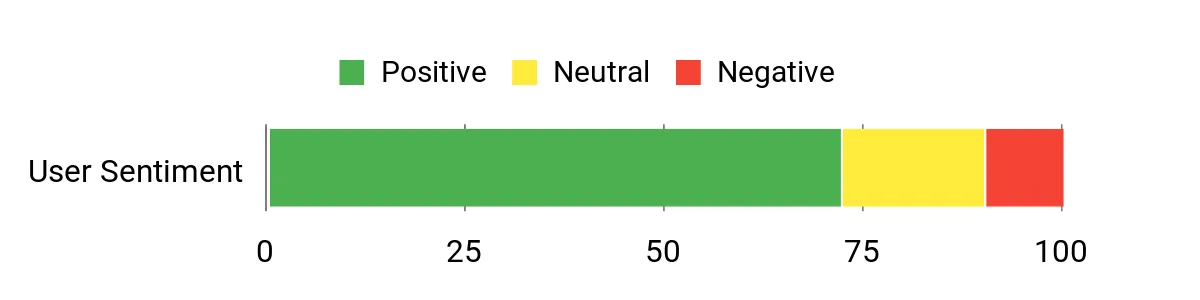
Review Snapshot
Review themes and software behavior can change over time. Treat the chart below as a general snapshot, then read recent verified-purchase feedback for current app support, fan noise, and setup behavior.
When To Use It
|
Situation |
How It Helps |
|---|---|
|
Bedroom or Apartment |
Automatic focus and keystone correction help you create a large image without a permanent television setup. |
|
Travel and Hotel Use |
Google TV and licensed Netflix reduce extra devices, but you still need a reliable power source and suitable Wi-Fi. |
|
Casual Gaming |
A dedicated game mode can suit relaxed console play. Competitive players should prioritize a gaming projector with lower measured input lag. |
|
Backyard Movie Night |
The compact body is easy to carry, but use it after sunset and plan an external power connection. |
Practicality
Place it on a stable surface, connect power, and let the automatic focus and keystone tools shape the image. Connectivity includes HDMI ARC, USB Type-A, USB Type-C, Wi-Fi, Bluetooth, and a 3.5 mm audio output. Keep the vents open and avoid placing the projector where someone can block the lens repeatedly.
Key Benefits
- Native 1080p resolution with 430 ISO lumens
- Google TV with licensed Netflix
- Two 8W speakers with Dolby Audio support
- Automatic focus and keystone correction
- Compact design for room-to-room use
The Freestyle 2nd Gen makes setup easy. Its cradle stand can aim the image from a wall toward a ceiling, while automatic leveling, focus, and keystone correction reduce manual adjustments. Samsung’s smart platform provides streaming apps, and Gaming Hub adds convenient access to supported cloud gaming services.
This is not the brightest projector in the group, so it needs a dark or carefully shaded space. It also lacks a built-in battery. Cordless use requires a compatible USB-C battery, and wired devices may need a micro-HDMI adapter.
Choose it when smart features, flexible placement, and casual gaming matter more than maximum brightness or broad physical connectivity.
The rotating stand and automatic image tools make it easy to project on different surfaces.
You need strong daytime brightness, a built-in battery, or several full-size ports.
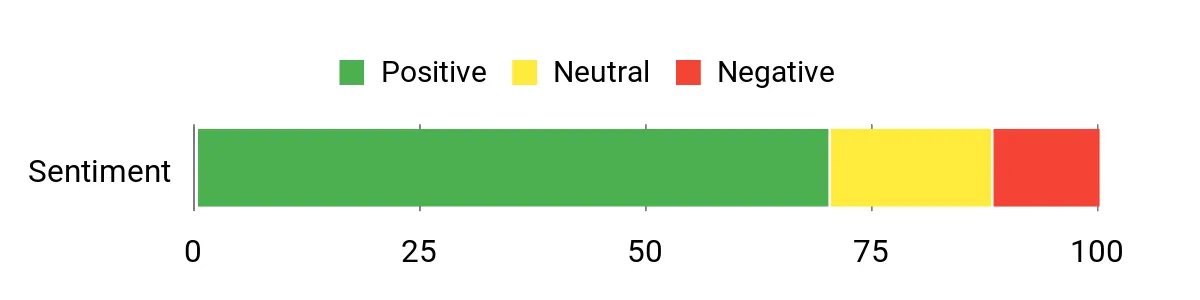
Review Snapshot
Smart-platform updates, seller condition, and app support can change. Use the chart as general context and check current verified-purchase reviews before buying.
When To Use It
|
Situation |
How It Helps |
|---|---|
|
Living Room Movie Night |
Automatic image adjustment and built-in smart apps help you start watching with little setup. |
|
Casual Cloud Gaming |
Gaming Hub puts supported cloud services in one interface. Network quality still affects responsiveness. |
|
Ceiling Projection |
The rotating cradle makes it easier to aim the image upward without a complex mount. |
|
Travel and Hotels |
Its compact body is easy to pack, but you need external power and may need a micro-HDMI adapter. |
Practicality
Connect it to Wi-Fi for streaming or use micro HDMI for a wired source. USB-C supplies power and can work with a compatible external battery. Keep airflow around the body during long sessions, and use a smaller image if the room is not fully dark.
Key Benefits
- Automatic leveling, focus, and keystone correction
- Samsung smart platform with Gaming Hub
- Rotating cradle for flexible wall or ceiling placement
- 360-degree built-in sound
- External USB-C battery compatibility
The Capsule 3 Laser solves the biggest portability problem in this group: it can run without an outlet. Its built-in battery supports about 2.5 hours of video playback, while Google TV and licensed Netflix let you stream without adding another device.
The 300 ANSI-lumen image suits dark rooms and outdoor viewing after sunset. It is not designed to compete with a full-size projector in daylight, and longer events still require USB-C PD charging or another power plan.
Choose it when battery power and compact packing matter more than maximum brightness or room-filling bass.
A built-in battery, laser light source, Google TV, and licensed Netflix make travel simpler.
You need daytime outdoor viewing, a very loud speaker, or more than one movie per charge.
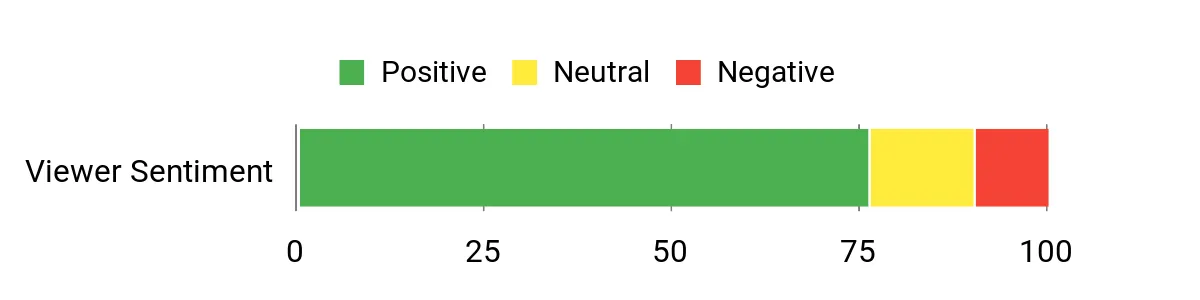
Review Snapshot
Battery runtime and app behavior depend on settings, software, and network conditions. Use the chart as general context and check recent verified-purchase feedback for current performance.
When To Use It
|
Situation |
How It Helps |
|---|---|
|
Backyard Evenings |
The built-in battery removes cable clutter for a movie after sunset. |
|
Weekend Trips |
Google TV, licensed Netflix, and a compact two-pound body reduce the gear you need to pack. |
|
Small Indoor Gatherings |
Automatic focus and keystone correction shorten setup, while the 8W speaker covers a modest room. |
|
Portable Presentations |
HDMI and USB-C connections can support small-group presentations in a dim room. Confirm your adapter before traveling. |
Practicality
Set it on a stable table or compatible stand, connect to Wi-Fi, and let the automatic focus and keystone tools handle basic alignment. Plan around the stated 2.5-hour video runtime, which can vary with brightness, volume, software, and battery condition. USB-C PD charging can extend longer sessions.
Key Benefits
- Native 1080p laser image with 300 ANSI lumens
- Built-in battery for about 2.5 hours of video playback
- Google TV with licensed Netflix
- Compact two-pound body and image up to 120 inches
- 8W speaker with Dolby Digital support
The CineBeam Q is the strongest choice here when image detail is the priority. Its native 4K resolution and RGB laser light source support a sharper, more color-focused picture than the Full HD models, while webOS provides direct access to major streaming services.
The compact body and rotating handle make it easy to move, but it still needs continuous external power. Its built-in speaker is better for casual use than a full home-theater experience, so an external speaker or soundbar is worth considering.
Pick it when you want true 4K resolution in a small design and can control room light, provide power, and add better audio when needed.
True 4K resolution, an RGB laser, and webOS deliver a premium picture-focused setup in a compact body.
You need a built-in battery, powerful onboard sound, or bright daytime projection.
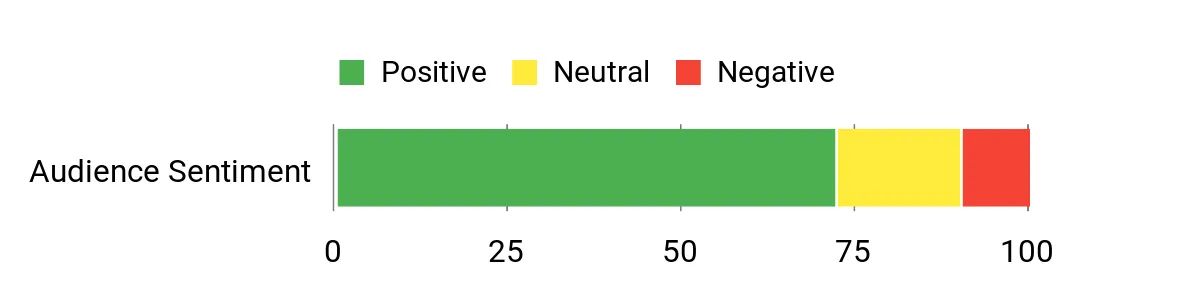
Review Snapshot
Seller options and software support can change. Treat the chart as general context and read recent verified-purchase feedback about app performance, remote behavior, and speaker quality.
When To Use It
|
Situation |
How It Helps |
|---|---|
|
Dark-Room Movie Nights |
The 4K RGB-laser image gives films and high-resolution streaming more visible detail. |
|
Small Living Rooms |
The compact footprint and automatic screen adjustment create a large display without a permanent installation. |
|
Photo and Video Sharing |
Wireless screen sharing and 4K output make it useful for displaying high-resolution visual content. |
|
Temporary Home Theater |
The rotating handle simplifies moving and aiming the projector, while webOS reduces cable clutter. |
Practicality
Place the projector on a stable surface, connect power, and allow automatic screen adjustment and focus to prepare the image. HDMI, USB-C, USB, Wi-Fi, Bluetooth, AirPlay 2, and screen sharing cover common media sources. Leave space around the vents and plan external audio for a fuller home-theater sound.
Key Benefits
- Native 4K UHD resolution
- Three-channel RGB laser light source
- 500 ANSI lumens and image up to 120 inches
- webOS streaming with major apps
- Automatic screen adjustment, autofocus, and rotating handle
Check Current Amazon Availability
FAQ
How Bright Does a Portable Projector Need To Be?
For a dark bedroom or an evening backyard movie, a few hundred stated lumens can produce a watchable image at a sensible screen size. Daytime viewing needs much more light output or strong control over windows and lamps. Do not compare ANSI and ISO numbers as if they use the same scale.
Do I Really Need a Built-In Battery?
A built-in battery matters when you want a truly cordless setup. In this guide, the NEBULA Capsule 3 Laser includes a battery. The MoGo 2 Pro and LG CineBeam Q require continuous external power, while Samsung supports compatible external USB-C batteries.
Which Portable Projector Is Best for Gaming?
The Samsung Freestyle 2nd Gen is the easiest pick for casual cloud gaming because Gaming Hub is built into its smart platform. The MoGo 2 Pro also includes a game mode for relaxed console play. Competitive gaming calls for a projector with independently measured low input lag and higher brightness.
Can I Use These Projectors Outdoors?
Yes, but use them after sunset or in deep shade. Protect every projector from rain, moisture, dust, and unstable surfaces. The NEBULA Capsule 3 Laser is the easiest cordless option, while the other models need external power.
How Can I Improve Image and Sound Quality?
Reduce ambient light, use a smooth neutral wall or projector screen, keep the image smaller when brightness is limited, and place the projector on a stable surface. For stronger bass and volume, connect a compatible Bluetooth speaker, soundbar, or wired audio system.
Should I Trust the Maximum Advertised Screen Size?
Use it as a technical limit, not a promise of the best picture. A smaller image is usually brighter and sharper. Match screen size to your room darkness, viewing distance, and the projector’s stated brightness.
Final Recommendation
Choose by your main priority:
- Best value: XGIMI MoGo 2 Pro (New)
- Best for smart streaming and casual gaming: Samsung The Freestyle 2nd Gen
- Best built-in battery: NEBULA Capsule 3 Laser
- Best true 4K picture: LG CineBeam Q HU710PB
Match the projector to your power plan and lighting conditions before comparing extra features. The NEBULA is the most travel-ready, the LG offers the strongest resolution, Samsung provides the most gaming-focused smart experience, and the updated MoGo 2 Pro gives you the most balanced everyday feature set.
Product specifications, software support, seller condition, and availability can change. Check the current Amazon listing before buying.
Portable Projector Comparison
| Product Name | Image | Brightness | Maximum Image Size | Native Resolution | Power | Connectivity | Amazon |
|---|---|---|---|---|---|---|---|
| XGIMI MoGo 2 Pro (New) |
 |
430 ISO lumens | 40 to 200 inches; 60 to 120 inches recommended | 1920 x 1080 | Plug-in; no built-in battery |
|
Check Price |
| Samsung The Freestyle 2nd Gen |
 |
230 ANSI lumens | 30 to 100 inches | 1920 x 1080 | USB-C power; compatible external battery required for cordless use |
|
Check Price |
| NEBULA Capsule 3 Laser |
 |
300 ANSI lumens | Up to 120 inches | 1920 x 1080 | Built-in battery; up to about 2.5 hours of video playback |
|
Check Price |
| LG CineBeam Q HU710PB |
 |
500 ANSI lumens | Up to 120 inches | 3840 x 2160 | Plug-in; no built-in battery |
|
Check Price |